> ## Documentation Index
> Fetch the complete documentation index at: https://docs.gameball.co/llms.txt
> Use this file to discover all available pages before exploring further.
# Product Updates 2025
> Gameball product updates, new features, and improvements throughout 2025.
## New Features
### Define and Track Goals for Automation Campaigns
You can now set one measurable goal for each automation to evaluate how effectively your flows drive customer actions. [Learn more](/product-documentation/automation-campaigns/how-to-create-an-automation-campaign).
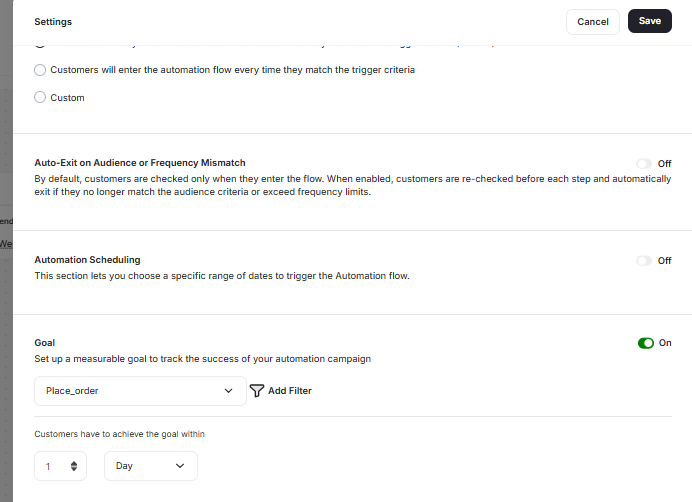 * **Goal Setup:** Each automation supports defining one goal from any Gameball event with optional filters and a measurement window (7, 14, or 30 days).
* **Automated Tracking:** After completing the automation, each customer is marked as Achieved, Pending, or Not Achieved.
* **Goal Performance Analytics:** A new tab in automation insights displays total participants, completions, goal achievements, and conversion trends.
***
## Other Improvements
### Lead Form Now Supports Custom Customer Attributes
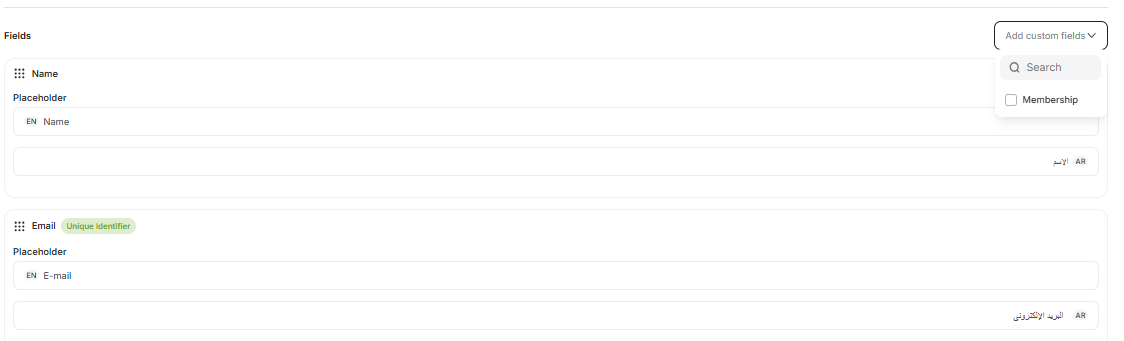
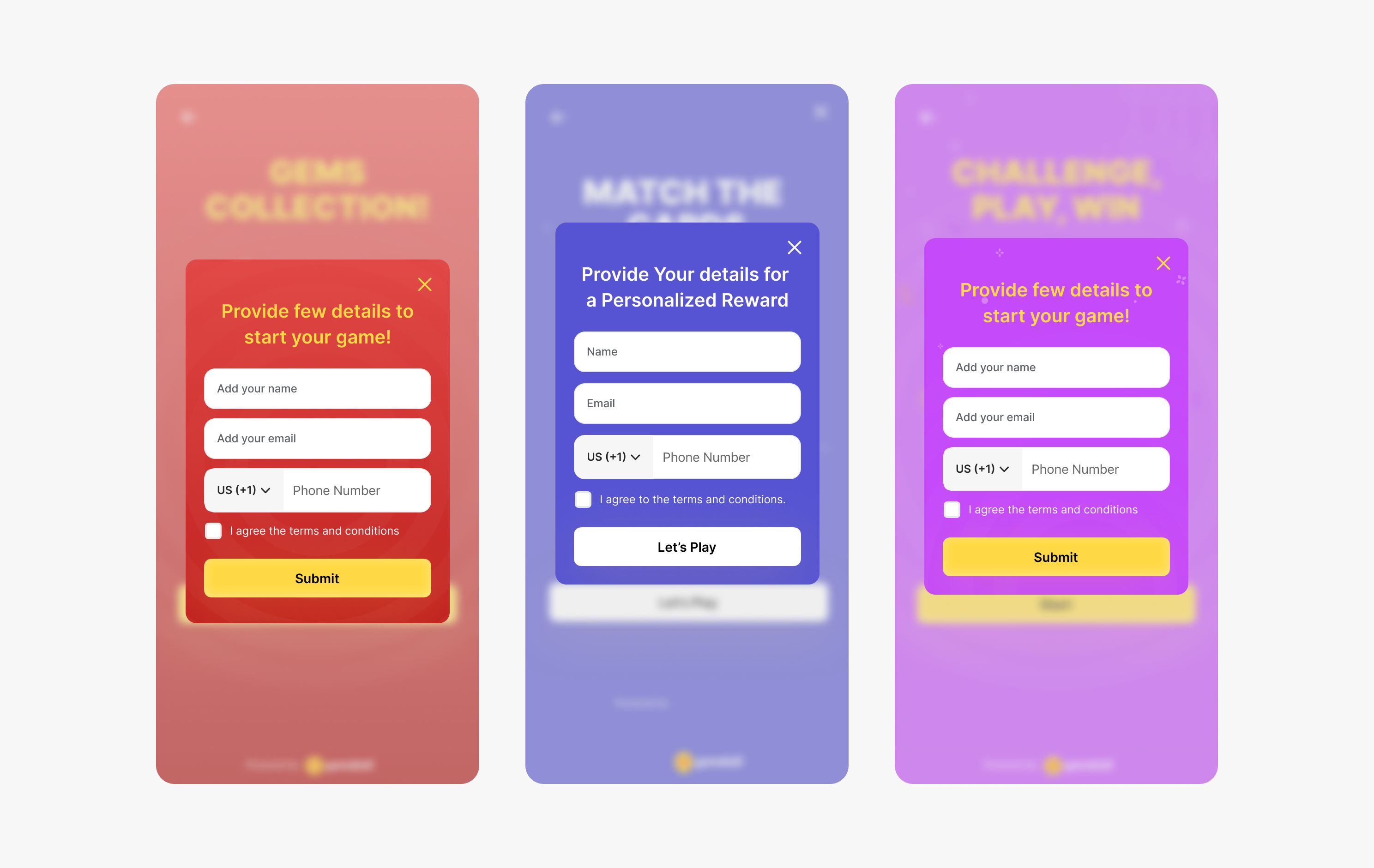
The Lead Form now supports up to 5 custom customer attributes (City, Gender, Age, etc.) with proper input types and validation. Rearrange fields, mark them as mandatory/optional, and toggle default fields on/off. [Learn more](/product-documentation/rewards-campaigns/reward-campaign-url).
* **Goal Setup:** Each automation supports defining one goal from any Gameball event with optional filters and a measurement window (7, 14, or 30 days).
* **Automated Tracking:** After completing the automation, each customer is marked as Achieved, Pending, or Not Achieved.
* **Goal Performance Analytics:** A new tab in automation insights displays total participants, completions, goal achievements, and conversion trends.
***
## Other Improvements
### Lead Form Now Supports Custom Customer Attributes
The Lead Form now supports up to 5 custom customer attributes (City, Gender, Age, etc.) with proper input types and validation. Rearrange fields, mark them as mandatory/optional, and toggle default fields on/off. [Learn more](/product-documentation/rewards-campaigns/reward-campaign-url).
 ### Test Push Notifications Inside Automation Campaigns
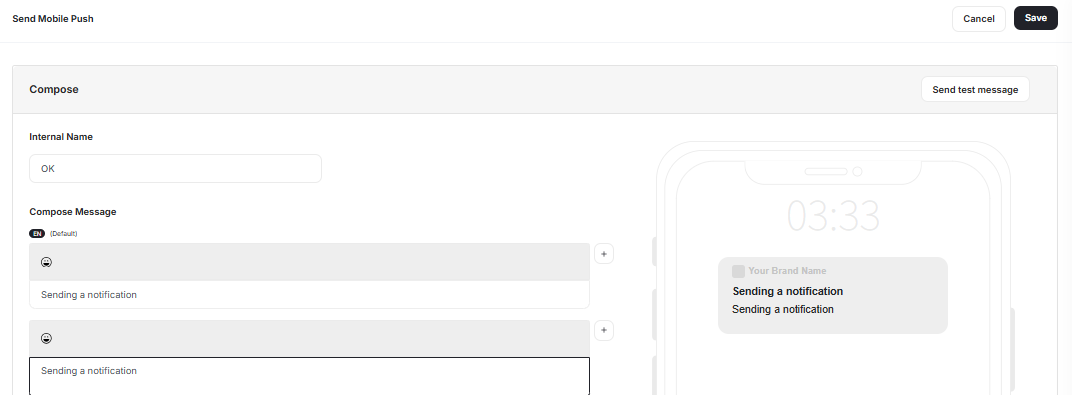
You can now validate the full push notification experience — content, variables, deep links, and delivery — without leaving the Automation builder via a new **"Send Test Notification"** button.
### Test Push Notifications Inside Automation Campaigns
You can now validate the full push notification experience — content, variables, deep links, and delivery — without leaving the Automation builder via a new **"Send Test Notification"** button.
 ### Improved Date & Time Display Across Dashboard Tables
Creation dates now show a friendly relative format (e.g., *3h ago, 7d ago*) alongside the precise creation timestamp, across Campaigns, Customers, Activities, Segments, and Settings pages.
### Separate Coupons Analytics Into a Dedicated Tab
Coupon insights have been separated from the Points & Rewards page into a dedicated **Coupons** tab with enhanced metrics for issued/redeemed coupons, revenue impact, and expiry analytics.
## New Features
### Advanced Budget Control for Campaigns
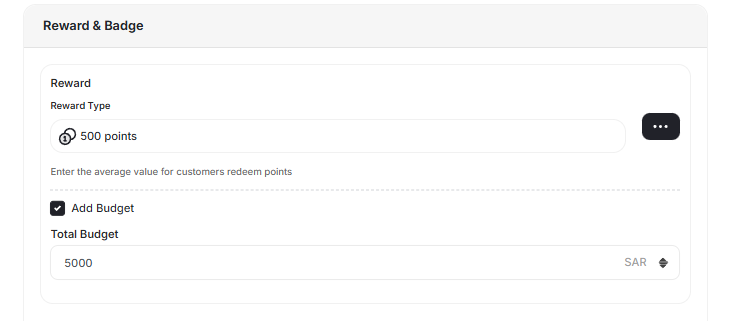
Define, monitor, and enforce spending limits for reward-based campaigns with automated threshold notifications at 50%, 80%, and 100% of budget. At 100%, the campaign is automatically deactivated. [Learn more](/product-documentation/rewards-campaigns/reward-campaign-general-setup-guide).
### Improved Date & Time Display Across Dashboard Tables
Creation dates now show a friendly relative format (e.g., *3h ago, 7d ago*) alongside the precise creation timestamp, across Campaigns, Customers, Activities, Segments, and Settings pages.
### Separate Coupons Analytics Into a Dedicated Tab
Coupon insights have been separated from the Points & Rewards page into a dedicated **Coupons** tab with enhanced metrics for issued/redeemed coupons, revenue impact, and expiry analytics.
## New Features
### Advanced Budget Control for Campaigns
Define, monitor, and enforce spending limits for reward-based campaigns with automated threshold notifications at 50%, 80%, and 100% of budget. At 100%, the campaign is automatically deactivated. [Learn more](/product-documentation/rewards-campaigns/reward-campaign-general-setup-guide).
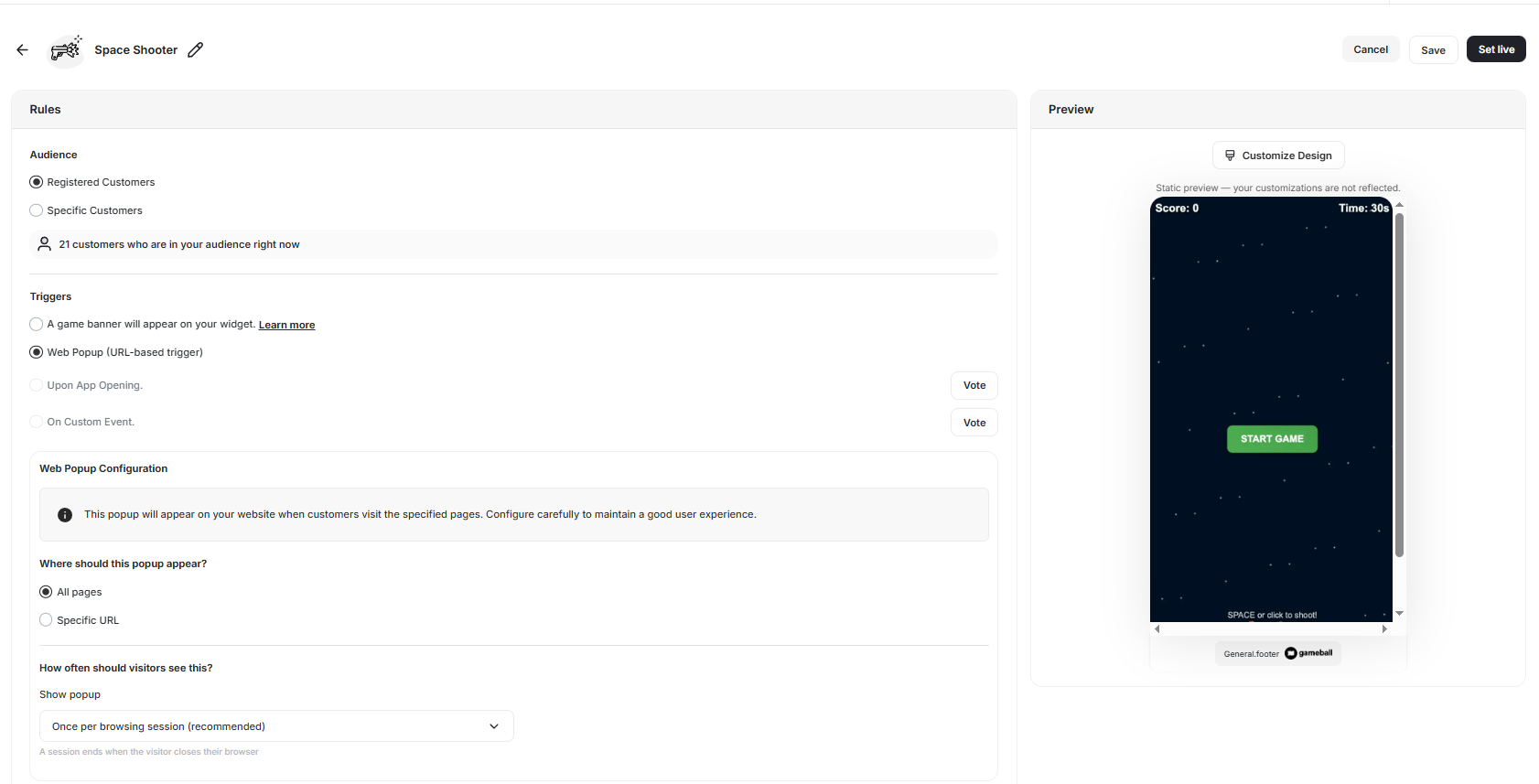
 ### Automatically Trigger Game Popups Based on Page URL
Games like Spin the Wheel, Slot Machine, and Match Cards can now be triggered automatically when a page URL matches predefined rules. The experience opens directly in a standalone pop-up, with flexible URL rules, timing options, and eligibility controls. [Learn more](/product-documentation/rewards-campaigns/reward-campaign-url).
### Automatically Trigger Game Popups Based on Page URL
Games like Spin the Wheel, Slot Machine, and Match Cards can now be triggered automatically when a page URL matches predefined rules. The experience opens directly in a standalone pop-up, with flexible URL rules, timing options, and eligibility controls. [Learn more](/product-documentation/rewards-campaigns/reward-campaign-url).
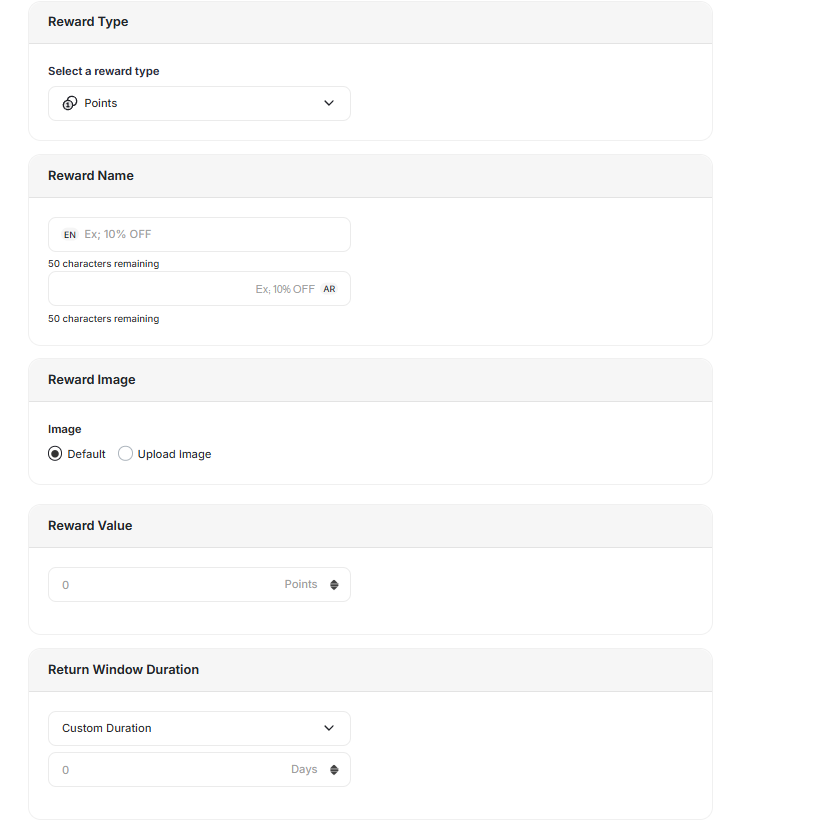
 ### Return Window Duration for Tier Entry Reward Points
Define a **Return Window Duration** for tier entry reward points to prevent temporary reward abuse. Tier-entry points stay locked (pending) until the configured window expires. [Learn more](/product-documentation/programs/vip-tiers/tier-settings/customizing-benefits-for-different-tiers).
### Return Window Duration for Tier Entry Reward Points
Define a **Return Window Duration** for tier entry reward points to prevent temporary reward abuse. Tier-entry points stay locked (pending) until the configured window expires. [Learn more](/product-documentation/programs/vip-tiers/tier-settings/customizing-benefits-for-different-tiers).
 ***
## Other Improvements
### Lifetime Tier Benefit Coupon Display in the Redeem Tab
Tier-based lifetime coupons now appear in a dedicated top section of the Redeem tab with a new card design displaying the tier name, a "Free Benefit" label, and a clear "Redeem Now" button — without showing points.
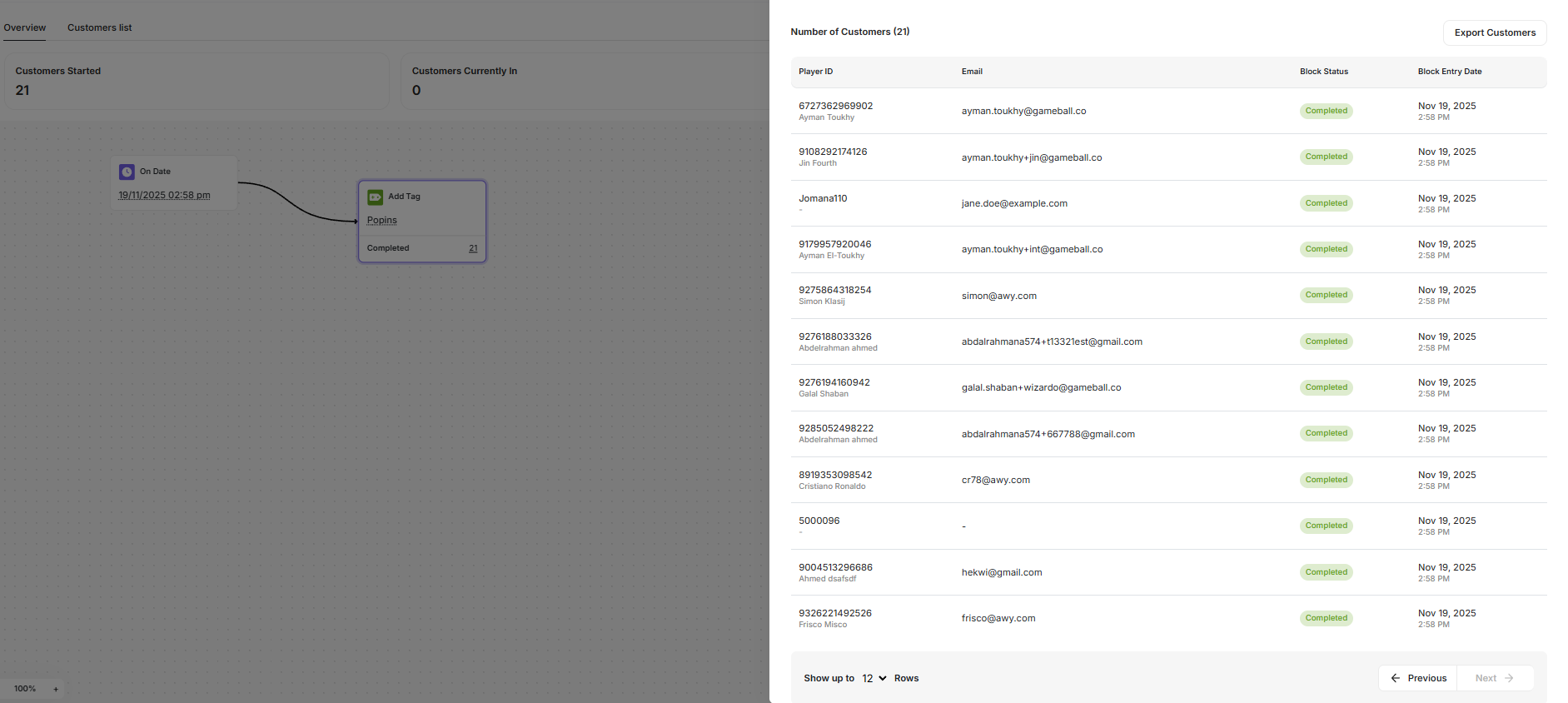
### Export Customers from Automation Action & Control Nodes
You can now export customers who reach any Action or Control node inside an automation flow as a CSV. [Learn more](/product-documentation/automation-campaigns/how-to-create-an-automation-campaign).
***
## Other Improvements
### Lifetime Tier Benefit Coupon Display in the Redeem Tab
Tier-based lifetime coupons now appear in a dedicated top section of the Redeem tab with a new card design displaying the tier name, a "Free Benefit" label, and a clear "Redeem Now" button — without showing points.
### Export Customers from Automation Action & Control Nodes
You can now export customers who reach any Action or Control node inside an automation flow as a CSV. [Learn more](/product-documentation/automation-campaigns/how-to-create-an-automation-campaign).
 ### Send `points_redeemed` Event to Integrations
Gameball now sends the `points_redeemed` event to Insider, MoEngage, and Klaviyo, enabling real-time journeys and campaigns based on customer point redemptions.
## New Features
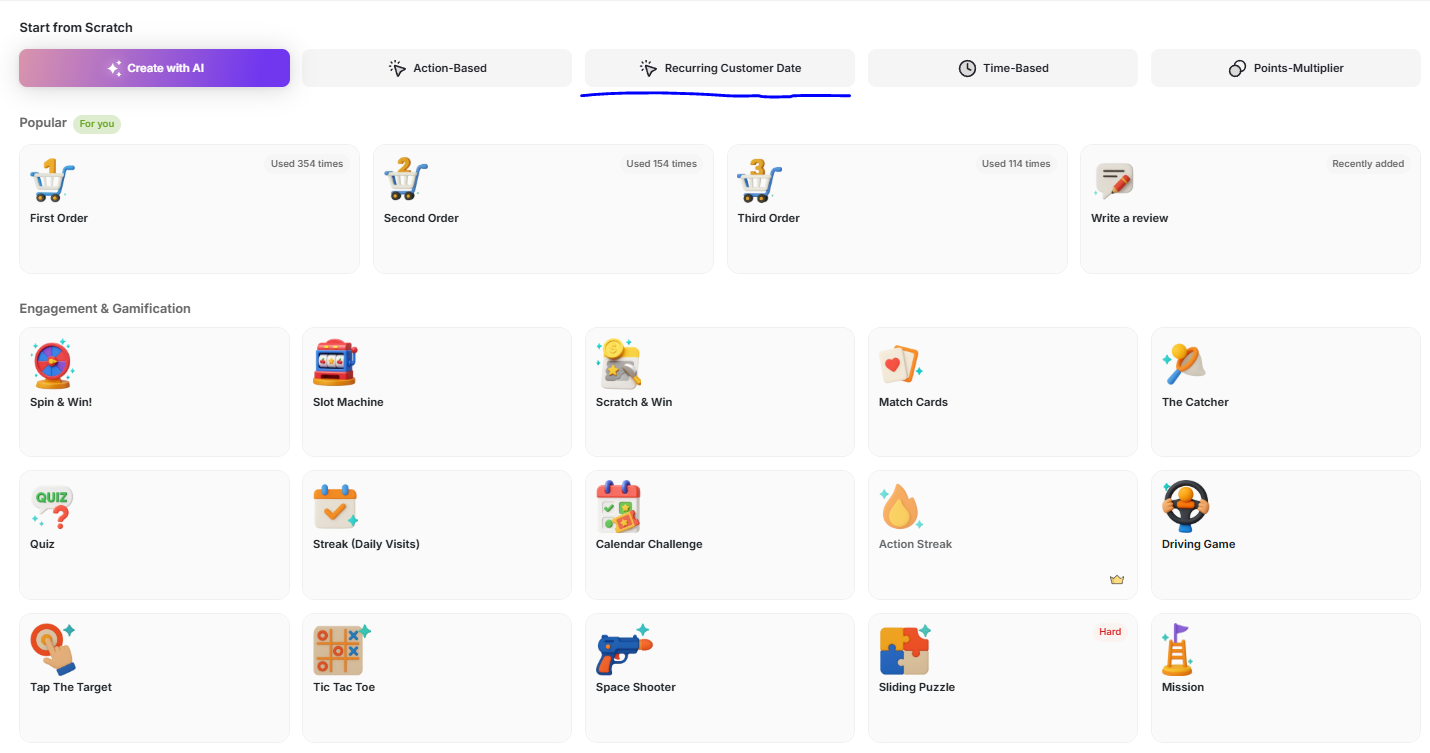
### Recurring Customer Date Campaign
Create reward campaigns based on **any customer attribute formatted as a date** — not just birthdays and anniversaries. Celebrate customers on join dates, subscription renewals, pet birthdays, or any custom date attribute. [Learn more](/product-documentation/rewards-campaigns/start-from-scratch/create-recurring-customer-date-reward-campaign).
### Send `points_redeemed` Event to Integrations
Gameball now sends the `points_redeemed` event to Insider, MoEngage, and Klaviyo, enabling real-time journeys and campaigns based on customer point redemptions.
## New Features
### Recurring Customer Date Campaign
Create reward campaigns based on **any customer attribute formatted as a date** — not just birthdays and anniversaries. Celebrate customers on join dates, subscription renewals, pet birthdays, or any custom date attribute. [Learn more](/product-documentation/rewards-campaigns/start-from-scratch/create-recurring-customer-date-reward-campaign).
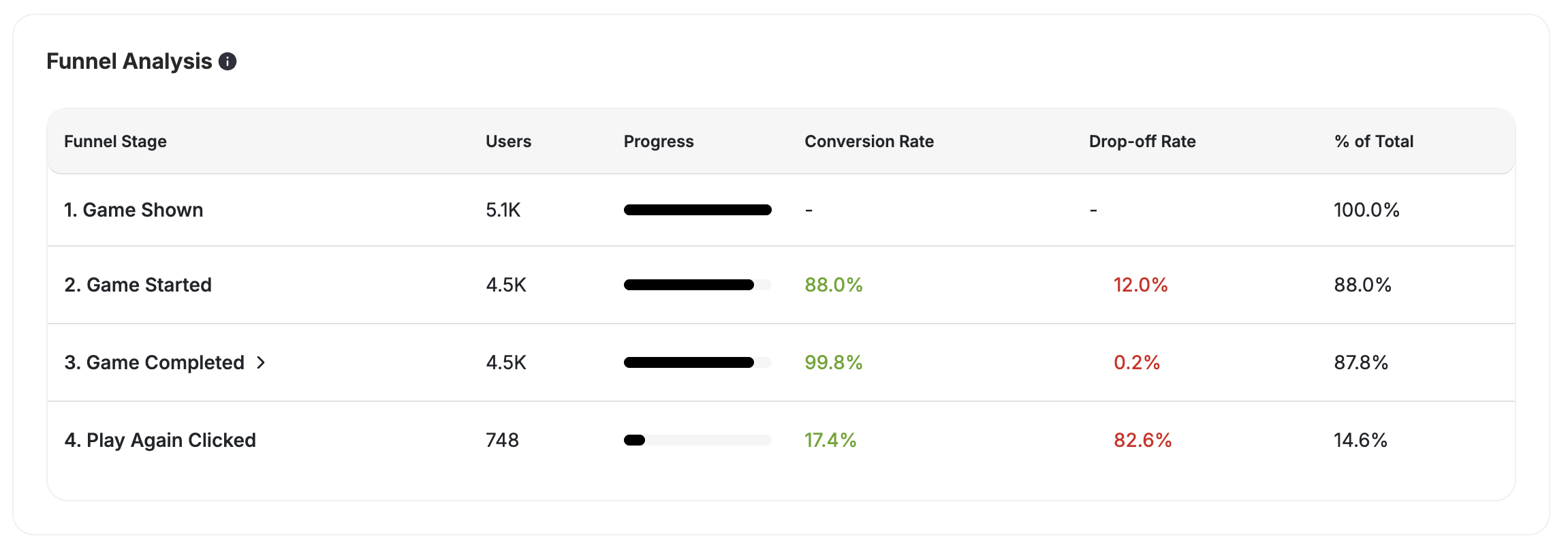
 ### Game Funnel Analytics
A new insights module provides a step-by-step view of how customers interact with every game campaign — from Game Shown → Lead Captured → Game Opened → Started → Completed → Rewarded/No Luck. Supports all game types, entry methods, and both guest and registered customers. [Learn more](/product-documentation/rewards-campaigns/reward-campaigns-insights).
### Game Funnel Analytics
A new insights module provides a step-by-step view of how customers interact with every game campaign — from Game Shown → Lead Captured → Game Opened → Started → Completed → Rewarded/No Luck. Supports all game types, entry methods, and both guest and registered customers. [Learn more](/product-documentation/rewards-campaigns/reward-campaigns-insights).
 ***
## Other Improvements
### Anonymous Customer Gameplay on Salla
Spin the Wheel and Slot Machine now support anonymous customer gameplay on Salla, enabling engagement with visitors before they create an account.
### Collections in Event Rule Dropdowns
Collections can now be selected directly from a dropdown when configuring event-based campaign rules, with search support for large catalogs. [Learn more](/product-documentation/rewards-campaigns/start-from-scratch/create-action-based-reward-campaign).
### New Filtering & Sorting Tools on Segments Page
Filter segments by status, creation date, and customer count range. Sort by name, date, or count directly from column headers. [Learn more](/product-documentation/customer-segmentation/how-to-segment-customers).
### Campaign Preview Stays Visible While Customizing Games
The game preview panel now uses a sticky floating layout, staying visible as you scroll through customization options.
***
## Bug Fixes
### Web Messages Not Displaying Reliably
Web messages now display reliably across all major browsers and mobile web whenever configured to appear.
### Filter Component UI Alignment
Fixed filter expansion behavior, chip display, and button alignment to match the Gameball design system.
## New Features
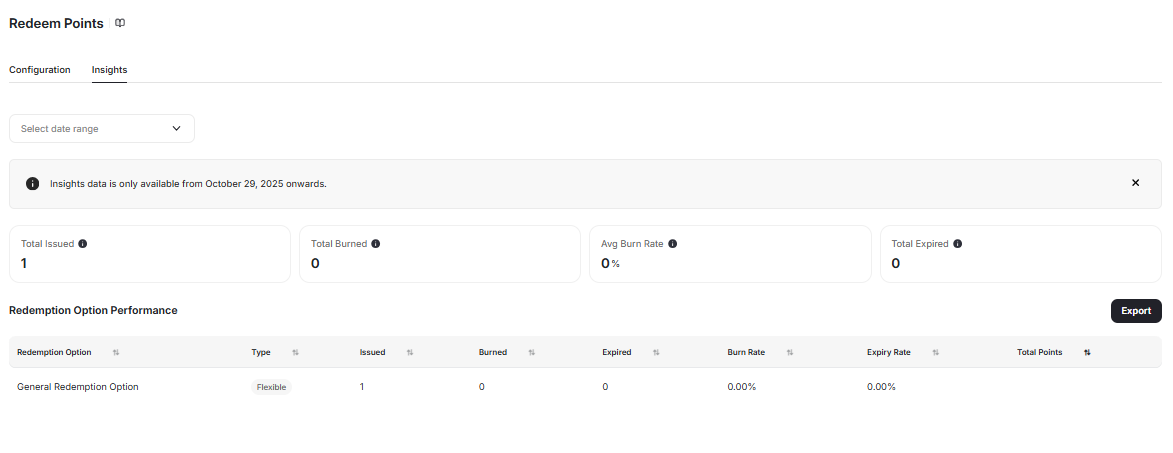
### "Insights" Tab for Redemption Options
Analyze the performance of each redemption option with a new **Insights** tab showing issued, burned, expired counts, burn/expiry rates, total points, time range filters, and export options. [Learn more](/product-documentation/programs/loyalty-points-redeem/launch-and-configure-your-redeem-pointing-system).
***
## Other Improvements
### Anonymous Customer Gameplay on Salla
Spin the Wheel and Slot Machine now support anonymous customer gameplay on Salla, enabling engagement with visitors before they create an account.
### Collections in Event Rule Dropdowns
Collections can now be selected directly from a dropdown when configuring event-based campaign rules, with search support for large catalogs. [Learn more](/product-documentation/rewards-campaigns/start-from-scratch/create-action-based-reward-campaign).
### New Filtering & Sorting Tools on Segments Page
Filter segments by status, creation date, and customer count range. Sort by name, date, or count directly from column headers. [Learn more](/product-documentation/customer-segmentation/how-to-segment-customers).
### Campaign Preview Stays Visible While Customizing Games
The game preview panel now uses a sticky floating layout, staying visible as you scroll through customization options.
***
## Bug Fixes
### Web Messages Not Displaying Reliably
Web messages now display reliably across all major browsers and mobile web whenever configured to appear.
### Filter Component UI Alignment
Fixed filter expansion behavior, chip display, and button alignment to match the Gameball design system.
## New Features
### "Insights" Tab for Redemption Options
Analyze the performance of each redemption option with a new **Insights** tab showing issued, burned, expired counts, burn/expiry rates, total points, time range filters, and export options. [Learn more](/product-documentation/programs/loyalty-points-redeem/launch-and-configure-your-redeem-pointing-system).
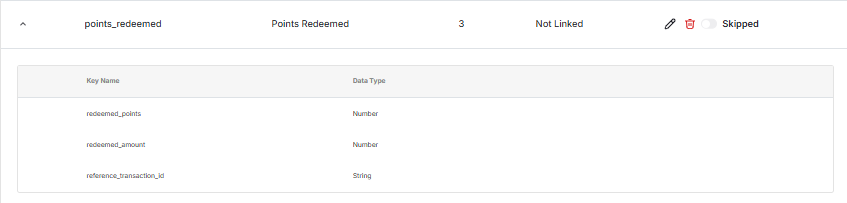
 ### New System Event: `points_redeemed`
A new built-in event that automatically triggers whenever a customer redeems points, enabling deeper tracking, automation triggers, and integration with external systems. Configurable in Dashboard, disabled by default. [Learn more](http://help.gameball.co/en/articles/12471048-events-gameball-fires-automatically-across-platforms).
### New System Event: `points_redeemed`
A new built-in event that automatically triggers whenever a customer redeems points, enabling deeper tracking, automation triggers, and integration with external systems. Configurable in Dashboard, disabled by default. [Learn more](http://help.gameball.co/en/articles/12471048-events-gameball-fires-automatically-across-platforms).
 ***
## Other Improvements
### Enhanced Customer Coupons API
New `isPromotion` flag and `promotionRules` object help distinguish automatic promotions from regular coupons and display qualification rules. [Learn more](/product-documentation/coupons/creating-coupon-manually).
### Responsive Game View for Standalone URLs
Games now automatically scale to fit any device or screen resolution — perfect for public activations, events, or in-store experiences on large touchscreens.
### Improved UX for Customer List in Campaigns
A new loading skeleton (shimmer effect) provides visual feedback while customer list data is being fetched, preventing confusion between "no data" and "still loading."
## New Features
### Easier Visibility for Tier Status and Expiry Date
A new **"Tier Evaluation Date"** field on customer profiles and a clear countdown in the widget show when tiers will reset. Supports LTR and RTL languages with automatic recalculation when settings change. [Learn more](/product-documentation/programs/vip-tiers/tier-settings/understanding-tier-expiry).
### Refunded Orders Now Can Be Excluded from Tier Progress
A new toggle under Tier Program Settings lets you exclude refunded orders from tier progress, maintaining fairness and data accuracy. [Learn more](/product-documentation/programs/vip-tiers/configuring-gameball-vip-tiers).
### Carry Over Attributes Across Automation Nodes
Pass dynamic attributes (Order ID, Points Earned, Friend Name, etc.) from one node to another inside automations for richer personalization and smarter branching. [Learn more](/product-documentation/automation-campaigns/how-to-create-an-automation-campaign).
***
## Other Improvements
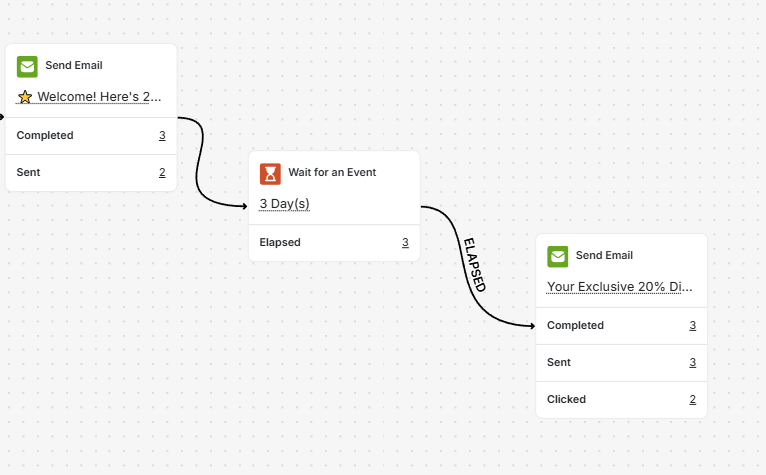
### View Sent & Clicked Email Analytics Within Automation
Each **Send Email** action node now displays Emails Sent and Emails Clicked counts with real-time refresh. [Learn more](/product-documentation/automation-campaigns/automation-actions).
***
## Other Improvements
### Enhanced Customer Coupons API
New `isPromotion` flag and `promotionRules` object help distinguish automatic promotions from regular coupons and display qualification rules. [Learn more](/product-documentation/coupons/creating-coupon-manually).
### Responsive Game View for Standalone URLs
Games now automatically scale to fit any device or screen resolution — perfect for public activations, events, or in-store experiences on large touchscreens.
### Improved UX for Customer List in Campaigns
A new loading skeleton (shimmer effect) provides visual feedback while customer list data is being fetched, preventing confusion between "no data" and "still loading."
## New Features
### Easier Visibility for Tier Status and Expiry Date
A new **"Tier Evaluation Date"** field on customer profiles and a clear countdown in the widget show when tiers will reset. Supports LTR and RTL languages with automatic recalculation when settings change. [Learn more](/product-documentation/programs/vip-tiers/tier-settings/understanding-tier-expiry).
### Refunded Orders Now Can Be Excluded from Tier Progress
A new toggle under Tier Program Settings lets you exclude refunded orders from tier progress, maintaining fairness and data accuracy. [Learn more](/product-documentation/programs/vip-tiers/configuring-gameball-vip-tiers).
### Carry Over Attributes Across Automation Nodes
Pass dynamic attributes (Order ID, Points Earned, Friend Name, etc.) from one node to another inside automations for richer personalization and smarter branching. [Learn more](/product-documentation/automation-campaigns/how-to-create-an-automation-campaign).
***
## Other Improvements
### View Sent & Clicked Email Analytics Within Automation
Each **Send Email** action node now displays Emails Sent and Emails Clicked counts with real-time refresh. [Learn more](/product-documentation/automation-campaigns/automation-actions).
 ### Points Expiry Date in Exported Activity Logs
A new `Points Expiry Date` column appears in exported customer activity logs for any activity involving earned points. [Learn more](/product-documentation/understanding-your-customers/your-customers/export-customer-activities-log).
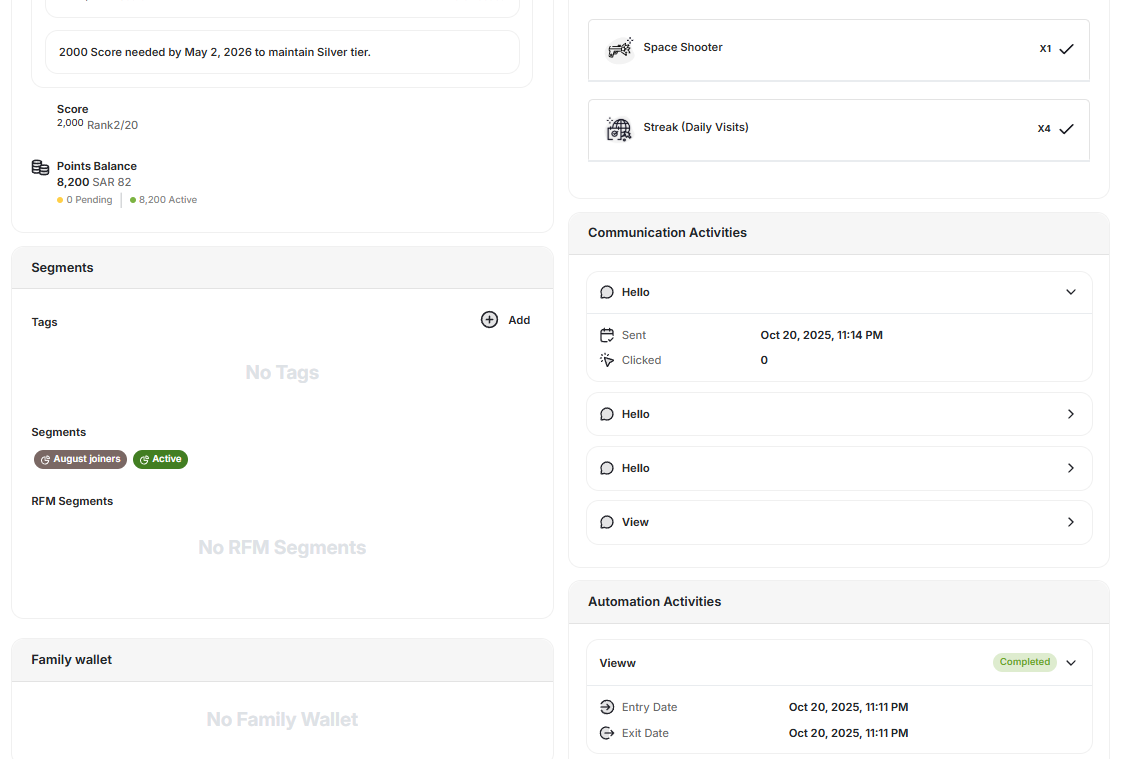
### Redesigned Communication & Automation Activities on Customer Page
Collapsible card layout with clear headers, icons, message type indicators, and status display for each activity. [Learn more](/product-documentation/understanding-your-customers/customer-profile/explore-and-manage-a-customer-profile).
### Points Expiry Date in Exported Activity Logs
A new `Points Expiry Date` column appears in exported customer activity logs for any activity involving earned points. [Learn more](/product-documentation/understanding-your-customers/your-customers/export-customer-activities-log).
### Redesigned Communication & Automation Activities on Customer Page
Collapsible card layout with clear headers, icons, message type indicators, and status display for each activity. [Learn more](/product-documentation/understanding-your-customers/customer-profile/explore-and-manage-a-customer-profile).
 ### Display Name and Terms & Conditions for Manual Coupons
Assign localized display names and Terms & Conditions to manual coupons, with multilingual support and API inclusion. [Learn more](/product-documentation/coupons/creating-coupon-manually).
## New Features
### Enable Guest Play with Lead Form for Games
AI-powered games (Tic Tac Toe, Tap the Target, Driving, Shooter, Puzzle) now support guest play with lead form capture, turning gameplay engagement into conversion opportunities. [Learn more](/product-documentation/rewards-campaigns/reward-campaign-url).
### Display Name and Terms & Conditions for Manual Coupons
Assign localized display names and Terms & Conditions to manual coupons, with multilingual support and API inclusion. [Learn more](/product-documentation/coupons/creating-coupon-manually).
## New Features
### Enable Guest Play with Lead Form for Games
AI-powered games (Tic Tac Toe, Tap the Target, Driving, Shooter, Puzzle) now support guest play with lead form capture, turning gameplay engagement into conversion opportunities. [Learn more](/product-documentation/rewards-campaigns/reward-campaign-url).
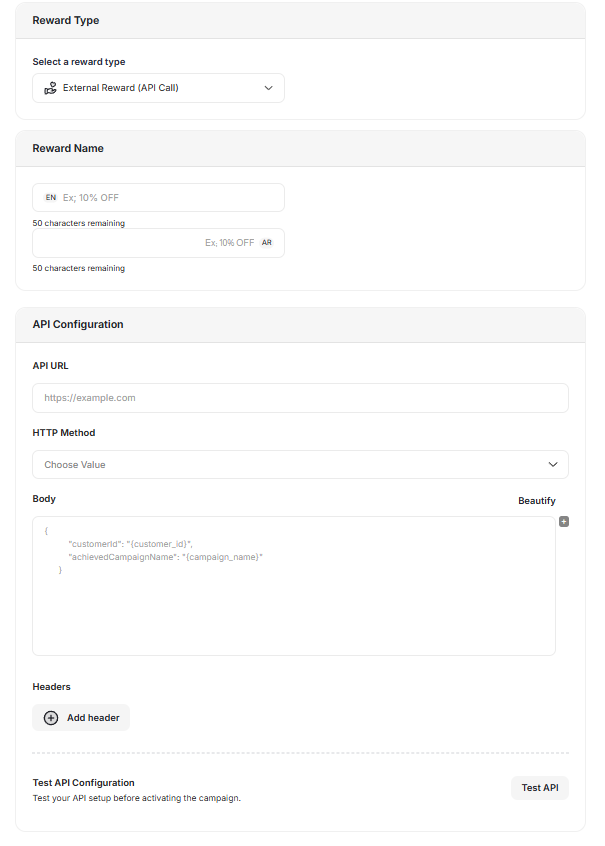
 ### Test API Call Configurations in Reward Campaigns
A new **"Test API"** button lets you verify API call settings (URL, headers, payload) directly during campaign or automation setup — without activating. [Learn more](/product-documentation/rewards-campaigns/send-external-rewards-using-api).
### Test API Call Configurations in Reward Campaigns
A new **"Test API"** button lets you verify API call settings (URL, headers, payload) directly during campaign or automation setup — without activating. [Learn more](/product-documentation/rewards-campaigns/send-external-rewards-using-api).
 ### Google Wallet Loyalty Card Integration
Customers can now generate a unique branded Google Wallet loyalty card with their name, points balance, tier, and QR/barcode for scanning. Automatic synchronization keeps balance and tier updates in near real-time.
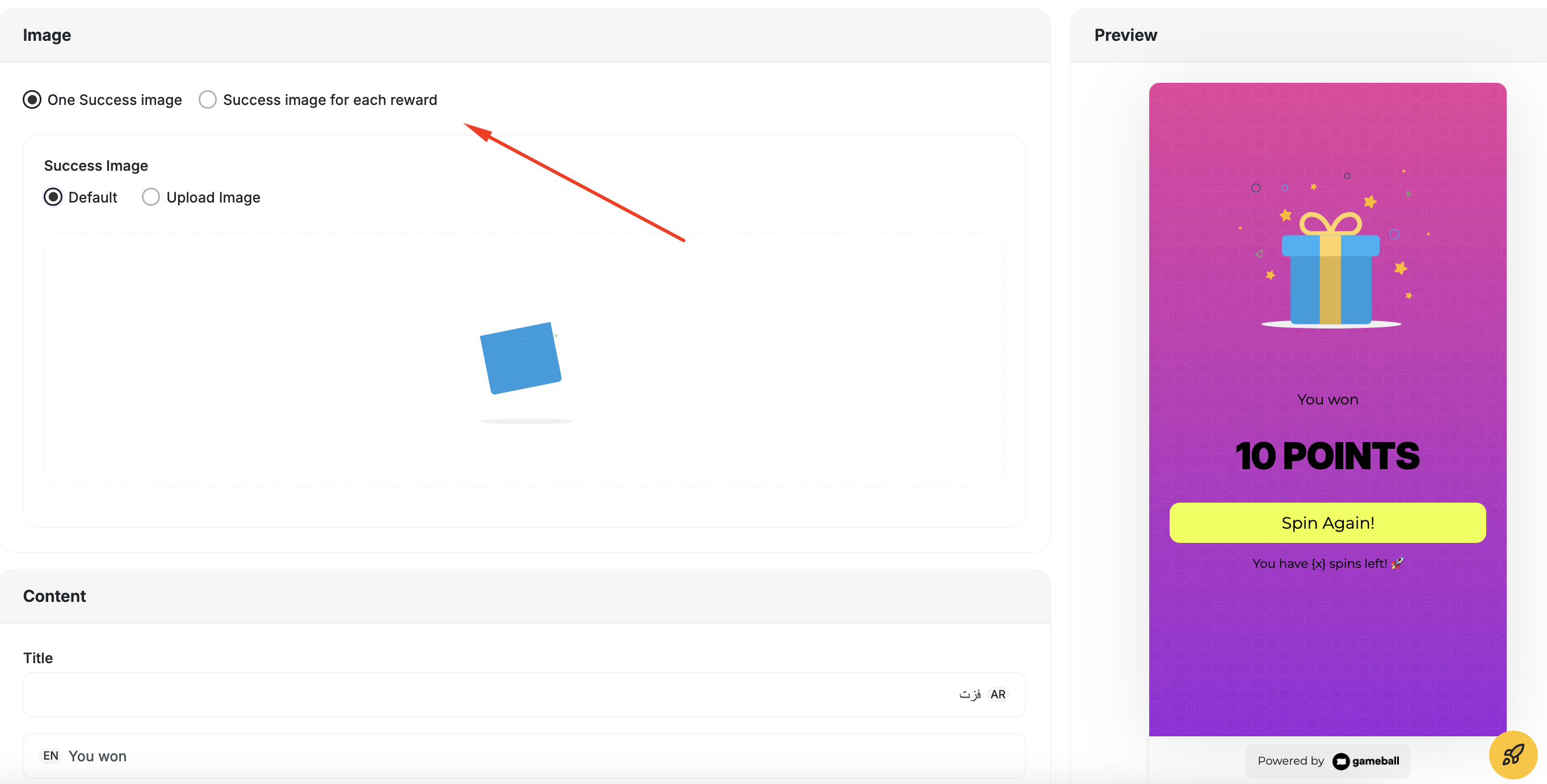
### Multiple Winning Icons for Game Success Screens
Assign a specific icon or image to each individual reward in multi-reward games (Spin the Wheel, Slot Machine, Scratch & Win) with live preview in the dashboard. [Learn more](/product-documentation/rewards-campaigns/templates/engagement-gamification/spin-the-wheel).
### Google Wallet Loyalty Card Integration
Customers can now generate a unique branded Google Wallet loyalty card with their name, points balance, tier, and QR/barcode for scanning. Automatic synchronization keeps balance and tier updates in near real-time.
### Multiple Winning Icons for Game Success Screens
Assign a specific icon or image to each individual reward in multi-reward games (Spin the Wheel, Slot Machine, Scratch & Win) with live preview in the dashboard. [Learn more](/product-documentation/rewards-campaigns/templates/engagement-gamification/spin-the-wheel).
 ### Send Test Emails Inside Automation
Preview and validate automation email content before publishing by sending test emails directly from the automation builder. [Learn more](/product-documentation/automation-campaigns/how-to-create-an-automation-campaign).
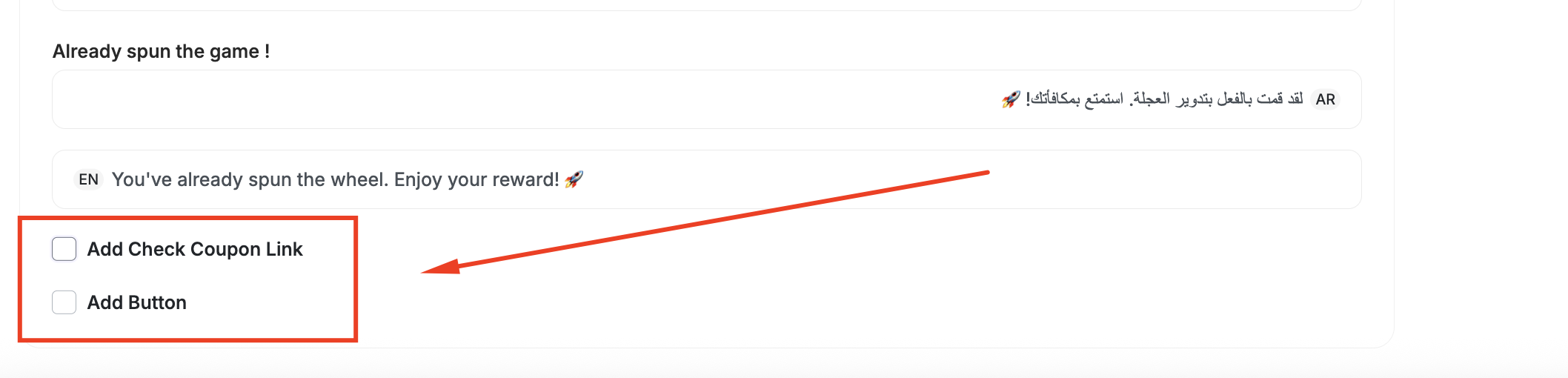
### "Check Coupon Details" Button on Game Success Screens
A configurable CTA button appears on game success screens when a coupon is won, linking directly to the coupon details page.
### Send Test Emails Inside Automation
Preview and validate automation email content before publishing by sending test emails directly from the automation builder. [Learn more](/product-documentation/automation-campaigns/how-to-create-an-automation-campaign).
### "Check Coupon Details" Button on Game Success Screens
A configurable CTA button appears on game success screens when a coupon is won, linking directly to the coupon details page.
 ***
## Other Improvements
### "Preferred Language" in Automation Conditional Splits
Use the **Preferred Language** customer attribute in Conditional Split nodes to personalize message flows by language. [Learn more](/product-documentation/automation-campaigns/automation-controls).
### "Happens One Time" for Multi-Step Referral Event Triggers
Mark multi-step referral events as "Happens One Time" without needing complex metadata configuration. [Learn more](/product-documentation/programs/referral-program/launching-referral-program).
### Configure Custom Game Rules
Customize time duration and number of lives for all game campaigns to fine-tune difficulty. [Learn more](/product-documentation/rewards-campaigns/reward-campaign-intro).
***
## Bug Fixes
### Correct Display for 0-Point Rewards in Games
Rewards worth 0 points now display the configured reward name instead of showing "No Luck." Reward Name is now mandatory for 0-point rewards.
### Exported Files Include Customer Tags
Customer export files now include a **Customer Tags** column with all tags per customer (comma-separated). [Learn more](/product-documentation/understanding-your-customers/your-customers/export-your-customer-list).
### Download Currently Uploaded Collections & Products
Download the latest uploaded CSV files for collections and products directly from the dashboard. [Learn more](/product-documentation/admin-settings/upload-products-collections-csv).
***
## Other Improvements
### "Preferred Language" in Automation Conditional Splits
Use the **Preferred Language** customer attribute in Conditional Split nodes to personalize message flows by language. [Learn more](/product-documentation/automation-campaigns/automation-controls).
### "Happens One Time" for Multi-Step Referral Event Triggers
Mark multi-step referral events as "Happens One Time" without needing complex metadata configuration. [Learn more](/product-documentation/programs/referral-program/launching-referral-program).
### Configure Custom Game Rules
Customize time duration and number of lives for all game campaigns to fine-tune difficulty. [Learn more](/product-documentation/rewards-campaigns/reward-campaign-intro).
***
## Bug Fixes
### Correct Display for 0-Point Rewards in Games
Rewards worth 0 points now display the configured reward name instead of showing "No Luck." Reward Name is now mandatory for 0-point rewards.
### Exported Files Include Customer Tags
Customer export files now include a **Customer Tags** column with all tags per customer (comma-separated). [Learn more](/product-documentation/understanding-your-customers/your-customers/export-your-customer-list).
### Download Currently Uploaded Collections & Products
Download the latest uploaded CSV files for collections and products directly from the dashboard. [Learn more](/product-documentation/admin-settings/upload-products-collections-csv).
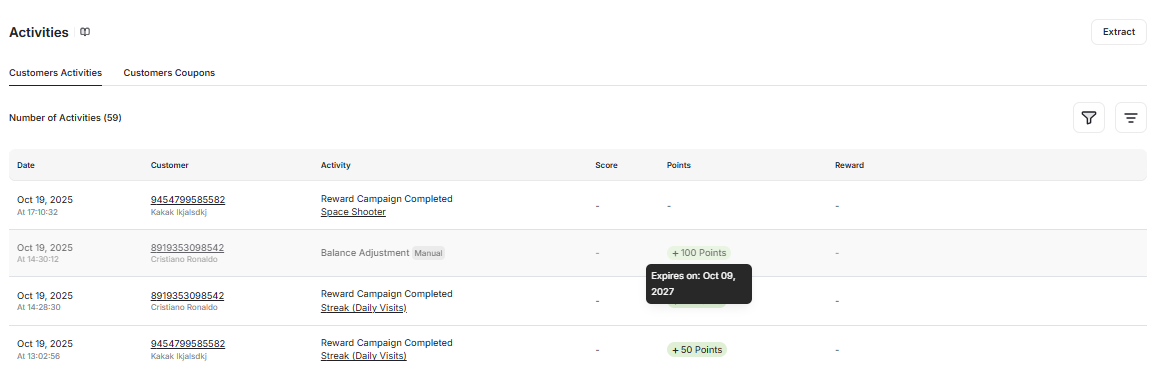
 ### Display Points Expiry Date in Customer Logs
Each reward transaction in Customer Logs now displays its associated expiry date via a tooltip. [Learn more](/product-documentation/understanding-your-customers/your-customers/customer-activity-log).
### Display Points Expiry Date in Customer Logs
Each reward transaction in Customer Logs now displays its associated expiry date via a tooltip. [Learn more](/product-documentation/understanding-your-customers/your-customers/customer-activity-log).
 ### Deep Link to Customer History in the Widget
New deep link `#gameball-history` opens the widget directly to the Customer History section from any external channel. [Learn more](/product-documentation/customer-widget/introduction-to-customer-widget).
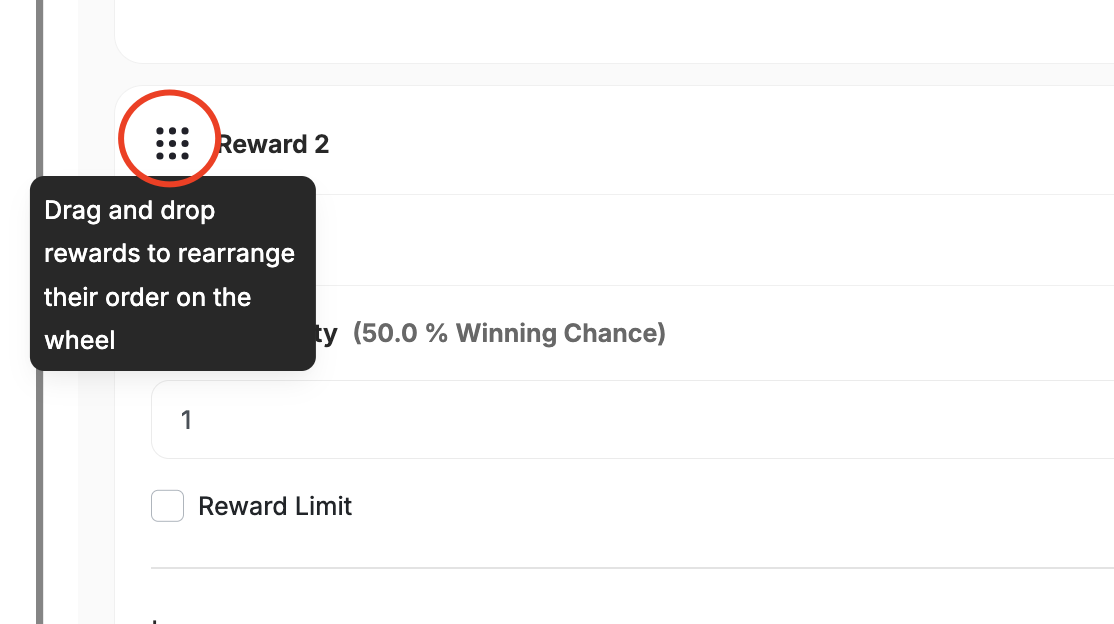
### Reorder Rewards in "Spin the Wheel"
Drag-and-drop interface for reordering rewards on the wheel, with real-time preview updates. Only visual order changes — probabilities remain intact. [Learn more](/product-documentation/rewards-campaigns/templates/engagement-gamification/spin-the-wheel).
### Deep Link to Customer History in the Widget
New deep link `#gameball-history` opens the widget directly to the Customer History section from any external channel. [Learn more](/product-documentation/customer-widget/introduction-to-customer-widget).
### Reorder Rewards in "Spin the Wheel"
Drag-and-drop interface for reordering rewards on the wheel, with real-time preview updates. Only visual order changes — probabilities remain intact. [Learn more](/product-documentation/rewards-campaigns/templates/engagement-gamification/spin-the-wheel).
 ### New Customer Attribute: Referral Status
Track whether referred customers are `pending` (haven't completed the referral action) or `successful` (completed it), available across segmentation, automation, and campaigns. [Learn more](/product-documentation/understanding-your-customers/customer-profile/customer-profile-attributes).
***
## Other Improvements
* **Removal of "Clicked" Tracking for Push Notifications** — Removed inconsistent "clicked" metric for more accurate reporting.
* **Improved Game Inner Page for Unsuccessful Attempts** — Clearer failure state design replaces misleading success visuals.
* **Minimum Two Tasks Required for Missions** — Ensures missions remain meaningful multi-step experiences. [Learn more](/product-documentation/rewards-campaigns/templates/engagement-gamification/mission).
* **Filter by Gameball Source in Automation Conditional Split** — Route customers based on how they were created (lead form, widget, API, POS, etc.). [Learn more](/product-documentation/automation-campaigns/automation-controls).
* **Custom Expiry Added to Manual Transaction API** — New optional `expiryAfter` field (1–3000 days) for custom point expiration.
## Core & Platform
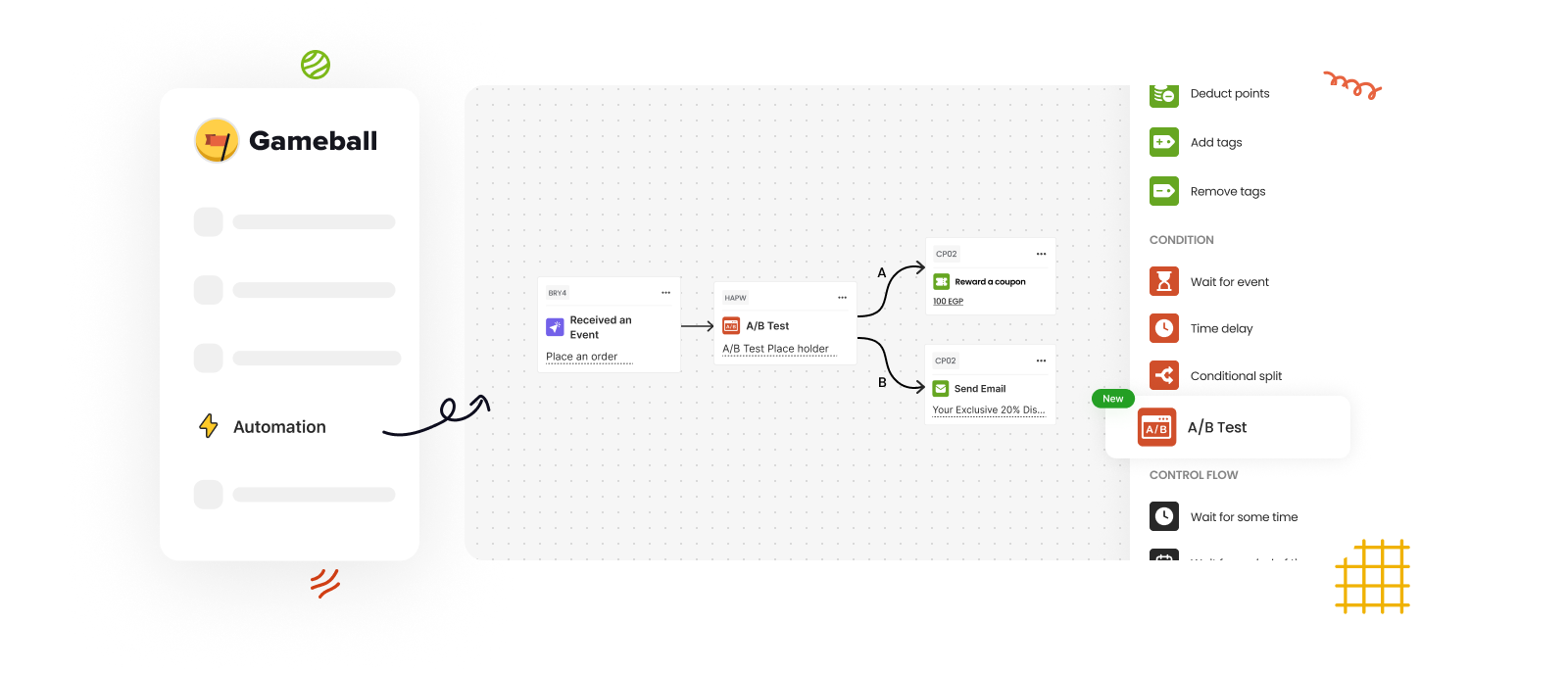
### A/B Testing in Automations
Split audiences into groups (A & B) with customizable ratios, build distinct automation paths, and measure performance side by side with detailed reporting on engagement, redemption, and revenue uplift. [Learn more](/product-documentation/automation-campaigns/introduction-to-automation-campaigns).
### New Customer Attribute: Referral Status
Track whether referred customers are `pending` (haven't completed the referral action) or `successful` (completed it), available across segmentation, automation, and campaigns. [Learn more](/product-documentation/understanding-your-customers/customer-profile/customer-profile-attributes).
***
## Other Improvements
* **Removal of "Clicked" Tracking for Push Notifications** — Removed inconsistent "clicked" metric for more accurate reporting.
* **Improved Game Inner Page for Unsuccessful Attempts** — Clearer failure state design replaces misleading success visuals.
* **Minimum Two Tasks Required for Missions** — Ensures missions remain meaningful multi-step experiences. [Learn more](/product-documentation/rewards-campaigns/templates/engagement-gamification/mission).
* **Filter by Gameball Source in Automation Conditional Split** — Route customers based on how they were created (lead form, widget, API, POS, etc.). [Learn more](/product-documentation/automation-campaigns/automation-controls).
* **Custom Expiry Added to Manual Transaction API** — New optional `expiryAfter` field (1–3000 days) for custom point expiration.
## Core & Platform
### A/B Testing in Automations
Split audiences into groups (A & B) with customizable ratios, build distinct automation paths, and measure performance side by side with detailed reporting on engagement, redemption, and revenue uplift. [Learn more](/product-documentation/automation-campaigns/introduction-to-automation-campaigns).
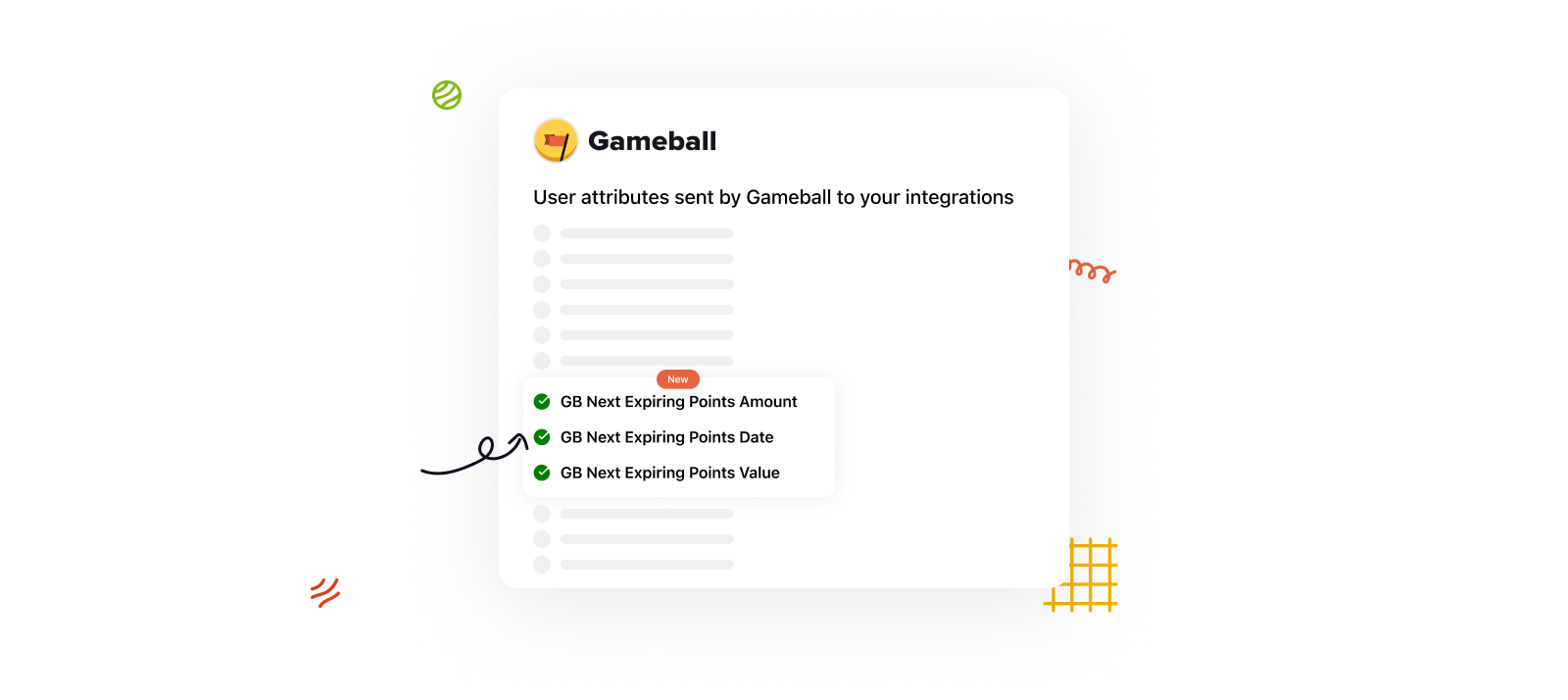
 ### New Synced Attributes: Next Expiring Points
Three new customer attributes synced with integrations: **Next Expiring Points Amount**, **Date**, and **Value** — enabling timely pre-expiry communications.
### New Synced Attributes: Next Expiring Points
Three new customer attributes synced with integrations: **Next Expiring Points Amount**, **Date**, and **Value** — enabling timely pre-expiry communications.
 ***
## Other Improvements
### Enhanced Widget Coupons Page Design
Redesigned layout with improved visibility and usability, automatically applied to all widgets.
***
## Fixes
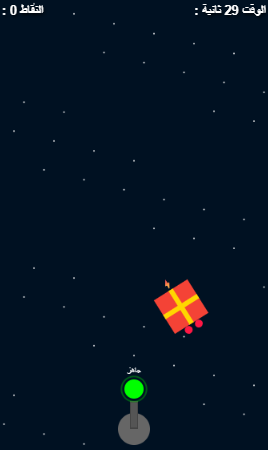
### Games in Arabic (RTL)
Resolved layout alignment, text rendering, and playability issues for games displayed in Arabic.
***
## Other Improvements
### Enhanced Widget Coupons Page Design
Redesigned layout with improved visibility and usability, automatically applied to all widgets.
***
## Fixes
### Games in Arabic (RTL)
Resolved layout alignment, text rendering, and playability issues for games displayed in Arabic.
 ### Games Hidden in Widget Breaking Offline Links
Games now work seamlessly via offline links even when hidden from the widget.
## Engagement
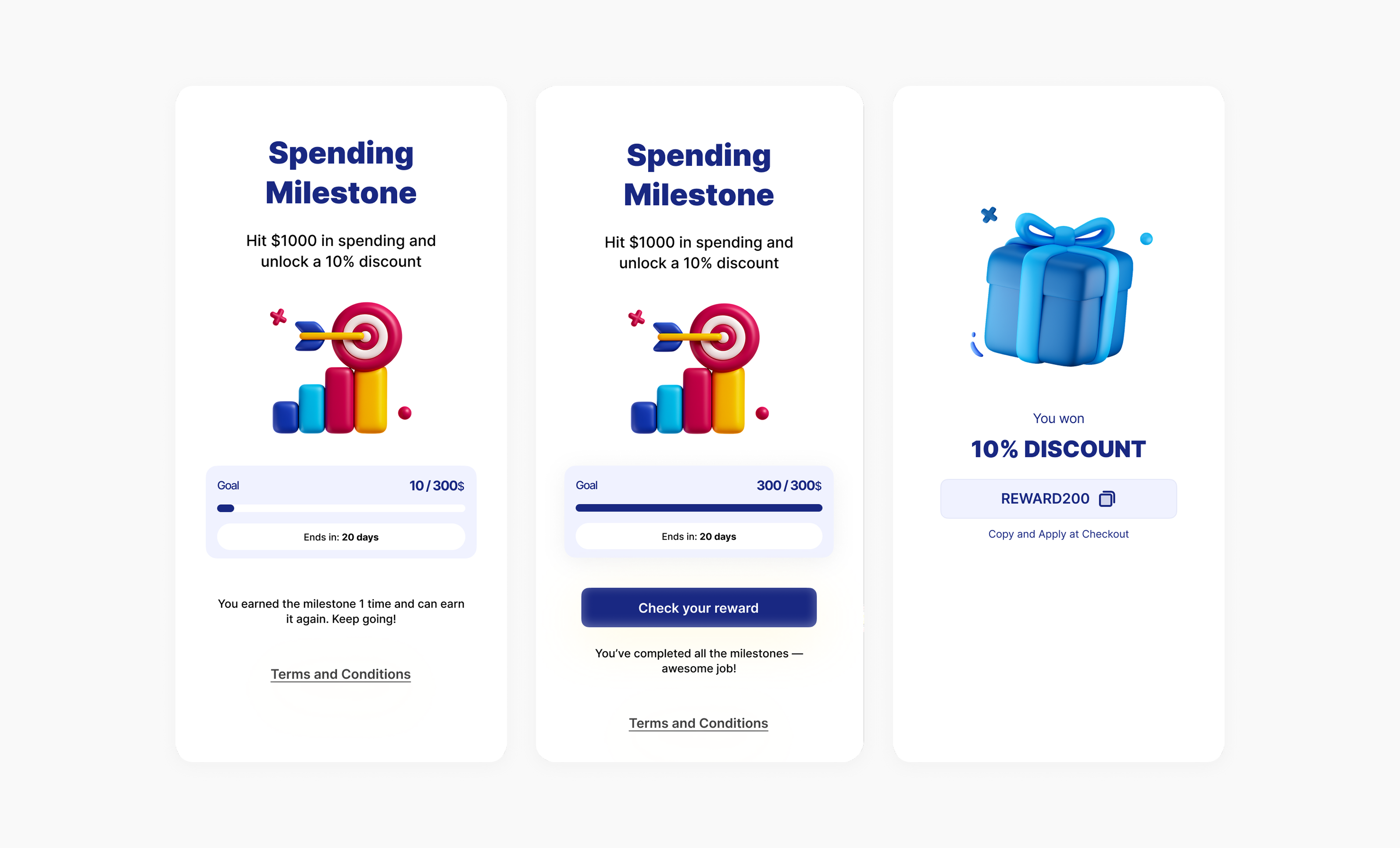
### Milestone: New Reward Campaign
A rule-based campaign that accumulates eligible spend or item count across orders during a defined period (e.g., SAR 500 per month). Supports spending milestones, collection/SKU-specific milestones, and items-purchased milestones. [Learn more](/product-documentation/rewards-campaigns/faqs/stamps-milestone-mission-campaigns).
### Games Hidden in Widget Breaking Offline Links
Games now work seamlessly via offline links even when hidden from the widget.
## Engagement
### Milestone: New Reward Campaign
A rule-based campaign that accumulates eligible spend or item count across orders during a defined period (e.g., SAR 500 per month). Supports spending milestones, collection/SKU-specific milestones, and items-purchased milestones. [Learn more](/product-documentation/rewards-campaigns/faqs/stamps-milestone-mission-campaigns).
 ***
## Core & Platform
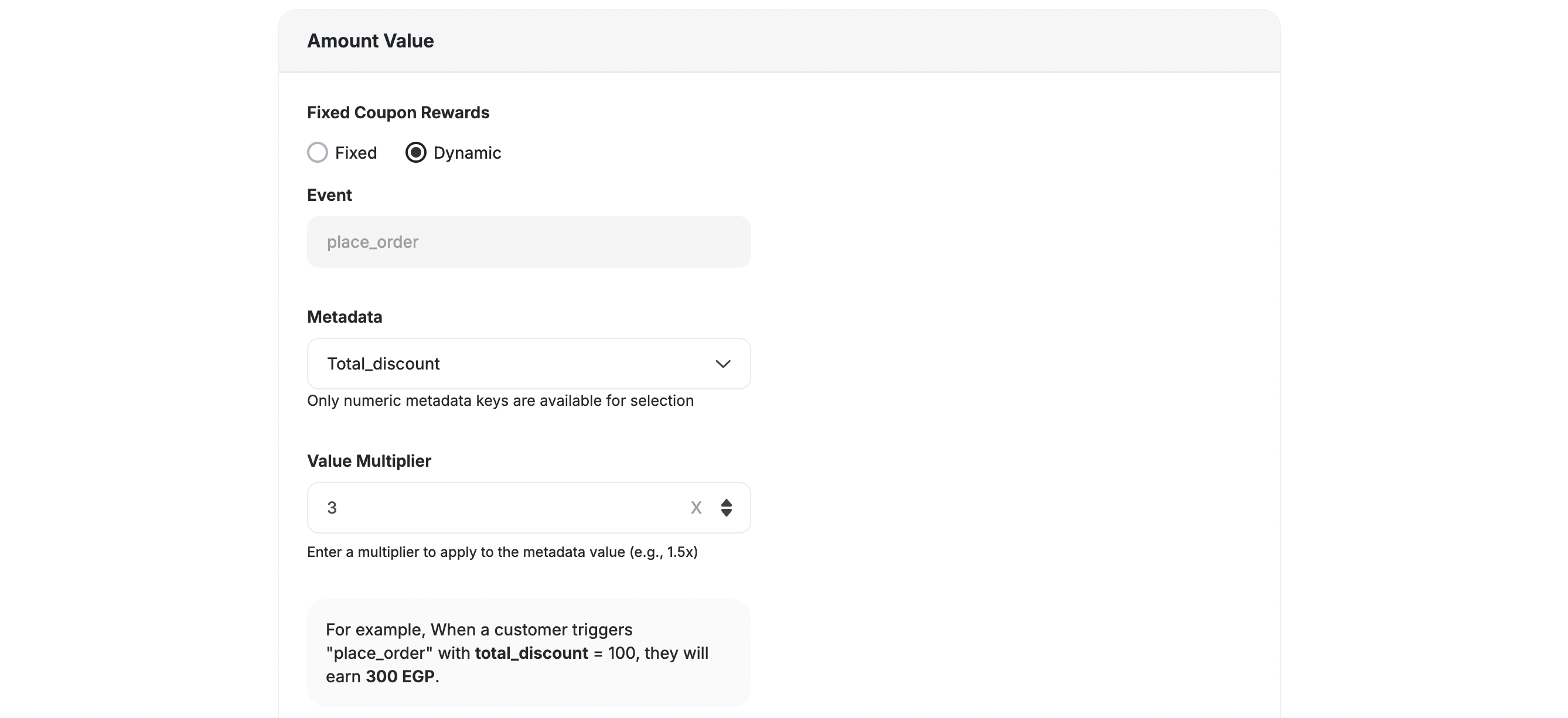
### Dynamic Value for Fixed Coupon Rewards
Configure fixed coupons to dynamically calculate their value based on a percentage of a chosen variable (e.g., 15% of cart total). [Learn more](/product-documentation/rewards-campaigns/faqs/understanding-rewards-types).
***
## Core & Platform
### Dynamic Value for Fixed Coupon Rewards
Configure fixed coupons to dynamically calculate their value based on a percentage of a chosen variable (e.g., 15% of cart total). [Learn more](/product-documentation/rewards-campaigns/faqs/understanding-rewards-types).
 ### Coupons Start & End Date
Set when coupons become valid and when they automatically expire for time-bound promotions. [Learn more](/product-documentation/coupons/creating-coupon-manually).
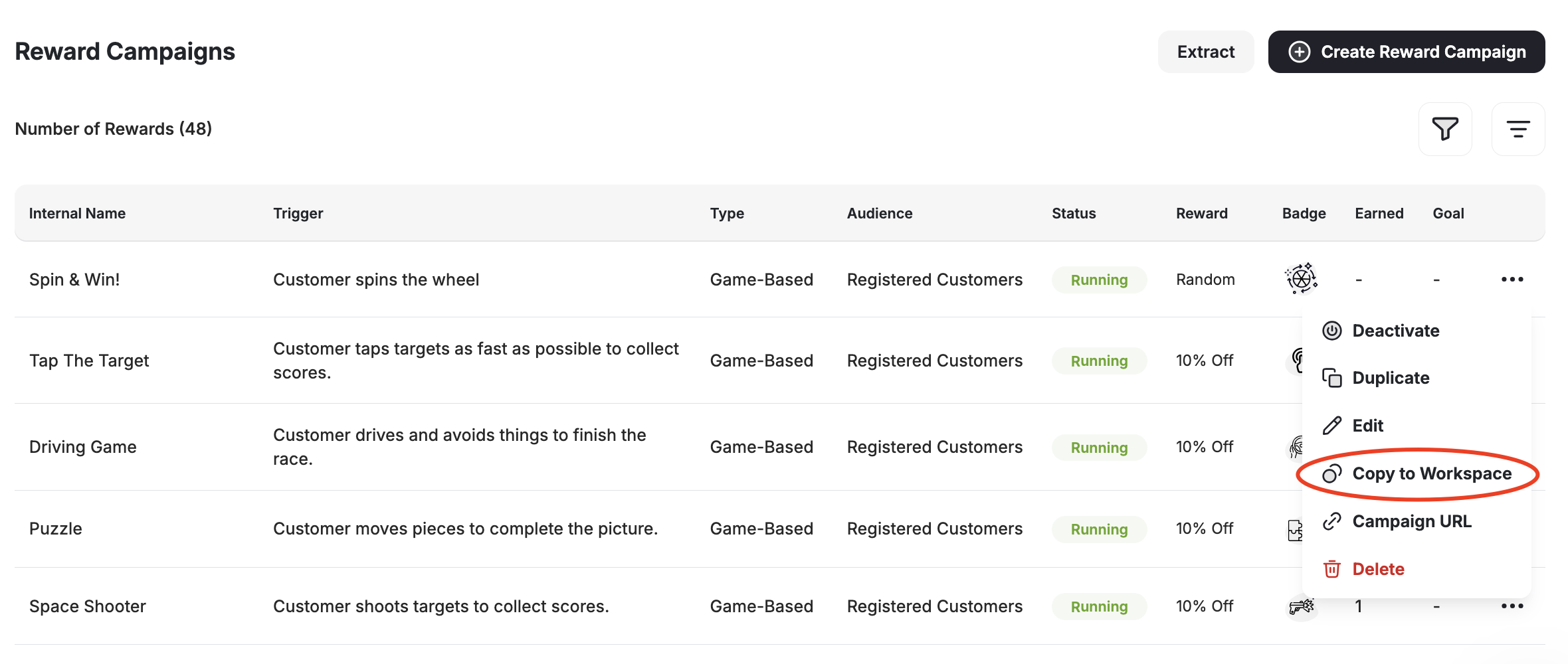
### Copy Campaigns Across Workspaces
Replicate successful reward campaigns across workspaces with automatic event creation, language handling, and safe defaults. [Learn more](/product-documentation/admin-settings/creating-multiple-workspaces).
### Coupons Start & End Date
Set when coupons become valid and when they automatically expire for time-bound promotions. [Learn more](/product-documentation/coupons/creating-coupon-manually).
### Copy Campaigns Across Workspaces
Replicate successful reward campaigns across workspaces with automatic event creation, language handling, and safe defaults. [Learn more](/product-documentation/admin-settings/creating-multiple-workspaces).
 ### Coupon Insights Tab
A new Insights tab on the coupon details page shows customer-level redemption data with export to CSV. [Learn more](/product-documentation/coupons/introduction-to-coupon-engine).
### "Is Referred" Customer Attribute
New boolean attribute identifying whether a customer was referred, available as a filter in campaigns, segments, and automations. [Learn more](/product-documentation/understanding-your-customers/customer-profile/customer-profile-attributes).
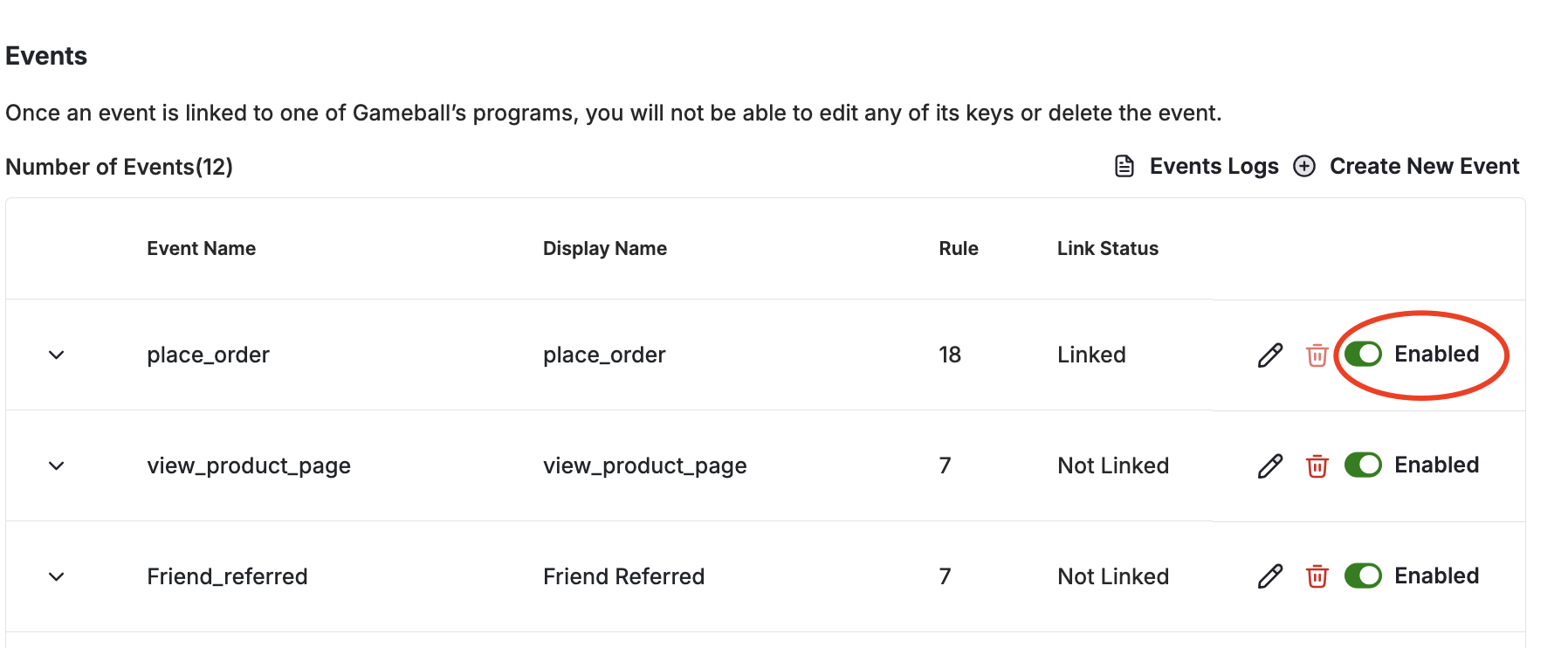
### Full Control Over Internal Gameball Events
Enable or disable auto-fired Gameball events (place\_order, view\_product, order\_refunded, etc.) with real-time effect. [Learn more](/product-documentation/admin-settings/create-and-send-events).
### Coupon Insights Tab
A new Insights tab on the coupon details page shows customer-level redemption data with export to CSV. [Learn more](/product-documentation/coupons/introduction-to-coupon-engine).
### "Is Referred" Customer Attribute
New boolean attribute identifying whether a customer was referred, available as a filter in campaigns, segments, and automations. [Learn more](/product-documentation/understanding-your-customers/customer-profile/customer-profile-attributes).
### Full Control Over Internal Gameball Events
Enable or disable auto-fired Gameball events (place\_order, view\_product, order\_refunded, etc.) with real-time effect. [Learn more](/product-documentation/admin-settings/create-and-send-events).
 ### Custom Expiry for Points Multiplier Campaigns
Set a configurable expiry period for bonus points earned through point multiplier campaigns, with delayed activation until after the return window. [Learn more](/product-documentation/rewards-campaigns/start-from-scratch/create-point-multiplier-reward-campaign).
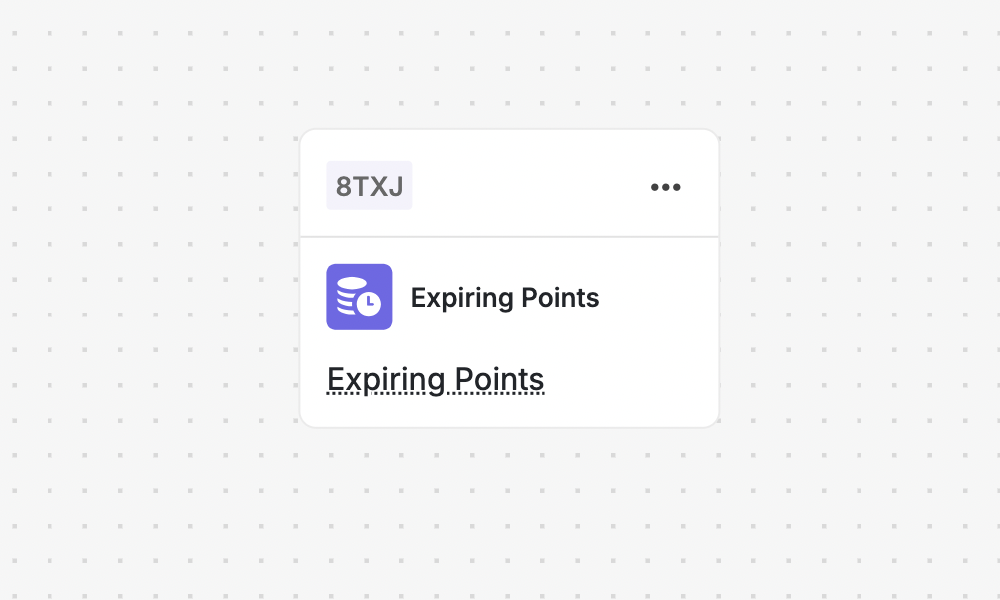
### Automate "Points to Expire" Notifications
New **"Points to Expire" trigger** in the Automation Builder for custom timing, multi-channel reminders, and conditions. Replaces the old fixed Points Expiry Notifications system. [Learn more](/product-documentation/automation-campaigns/how-to-create-an-automation-campaign).
### Custom Expiry for Points Multiplier Campaigns
Set a configurable expiry period for bonus points earned through point multiplier campaigns, with delayed activation until after the return window. [Learn more](/product-documentation/rewards-campaigns/start-from-scratch/create-point-multiplier-reward-campaign).
### Automate "Points to Expire" Notifications
New **"Points to Expire" trigger** in the Automation Builder for custom timing, multi-channel reminders, and conditions. Replaces the old fixed Points Expiry Notifications system. [Learn more](/product-documentation/automation-campaigns/how-to-create-an-automation-campaign).
 ***
## Other Improvements
* **reCAPTCHA Added to Login Flow** — Google reCAPTCHA protects against automated login attempts.
* **MoEngage: Country & Currency Support** — Customer events and attributes now include country and currency data. [Learn more](/product-documentation/apps-integrations/moengage-integration).
* **Workspace Information Synced to MoEngage** — Segment and target customers by specific workspace in MoEngage.
## Engagement
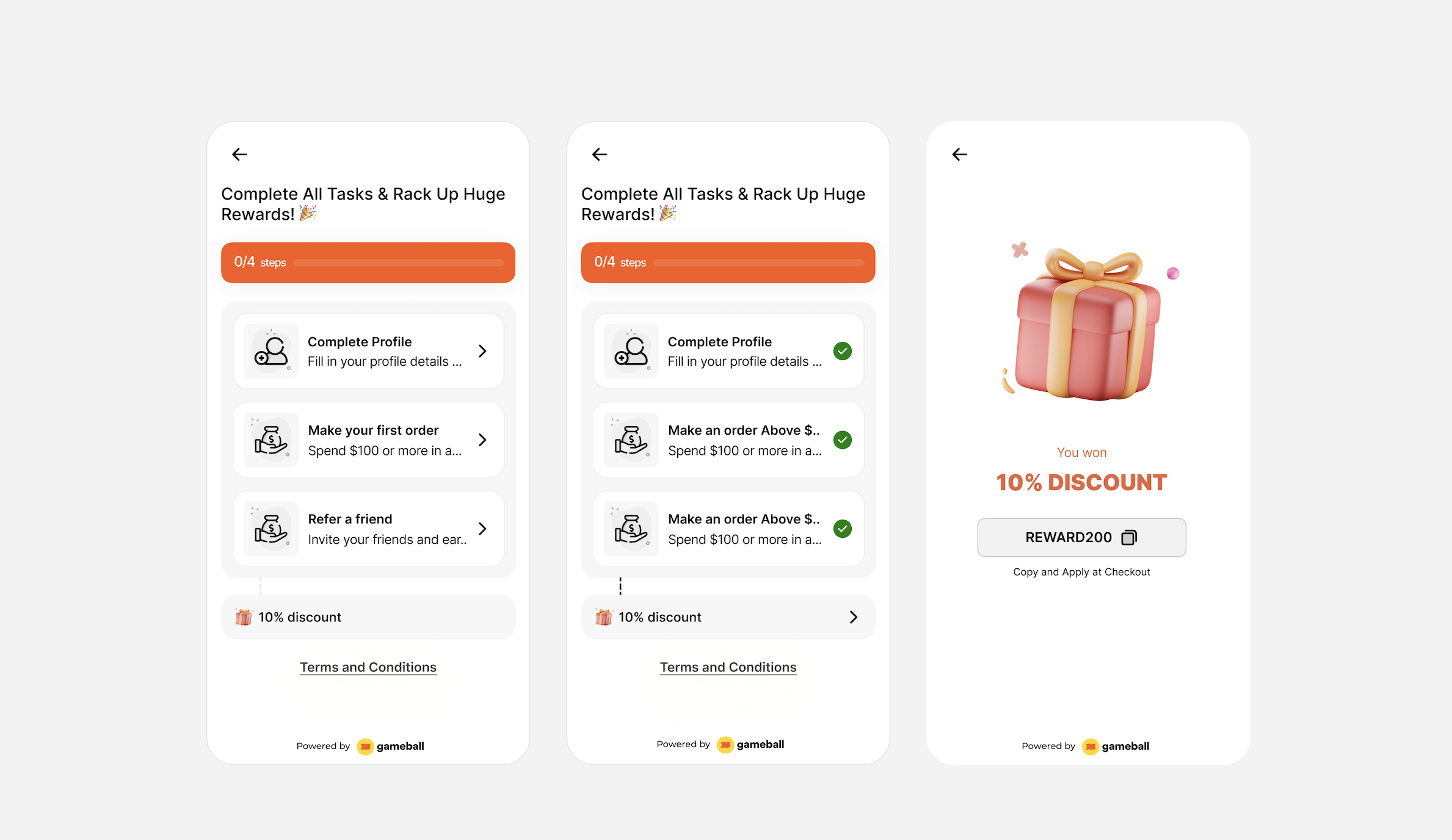
### Mission: New Reward Campaign
Define up to 10 different tasks per mission. Once a customer completes all tasks (regardless of order), they earn a reward and unlock a badge — perfect for onboarding flows and multi-step journeys. [Learn more](/product-documentation/rewards-campaigns/templates/engagement-gamification/mission).
***
## Other Improvements
* **reCAPTCHA Added to Login Flow** — Google reCAPTCHA protects against automated login attempts.
* **MoEngage: Country & Currency Support** — Customer events and attributes now include country and currency data. [Learn more](/product-documentation/apps-integrations/moengage-integration).
* **Workspace Information Synced to MoEngage** — Segment and target customers by specific workspace in MoEngage.
## Engagement
### Mission: New Reward Campaign
Define up to 10 different tasks per mission. Once a customer completes all tasks (regardless of order), they earn a reward and unlock a badge — perfect for onboarding flows and multi-step journeys. [Learn more](/product-documentation/rewards-campaigns/templates/engagement-gamification/mission).
 ### External Reward in Referral & Tiers Programs
External Reward, previously limited to Reward Campaigns, is now available in Referral and Tiers modules. [Learn more about Referral](/product-documentation/programs/referral-program/launching-referral-program) and [VIP Tiers](/product-documentation/programs/vip-tiers/configuring-gameball-vip-tiers).
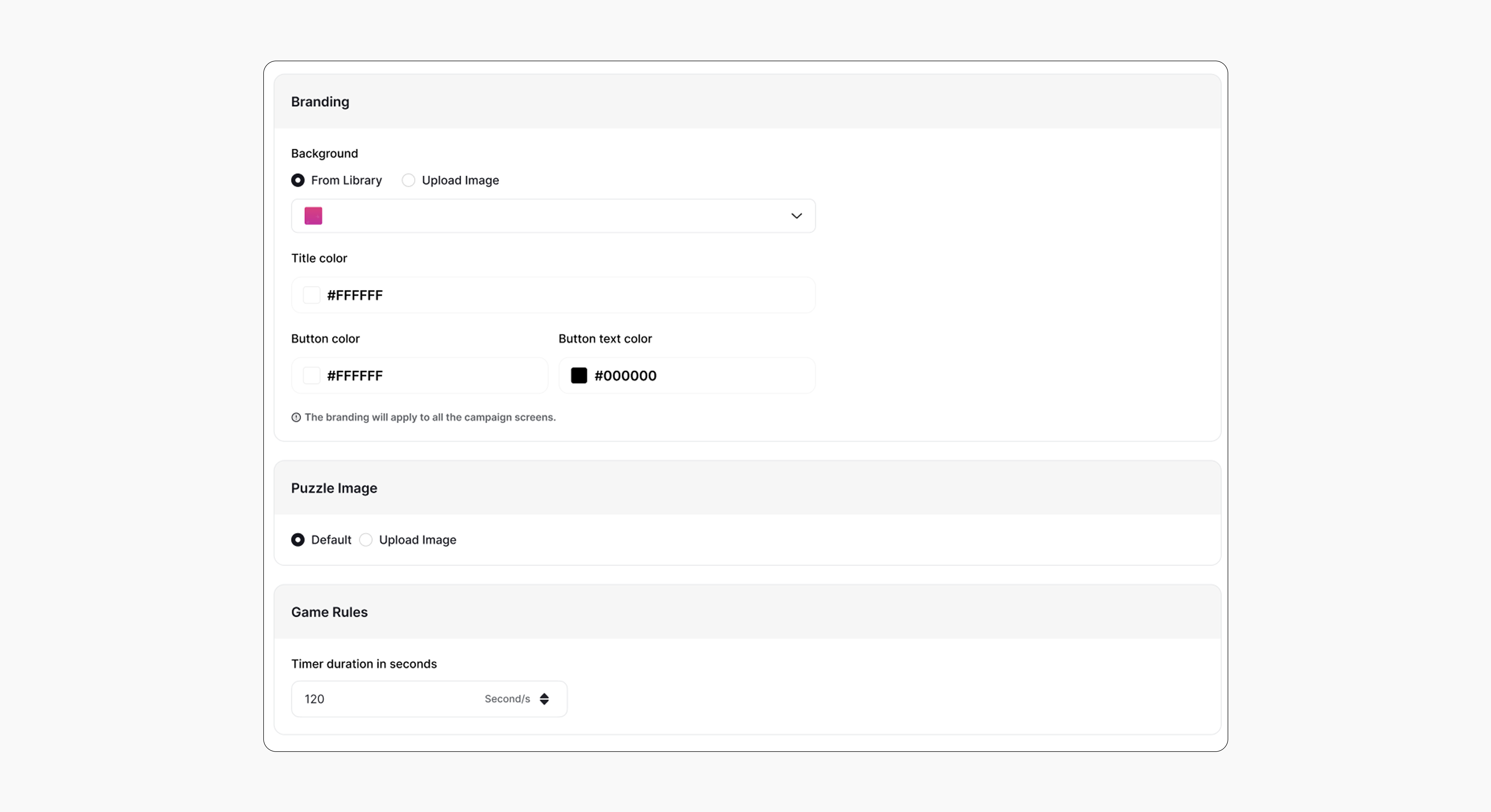
### Puzzle Game Customization
Fully personalize the Puzzle Game — background image, branding colors, puzzle image, and custom timer. [Learn more](/product-documentation/rewards-campaigns/templates/engagement-gamification/sliding-puzzle).
### External Reward in Referral & Tiers Programs
External Reward, previously limited to Reward Campaigns, is now available in Referral and Tiers modules. [Learn more about Referral](/product-documentation/programs/referral-program/launching-referral-program) and [VIP Tiers](/product-documentation/programs/vip-tiers/configuring-gameball-vip-tiers).
### Puzzle Game Customization
Fully personalize the Puzzle Game — background image, branding colors, puzzle image, and custom timer. [Learn more](/product-documentation/rewards-campaigns/templates/engagement-gamification/sliding-puzzle).
 ***
## Core & Platform
### New "Order Refunded" Event
A new `order_refunded` system event fires automatically when a refund is processed, logging original order ID, refund ID, refunded amount, and points.
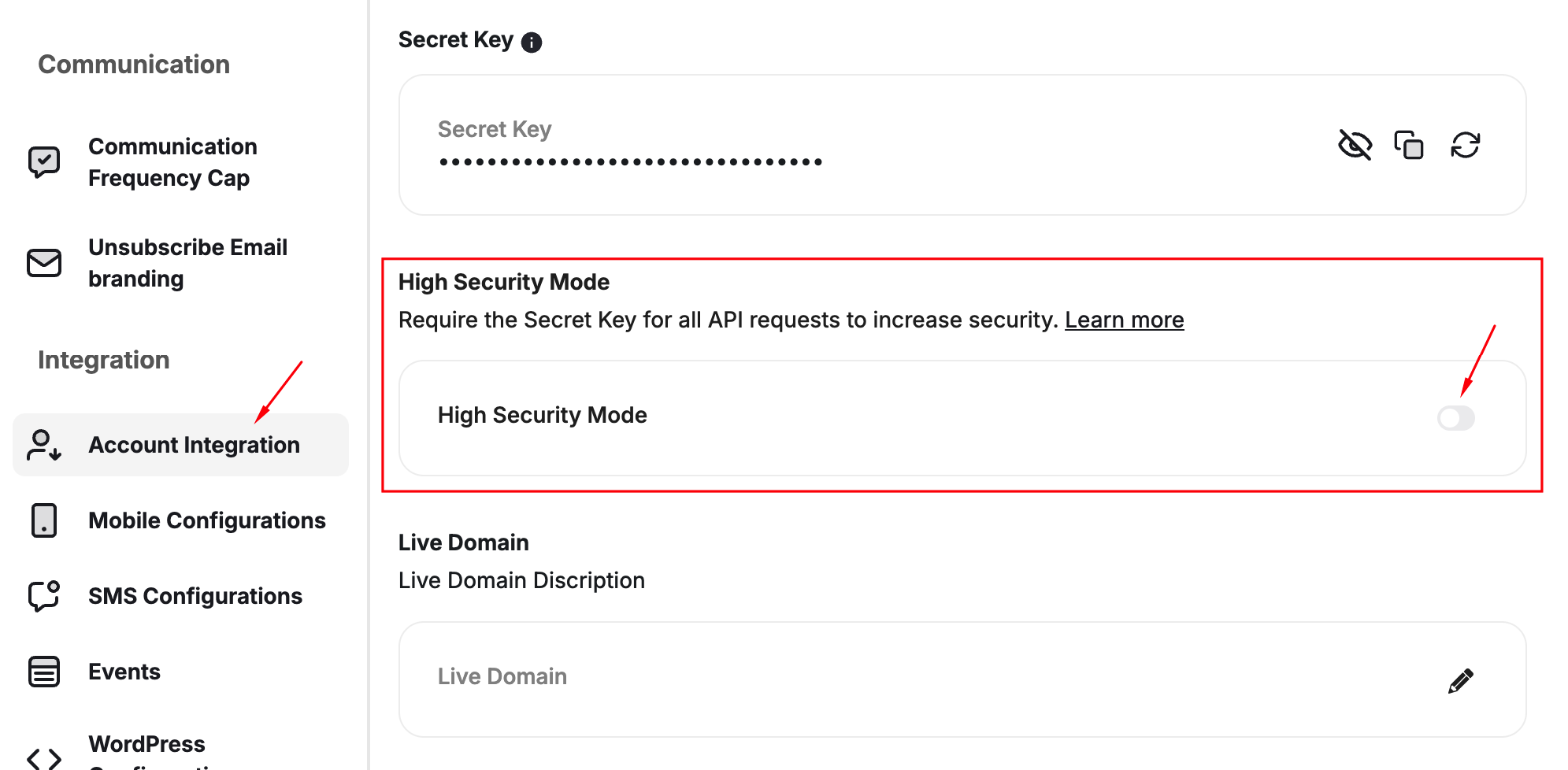
### API & Secret Key Rotation from Dashboard
Rotate API keys and Secret Key individually from the dashboard with immediate replacement. Shopify & Salla stores update automatically. [Learn more](/product-documentation/admin-settings/get-api-keys).
### High Security Mode for API Authentication
Optional feature requiring Secret Key alongside API Key for all integration API requests, preventing unauthorized access and data exposure. [Learn more](/product-documentation/admin-settings/get-api-keys).
***
## Core & Platform
### New "Order Refunded" Event
A new `order_refunded` system event fires automatically when a refund is processed, logging original order ID, refund ID, refunded amount, and points.
### API & Secret Key Rotation from Dashboard
Rotate API keys and Secret Key individually from the dashboard with immediate replacement. Shopify & Salla stores update automatically. [Learn more](/product-documentation/admin-settings/get-api-keys).
### High Security Mode for API Authentication
Optional feature requiring Secret Key alongside API Key for all integration API requests, preventing unauthorized access and data exposure. [Learn more](/product-documentation/admin-settings/get-api-keys).
 ### Product-Level Order Segmentation
Segment customers based on exact products and quantities purchased — filter by Product ID, SKU, Category, Collection, Title, Quantity, and Price with AND/OR conditions. [Learn more](/product-documentation/customer-segmentation/how-to-segment-customers).
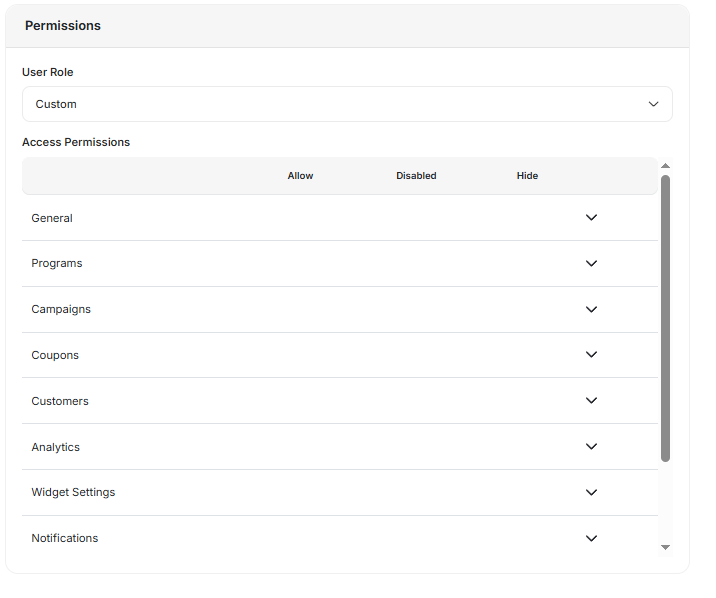
### Custom User Permissions Per Invitation
Configure dashboard access per user individually during invitation with Hide/Disabled/Allow options for each section. [Learn more](/product-documentation/admin-settings/create-user-assign-roles).
### Product-Level Order Segmentation
Segment customers based on exact products and quantities purchased — filter by Product ID, SKU, Category, Collection, Title, Quantity, and Price with AND/OR conditions. [Learn more](/product-documentation/customer-segmentation/how-to-segment-customers).
### Custom User Permissions Per Invitation
Configure dashboard access per user individually during invitation with Hide/Disabled/Allow options for each section. [Learn more](/product-documentation/admin-settings/create-user-assign-roles).
 ***
## Other Improvements
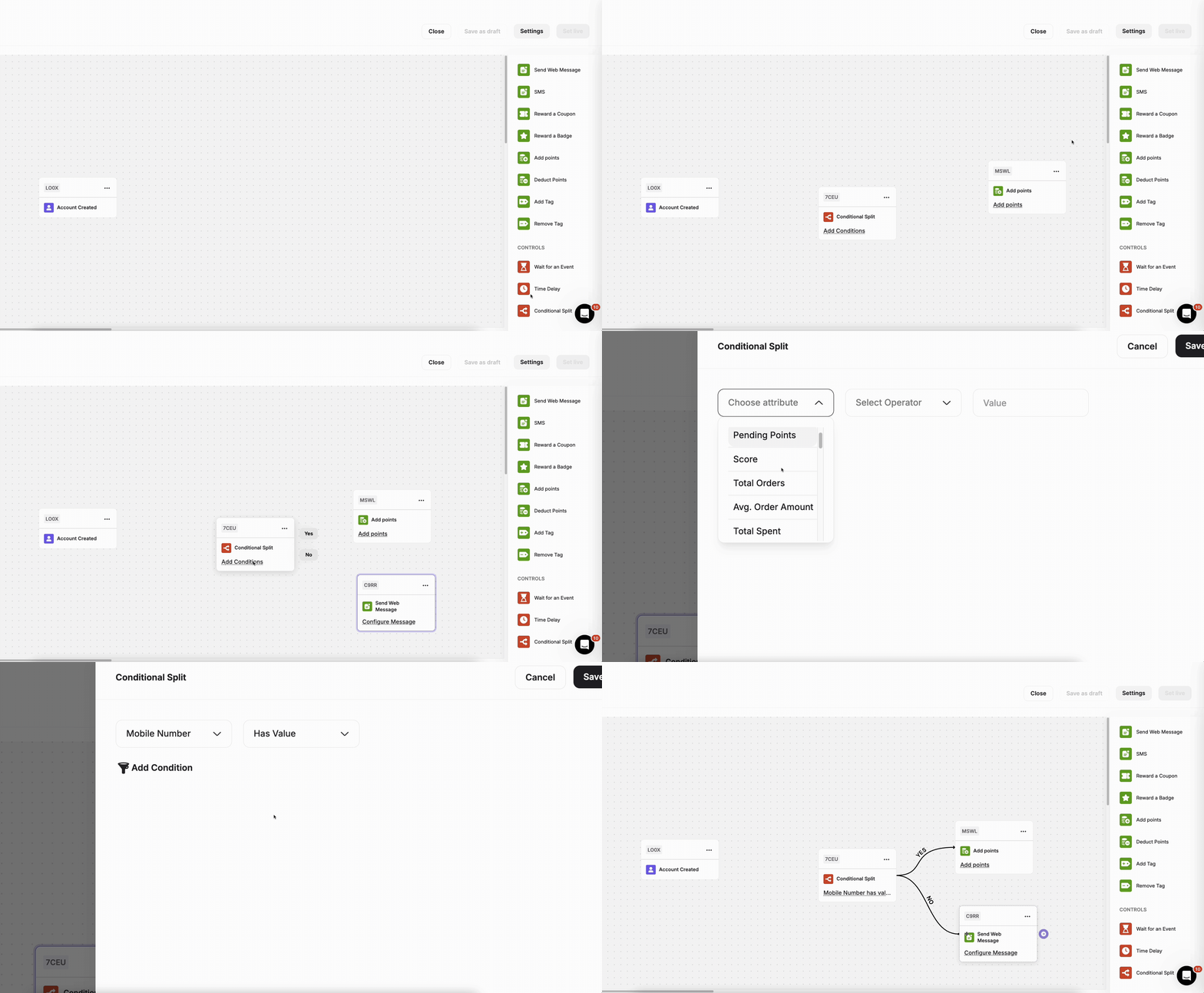
### "Has Value" Operator in Automation Condition Split
Check if a specific customer attribute is not empty for more precise flow splitting. [Learn more](/product-documentation/automation-campaigns/introduction-to-automation-campaigns).
***
## Other Improvements
### "Has Value" Operator in Automation Condition Split
Check if a specific customer attribute is not empty for more precise flow splitting. [Learn more](/product-documentation/automation-campaigns/introduction-to-automation-campaigns).
 ## General New Features
### Create Order-Based Customer Segments
Create customer segments based on actual order data — Total Order Value, Number of Orders, Order Date Range, Average Order Value, and Specific Value Ranges. Fully refunded orders are excluded by default. [Learn more](/product-documentation/customer-segmentation/how-to-segment-customers).
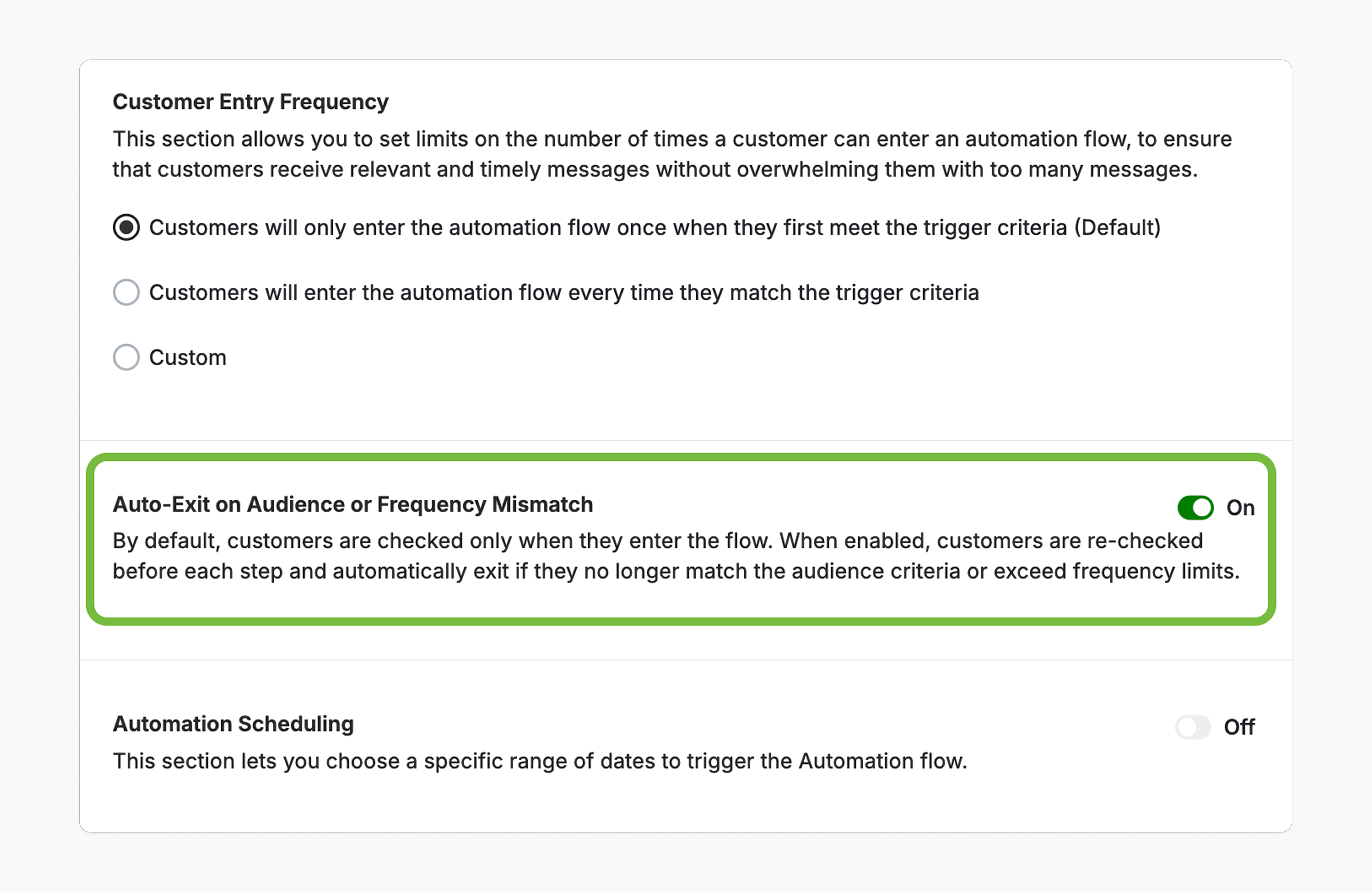
### Continuous Audience & Frequency Re-Evaluation in Automations
Enable continuous re-evaluation before each step in the automation. If a customer becomes ineligible, they're automatically exited from the flow. [Learn more](/product-documentation/automation-campaigns/making-edits-on-active-automation).
## General New Features
### Create Order-Based Customer Segments
Create customer segments based on actual order data — Total Order Value, Number of Orders, Order Date Range, Average Order Value, and Specific Value Ranges. Fully refunded orders are excluded by default. [Learn more](/product-documentation/customer-segmentation/how-to-segment-customers).
### Continuous Audience & Frequency Re-Evaluation in Automations
Enable continuous re-evaluation before each step in the automation. If a customer becomes ineligible, they're automatically exited from the flow. [Learn more](/product-documentation/automation-campaigns/making-edits-on-active-automation).
 ### Streak Campaign Editing Experience
Safely make changes to live Streak campaigns while ensuring consistent customer progress and eligibility. [Learn more](/product-documentation/rewards-campaigns/templates/engagement-gamification/streak-campaign).
### Lead Form for Quiz, The Catcher & Match Card Games
More game campaigns now support guest and anonymous customers via the lead form. [Learn more](/product-documentation/rewards-campaigns/reward-campaign-url).
### Slot Machine & Scratch and Win Customization
Upload custom images for success and no-luck outcomes, add buttons, and customize lead forms for both game types. [Learn more about Slot Machine](/product-documentation/rewards-campaigns/templates/engagement-gamification/slot-machine) | [Scratch and Win](/product-documentation/rewards-campaigns/templates/engagement-gamification/scratch-and-win).
***
## Core & Platform
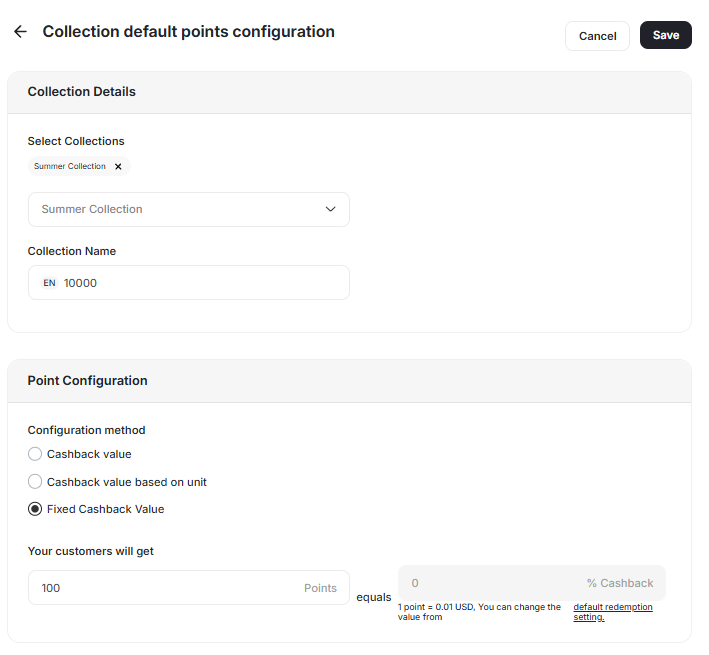
### Fixed Points Cashback Per Collection
Configure cashback rules to issue a fixed number of points per collection, regardless of product price. [Learn more](/product-documentation/programs/loyalty-points-earn/collection-based-earning-rules).
### Streak Campaign Editing Experience
Safely make changes to live Streak campaigns while ensuring consistent customer progress and eligibility. [Learn more](/product-documentation/rewards-campaigns/templates/engagement-gamification/streak-campaign).
### Lead Form for Quiz, The Catcher & Match Card Games
More game campaigns now support guest and anonymous customers via the lead form. [Learn more](/product-documentation/rewards-campaigns/reward-campaign-url).
### Slot Machine & Scratch and Win Customization
Upload custom images for success and no-luck outcomes, add buttons, and customize lead forms for both game types. [Learn more about Slot Machine](/product-documentation/rewards-campaigns/templates/engagement-gamification/slot-machine) | [Scratch and Win](/product-documentation/rewards-campaigns/templates/engagement-gamification/scratch-and-win).
***
## Core & Platform
### Fixed Points Cashback Per Collection
Configure cashback rules to issue a fixed number of points per collection, regardless of product price. [Learn more](/product-documentation/programs/loyalty-points-earn/collection-based-earning-rules).
 ### Customizable Referral Page Image
Upload custom brand visuals for the referral page directly from the dashboard. [Learn more](/product-documentation/customer-widget/start-configuring-profile/customizing-tabs-visibility-and-order-in-gameball-widget-settings).
### Upload Custom Earn and Redeem Icons for the Widget
Upload unique icons that represent your loyalty actions to match your brand personality. [Learn more](/product-documentation/customer-widget/start-configuring-profile/customize-your-gameball-customer-widget-to-match-your-brand).
### Total Customers Count API
Retrieve the total number of customers in your Gameball account through a simple API call.
***
## Other Improvements
* **Enhanced Dynamic Reward Selection with Tooltips** — Tooltips explain why Dynamic Reward is disabled.
* **Updated Third-Party Coupons Display Name** — Reflects the name you provided when adding a coupon group. [Learn more](/product-documentation/admin-settings/third-party-coupons).
* **Filter Customers' Coupons by Customer ID** — New filter in the Customer Coupons section.
* **\[Shopify] Embedded Blocks Now Show Reward Name** — Replaces coupon-value-only display with the full reward name.
## General New Features
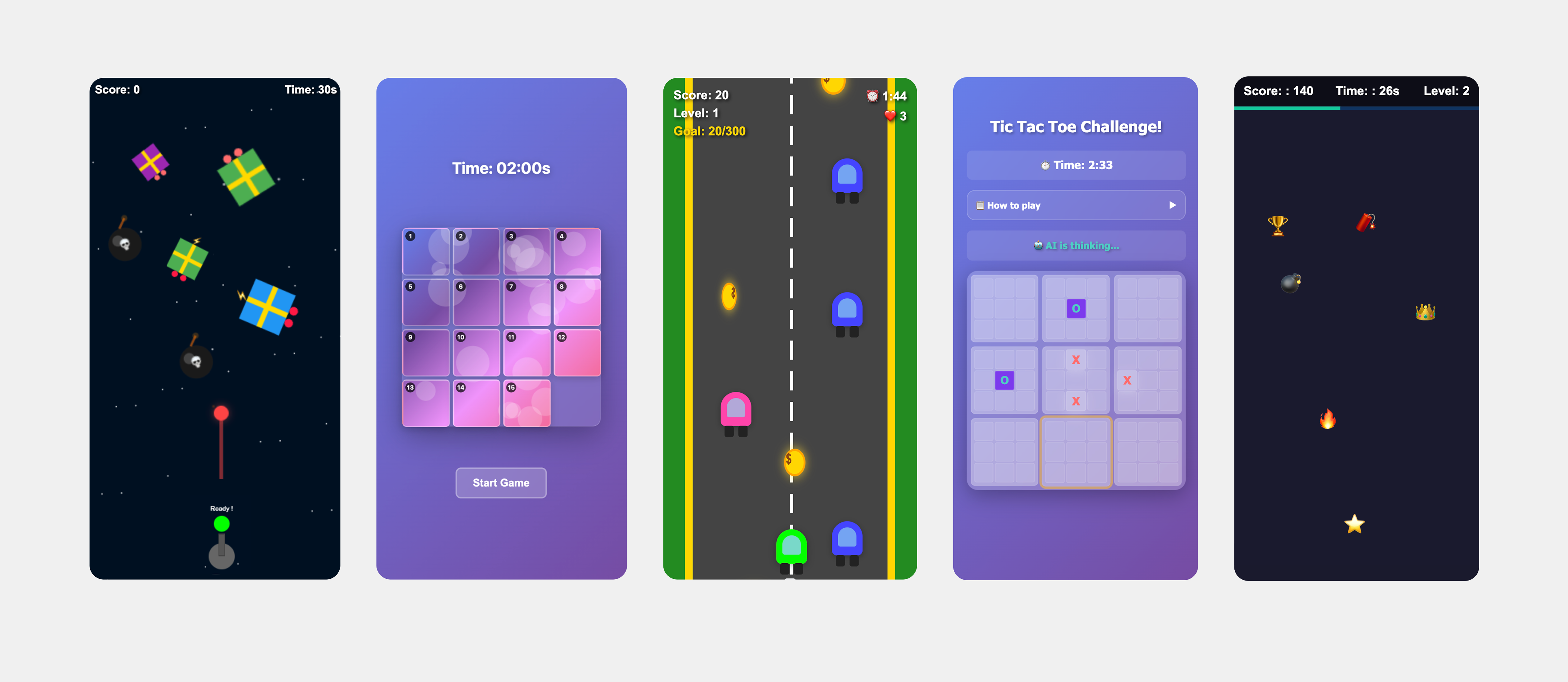
### 5 New Gamified Reward Campaigns
Introducing Space Shooter, Sliding Puzzle, Driving Game, Tic Tac Toe, and Tap the Target — each designed to deliver unique, interactive experiences that increase customer participation. [Try the demo](https://demo-store.gameball.co/).
### Customizable Referral Page Image
Upload custom brand visuals for the referral page directly from the dashboard. [Learn more](/product-documentation/customer-widget/start-configuring-profile/customizing-tabs-visibility-and-order-in-gameball-widget-settings).
### Upload Custom Earn and Redeem Icons for the Widget
Upload unique icons that represent your loyalty actions to match your brand personality. [Learn more](/product-documentation/customer-widget/start-configuring-profile/customize-your-gameball-customer-widget-to-match-your-brand).
### Total Customers Count API
Retrieve the total number of customers in your Gameball account through a simple API call.
***
## Other Improvements
* **Enhanced Dynamic Reward Selection with Tooltips** — Tooltips explain why Dynamic Reward is disabled.
* **Updated Third-Party Coupons Display Name** — Reflects the name you provided when adding a coupon group. [Learn more](/product-documentation/admin-settings/third-party-coupons).
* **Filter Customers' Coupons by Customer ID** — New filter in the Customer Coupons section.
* **\[Shopify] Embedded Blocks Now Show Reward Name** — Replaces coupon-value-only display with the full reward name.
## General New Features
### 5 New Gamified Reward Campaigns
Introducing Space Shooter, Sliding Puzzle, Driving Game, Tic Tac Toe, and Tap the Target — each designed to deliver unique, interactive experiences that increase customer participation. [Try the demo](https://demo-store.gameball.co/).
 ### Reward Campaigns Catalog New Experience
Refreshed Reward Campaigns Catalog with a new look and improved browsing for the growing variety of campaign types.
### Customize Scratch & Win Cover Image
Fully customize the Scratch & Win cover image to match your brand identity. [Learn more](/product-documentation/rewards-campaigns/templates/engagement-gamification/scratch-and-win).
### Lead Form for Scratch & Win
Scratch & Win campaigns now support guest and anonymous customers via campaign URL with lead form. [Learn more](/product-documentation/rewards-campaigns/templates/engagement-gamification/scratch-and-win).
### Lead Form: Terms & Conditions Link Support
Add a Terms & Conditions hyperlink directly in the lead form for compliance and transparency.
***
## Core & Platform
### Saudi Riyal Symbol Support in Arabic Widget
The **﷼** symbol now displays correctly when the widget is set to Arabic and Saudi Riyal is the selected currency.
***
## Other Improvements
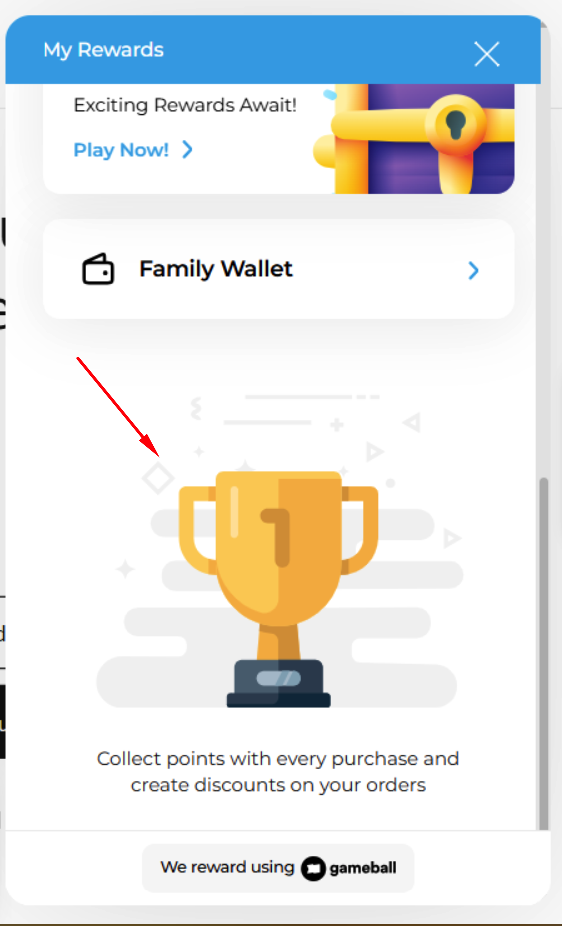
### Option to Hide Trophy Icon in Widget
Hide the trophy icon and default status text when Level and Referral cards are disabled for a cleaner widget design. [Learn more](/product-documentation/customer-widget/start-configuring-profile/customizing-tabs-visibility-and-order-in-gameball-widget-settings).
### Reward Campaigns Catalog New Experience
Refreshed Reward Campaigns Catalog with a new look and improved browsing for the growing variety of campaign types.
### Customize Scratch & Win Cover Image
Fully customize the Scratch & Win cover image to match your brand identity. [Learn more](/product-documentation/rewards-campaigns/templates/engagement-gamification/scratch-and-win).
### Lead Form for Scratch & Win
Scratch & Win campaigns now support guest and anonymous customers via campaign URL with lead form. [Learn more](/product-documentation/rewards-campaigns/templates/engagement-gamification/scratch-and-win).
### Lead Form: Terms & Conditions Link Support
Add a Terms & Conditions hyperlink directly in the lead form for compliance and transparency.
***
## Core & Platform
### Saudi Riyal Symbol Support in Arabic Widget
The **﷼** symbol now displays correctly when the widget is set to Arabic and Saudi Riyal is the selected currency.
***
## Other Improvements
### Option to Hide Trophy Icon in Widget
Hide the trophy icon and default status text when Level and Referral cards are disabled for a cleaner widget design. [Learn more](/product-documentation/customer-widget/start-configuring-profile/customizing-tabs-visibility-and-order-in-gameball-widget-settings).
 ## Key Highlights
### Stamps Campaign
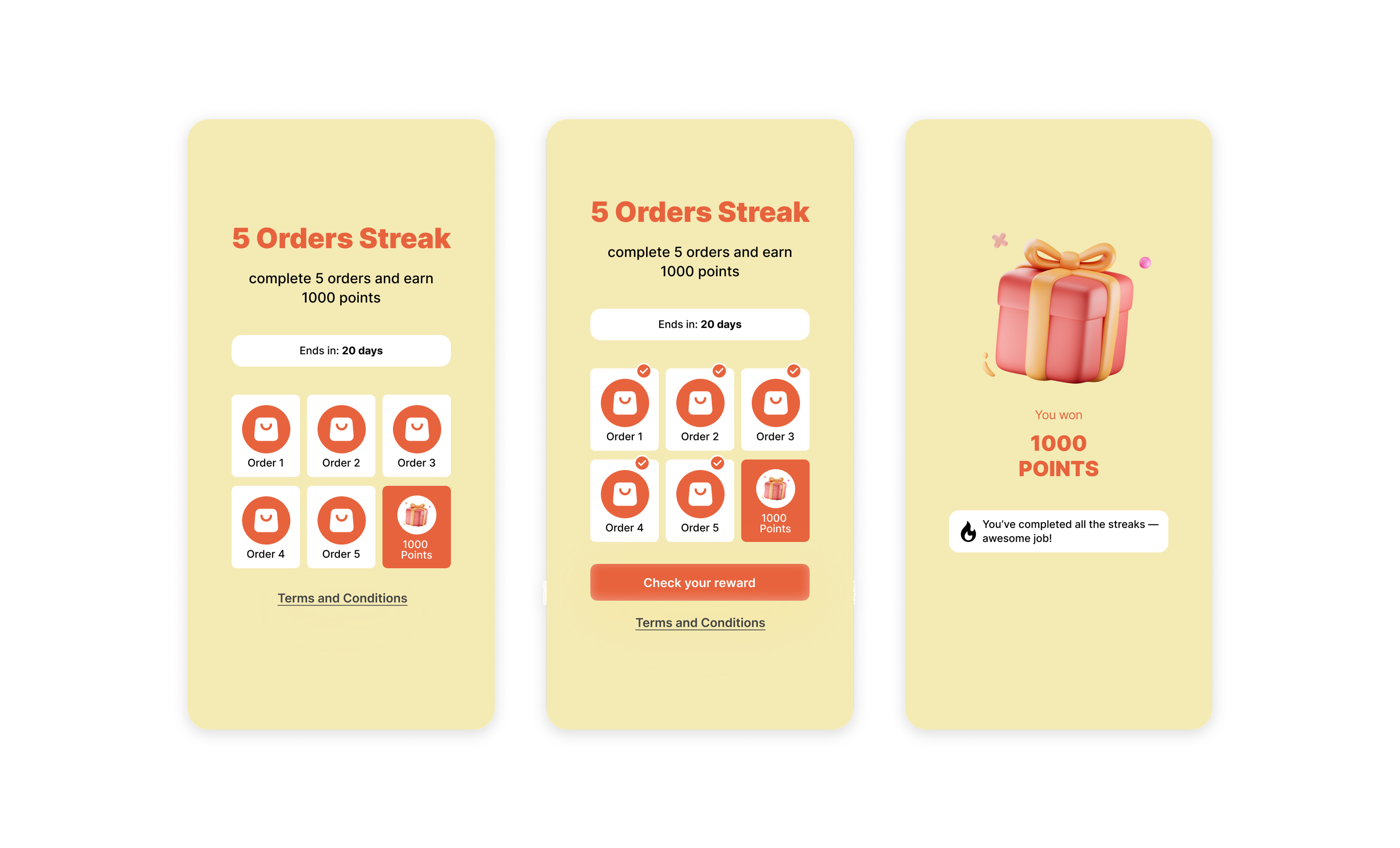
Reward customers for completing a specific action multiple times in a row — drive repeat purchases, promote high-value orders, encourage category exploration, and boost referrals. [Learn more](/product-documentation/rewards-campaigns/templates/engagement-gamification/streak-campaign).
## Key Highlights
### Stamps Campaign
Reward customers for completing a specific action multiple times in a row — drive repeat purchases, promote high-value orders, encourage category exploration, and boost referrals. [Learn more](/product-documentation/rewards-campaigns/templates/engagement-gamification/streak-campaign).
 ### Exclude Taxes from Reward Calculations
A new toggle under Earn Settings lets you base rewards on the order subtotal before taxes. Requires `total_tax` and per-lineitem `taxes` in order APIs. [Learn more](/product-documentation/programs/loyalty-points-redeem/launch-and-configure-your-redeem-pointing-system).
### New API: Retrieve Coupon Lock Details
`GET /integrations/locks/{lockReference}` returns detailed info for locked coupons including associated customer, usage status, expiry, and all locked coupons under the reference.
***
## Other Improvements
* **Dynamic Rewards Now Support Up to 3 Decimal Places** — More accurate point distribution (e.g., 1.015 multiplier). [Learn more](/product-documentation/rewards-campaigns/faqs/understanding-rewards-types).
* **Improved Automation Reactivation Handling** — Customer progress is now preserved when deactivating and reactivating automations.
* **Game Lead Form: Update Only Missing Attributes** — Existing customer data is preserved, only new data is added to profiles.
### The Catcher Game: A New Reward Campaign
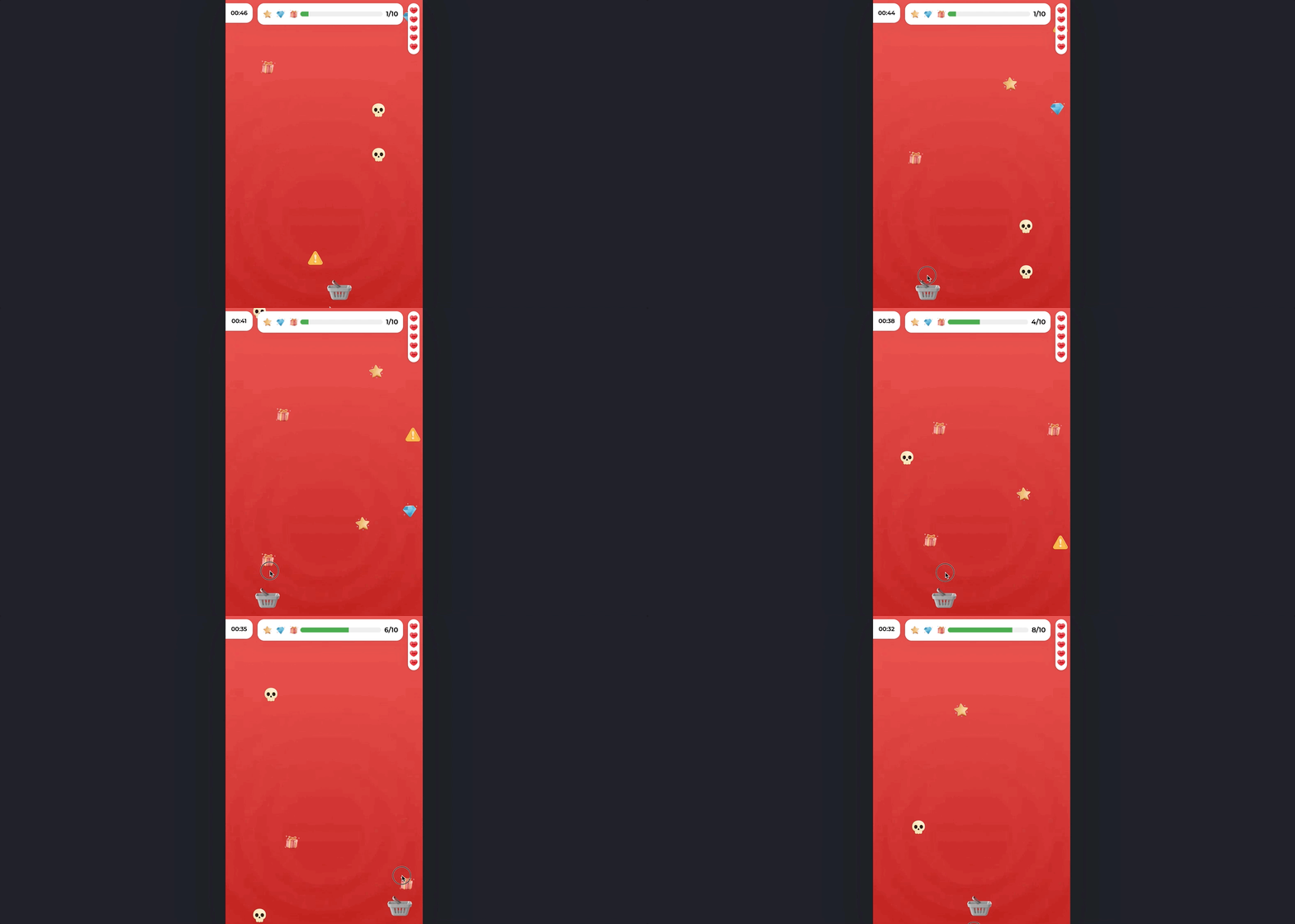
An interactive game where customers collect specific items within a time frame to earn rewards. Avoiding unnecessary items is key — each mistake costs a life. [Try it](https://play.gameball.app/?k=f625e2144ad74d17a34c1b2c795aa8bd\&d=details_catcher_79334\&m=xa).
### Exclude Taxes from Reward Calculations
A new toggle under Earn Settings lets you base rewards on the order subtotal before taxes. Requires `total_tax` and per-lineitem `taxes` in order APIs. [Learn more](/product-documentation/programs/loyalty-points-redeem/launch-and-configure-your-redeem-pointing-system).
### New API: Retrieve Coupon Lock Details
`GET /integrations/locks/{lockReference}` returns detailed info for locked coupons including associated customer, usage status, expiry, and all locked coupons under the reference.
***
## Other Improvements
* **Dynamic Rewards Now Support Up to 3 Decimal Places** — More accurate point distribution (e.g., 1.015 multiplier). [Learn more](/product-documentation/rewards-campaigns/faqs/understanding-rewards-types).
* **Improved Automation Reactivation Handling** — Customer progress is now preserved when deactivating and reactivating automations.
* **Game Lead Form: Update Only Missing Attributes** — Existing customer data is preserved, only new data is added to profiles.
### The Catcher Game: A New Reward Campaign
An interactive game where customers collect specific items within a time frame to earn rewards. Avoiding unnecessary items is key — each mistake costs a life. [Try it](https://play.gameball.app/?k=f625e2144ad74d17a34c1b2c795aa8bd\&d=details_catcher_79334\&m=xa).
 ### SMS Reminder for Expiring Points
Automatically notify customers 15 days before their points expire via SMS, boosting engagement and reducing unused points. [Learn more](/product-documentation/communication-campaigns/create-and-configure-sms-campaigns).
### Sort the Redemption Options Order in the Widget
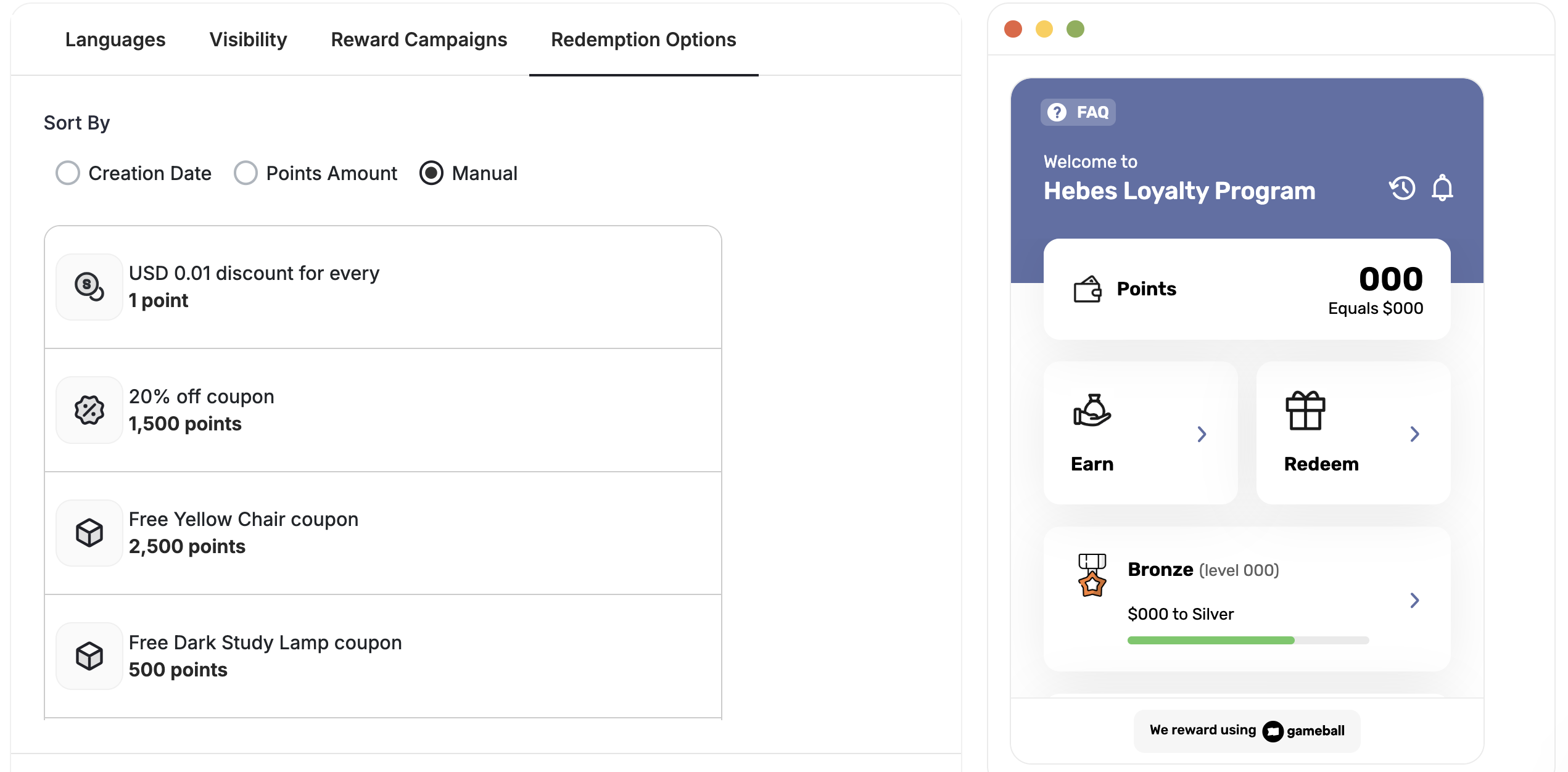
Three sorting modes: Auto by Creation Date, Auto by Points Required, or Manual drag-and-drop — with real-time preview. [Learn more](/product-documentation/customer-widget/start-configuring-profile/customizing-tabs-visibility-and-order-in-gameball-widget-settings).
### SMS Reminder for Expiring Points
Automatically notify customers 15 days before their points expire via SMS, boosting engagement and reducing unused points. [Learn more](/product-documentation/communication-campaigns/create-and-configure-sms-campaigns).
### Sort the Redemption Options Order in the Widget
Three sorting modes: Auto by Creation Date, Auto by Points Required, or Manual drag-and-drop — with real-time preview. [Learn more](/product-documentation/customer-widget/start-configuring-profile/customizing-tabs-visibility-and-order-in-gameball-widget-settings).
 ### Open Widget Directly to a Specific Redemption Option
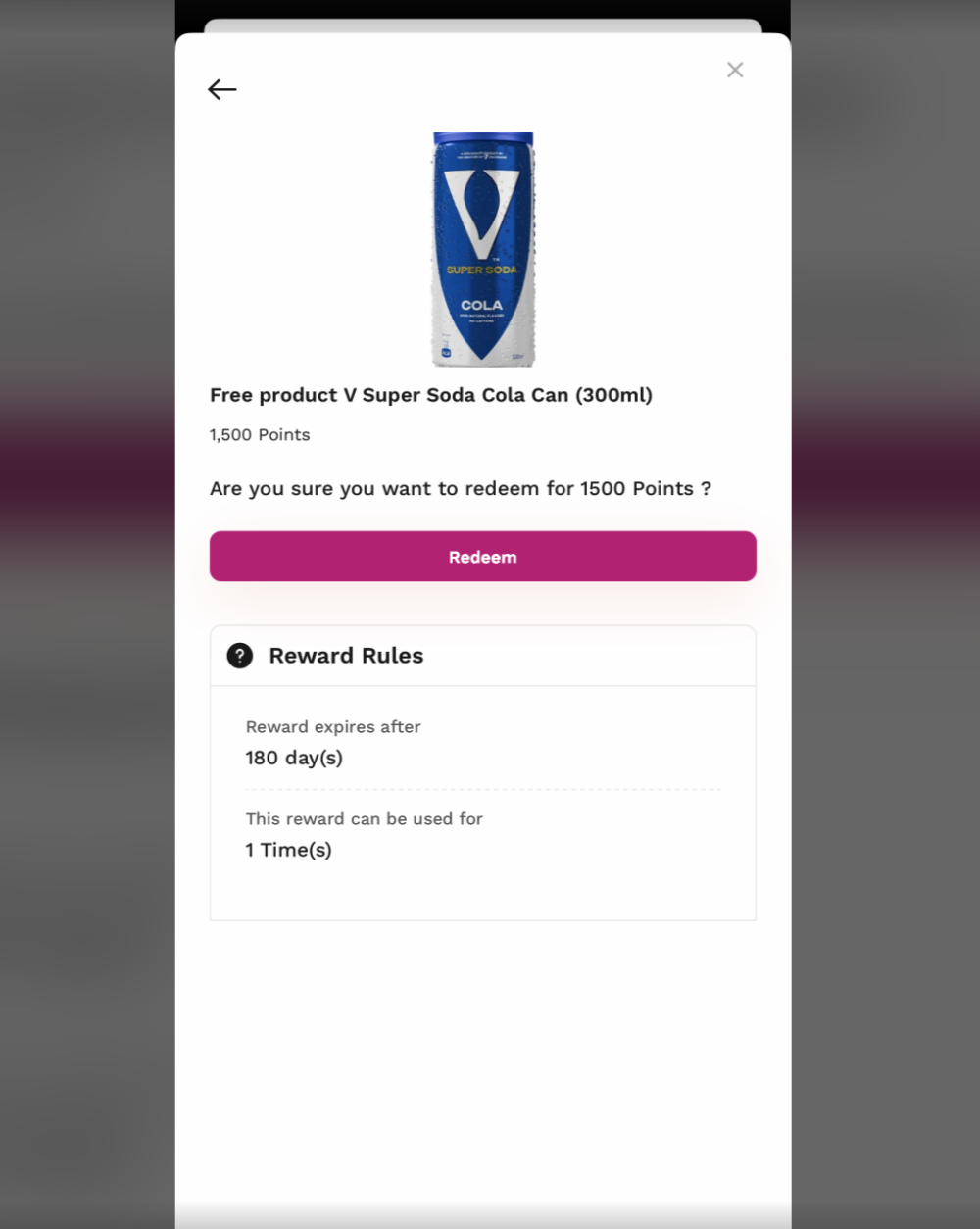
Deep-link to a specific redemption option using the reward ID. Embed links in web banners, emails, mobile CTAs, or QR codes.
### Open Widget Directly to a Specific Redemption Option
Deep-link to a specific redemption option using the reward ID. Embed links in web banners, emails, mobile CTAs, or QR codes.
 ***
## Other Improvements
* **Exclude Specific Customers Across All Campaign Types** — Fine-tune targeting by removing certain customers from any campaign or module.
* **Bulk Untag Customers** — Remove tags from large customer lists via dashboard or CSV upload.
* **External Terms & Conditions Link in FAQ** — Add hyperlinks to your Terms & Conditions in the widget FAQ sections.
* **Actual Order Date/Time in Exported Sheets** — New column showing the original order date/time submitted via the Order API.
### Play & Win: A New Home for Games in the Widget
We've introduced a new **Play & Win** section in the Gameball widget to make games easier to find, easier to understand, and more engaging for customers. Instead of appearing alongside regular earning actions, all game-based campaigns now live in one dedicated place.
***
## Other Improvements
* **Exclude Specific Customers Across All Campaign Types** — Fine-tune targeting by removing certain customers from any campaign or module.
* **Bulk Untag Customers** — Remove tags from large customer lists via dashboard or CSV upload.
* **External Terms & Conditions Link in FAQ** — Add hyperlinks to your Terms & Conditions in the widget FAQ sections.
* **Actual Order Date/Time in Exported Sheets** — New column showing the original order date/time submitted via the Order API.
### Play & Win: A New Home for Games in the Widget
We've introduced a new **Play & Win** section in the Gameball widget to make games easier to find, easier to understand, and more engaging for customers. Instead of appearing alongside regular earning actions, all game-based campaigns now live in one dedicated place.
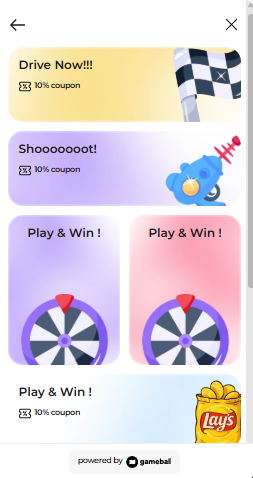 **Play & Win** is a new widget section that displays all active game campaigns in one place. It helps customers quickly discover games and clearly separates games from standard earning actions. The section appears automatically when at least one game is active and disappears when no games are available.
If you already have game campaigns, **nothing changes immediately.** Your existing games will continue to appear under the **Earn** section. When you edit an existing game campaign, you'll be asked to add or update the game's banner through the customization section. Once completed, the game will automatically move from **Earn** to **Play & Win**.
[Learn how to configure the Play & Win section](/product-documentation/customer-widget/start-configuring-profile/customizing-tabs-visibility-and-order-in-gameball-widget-settings).
**Play & Win** is a new widget section that displays all active game campaigns in one place. It helps customers quickly discover games and clearly separates games from standard earning actions. The section appears automatically when at least one game is active and disappears when no games are available.
If you already have game campaigns, **nothing changes immediately.** Your existing games will continue to appear under the **Earn** section. When you edit an existing game campaign, you'll be asked to add or update the game's banner through the customization section. Once completed, the game will automatically move from **Earn** to **Play & Win**.
[Learn how to configure the Play & Win section](/product-documentation/customer-widget/start-configuring-profile/customizing-tabs-visibility-and-order-in-gameball-widget-settings).