> ## Documentation Index
> Fetch the complete documentation index at: https://docs.gameball.co/llms.txt
> Use this file to discover all available pages before exploring further.
# Track Referrals
> Reward your customers for referring new users and help grow your business organically
## Introduction
One of the most effective ways to get new users is through user referrals. You can use Gameball referrals capabilities to encourage your users to invite their friends by offering rewards for successful referrals to both the referrer and the recipient.
Gameball referrals uses **Firebase Dynamic** Links in the background to generate customers' referral links and track referrals. Dynamic Links are smart URLs (deep links) that survive the app install process, so new referred users via referral links will be easily tracked when they open the app for the first time.
Gameball and its SDK provides hassle free integration to track referrals where you will only need to:
1. Provide your firebase info through Gameball dashboard to generate referral links to your customers.
2. Send referral code (if any) with every new account creation through your app.
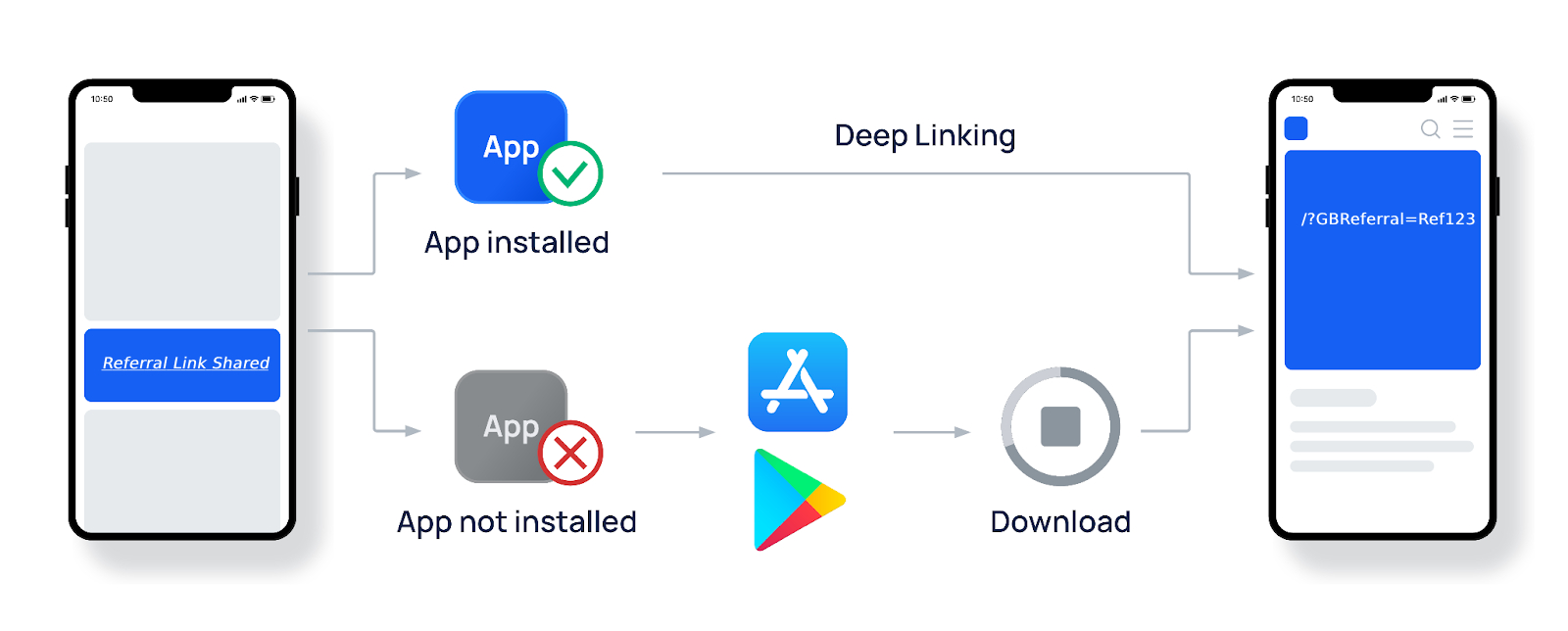 Your customers will be able to get and share their referral link from [Gameball Customer Widget](/installation-guides/v2/react-native/initialize-profile).
Tracking referral requires Firebase and Firebase Dynamic Links SDKs installed into your app.
## Integration Steps
To integrate and track referrals you need to perform two main steps:
1. Configure your Firebase dynamic links settings from your firebase console
2. Configure Firebase on your App and Gameball account dashboard
3. Invoke SDK Referral method within your App user registration flow
## Integration Details
Below is a step by step guide on how to listen to referral registration and notify Gameball to track and reward.
1. First, you'll need to set up Firebase within your mobile app.
2. After setting Firebase deep links within your app and configuring Firebase from Gameball's dashboard, you'll need to listen to deep links query parameters within your app. When a user clicks on a Firebase Dynamic Link that includes the **GBReferral** parameter, the **GBReferral** parameter will be included in the deep link query parameters. This parameter contains the referral information that you'll need to send to **Gameball** to track referrals.
Here's an example of how you can listen to deep links query parameters and locate the **GBReferral** parameter in your mobile app:
```javascript theme={null}
// Listen for incoming Firebase Dynamic Links
Firebase.dynamicLinks().getDynamicLink { (dynamicLink, error) in
guard let dynamicLink = dynamicLink,
let deepLink = dynamicLink.url,
let queryItems = URLComponents(url: deepLink, resolvingAgainstBaseURL: true)?.queryItems else {
return
}
// Locate the GBReferral parameter
if let gbReferral = queryItems.first(where: { $0.name == "GBReferral" })?.value {
// Track the referral in your Gameball account
// ...
import dynamicLinks from '@react-native-firebase/dynamic-links';
dynamicLinks()
.onLink((link) => {
if (link.url) {
const urlParams = new URLSearchParams(link.url.split('?')[1]);
const gbReferral = urlParams.get('GBReferral');
if (gbReferral) {
// Track the referral in your Gameball account
console.log('GBReferral:', gbReferral);
}
}
})
.catch((error) => console.error('Dynamic Link error:', error));
```
You have full flexibility to choose Firebase dependency packages to be used for dynamic link extraction while keeping Gameball SDK focused solely on Gameball
Once you have located the **GBReferral** parameter within a dynamic link, you will need to send its value and send along with the [registerPlayer](/installation-guides/v2/react-native/initialize-profile#register-customer) SDK call that is being executed for the newly created referred customer.
```typescript theme={null}
GameballSDK.registerPlayer({
playerUniqueId: "{CUST_ID}",
deviceToken: "{deviceToken}",
referrerCode: "{referrerCode}",
playerAttributes: {
displayName: "{displayName}",
firstName: "{firstName}",
lastName: "{lastName}",
//other attributes
},
})
```
## Next Steps
* [Push Notifications](/installation-guides/v2/react-native/push-notifications)
* [Go-Live Checklist](/installation-guides/v2/react-native/go-live-checklist)
Your customers will be able to get and share their referral link from [Gameball Customer Widget](/installation-guides/v2/react-native/initialize-profile).
Tracking referral requires Firebase and Firebase Dynamic Links SDKs installed into your app.
## Integration Steps
To integrate and track referrals you need to perform two main steps:
1. Configure your Firebase dynamic links settings from your firebase console
2. Configure Firebase on your App and Gameball account dashboard
3. Invoke SDK Referral method within your App user registration flow
## Integration Details
Below is a step by step guide on how to listen to referral registration and notify Gameball to track and reward.
1. First, you'll need to set up Firebase within your mobile app.
2. After setting Firebase deep links within your app and configuring Firebase from Gameball's dashboard, you'll need to listen to deep links query parameters within your app. When a user clicks on a Firebase Dynamic Link that includes the **GBReferral** parameter, the **GBReferral** parameter will be included in the deep link query parameters. This parameter contains the referral information that you'll need to send to **Gameball** to track referrals.
Here's an example of how you can listen to deep links query parameters and locate the **GBReferral** parameter in your mobile app:
```javascript theme={null}
// Listen for incoming Firebase Dynamic Links
Firebase.dynamicLinks().getDynamicLink { (dynamicLink, error) in
guard let dynamicLink = dynamicLink,
let deepLink = dynamicLink.url,
let queryItems = URLComponents(url: deepLink, resolvingAgainstBaseURL: true)?.queryItems else {
return
}
// Locate the GBReferral parameter
if let gbReferral = queryItems.first(where: { $0.name == "GBReferral" })?.value {
// Track the referral in your Gameball account
// ...
import dynamicLinks from '@react-native-firebase/dynamic-links';
dynamicLinks()
.onLink((link) => {
if (link.url) {
const urlParams = new URLSearchParams(link.url.split('?')[1]);
const gbReferral = urlParams.get('GBReferral');
if (gbReferral) {
// Track the referral in your Gameball account
console.log('GBReferral:', gbReferral);
}
}
})
.catch((error) => console.error('Dynamic Link error:', error));
```
You have full flexibility to choose Firebase dependency packages to be used for dynamic link extraction while keeping Gameball SDK focused solely on Gameball
Once you have located the **GBReferral** parameter within a dynamic link, you will need to send its value and send along with the [registerPlayer](/installation-guides/v2/react-native/initialize-profile#register-customer) SDK call that is being executed for the newly created referred customer.
```typescript theme={null}
GameballSDK.registerPlayer({
playerUniqueId: "{CUST_ID}",
deviceToken: "{deviceToken}",
referrerCode: "{referrerCode}",
playerAttributes: {
displayName: "{displayName}",
firstName: "{firstName}",
lastName: "{lastName}",
//other attributes
},
})
```
## Next Steps
* [Push Notifications](/installation-guides/v2/react-native/push-notifications)
* [Go-Live Checklist](/installation-guides/v2/react-native/go-live-checklist)