> ## Documentation Index
> Fetch the complete documentation index at: https://docs.gameball.co/llms.txt
> Use this file to discover all available pages before exploring further.
# How Do I Configure Gameball Currency Settings?
> Match between your platform currency and Gameball currency.
## Plan Availability
**All Gameball customers**
***
## Configure Gameball Currency Settings
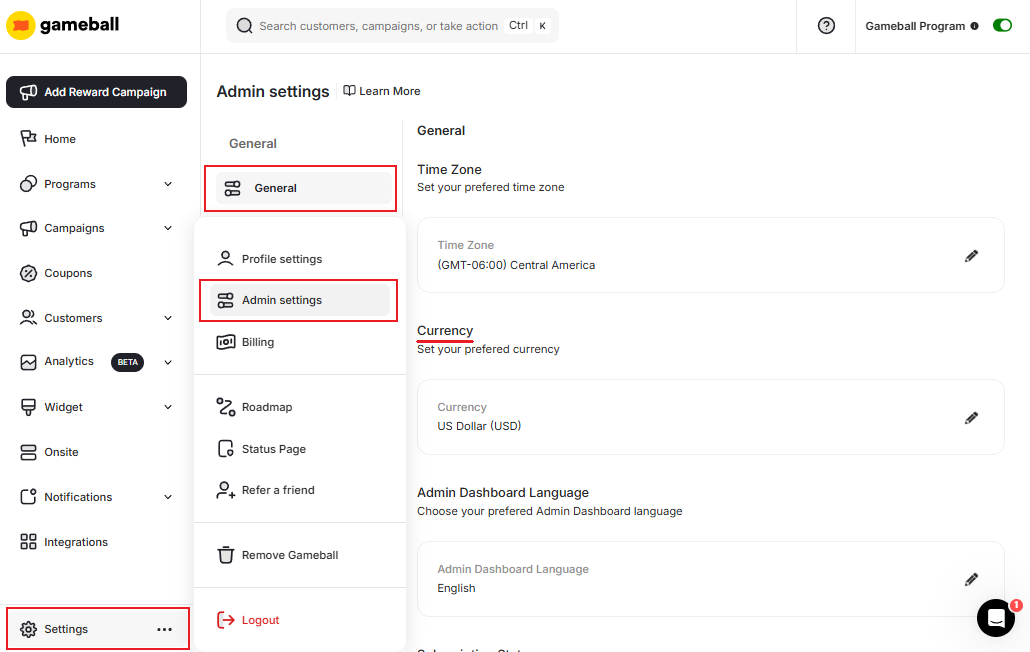
You can access the **Currency** settings section in **Gameball Admin Dashboard** through **Settings > Admin Settings > General > Currency Section**
 Inside the Currency section you will find an option where you can change how the currency appears on Gameball's Widget to be as a symbol.
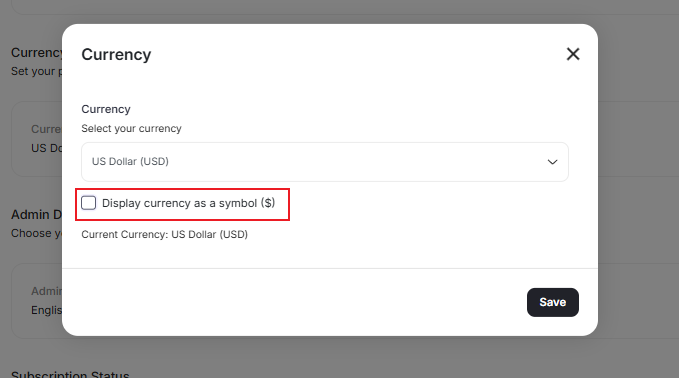 The chosen currency will be applied to all currency fields in the system:
Total Rewarded Points Equivalence shown in your Earn Program.
Total Redeemed Points Equivalence shown in your Redeem Program.
Points value for redemption in the default redemption rule of Earn Configurations.
Points Equivalence displayed inside the Gameball Widget for customers.
***
## Related Articles
Match your platform timezone with Gameball data timestamps.
Configure customer profile attributes for deeper segmentation insights.
Change the language of your Gameball dashboard to your preferred locale.
The chosen currency will be applied to all currency fields in the system:
Total Rewarded Points Equivalence shown in your Earn Program.
Total Redeemed Points Equivalence shown in your Redeem Program.
Points value for redemption in the default redemption rule of Earn Configurations.
Points Equivalence displayed inside the Gameball Widget for customers.
***
## Related Articles
Match your platform timezone with Gameball data timestamps.
Configure customer profile attributes for deeper segmentation insights.
Change the language of your Gameball dashboard to your preferred locale.