> ## Documentation Index
> Fetch the complete documentation index at: https://docs.gameball.co/llms.txt
> Use this file to discover all available pages before exploring further.
# How Do I Configure Gameball Time Zone Settings?
> Match between your platform timezone and Gameball data timezone.
## Plan Availability
**All Gameball customers**
***
## Configure Gameball Time Zone Settings
You can access the **Time zone** settings section in **Gameball Admin Dashboard** through **Settings > Admin Settings > General > Time zone Section**.
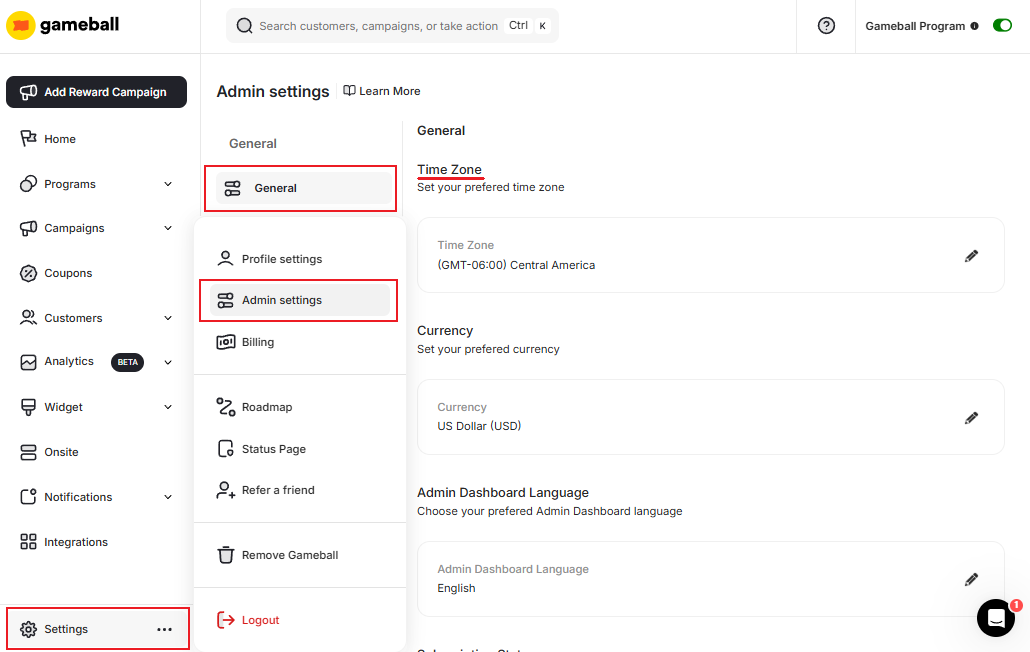 The time zone will be applied to all dates across the system:
All date-based analytics and reporting reflect the configured time zone.
Customer join dates are recorded using the configured time zone.
Achievement timestamps are aligned with your selected time zone.
All points earning and redemption events are timestamped in your time zone.
Setting the correct time zone is essential to ensure your reports and activity logs reflect accurate timestamps.
Gameball automatically adjusts for Daylight Saving Time (DST). When a country changes its clocks, timezone offsets update accordingly — campaign schedules, expiry times, and event timestamps remain accurate for merchants in DST-observing regions.
***
## Related Articles
Match your platform currency with the Gameball currency display.
Configure customer profile attributes for deeper segmentation insights.
Change the language of your Gameball dashboard to your preferred locale.
The time zone will be applied to all dates across the system:
All date-based analytics and reporting reflect the configured time zone.
Customer join dates are recorded using the configured time zone.
Achievement timestamps are aligned with your selected time zone.
All points earning and redemption events are timestamped in your time zone.
Setting the correct time zone is essential to ensure your reports and activity logs reflect accurate timestamps.
Gameball automatically adjusts for Daylight Saving Time (DST). When a country changes its clocks, timezone offsets update accordingly — campaign schedules, expiry times, and event timestamps remain accurate for merchants in DST-observing regions.
***
## Related Articles
Match your platform currency with the Gameball currency display.
Configure customer profile attributes for deeper segmentation insights.
Change the language of your Gameball dashboard to your preferred locale.