> ## Documentation Index
> Fetch the complete documentation index at: https://docs.gameball.co/llms.txt
> Use this file to discover all available pages before exploring further.
# How Do I Get My Account Integration Details: API Key and Secret Key?
> To start the integration process, this is where you can get your integration keys or activate your high security mode on Gameball dashboard.
## Plan Availability
| Feature | Available |
| -------------------- | --------- |
| API Key & Secret Key | Guru |
If you are on the Pro plan, API access is available as a paid add-on. Contact Gameball support to request a payment link.
| Feature | Available |
| -------------------- | --------- |
| API Key & Secret Key | All plans |
To start your account integration with your platform, you will need to access your Gameball API keys, Secret Key, as well as enable some security measures if needed, such as your High Security Mode, or apply key rotation. The following will show you where to find those keys and how to apply strong security measures.
***
## Accessing Account Integration Settings
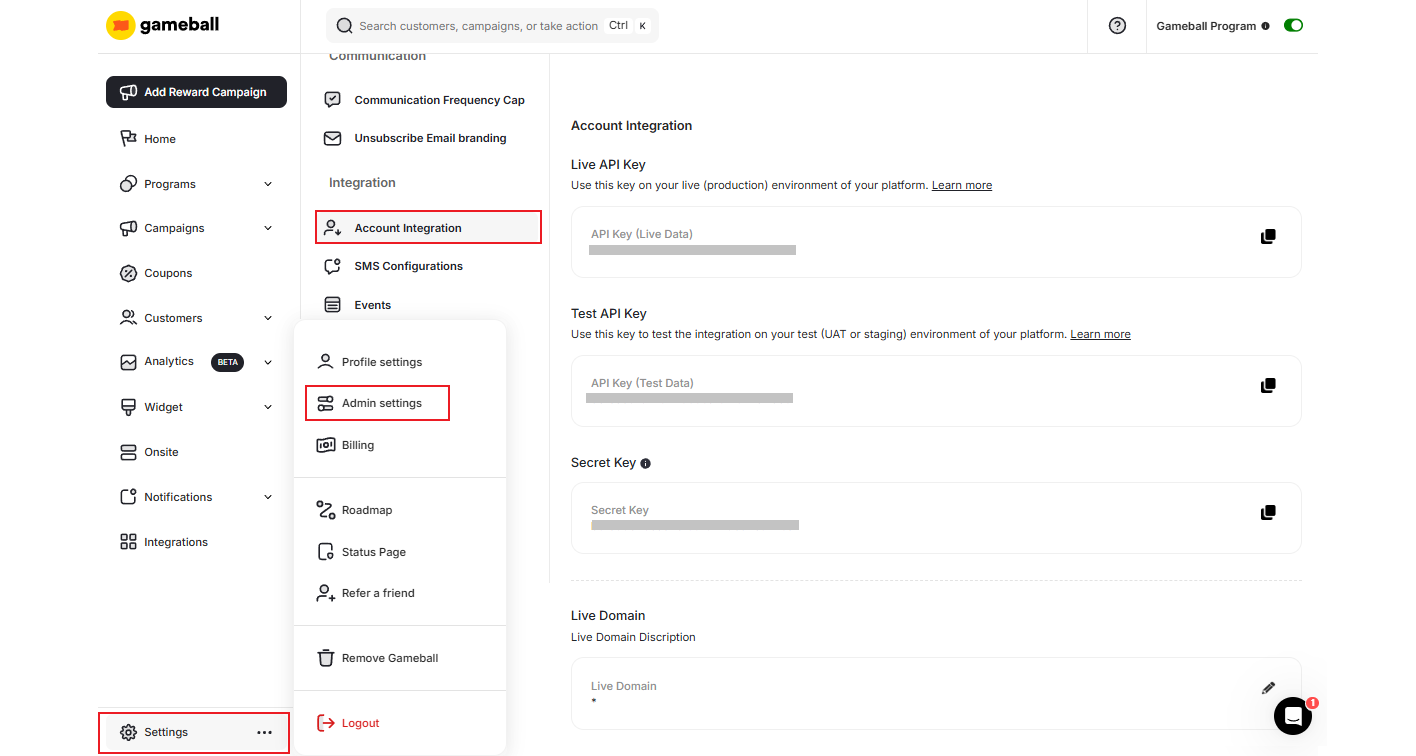
You can access your **Account Integration** settings section in **Gameball Admin Dashboard** through **Settings > Admin Settings > Account Integration**.
 ***
## Integration Keys
This is your account key, which will be used in the integration between your platform and Gameball.
You will have a **Test API Key** and a **Live API Key**. Use the test one during your integration and the live one after going live. [Read more about Test/Live Data API Keys](/product-documentation/integrate-gameball/other-integration-notes/test-and-live-data)
This is your account key, which will be used for test environments.
This is your account points transactions key. It will be used with all points transactions APIs.
When enabled, this mode ensures that all API requests are verified and secure, preventing unauthorized access and data exposure. This feature is disabled by default and can be easily activated in the Integration settings within the Admin panel. Once enabled, any integration that previously required only an API key will now also require a Secret Key, ensuring that even if the API key is exposed, it cannot be misused.
***
## Integration Keys
This is your account key, which will be used in the integration between your platform and Gameball.
You will have a **Test API Key** and a **Live API Key**. Use the test one during your integration and the live one after going live. [Read more about Test/Live Data API Keys](/product-documentation/integrate-gameball/other-integration-notes/test-and-live-data)
This is your account key, which will be used for test environments.
This is your account points transactions key. It will be used with all points transactions APIs.
When enabled, this mode ensures that all API requests are verified and secure, preventing unauthorized access and data exposure. This feature is disabled by default and can be easily activated in the Integration settings within the Admin panel. Once enabled, any integration that previously required only an API key will now also require a Secret Key, ensuring that even if the API key is exposed, it cannot be misused.
 You can now **secure your accounts by rotating keys** without affecting your existing platform connections, helping them comply with security best practices (e.g., periodic credential rotation) and mitigate potential key exposure risks.
 Key features of rotation:
| Feature | Details |
| ------------------------------------- | ------------------------------------------------------------------------------------------------------ |
| Individual Key Rotation | API keys and Secret Key can each be rotated separately with dedicated actions |
| Immediate Replacement | Upon rotation, a new key is generated instantly and the old key is immediately disabled |
| Automated Updates for Shopify & Salla | Rotated keys are automatically updated in connected Shopify and Salla stores — no manual update needed |
| Access Control | Only Admins, Workspace Owners, and Workspace Admins can rotate keys; configurable with custom roles |
***
## Related Articles
Understand the difference between test and live API keys and when to use each.
A complete guide to integrating Gameball with your web application.
A complete guide to integrating Gameball with your mobile application.
Learn how to publish the Gameball experience and widget on your store.
Key features of rotation:
| Feature | Details |
| ------------------------------------- | ------------------------------------------------------------------------------------------------------ |
| Individual Key Rotation | API keys and Secret Key can each be rotated separately with dedicated actions |
| Immediate Replacement | Upon rotation, a new key is generated instantly and the old key is immediately disabled |
| Automated Updates for Shopify & Salla | Rotated keys are automatically updated in connected Shopify and Salla stores — no manual update needed |
| Access Control | Only Admins, Workspace Owners, and Workspace Admins can rotate keys; configurable with custom roles |
***
## Related Articles
Understand the difference between test and live API keys and when to use each.
A complete guide to integrating Gameball with your web application.
A complete guide to integrating Gameball with your mobile application.
Learn how to publish the Gameball experience and widget on your store.