> ## Documentation Index
> Fetch the complete documentation index at: https://docs.gameball.co/llms.txt
> Use this file to discover all available pages before exploring further.
# How Do I Integrate Attentive with Gameball?
> Integrate Gameball with Attentive to Enhance Your SMS Marketing Campaigns.
Gameball and Attentive integration allows you to leverage customer engagement data from Gameball to power your SMS marketing campaigns in Attentive. Follow this guide to seamlessly connect the two platforms and maximize the impact of your loyalty and marketing efforts.
***
## Prerequisites
Before starting the integration, ensure the following:
* You have an active **Gameball** account.
* You have an active **Attentive** account.
* Access to admin permissions in both platforms.
***
## How to Configure Attentive on Gameball
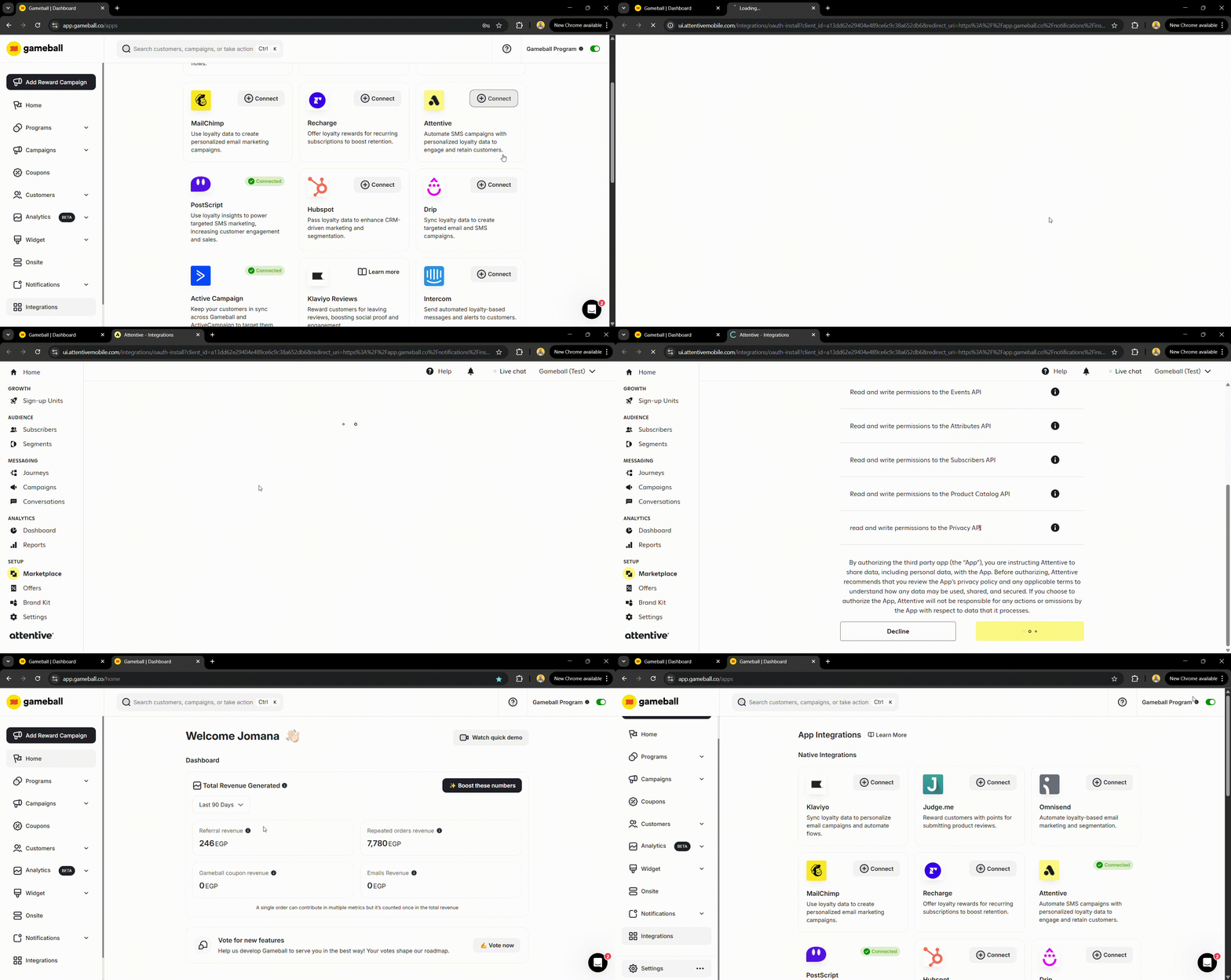
1. Log in to your **Gameball Dashboard**.
2. Navigate to the **Integrations** section from the left menu.
3. Select **Attentive** and click **Connect**, then **Next**.
4. You will be redirected to the **Attentive dashboard**. Scroll down and click **Authorize**.
5. Go back to the integration section on the dashboard to ensure that the Attentive app is now connected to your Gameball account.
 The following customer attributes are synced to Attentive:
| Attribute | Description |
| -------------------------- | ----------------------------- |
| Customer ID | Unique customer identifier |
| Date of Birth | Customer's birthday |
| Join Date | When the customer joined |
| Tier Name | Current loyalty tier |
| Wallet Points | Available points balance |
| Pending Points | Points awaiting confirmation |
| Tier Progress | Progress toward next tier |
| Tier ID | Current tier identifier |
| Completed Reward Campaigns | Number of completed campaigns |
| Referral Code | Customer's referral code |
| Referral Link | Customer's referral link |
| Tags and Segments | Assigned tags and segments |
Save your settings once configured.
Before launching your campaigns, test the integration to ensure it works as expected:
1. Perform a test action in Gameball (e.g., award points to a test user).
2. Check if the event appears in Attentive under the corresponding profile.
3. Send a test SMS using the synced data in Attentive.
***
## Create SMS Campaigns in Attentive
Now that the integration is live, use Gameball data to personalize your Attentive campaigns:
1. Navigate to **Campaigns** in Attentive.
2. Create a new campaign and select your target audience based on Gameball data (e.g., customers who achieved a certain tier or redeemed rewards).
3. Use dynamic variables (e.g., `{total_points}`, `{current_level}`) to personalize your messages.
4. Launch your campaign.
***
## Troubleshooting
If you encounter issues:
1. Verify that the API key and webhook URL are correctly configured.
2. Check the integration logs in Gameball for error messages.
3. Contact Gameball support or Attentive support for further assistance.
***
## Frequently Asked Questions
We've built a retry mechanism for quick data synchronization. However, if you encounter delays, check your integration settings or contact support.
Yes, only Gameball-related loyalty data is passed to Attentive, ensuring data safety and compliance with privacy regulations.
***
Integrate Gameball with MoEngage for engagement campaigns.
Automate loyalty workflows with Shopify Flow.
The following customer attributes are synced to Attentive:
| Attribute | Description |
| -------------------------- | ----------------------------- |
| Customer ID | Unique customer identifier |
| Date of Birth | Customer's birthday |
| Join Date | When the customer joined |
| Tier Name | Current loyalty tier |
| Wallet Points | Available points balance |
| Pending Points | Points awaiting confirmation |
| Tier Progress | Progress toward next tier |
| Tier ID | Current tier identifier |
| Completed Reward Campaigns | Number of completed campaigns |
| Referral Code | Customer's referral code |
| Referral Link | Customer's referral link |
| Tags and Segments | Assigned tags and segments |
Save your settings once configured.
Before launching your campaigns, test the integration to ensure it works as expected:
1. Perform a test action in Gameball (e.g., award points to a test user).
2. Check if the event appears in Attentive under the corresponding profile.
3. Send a test SMS using the synced data in Attentive.
***
## Create SMS Campaigns in Attentive
Now that the integration is live, use Gameball data to personalize your Attentive campaigns:
1. Navigate to **Campaigns** in Attentive.
2. Create a new campaign and select your target audience based on Gameball data (e.g., customers who achieved a certain tier or redeemed rewards).
3. Use dynamic variables (e.g., `{total_points}`, `{current_level}`) to personalize your messages.
4. Launch your campaign.
***
## Troubleshooting
If you encounter issues:
1. Verify that the API key and webhook URL are correctly configured.
2. Check the integration logs in Gameball for error messages.
3. Contact Gameball support or Attentive support for further assistance.
***
## Frequently Asked Questions
We've built a retry mechanism for quick data synchronization. However, if you encounter delays, check your integration settings or contact support.
Yes, only Gameball-related loyalty data is passed to Attentive, ensuring data safety and compliance with privacy regulations.
***
Integrate Gameball with MoEngage for engagement campaigns.
Automate loyalty workflows with Shopify Flow.