> ## Documentation Index
> Fetch the complete documentation index at: https://docs.gameball.co/llms.txt
> Use this file to discover all available pages before exploring further.
# What Are Attributes Across Automation Nodes?
> Find all the events and attributes you will find while creating an automation.
You can use attributes to set your own rules for each trigger, action, or control. Here is how attributes work in automations.
By clicking the **Plus Icon** inside any trigger or actions, a small pop-up will appear giving you a list of attributes under 3 different tabs:
Dynamic attributes passed by previously chosen Event, Condition, or API (such as Order ID, Points Earned, or Friend Name). Variables depend on attributes used in the previous trigger or action.
All customer-related variables such as name, ID, number, referral link, etc.
Variables related to your general configurations, like chosen currency, points name, score name, etc.
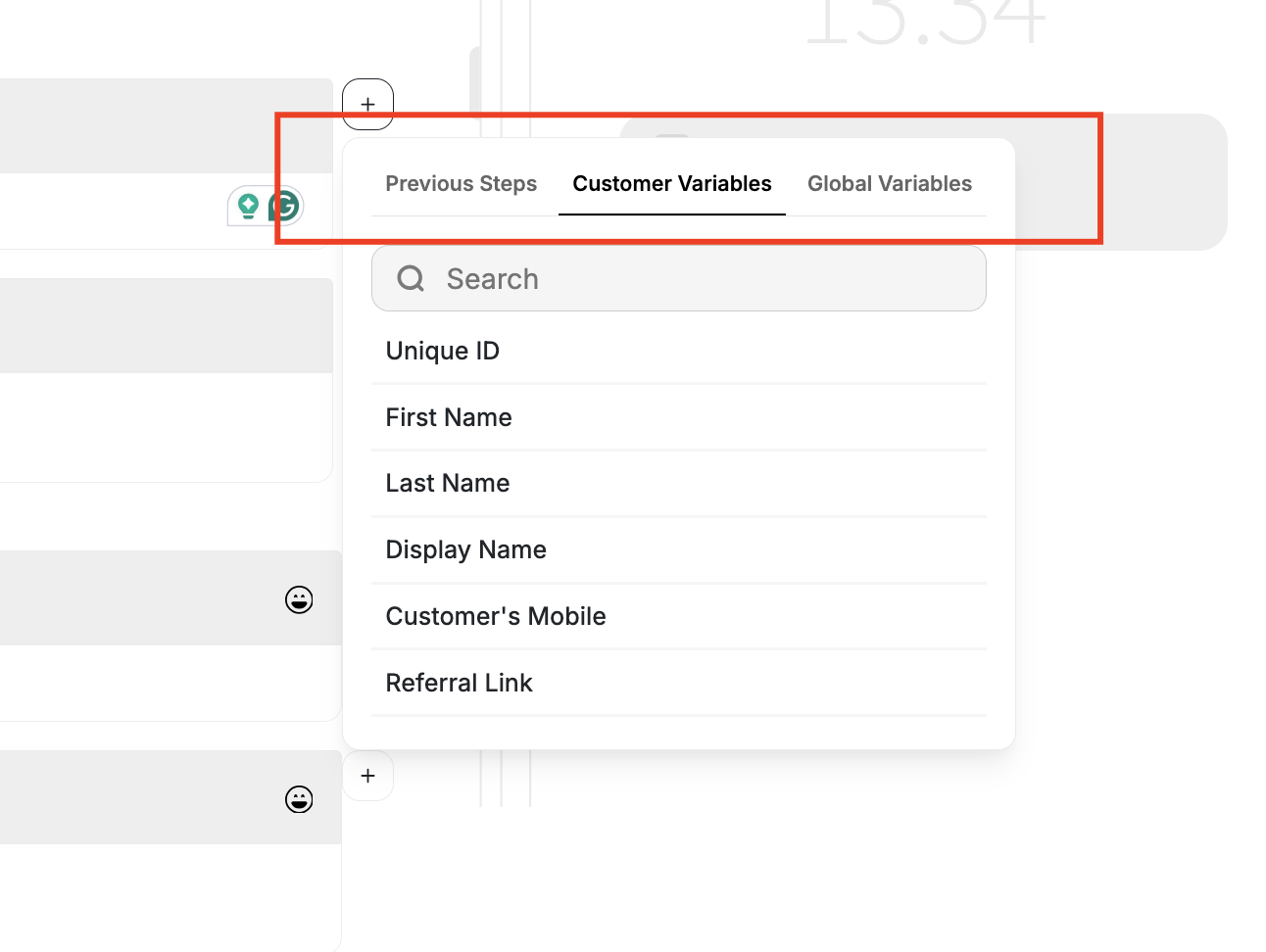 Here is a list of attributes you will find while creating your automation:
Dynamic attributes passed from the preceding node. Available variables depend on what was used in the prior trigger or action — see the [event-specific tables below](#subsequent-variables-by-event-type).
| Variable |
| -------------------------- |
| Unique ID |
| First Name |
| Last Name |
| Display Name |
| Customer's Mobile |
| Referral Link |
| Mobile Referral Link |
| Points |
| Tier Up Total Progress |
| **Remaining to Next Tier** |
| Score Name |
| Coupon Code |
| Coupon Value |
| Reward Campaign Reward |
| Tier Entry Reward |
| Tier Lifetime Reward |
| location |
| membershipLevel |
| graduationDate |
| isMarried |
| occupation |
| company |
| hobbies |
| Variable |
| -------------------------------- |
| Equivalent Value of Total Points |
| Currency |
| Points Name |
| Referral Link |
| Mobile Referral Link |
***
## Carry Over Attributes Across Automation Nodes
Dynamic attributes are passed from one node to another, such as Order ID, Points Earned, or Friend Name, from one node to another inside your automations. This enables richer personalization, smarter branching, and more context-aware automation actions.
### Why This Matters
Previously, attributes generated in one node (e.g., an event or Add Points) couldn't be reused later in the same automation. That meant messages and actions couldn't dynamically reflect the context of the customer's previous interactions.
Now, attributes flow seamlessly across nodes, allowing for **smarter, fully contextual automation journeys**.
***
## How It Works
Attributes created or received in one node (Event, Condition, or API) are automatically available to all subsequent nodes in the same automation branch. Attributes remain accessible for personalization in later actions.
Action nodes (e.g., Send Email, Send SMS, Assign Points) can now reference these carried-over attributes. The variable picker in the dashboard displays available attributes grouped by source node.
If an earlier node is edited or removed, any dependent attributes trigger a warning: "This attribute is no longer available." Missing attributes are safely replaced with placeholders to prevent automation errors.
***
## Subsequent Variables by Event Type
Here are some examples of what you will find as a subsequent of a chosen first attribute:
### Place Order
| Event/attribute chosen in the first Node | Subsequent variables in the next nodes under "Previous Steps" |
| ---------------------------------------- | ------------------------------------------------------------------------------------------------------------------------------------------------------------------------------------------------------------------------------------------------------------------------------------------------------------------------ |
| `place_order` | `channel_type`, `paymentMethod`, `subClass`, `discount_codes`, `campaign`, `title`, `branch_name`, `merchant_name`, `cart_id`, `unique_items`, `total_items`, `source`, `product_sku`, `product_id`, `Weight`, `product_vendor`, `Tag`, `product_category`, `order_id`, `total_price`, `total_discount`, `collection_id` |
### View Product Page
| Event/attribute chosen in the first Node | Subsequent variables in the next nodes under "Previous Steps" |
| ---------------------------------------- | ---------------------------------------------------------------------------------------------------------------- |
| `view_product_page` | `product_category`, `product_vendor`, `product_title`, `product_id`, `customer_id`, `shop_name`, `collection_id` |
### Friend Referred
| Event/attribute chosen in the first Node | Subsequent variables in the next nodes under "Previous Steps" |
| ---------------------------------------- | ------------------------------------------------------------------------------------------------------------------------------- |
| Friend Referred | `discount_codes`, `total_discount`, `merchant_name`, `merchant_id`, `total_price`, `referred_friend_name`, `referred_friend_id` |
### Add to Cart
| Event/attribute chosen in the first Node | Subsequent variables in the next nodes under "Previous Steps" |
| ---------------------------------------- | ------------------------------------------------------------------------------------------------------------------ |
| `add_to_cart` | `cart_id`, `collection_id`, `product_id`, `unique_items`, `vendor`, `total_items`, `total_discount`, `total_price` |
### Order Refunded
| Event/attribute chosen in the first Node | Subsequent variables in the next nodes under "Previous Steps" |
| ---------------------------------------- | ------------------------------------------------------------- |
| `order_refunded` | `order_id`, `refunded_points`, `refunded_amount`, `refund_id` |
### Points Redeemed
| Event/attribute chosen in the first Node | Subsequent variables in the next nodes under "Previous Steps" |
| ---------------------------------------- | ---------------------------------------------------------------- |
| Points Redeemed | `reference_transaction_id`, `redeemed_amount`, `redeemed_points` |
### Tier Changes
| Event/attribute chosen in the first Node | Subsequent variables in the next nodes under "Previous Steps" |
| ---------------------------------------- | -------------------------------------------------------------------------------- |
| Tier Changes | Tier Lifetime Reward, Tier Entry Reward, Previous Tier, Next Tier, Achieved Tier |
### Reward Campaign Achieved
| Event/attribute chosen in the first Node | Subsequent variables in the next nodes under "Previous Steps" |
| ---------------------------------------- | ---------------------------------------------------------------------------------------------- |
| Reward Campaign Achieved | How to redeem Instructions, Coupon Code, Campaign Reward Value, Campaign Reward, Campaign Name |
### Expiring Points
| Event/attribute chosen in the first Node | Subsequent variables in the next nodes under "Previous Steps" |
| ---------------------------------------- | --------------------------------------------------------------------------- |
| Expiring Points | Next Expiring Points Date, Next Expiring Points Value, Next Expiring Points |
Here is a list of attributes you will find while creating your automation:
Dynamic attributes passed from the preceding node. Available variables depend on what was used in the prior trigger or action — see the [event-specific tables below](#subsequent-variables-by-event-type).
| Variable |
| -------------------------- |
| Unique ID |
| First Name |
| Last Name |
| Display Name |
| Customer's Mobile |
| Referral Link |
| Mobile Referral Link |
| Points |
| Tier Up Total Progress |
| **Remaining to Next Tier** |
| Score Name |
| Coupon Code |
| Coupon Value |
| Reward Campaign Reward |
| Tier Entry Reward |
| Tier Lifetime Reward |
| location |
| membershipLevel |
| graduationDate |
| isMarried |
| occupation |
| company |
| hobbies |
| Variable |
| -------------------------------- |
| Equivalent Value of Total Points |
| Currency |
| Points Name |
| Referral Link |
| Mobile Referral Link |
***
## Carry Over Attributes Across Automation Nodes
Dynamic attributes are passed from one node to another, such as Order ID, Points Earned, or Friend Name, from one node to another inside your automations. This enables richer personalization, smarter branching, and more context-aware automation actions.
### Why This Matters
Previously, attributes generated in one node (e.g., an event or Add Points) couldn't be reused later in the same automation. That meant messages and actions couldn't dynamically reflect the context of the customer's previous interactions.
Now, attributes flow seamlessly across nodes, allowing for **smarter, fully contextual automation journeys**.
***
## How It Works
Attributes created or received in one node (Event, Condition, or API) are automatically available to all subsequent nodes in the same automation branch. Attributes remain accessible for personalization in later actions.
Action nodes (e.g., Send Email, Send SMS, Assign Points) can now reference these carried-over attributes. The variable picker in the dashboard displays available attributes grouped by source node.
If an earlier node is edited or removed, any dependent attributes trigger a warning: "This attribute is no longer available." Missing attributes are safely replaced with placeholders to prevent automation errors.
***
## Subsequent Variables by Event Type
Here are some examples of what you will find as a subsequent of a chosen first attribute:
### Place Order
| Event/attribute chosen in the first Node | Subsequent variables in the next nodes under "Previous Steps" |
| ---------------------------------------- | ------------------------------------------------------------------------------------------------------------------------------------------------------------------------------------------------------------------------------------------------------------------------------------------------------------------------ |
| `place_order` | `channel_type`, `paymentMethod`, `subClass`, `discount_codes`, `campaign`, `title`, `branch_name`, `merchant_name`, `cart_id`, `unique_items`, `total_items`, `source`, `product_sku`, `product_id`, `Weight`, `product_vendor`, `Tag`, `product_category`, `order_id`, `total_price`, `total_discount`, `collection_id` |
### View Product Page
| Event/attribute chosen in the first Node | Subsequent variables in the next nodes under "Previous Steps" |
| ---------------------------------------- | ---------------------------------------------------------------------------------------------------------------- |
| `view_product_page` | `product_category`, `product_vendor`, `product_title`, `product_id`, `customer_id`, `shop_name`, `collection_id` |
### Friend Referred
| Event/attribute chosen in the first Node | Subsequent variables in the next nodes under "Previous Steps" |
| ---------------------------------------- | ------------------------------------------------------------------------------------------------------------------------------- |
| Friend Referred | `discount_codes`, `total_discount`, `merchant_name`, `merchant_id`, `total_price`, `referred_friend_name`, `referred_friend_id` |
### Add to Cart
| Event/attribute chosen in the first Node | Subsequent variables in the next nodes under "Previous Steps" |
| ---------------------------------------- | ------------------------------------------------------------------------------------------------------------------ |
| `add_to_cart` | `cart_id`, `collection_id`, `product_id`, `unique_items`, `vendor`, `total_items`, `total_discount`, `total_price` |
### Order Refunded
| Event/attribute chosen in the first Node | Subsequent variables in the next nodes under "Previous Steps" |
| ---------------------------------------- | ------------------------------------------------------------- |
| `order_refunded` | `order_id`, `refunded_points`, `refunded_amount`, `refund_id` |
### Points Redeemed
| Event/attribute chosen in the first Node | Subsequent variables in the next nodes under "Previous Steps" |
| ---------------------------------------- | ---------------------------------------------------------------- |
| Points Redeemed | `reference_transaction_id`, `redeemed_amount`, `redeemed_points` |
### Tier Changes
| Event/attribute chosen in the first Node | Subsequent variables in the next nodes under "Previous Steps" |
| ---------------------------------------- | -------------------------------------------------------------------------------- |
| Tier Changes | Tier Lifetime Reward, Tier Entry Reward, Previous Tier, Next Tier, Achieved Tier |
### Reward Campaign Achieved
| Event/attribute chosen in the first Node | Subsequent variables in the next nodes under "Previous Steps" |
| ---------------------------------------- | ---------------------------------------------------------------------------------------------- |
| Reward Campaign Achieved | How to redeem Instructions, Coupon Code, Campaign Reward Value, Campaign Reward, Campaign Name |
### Expiring Points
| Event/attribute chosen in the first Node | Subsequent variables in the next nodes under "Previous Steps" |
| ---------------------------------------- | --------------------------------------------------------------------------- |
| Expiring Points | Next Expiring Points Date, Next Expiring Points Value, Next Expiring Points |