> ## Documentation Index
> Fetch the complete documentation index at: https://docs.gameball.co/llms.txt
> Use this file to discover all available pages before exploring further.
# How Do I Acquire New Customers?
> Attract new customers with Gameball's Automation Templates
This article covers the **Acquire New Customers** automation templates, designed to drive first purchases and encourage loyal customers to spread the word.
***
## Welcome Series Template
### Goal
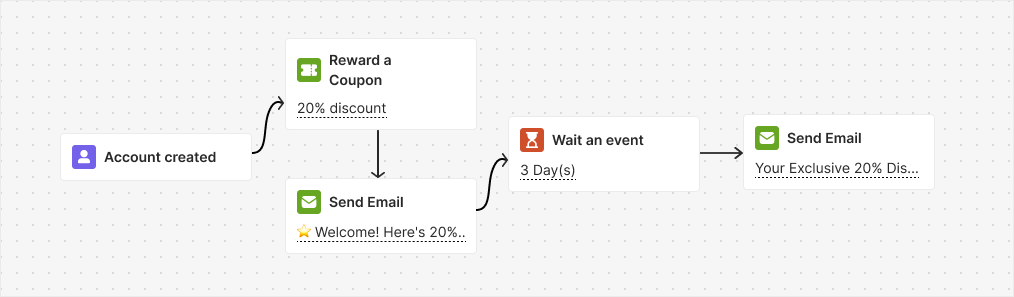
Encourage new customers to complete their first purchase by giving them a surprise gift — a 20% discount — when they create an account.
### Flow
They receive an email about the discount right away, and if they do not make a purchase within 3 days, they get a reminder email encouraging them to take advantage of the discount.
 ### Trigger
Account Created
### Instructions
* Avoid using the "Create Account" challenge with this automation to prevent customers from earning rewards twice.
* Make sure to disable any other welcome email upon account creation to prevent duplicate emails from being sent.
***
## Ask Repeated Customers for Referrals Template
### Goal
Encourage loyal customers (those with more than 2 orders) to refer their friends after making a purchase.
### Flow
This automation triggers when a customer places an order and waits for 14 days. It then sends an email inviting the customer to refer a friend and earn rewards. If no successful referrals are received within 2 days, a reminder email is sent.
### Trigger
Account Created
### Instructions
* Avoid using the "Create Account" challenge with this automation to prevent customers from earning rewards twice.
* Make sure to disable any other welcome email upon account creation to prevent duplicate emails from being sent.
***
## Ask Repeated Customers for Referrals Template
### Goal
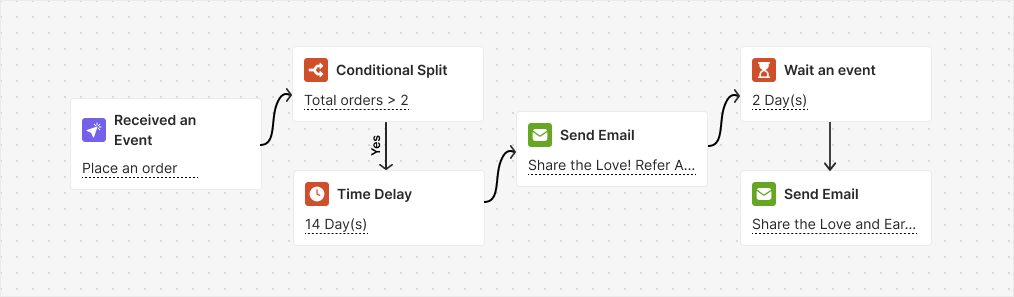
Encourage loyal customers (those with more than 2 orders) to refer their friends after making a purchase.
### Flow
This automation triggers when a customer places an order and waits for 14 days. It then sends an email inviting the customer to refer a friend and earn rewards. If no successful referrals are received within 2 days, a reminder email is sent.
 ### Trigger
Placed Order
### Instructions
* Enable the referral program and set up rewards for both your customers and their friends.
* Ensure that you activate the notification emails for both the customer and their friend upon successful referral.
* Adjust the 14-day wait to match your process. It is set to ensure that the customer received the order; change it if needed.
This template nudges existing customers to make referrals. It does not send reminders to the referred friend who hasn't signed up yet, and it does not support referrer-initiated follow-ups to specific friends.
***
## Related Articles
Step-by-step guide to building and launching automation campaigns.
Overview of all available ready-to-use automation templates.
### Trigger
Placed Order
### Instructions
* Enable the referral program and set up rewards for both your customers and their friends.
* Ensure that you activate the notification emails for both the customer and their friend upon successful referral.
* Adjust the 14-day wait to match your process. It is set to ensure that the customer received the order; change it if needed.
This template nudges existing customers to make referrals. It does not send reminders to the referred friend who hasn't signed up yet, and it does not support referrer-initiated follow-ups to specific friends.
***
## Related Articles
Step-by-step guide to building and launching automation campaigns.
Overview of all available ready-to-use automation templates.