> ## Documentation Index
> Fetch the complete documentation index at: https://docs.gameball.co/llms.txt
> Use this file to discover all available pages before exploring further.
# What Are Reviews & Data Collection Automation Templates?
> Understand customer satisfaction levels by collecting reviews and data using Automation Campaigns.
Reviews and feedback are invaluable for businesses to understand customer satisfaction and improve products or services. This article covers the **Reviews & Data Collection** Automation Templates.
***
## Ask for Reviews
### Goal
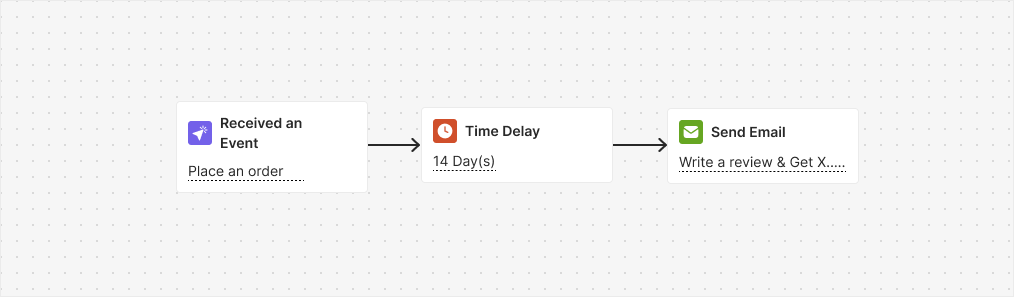
Ask customers to leave reviews for purchased products by offering incentives.
### Flow
After a waiting period of 14 days following a customer's purchase, an email is sent inviting them to leave a review. In return, customers are offered X points as an incentive.
 ### Trigger
Placed Order
### Instructions
* Along with this automation, you need to reward a customer upon adding a review by enabling the "Reward for Reviews" automation series or activating the "Write a Review" challenge.
* Adjust the 14-day wait to match your process. It is set to ensure that the customer received the order; change it if needed.
***
## Reward for Reviews
### Goal
Reward customers for writing reviews to incentivize and encourage feedback on products.
### Flow
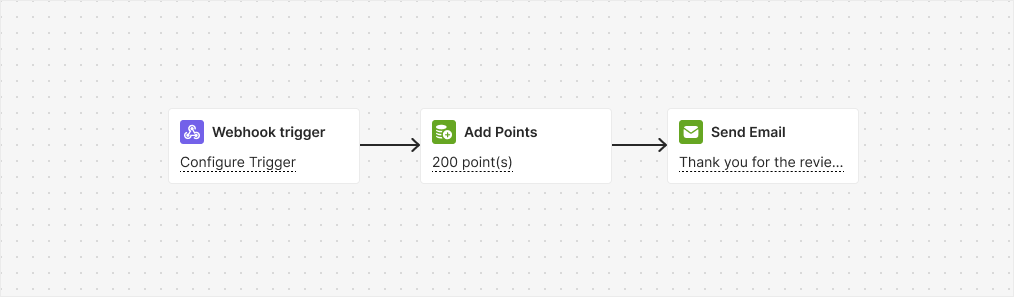
This automation is triggered by a webhook when a user writes a review. The customer then receives 200 points and a special badge as recognition for their contribution.
### Trigger
Placed Order
### Instructions
* Along with this automation, you need to reward a customer upon adding a review by enabling the "Reward for Reviews" automation series or activating the "Write a Review" challenge.
* Adjust the 14-day wait to match your process. It is set to ensure that the customer received the order; change it if needed.
***
## Reward for Reviews
### Goal
Reward customers for writing reviews to incentivize and encourage feedback on products.
### Flow
This automation is triggered by a webhook when a user writes a review. The customer then receives 200 points and a special badge as recognition for their contribution.
 ### Trigger
Webhook
### Instructions
* Avoid using the "Write a Review" challenge with this automation to prevent customers from earning rewards twice.
* Configure the webhook trigger to notify Gameball when someone leaves a review.
***
## Collect Feedback/Survey
### Goal
Incentivize feedback participation and survey completion to enhance customer engagement and satisfaction.
### Flow
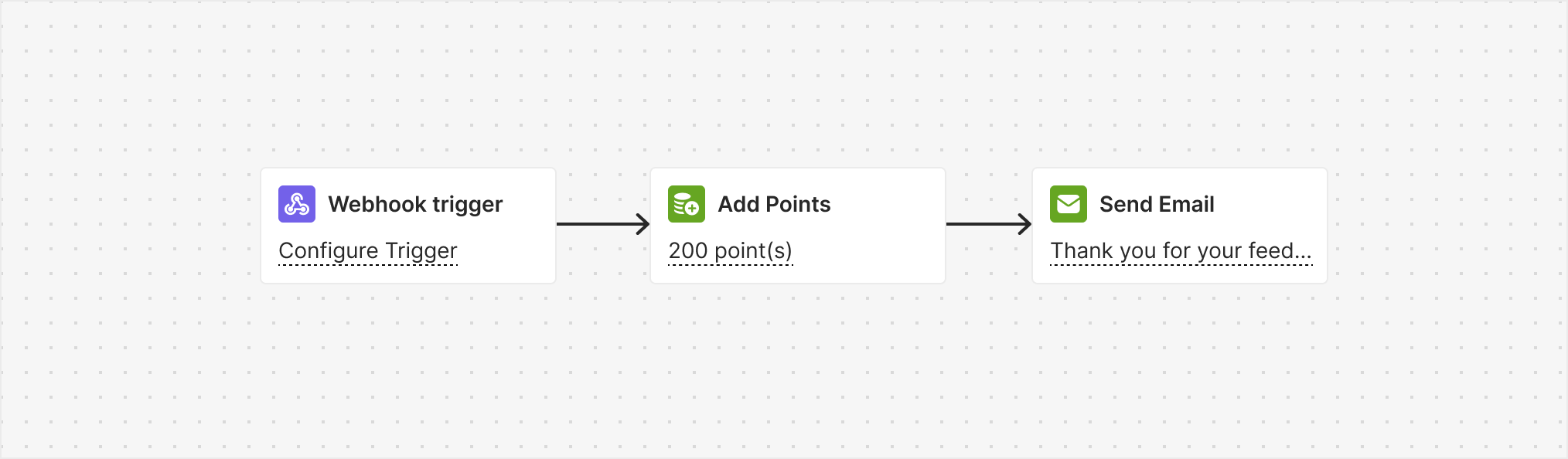
This automation is triggered by a webhook when a customer leaves feedback or fills out a survey. The customer then receives 200 points and a special badge as recognition for their contribution.
### Trigger
Webhook
### Instructions
* Avoid using the "Write a Review" challenge with this automation to prevent customers from earning rewards twice.
* Configure the webhook trigger to notify Gameball when someone leaves a review.
***
## Collect Feedback/Survey
### Goal
Incentivize feedback participation and survey completion to enhance customer engagement and satisfaction.
### Flow
This automation is triggered by a webhook when a customer leaves feedback or fills out a survey. The customer then receives 200 points and a special badge as recognition for their contribution.
 ### Trigger
Webhook. [Learn how to set it up](/product-documentation/automation-campaigns/webhooks-in-automation).
### Instructions
Configure the webhook trigger to notify Gameball when someone leaves feedback or fills out a survey.
***
## Related Articles
Step-by-step guide to building automation campaigns.
Overview of all available automation templates.
### Trigger
Webhook. [Learn how to set it up](/product-documentation/automation-campaigns/webhooks-in-automation).
### Instructions
Configure the webhook trigger to notify Gameball when someone leaves feedback or fills out a survey.
***
## Related Articles
Step-by-step guide to building automation campaigns.
Overview of all available automation templates.