> ## Documentation Index
> Fetch the complete documentation index at: https://docs.gameball.co/llms.txt
> Use this file to discover all available pages before exploring further.
# What Is Communication Campaigns?
> Discover Gameball's Communication Campaigns, formerly known as Outbound, to tailor messages for various purposes.
Gameball's Communication Campaigns, formerly known as Outbound, empower you to tailor messages for various purposes, including acquisition, retention, customer journey facilitation, and engagement. This feature serves as a versatile tool to complement campaigns and enhance program performance.
***
## Types of Communication Campaigns
Reach customers directly with personalized email messages for promotions, new collections, promo codes, and more.
Pop up timely messages during the customer's platform journey to upsell, alert, and drive action.
Send targeted push notifications directly to customers' mobile devices to boost retention and engagement.
Deliver fast, high-visibility text messages for time-sensitive promotions, updates, and personalized offers.
### Emails
Email marketing is a ubiquitous strategy across industries to boost sales, conversion rates, and retention. Unlike other channels, emails are always accessible by customers, ensuring message permanence. Emails are sent to registered customers and guests who have previously made at least one order. Segmentation and triggers enable personalized email delivery based on customer information or actions. [Learn how to set up an Email campaign](/product-documentation/communication-campaigns/create-and-configure-email-campaigns).
Gameball also offers [pre-designed email templates](/product-documentation/communication-campaigns/templates/email-campaigns-templates) for quick campaign setup.
### Web Messages
Web messages enable real-time communication with customers during their platform journey. Ideal for upselling, alerts, and motivating customers to take action or complete and win reward campaigns. Pop-up messages prompt customers to engage with campaigns, daily deals, or offers, driving conversion rates. Customizable triggers ensure the timely delivery of web messages tailored to customer behavior. [Learn how to set up a Web Message campaign](/product-documentation/communication-campaigns/create-and-configure-web-message-campaigns).
Leverage a variety of [ready-made web message](/product-documentation/communication-campaigns/templates/web-messages-campaigns-templates) templates to streamline campaign creation.
### Mobile Push
Mobile push notifications provide a direct channel to reach customers at any time. Effective for promoting hot deals and encouraging platform revisits to boost customer retention and sales. Configurable triggers allow targeted push notifications based on customer behavior or segments. [Learn how to set up a Mobile Push campaign](/product-documentation/communication-campaigns/create-and-configure-mobile-push-campaigns).
Leverage a variety of [ready-made mobile push notification templates](/product-documentation/communication-campaigns/templates/push-notification-campaigns-templates) to streamline campaign creation.
### SMS
SMS campaigns offer a fast and highly effective way to reach customers directly on their mobile devices. With high open rates and immediate visibility, SMS is ideal for time-sensitive promotions, order updates, or important announcements. Messages can be tailored based on customer segments or triggered by specific actions to ensure timely and relevant communication. [Learn how to set up an SMS campaign](/product-documentation/communication-campaigns/create-and-configure-sms-campaigns).
***
## Creating a New Communication Campaign
Navigate to the **Gameball Dashboard** and click on **Campaigns**.
Choose **Communication**, then click on the **Create Campaign** button.
Choose the desired type of campaign if you want to start from scratch: **Emails**, **Mobile Push**, **Web Messages**, or **SMS**.
Or choose from the [ready-made templates](/product-documentation/communication-campaigns/templates/email-campaigns-templates) for each type.
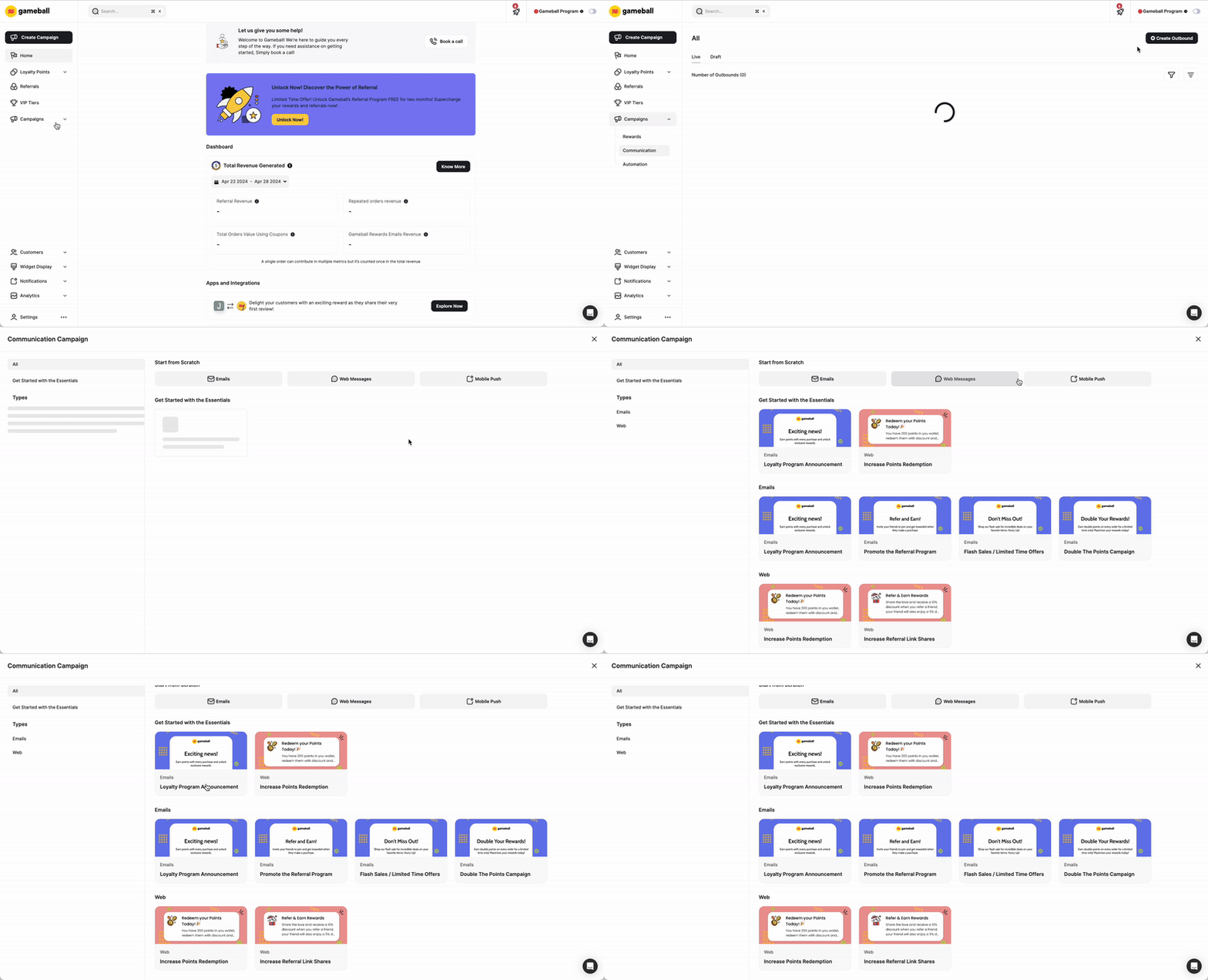 Follow the intuitive setup process to customize the campaign based on your objectives and audience, or check out these articles to learn how to configure a communication campaign from scratch.
***
## Filtering Your Communication Campaigns
Use filters to quickly find and manage campaigns in your list.
| Filter | Description |
| ------------ | -------------------------------------------------------------------- |
| **Audience** | Filter campaigns by their target audience or segment. |
| **Triggers** | Filter by the trigger type used to activate the campaign. |
| **Channel** | Filter by delivery channel: Email, Web Message, Mobile Push, or SMS. |
| **Status** | Filter by campaign status: Active, Scheduled, Draft, or Archived. |
***
Learn about Gameball's Rewards Campaigns and how to set up challenges and rewards for customers.
Learn about Gameball's Automation Campaigns to trigger personalized messages and rewards automatically.
Follow the intuitive setup process to customize the campaign based on your objectives and audience, or check out these articles to learn how to configure a communication campaign from scratch.
***
## Filtering Your Communication Campaigns
Use filters to quickly find and manage campaigns in your list.
| Filter | Description |
| ------------ | -------------------------------------------------------------------- |
| **Audience** | Filter campaigns by their target audience or segment. |
| **Triggers** | Filter by the trigger type used to activate the campaign. |
| **Channel** | Filter by delivery channel: Email, Web Message, Mobile Push, or SMS. |
| **Status** | Filter by campaign status: Active, Scheduled, Draft, or Archived. |
***
Learn about Gameball's Rewards Campaigns and how to set up challenges and rewards for customers.
Learn about Gameball's Automation Campaigns to trigger personalized messages and rewards automatically.