> ## Documentation Index
> Fetch the complete documentation index at: https://docs.gameball.co/llms.txt
> Use this file to discover all available pages before exploring further.
# How Do I Use RFM Segments to Serve My Goals?
> Learn more about the RFM segments Gameball has created, and how to use them to help retain, engage, and make players more loyal.
| Platform | Plan |
| ------------ | ------------------- |
| Shopify | Start, Pro, & Guru |
| Salla | Pro, & Guru |
| Non-Platform | Growth & Enterprise |
***
RFM segmentation allows you to divide your customer base into clear groups based on their purchasing habits. You can use these segments to better understand your audience and take tailored actions that enhance engagement, retention, and loyalty. [Learn more about RFM segmentation](/product-documentation/customer-segmentation/rfm-segments/introduction-to-rfm-segments).
This article guides you through how to use RFM segments effectively to support your business goals, whether you are focused on customer acquisition, retention, or reactivation.
***
## How to Know More Details About RFM Segments
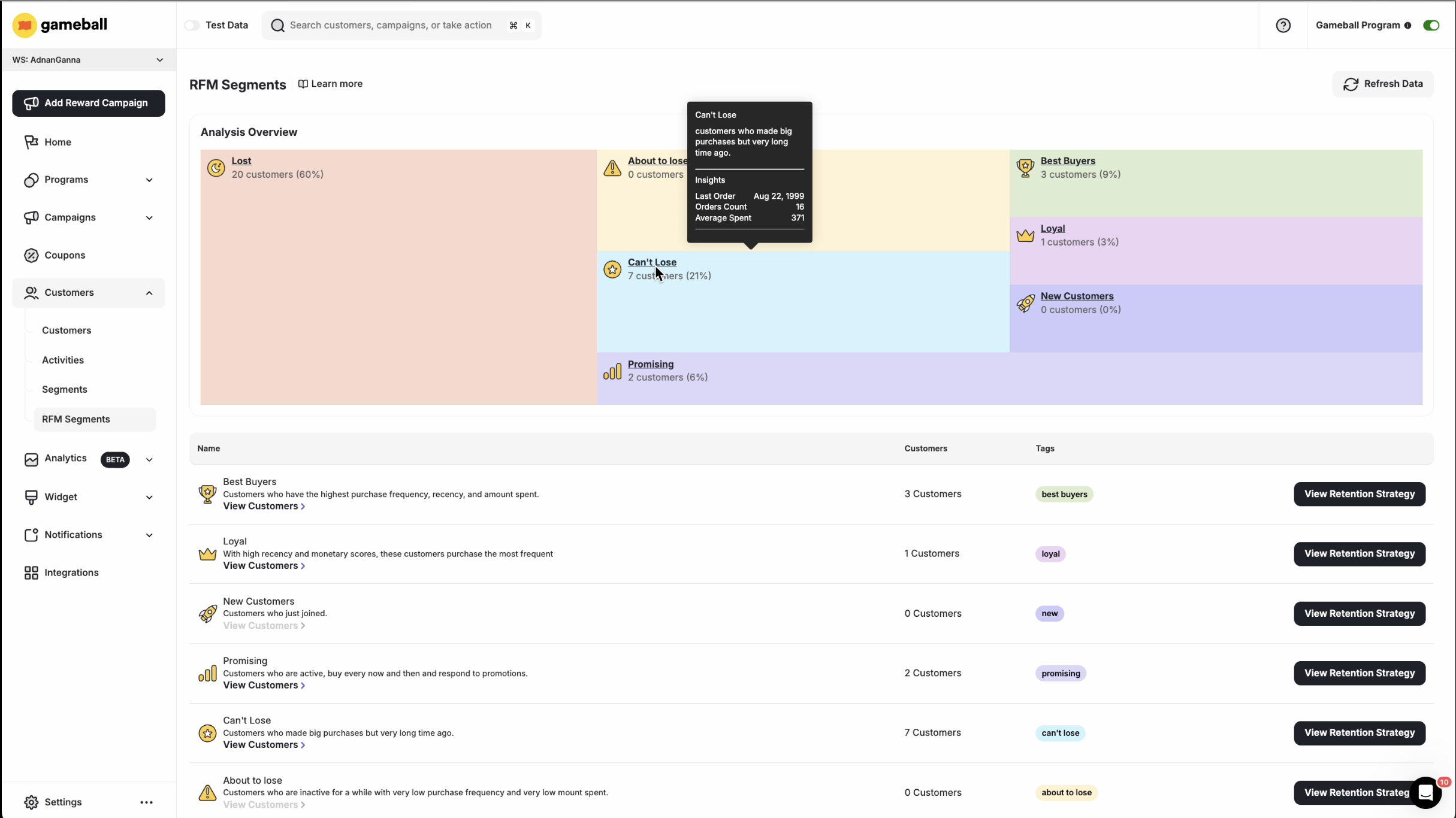
On the **RFM Segments** page, hover over any segment to view key details, including:
* Segment description
* Last order date
* Number of orders
* Average amount spent
 * Gameball does not remove outliers; however, RFM works on percentiles, not absolute numbers.
* RFM is refreshed once a day.
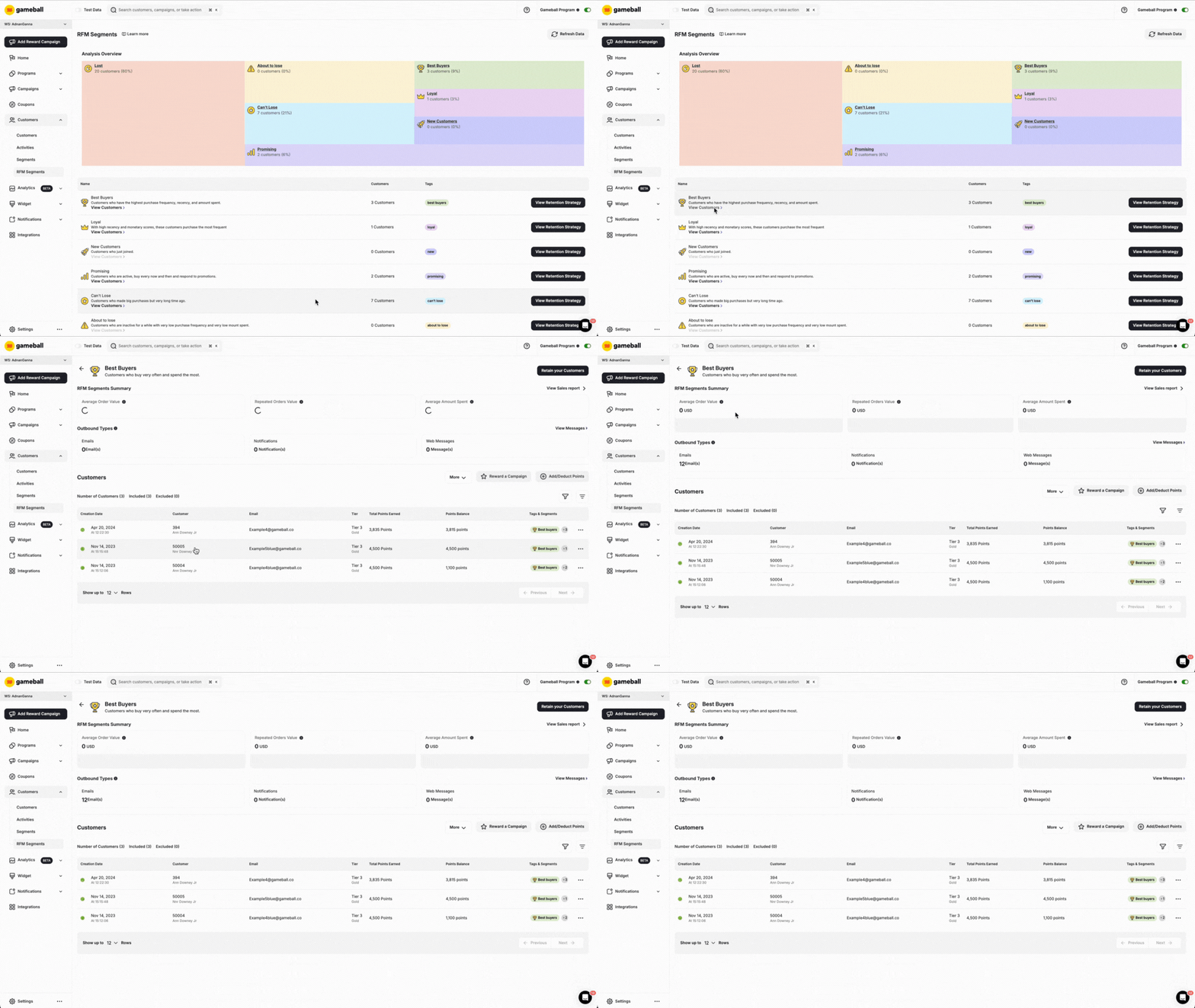
To explore the full customer list within a specific segment, scroll down and click **View Customers** under the segment description. You will be taken to that segment's details page, where you can see all customers and apply various bulk actions.
* Gameball does not remove outliers; however, RFM works on percentiles, not absolute numbers.
* RFM is refreshed once a day.
To explore the full customer list within a specific segment, scroll down and click **View Customers** under the segment description. You will be taken to that segment's details page, where you can see all customers and apply various bulk actions.
 ***
## Available Actions for RFM Segments
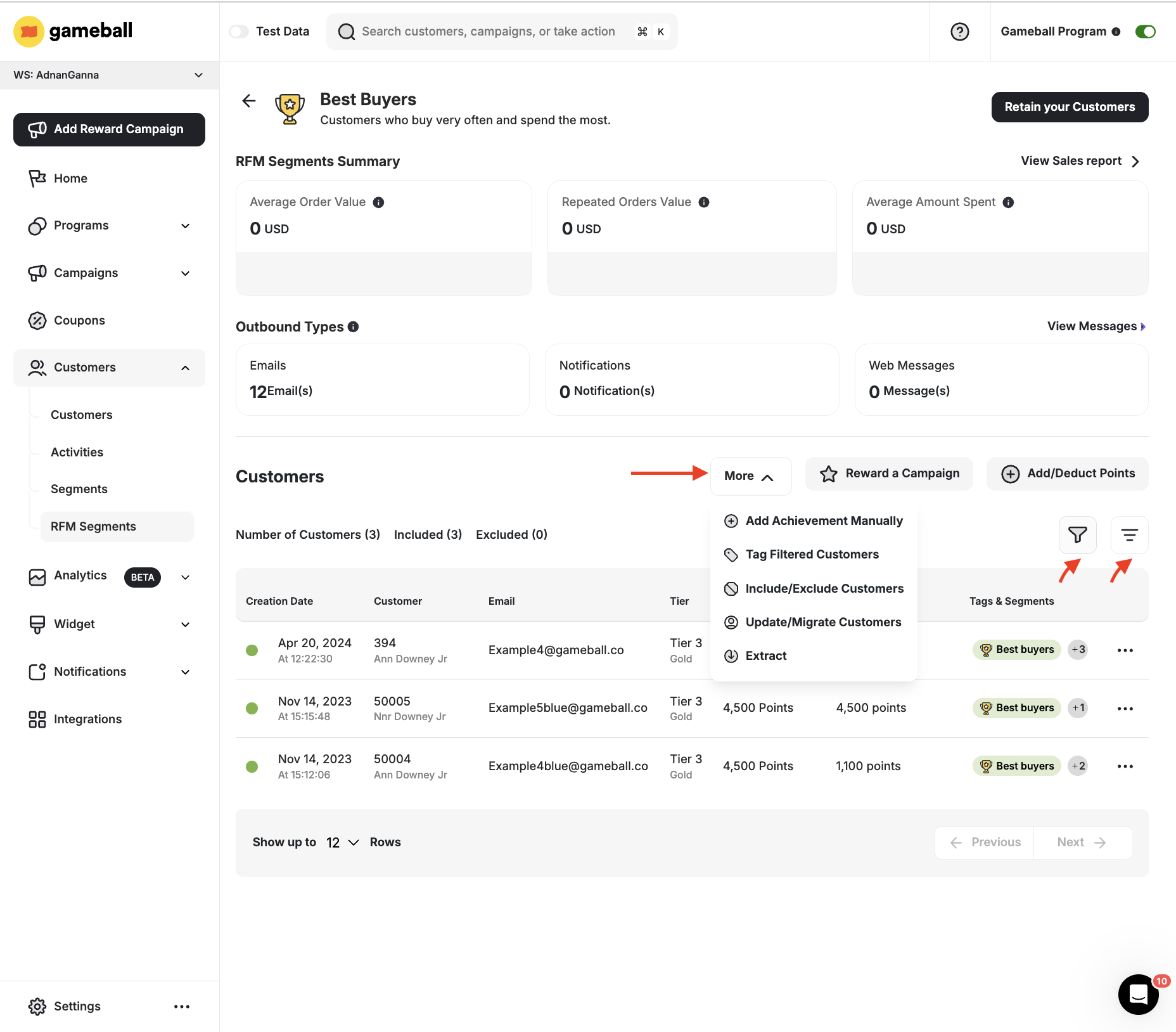
For each RFM segment, you can:
* Filter & Sort the Customer lists
* Add or deduct points
* Reward a Campaign
* Apply tags
* Include or exclude customers from the loyalty program
* Update or migrate customer information
* Extract the list
***
## Available Actions for RFM Segments
For each RFM segment, you can:
* Filter & Sort the Customer lists
* Add or deduct points
* Reward a Campaign
* Apply tags
* Include or exclude customers from the loyalty program
* Update or migrate customer information
* Extract the list
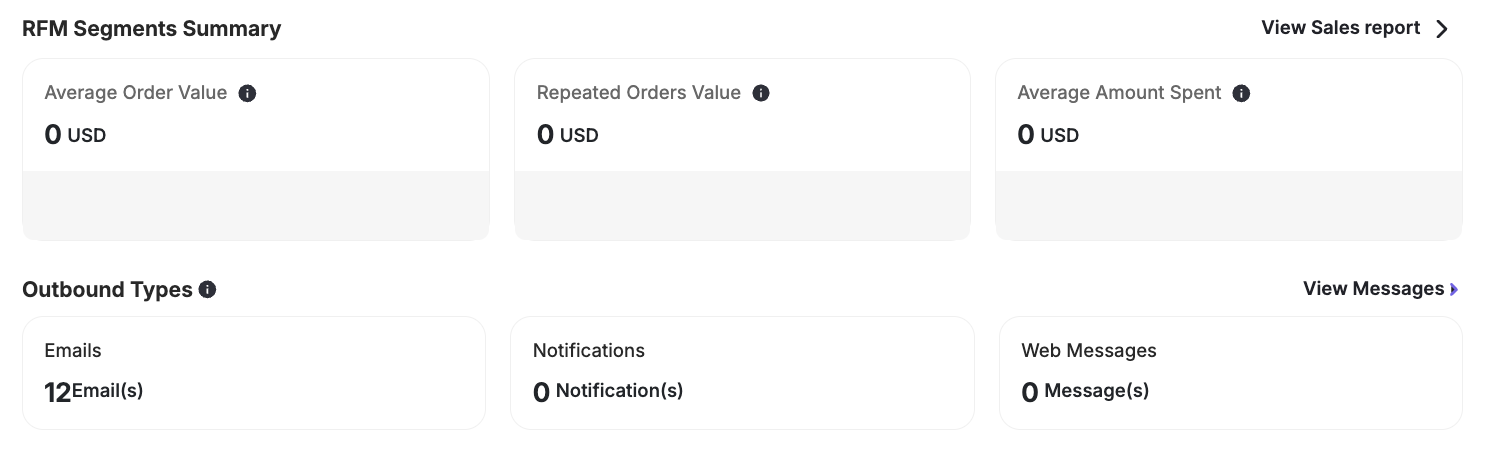
 You can also view how many outbound messages were sent to customers under each segment, as well as a summary of the segment's sales.
 ***
## Applying Retention Strategies Using RFM Segments
Segmenting your customers using RFM is a crucial step toward delivering more personalized and effective engagement. Once your customers are categorized, you can tailor campaigns and strategies that match the unique behavior of each segment.
For example, with the **Best Buyers** segment, you may want to reward these high-value customers with exclusive offers to ensure they remain active and loyal. For customers in segments like **About to Lose** or **Lost**, focus on reactivation tactics such as time-limited discounts or reminders.
Gameball supports you with recommended actions and ready-made templates for each segment, helping you build strategies that align with your goals.
***
## Where to Find the Suggested Retention Strategies
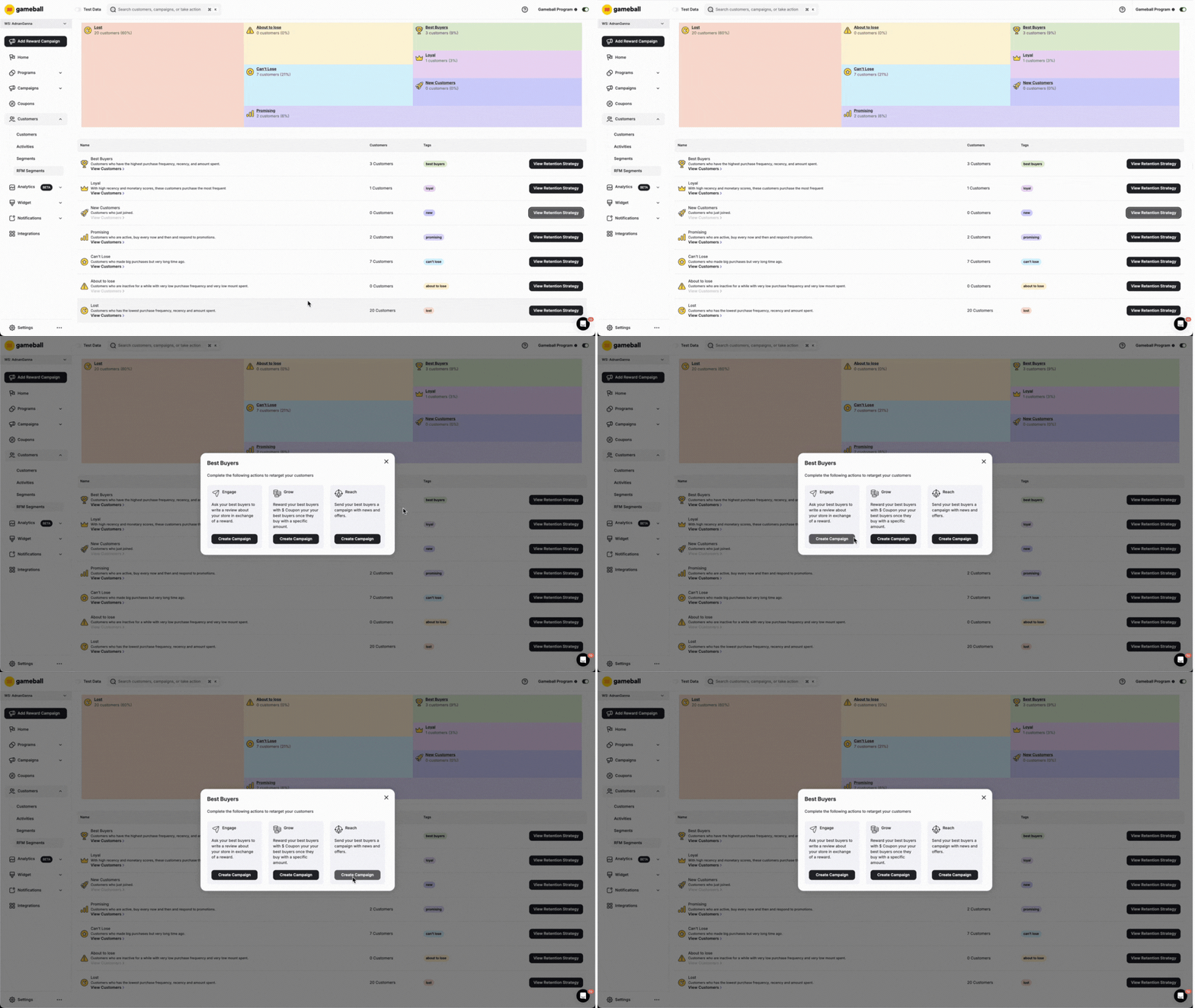
Beside each segment on the **RFM Segments** page, click **Retention Strategy for Your Customers**. A list of suggested actions will appear — choose the action that best fits your goal.
***
## Applying Retention Strategies Using RFM Segments
Segmenting your customers using RFM is a crucial step toward delivering more personalized and effective engagement. Once your customers are categorized, you can tailor campaigns and strategies that match the unique behavior of each segment.
For example, with the **Best Buyers** segment, you may want to reward these high-value customers with exclusive offers to ensure they remain active and loyal. For customers in segments like **About to Lose** or **Lost**, focus on reactivation tactics such as time-limited discounts or reminders.
Gameball supports you with recommended actions and ready-made templates for each segment, helping you build strategies that align with your goals.
***
## Where to Find the Suggested Retention Strategies
Beside each segment on the **RFM Segments** page, click **Retention Strategy for Your Customers**. A list of suggested actions will appear — choose the action that best fits your goal.
 ***
## What Happens When You Choose to Create a Campaign
You will be redirected to the configuration page of a Communication or Rewards campaign that is targeting the exact segment you initially chose. Complete the rest of the campaign's details, such as composing the message, and then set it live.
Learn more about creating a Communication or Reward Campaign in the relevant sections of the documentation.
***
## Related Articles
Understand the concept of RFM analysis and how Gameball uses it to segment customers.
Learn how to create and manage customer segments using the segmentation engine.
***
## What Happens When You Choose to Create a Campaign
You will be redirected to the configuration page of a Communication or Rewards campaign that is targeting the exact segment you initially chose. Complete the rest of the campaign's details, such as composing the message, and then set it live.
Learn more about creating a Communication or Reward Campaign in the relevant sections of the documentation.
***
## Related Articles
Understand the concept of RFM analysis and how Gameball uses it to segment customers.
Learn how to create and manage customer segments using the segmentation engine.