> ## Documentation Index
> Fetch the complete documentation index at: https://docs.gameball.co/llms.txt
> Use this file to discover all available pages before exploring further.
# What Are Some Use Cases for Segmentation?
> Use cases on how to fully utilize Customer Segmentation combined with other Gameball features.
| Platform | Plan |
| -------------------- | -------------------- |
| Shopify | Starter, Pro, & Guru |
| Salla | Pro, & Guru |
| Non-platform clients | Growth & Enterprise |
Segmentation is one of the most impactful tools you can use to personalize your marketing efforts and increase return on investment (ROI). With Gameball's segmentation feature, you can identify and act on specific customer behaviors, interests, and engagement levels to optimize your communication and retention tactics.
Targeting the mass market without distinction is no longer an effective approach. Instead, focusing on well-defined customer segments allows you to deliver the right message to the right audience.
***
## Customer Segments and Tactics
Gameball enables you to identify and engage with multiple customer segments. Below are four common and highly valuable segments, along with tactics to improve their engagement:
| Segment | Description |
| --------------------------- | --------------------------------------------------------------------------------------- |
| **The Champions** | Your top-performing VIP customers who contribute a significant portion of your revenue. |
| **Product Viewers** | Customers who explore your products but do not proceed to checkout. |
| **Slipping Away Customers** | Customers who are showing signs of churn and disengagement. |
| **The Buyer** | Segments customers into groups based on different purchasing behavior. |
***
## The Champions (VIP Customers)
### Identify Bases for Segmentation
A VIP customer could be someone who:
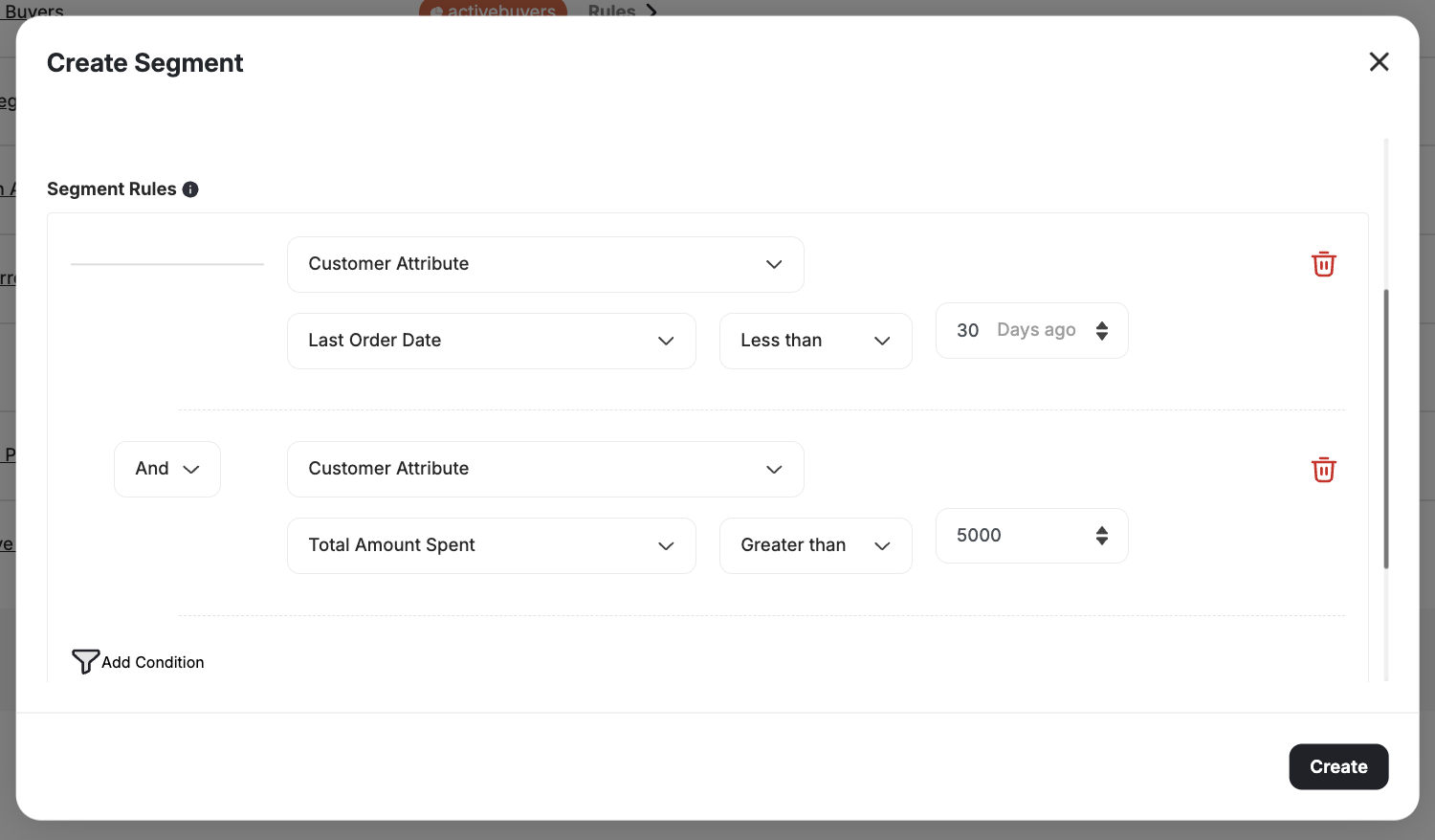
* Made a purchase within the last 30 days
* Spent over \$5,000 in total
### Create a New Segment
Select **Customer Attribute** as the segmentation type.
Use **Last Order Date** as the filter attribute, set the operator to **less than**, and set the time frame to **30 days**.
Add another filter: **Total Amount Spent** with the operator **greater than** and the value set to **\$5,000**.
 ### Alternative Segment Criteria
You may also define VIP customers as those who:
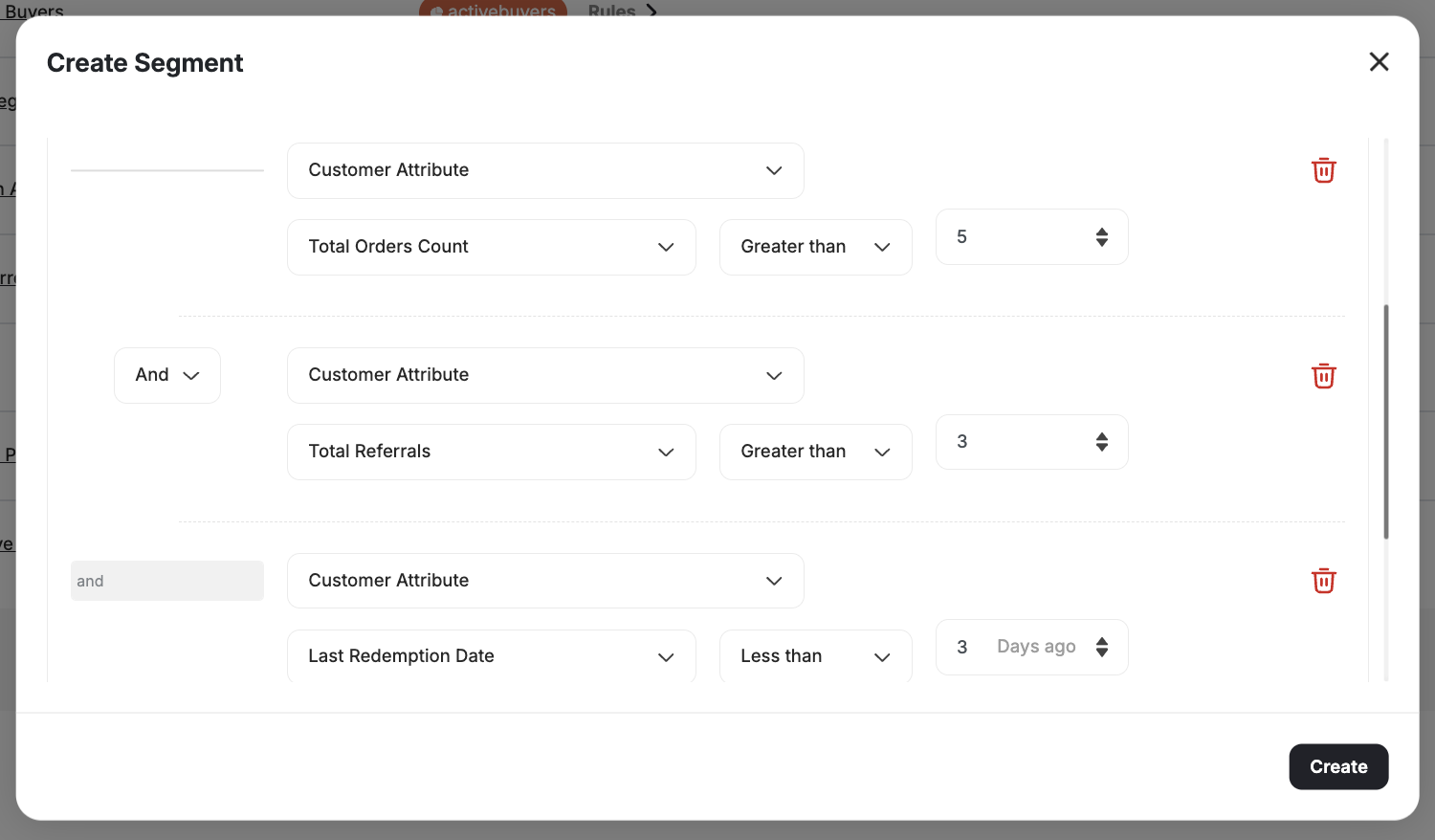
* Placed more than 5 orders
* Referred more than 3 friends
* Redeemed points recently
Select **Event** as the segmentation attribute and choose **Place Order**, with **Count greater than 5**.
Add a **Customer Attribute** for **Total Referrals greater than 3**.
Optionally, filter by **Last Redemption Date less than 3 days**.
### Alternative Segment Criteria
You may also define VIP customers as those who:
* Placed more than 5 orders
* Referred more than 3 friends
* Redeemed points recently
Select **Event** as the segmentation attribute and choose **Place Order**, with **Count greater than 5**.
Add a **Customer Attribute** for **Total Referrals greater than 3**.
Optionally, filter by **Last Redemption Date less than 3 days**.
 **Use Other Gameball Features**
* Create a **custom reward campaign** for this segment to earn extra points.
* Visit the configured segment, click **Reward a Challenge**, and assign a pre-configured challenge with tailored rewards.
***
## The Product Viewers
### Identify Bases for Segmentation
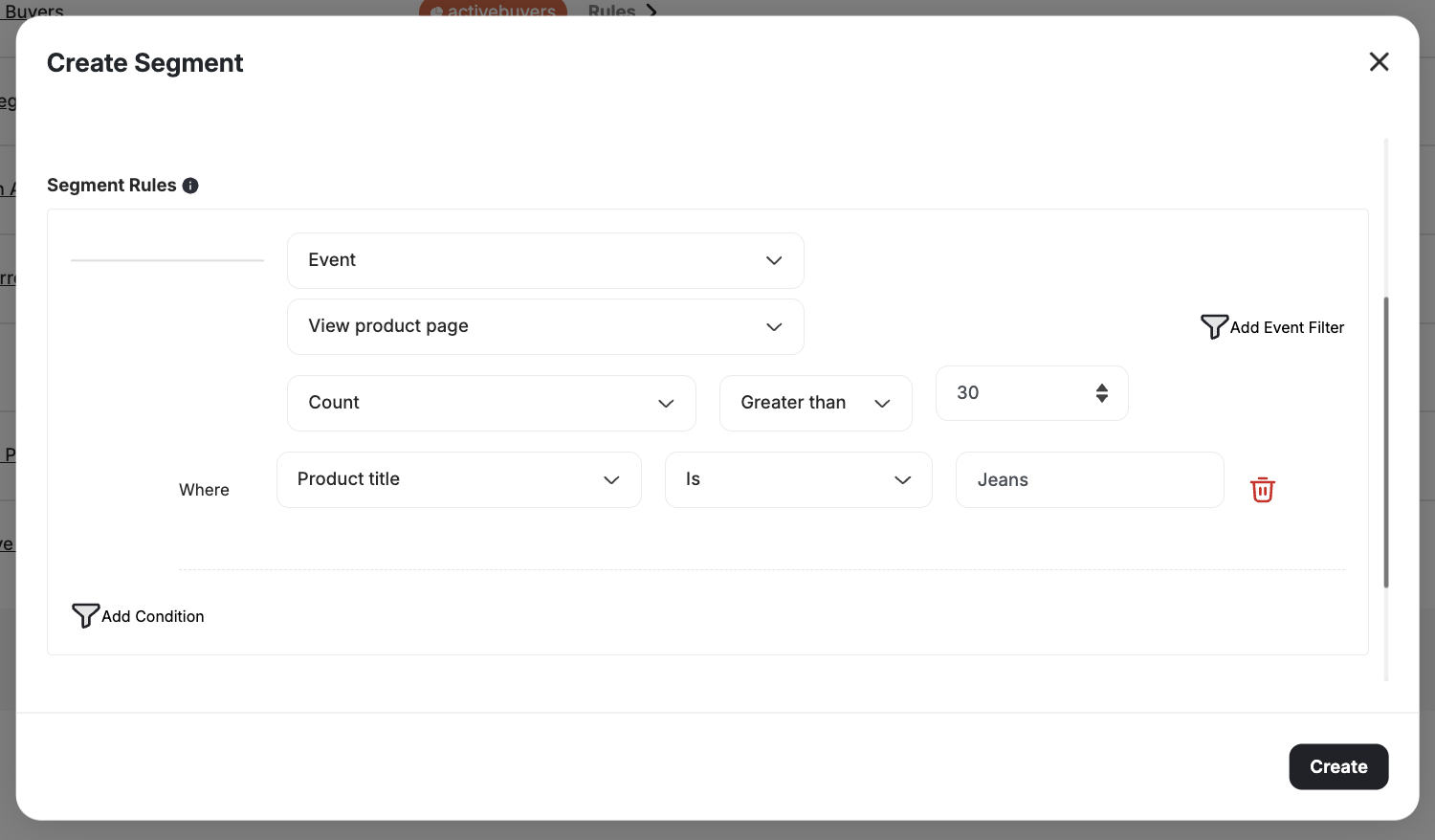
For instance, if your **jeans product page** is frequently visited but sees low conversions:
### Create a New Segment
Choose **Event** as the segmentation type. Select **View Product Page**, and use the **First Occurrence greater than 30 days**.
Add a second filter:
* Event: **View Product Page**
* Add an **Event Filter:** Product Title **contains** "jeans"
**Use Other Gameball Features**
* Create a **custom reward campaign** for this segment to earn extra points.
* Visit the configured segment, click **Reward a Challenge**, and assign a pre-configured challenge with tailored rewards.
***
## The Product Viewers
### Identify Bases for Segmentation
For instance, if your **jeans product page** is frequently visited but sees low conversions:
### Create a New Segment
Choose **Event** as the segmentation type. Select **View Product Page**, and use the **First Occurrence greater than 30 days**.
Add a second filter:
* Event: **View Product Page**
* Add an **Event Filter:** Product Title **contains** "jeans"
 **Use Other Gameball Features**
* Create a special **redemption rule** for this segment under **Points Redemption Settings**.
* Offer promotional discounts specific to the product category.
***
## The Slipping Away Customers
### Identify Bases for Segmentation
Disengaged customers are at high risk of churn. You may consider a customer as slipping away if:
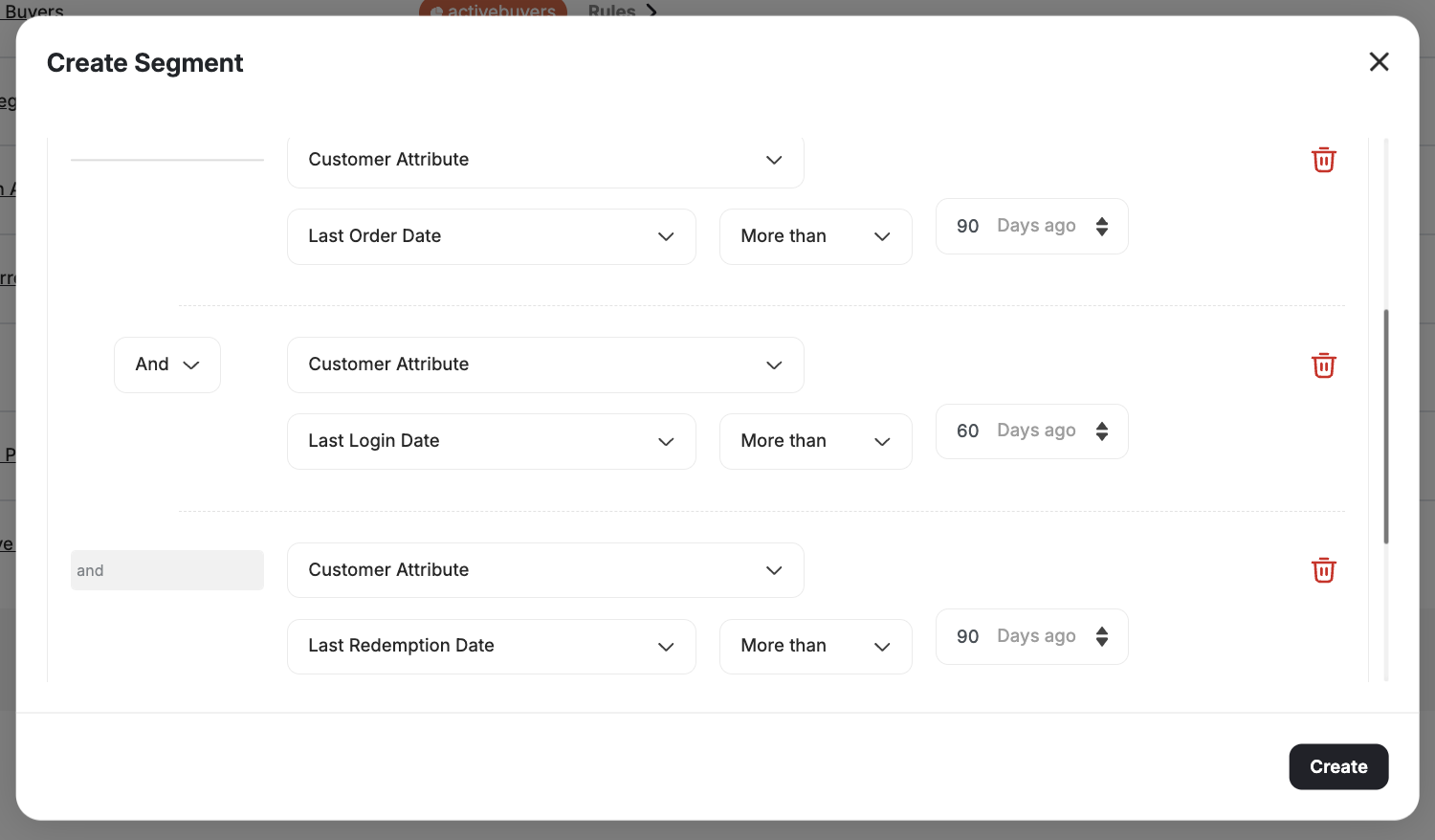
* No orders in the last 90 days
* No website visits in the last 60 days
* No point redemptions in the last 90 days
### Create a New Segment
Use **Customer Attribute: Last Order Date More than 90 days**.
Add **Customer Attribute: Last Login Date greater than 60 days**.
Add **Customer Attribute: Last Redemption Date greater than 90 days**.
**Use Other Gameball Features**
* Create a special **redemption rule** for this segment under **Points Redemption Settings**.
* Offer promotional discounts specific to the product category.
***
## The Slipping Away Customers
### Identify Bases for Segmentation
Disengaged customers are at high risk of churn. You may consider a customer as slipping away if:
* No orders in the last 90 days
* No website visits in the last 60 days
* No point redemptions in the last 90 days
### Create a New Segment
Use **Customer Attribute: Last Order Date More than 90 days**.
Add **Customer Attribute: Last Login Date greater than 60 days**.
Add **Customer Attribute: Last Redemption Date greater than 90 days**.
 **Use Other Gameball Features**
* Create a **scheduled challenge** for this segment with an **achievement reward**.
* Set up an **email notification** to communicate the reward and encourage re-engagement.
***
## The Buyer: Product-Level Order Segmentation
You can create **highly targeted and personalized campaigns** by analyzing **specific product purchase behavior**. Segment customers based on the exact products and quantities purchased in actual orders.
For example:
* Target customers who purchased a specific SKU.
* Segment customers buying a particular category or high-quantity product.
**Product Line Item Filters:**
| Filter | Description |
| ---------------------- | ------------------------------------------------- |
| **Product ID** | Target customers who purchased a specific product |
| **SKU** | Filter by stock-keeping unit |
| **Category** | Segment by product category |
| **Collection** | Target purchasers from a specific collection |
| **Product Title** | Filter by product name |
| **Quantity Purchased** | Filter by the quantity purchased per product |
| **Price** | Filter by price per line item |
***
* All segments in Gameball are dynamic. The system continuously updates customer groupings based on real-time behavior and data.
* Avoid static segmentation to ensure the ongoing relevance and effectiveness of your campaigns.
***
## Related Articles
Learn how to create and manage customer segments using the segmentation engine.
Understand RFM analysis and how Gameball automatically segments customers.
**Use Other Gameball Features**
* Create a **scheduled challenge** for this segment with an **achievement reward**.
* Set up an **email notification** to communicate the reward and encourage re-engagement.
***
## The Buyer: Product-Level Order Segmentation
You can create **highly targeted and personalized campaigns** by analyzing **specific product purchase behavior**. Segment customers based on the exact products and quantities purchased in actual orders.
For example:
* Target customers who purchased a specific SKU.
* Segment customers buying a particular category or high-quantity product.
**Product Line Item Filters:**
| Filter | Description |
| ---------------------- | ------------------------------------------------- |
| **Product ID** | Target customers who purchased a specific product |
| **SKU** | Filter by stock-keeping unit |
| **Category** | Segment by product category |
| **Collection** | Target purchasers from a specific collection |
| **Product Title** | Filter by product name |
| **Quantity Purchased** | Filter by the quantity purchased per product |
| **Price** | Filter by price per line item |
***
* All segments in Gameball are dynamic. The system continuously updates customer groupings based on real-time behavior and data.
* Avoid static segmentation to ensure the ongoing relevance and effectiveness of your campaigns.
***
## Related Articles
Learn how to create and manage customer segments using the segmentation engine.
Understand RFM analysis and how Gameball automatically segments customers.