> ## Documentation Index
> Fetch the complete documentation index at: https://docs.gameball.co/llms.txt
> Use this file to discover all available pages before exploring further.
# How Do I Hide Gameball's Widget Button?
> Learn how to hide Gameball widget launcher button from your platform by following some easy steps.
If you do not want to choose any of the available Gameball launcher shapes because they do not match your brand theme, or you simply do not have a space for them, you can hide the widget launcher button and use Gameball deep links on your platform to open the Gameball widget. Read more about [how to use deep links to open Gameball widget](/product-documentation/customer-widget/player-profile-tabs/enable-opening-gameball-widget-through-inline-links-using-deeplinks).
***
## How to Hide Gameball's Traditional Launcher Button
On the **Gameball Admin Dashboard**, go to **Widget > Launcher: Shape**.
Under **Launcher**, choose the **Hide** option.
Click **Save** to apply your changes.
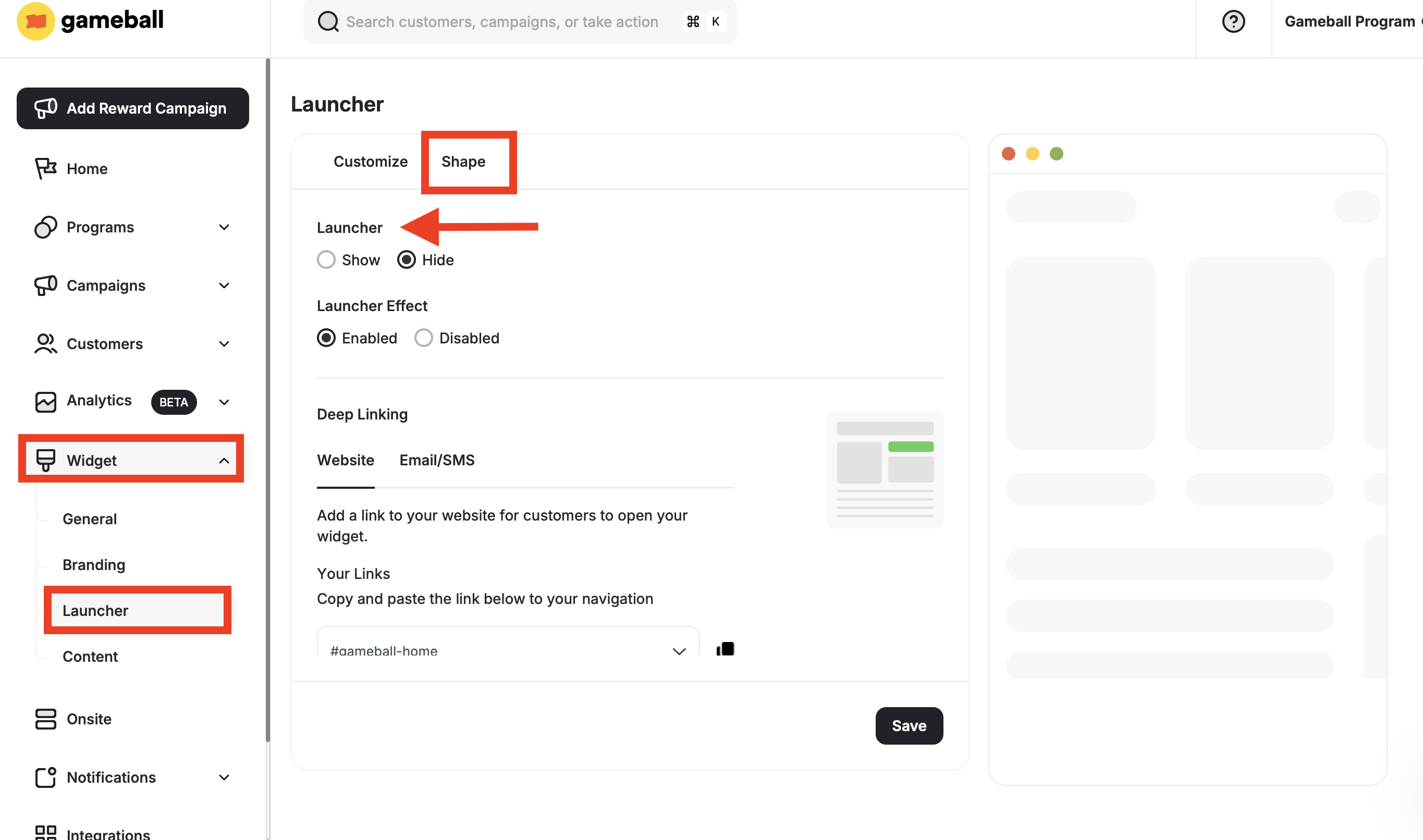 Now, Gameball's launcher button will no longer appear on your platform. Make sure to use our [Deep Links](/product-documentation/customer-widget/player-profile-tabs/enable-opening-gameball-widget-through-inline-links-using-deeplinks) if you still want your customers to access the widget from a different place on your platform.
***
## Related Articles
Control the shape, position, icon, and visibility of your loyalty launcher button.
Adjust colors, fonts, icons, and identity to align the widget with your platform's look and feel.
Let customers open any section of the widget through custom links and inline elements on your site.
Now, Gameball's launcher button will no longer appear on your platform. Make sure to use our [Deep Links](/product-documentation/customer-widget/player-profile-tabs/enable-opening-gameball-widget-through-inline-links-using-deeplinks) if you still want your customers to access the widget from a different place on your platform.
***
## Related Articles
Control the shape, position, icon, and visibility of your loyalty launcher button.
Adjust colors, fonts, icons, and identity to align the widget with your platform's look and feel.
Let customers open any section of the widget through custom links and inline elements on your site.