> ## Documentation Index
> Fetch the complete documentation index at: https://docs.gameball.co/llms.txt
> Use this file to discover all available pages before exploring further.
# How Do I Track your Outbound Email Consumption on Shopify?
> Understand & track your Outbound emails consumption on Shopify
In this article, we will discuss significant enhancements to our Outbounds feature, aimed at providing greater control and visibility over your email usage. With the introduction of email limits and consumption tracking, managing your email outreach has never been more straightforward.
***
## Email Limits by Plan
| Plan | Email Limit per Billing Cycle |
| -------------- | ----------------------------- |
| Free / Starter | 0 (no outbound emails) |
| PRO | 10,000 emails |
| Guru | 10,000 emails |
Our **PRO** and **Guru** plans come with a generous email limit of 10,000 emails per billing cycle. This limit ensures that you can effectively reach out to your audience without worrying about exceeding your capacity.
***
## How Does Consumption Tracking Work?
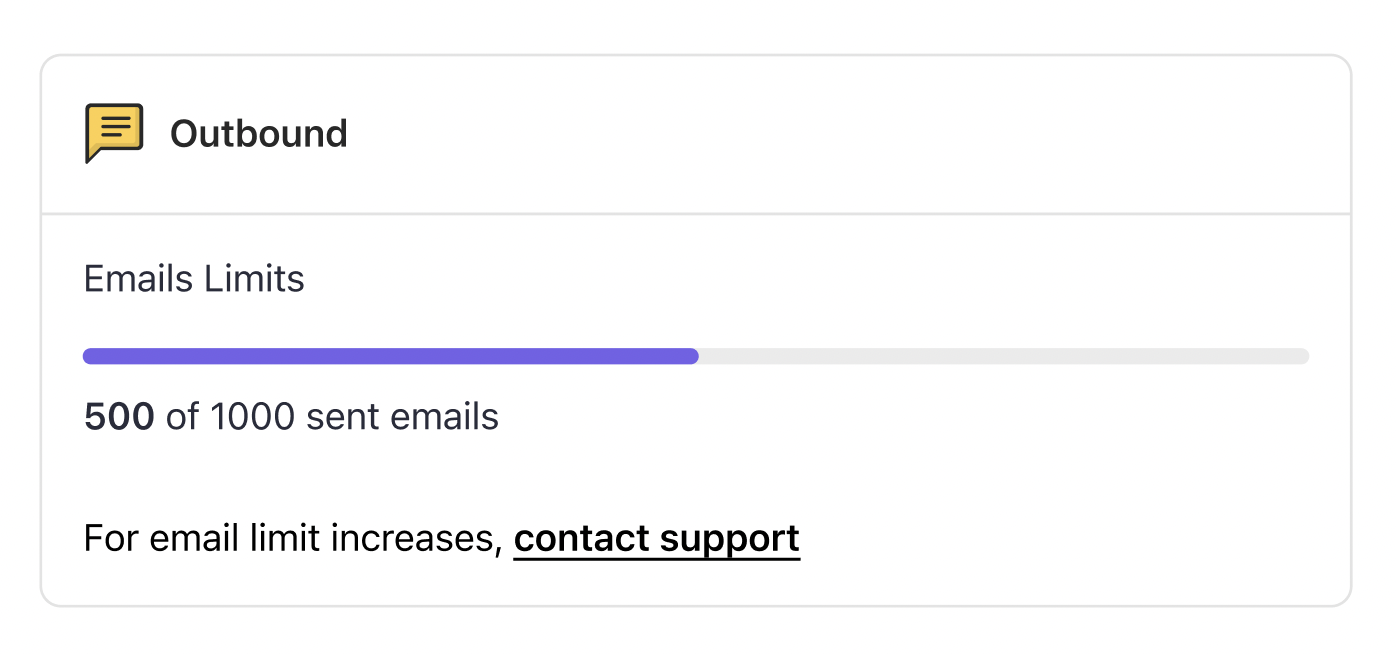
When you navigate to your billing page, you'll notice a new addition: the **Email Consumption** card. This card provides real-time insights into your email usage, allowing you to monitor how many emails you've sent against your allocated limit.
 ***
## Managing Plan Transitions
We understand that your business needs may change over time. Here is how email consumption is handled when transitioning between plans:
| Scenario | What Happens |
| -------------------------------------------------------------------- | -------------------------------------------------------------------------------------- |
| Downgrading from PRO/Guru to Free/Starter | Email consumption resets to "0 of 0" — no emails are sent beyond your new plan's limit |
| Downgrading then upgrading back to PRO within the same billing cycle | Email consumption retains its previous status, reflecting the 10,000 email limit |
| Upgrading to PRO in a subsequent billing cycle after downgrading | Email consumption resets, giving you a fresh start with your 10,000 email allocation |
***
## Consumption Alerts
When you approach your email limit, Gameball will send you timely alerts to notify you of your consumption progress:
You'll receive an email notification when you've consumed 80% of your allocated emails for the billing cycle. This alert serves as a gentle reminder to monitor your usage and consider adjusting your plan if needed.
Upon reaching 100% of your email limit, you'll receive another email notification. This alert signals that you've exhausted your allocated emails for the current billing cycle.
***
## No Hidden Charges
We believe in transparent pricing. Once your email limit is reached, **email sending stops automatically** — remaining contacts in that send will not receive the email. No overage charges apply. Sending resumes at the start of your next billing cycle.
Email notifications are a separate feature that allows you to send customers emails when they achieve certain milestones (like earning cashback, completing reward campaigns, or reaching new tiers). Email notifications do not have an outbound charge limit and are available under certain packages. [Learn more about email notifications](/product-documentation/instant-notifications/email-notifications/sending-achievement-emails).
***
## Need Further Assistance?
If you have any questions or need assistance with managing your email limits, don't hesitate to reach out to our [Support](mailto:support@gameball.co). We're here to support you every step of the way.
***
## Related Articles
Send customers achievement milestone emails when they reach new tiers or earn rewards.
Compare plan features and understand what is included in each tier.
***
## Managing Plan Transitions
We understand that your business needs may change over time. Here is how email consumption is handled when transitioning between plans:
| Scenario | What Happens |
| -------------------------------------------------------------------- | -------------------------------------------------------------------------------------- |
| Downgrading from PRO/Guru to Free/Starter | Email consumption resets to "0 of 0" — no emails are sent beyond your new plan's limit |
| Downgrading then upgrading back to PRO within the same billing cycle | Email consumption retains its previous status, reflecting the 10,000 email limit |
| Upgrading to PRO in a subsequent billing cycle after downgrading | Email consumption resets, giving you a fresh start with your 10,000 email allocation |
***
## Consumption Alerts
When you approach your email limit, Gameball will send you timely alerts to notify you of your consumption progress:
You'll receive an email notification when you've consumed 80% of your allocated emails for the billing cycle. This alert serves as a gentle reminder to monitor your usage and consider adjusting your plan if needed.
Upon reaching 100% of your email limit, you'll receive another email notification. This alert signals that you've exhausted your allocated emails for the current billing cycle.
***
## No Hidden Charges
We believe in transparent pricing. Once your email limit is reached, **email sending stops automatically** — remaining contacts in that send will not receive the email. No overage charges apply. Sending resumes at the start of your next billing cycle.
Email notifications are a separate feature that allows you to send customers emails when they achieve certain milestones (like earning cashback, completing reward campaigns, or reaching new tiers). Email notifications do not have an outbound charge limit and are available under certain packages. [Learn more about email notifications](/product-documentation/instant-notifications/email-notifications/sending-achievement-emails).
***
## Need Further Assistance?
If you have any questions or need assistance with managing your email limits, don't hesitate to reach out to our [Support](mailto:support@gameball.co). We're here to support you every step of the way.
***
## Related Articles
Send customers achievement milestone emails when they reach new tiers or earn rewards.
Compare plan features and understand what is included in each tier.