> ## Documentation Index
> Fetch the complete documentation index at: https://docs.gameball.co/llms.txt
> Use this file to discover all available pages before exploring further.
# How Do I Use Events on Shopify?
> Get more details about how to use Shopify events through Gameball.
Before starting, please read this article to learn more about the Gameball events engine: [How does the Event(s) Rule Engine work?](/product-documentation/rewards-campaigns/faqs/using-the-event-engine)
The following are the available Shopify events on Gameball.
***
## place\_order
### Description
This event will be sent to Gameball when your customer places an order on your platform entirely. **(Entirely means that the order status is Paid.)**
The **place\_order** event will not be sent to Gameball unless the order status is **"Paid"** to avoid potential fraud cases for payment methods like COD.
### Keys
| Key | Description |
| ------------------ | ------------------------------------------------------------------------------------------------------------------------------------- |
| `total_discount` | Total discount applied on this order |
| `total_price` | Total order price |
| `order_id` | Order ID on Shopify |
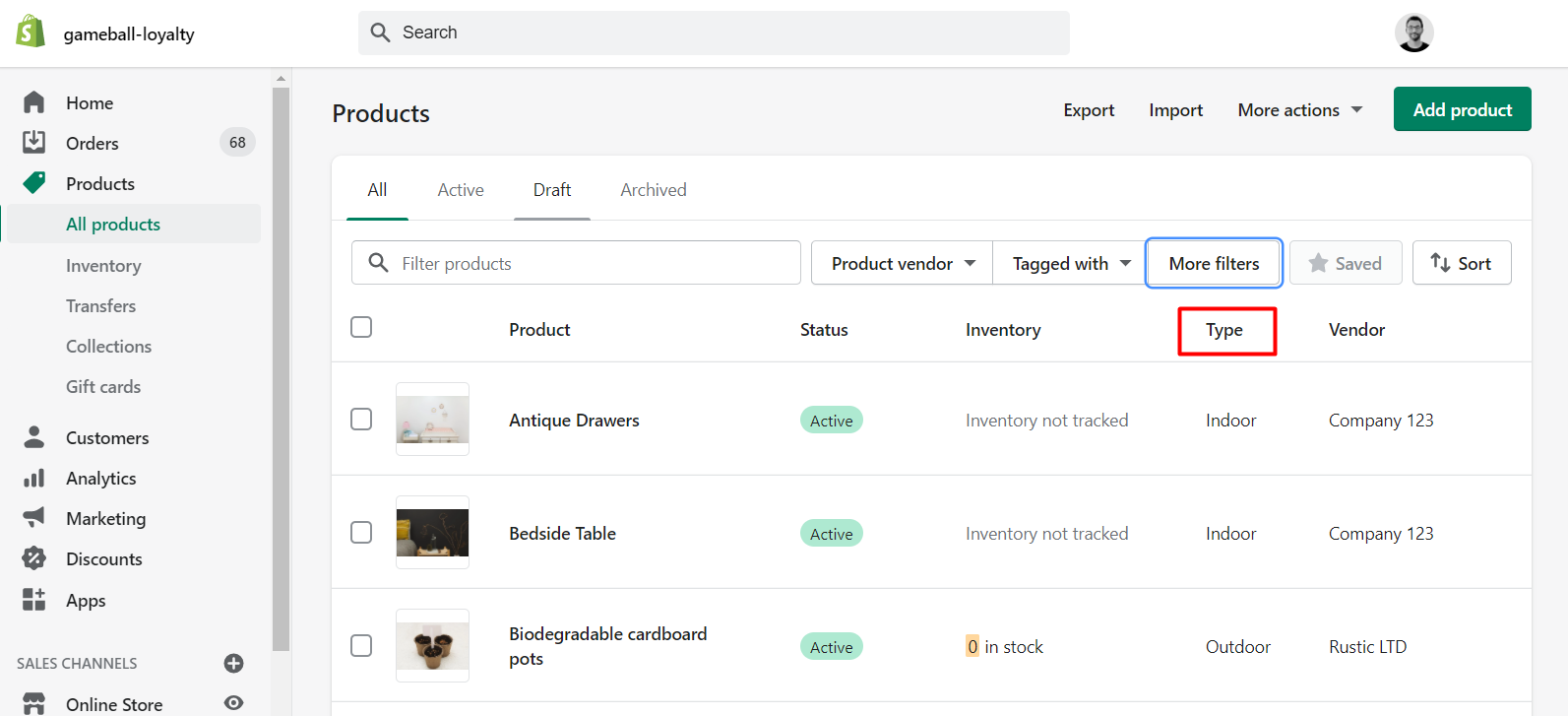
| `product_category` | Product **type** of the order (fashion, electronics, etc.) Can be one category or multiple categories based on the items in the order |
| `tag` | Product tag of the order. Can be one tag or multiple tags based on the items in the order |
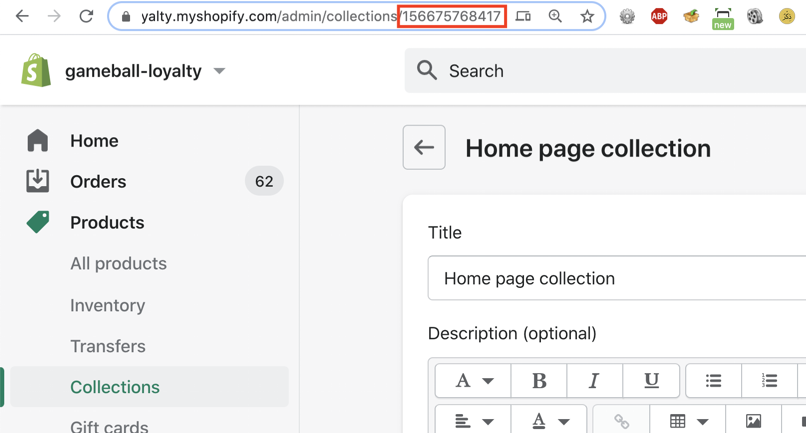
| `collection_id` | Collection IDs of the order products. Can be one collection or multiple collections based on the products in the order |
| `weight` | Order weight |
| `vendor` | Product brand/vendor inside this order (e.g. Zara, Nike). Can be one or multiple brands sent simultaneously |
| `source` | Whether the order was placed on the online Shopify store or through Shopify POS. Returns `"web"` or `"pos"` |
 ***
## view\_product\_page
### Description
This event should be sent when your customer views a product page on your Shopify store.
### Keys
| Key | Description |
| ------------------ | ------------------------------------------------------------------------------------------------- |
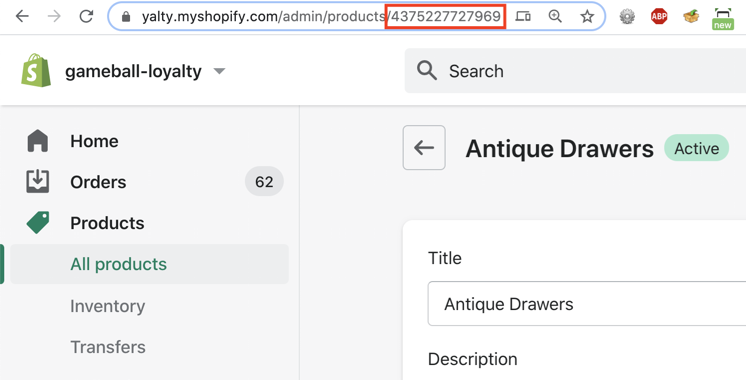
| `product_id` | Product ID on Shopify (found in the URL of the product) |
| `product_category` | Product category (fashion, electronics, etc.) based on available categories on your Shopify store |
| `product_vendor` | Product brand/vendor, based on available vendors on your Shopify store |
| `collection_id` | Collection IDs of the product. Can be one collection or multiple collections |
***
## view\_product\_page
### Description
This event should be sent when your customer views a product page on your Shopify store.
### Keys
| Key | Description |
| ------------------ | ------------------------------------------------------------------------------------------------- |
| `product_id` | Product ID on Shopify (found in the URL of the product) |
| `product_category` | Product category (fashion, electronics, etc.) based on available categories on your Shopify store |
| `product_vendor` | Product brand/vendor, based on available vendors on your Shopify store |
| `collection_id` | Collection IDs of the product. Can be one collection or multiple collections |
 All the above events can be used in both the reward campaigns engine and while sending communication campaigns.
***
## Friends\_Referred
This event is automatically tracked when a customer successfully refers a friend through the Gameball referral program.
***
## Order\_Refunded
The `order_refunded` event is automatically triggered by Gameball whenever a refund is processed through the platform.
This event is only applicable when using the **V4.0 Refund APIs**.
This feature enables you to **track refunded orders directly within the customer profile**, helping them maintain an accurate transaction history and improve your customer support processes.
* **Full Refund Visibility:** Every refund triggers an `order_refunded` event, logging essential refund data.
* **Customer Transparency:** Refunded orders are now visible within each customer's activity timeline.
* **Better Segmentation and Reporting:** You can now segment customers based on refund behavior or integrate this event into your loyalty logic and analytics tools.
| Field | Description |
| ----------------- | ----------------------------------------------- |
| `order_id` | The original order ID |
| `refund_id` | The unique refund ID |
| `refunded_amount` | The monetary amount refunded |
| `refunded_points` | The number of points deducted due to the refund |
***
## Related Articles
Understand how event-based triggers drive reward campaign logic.
Use the Source key to target campaigns by sales channel.
All the above events can be used in both the reward campaigns engine and while sending communication campaigns.
***
## Friends\_Referred
This event is automatically tracked when a customer successfully refers a friend through the Gameball referral program.
***
## Order\_Refunded
The `order_refunded` event is automatically triggered by Gameball whenever a refund is processed through the platform.
This event is only applicable when using the **V4.0 Refund APIs**.
This feature enables you to **track refunded orders directly within the customer profile**, helping them maintain an accurate transaction history and improve your customer support processes.
* **Full Refund Visibility:** Every refund triggers an `order_refunded` event, logging essential refund data.
* **Customer Transparency:** Refunded orders are now visible within each customer's activity timeline.
* **Better Segmentation and Reporting:** You can now segment customers based on refund behavior or integrate this event into your loyalty logic and analytics tools.
| Field | Description |
| ----------------- | ----------------------------------------------- |
| `order_id` | The original order ID |
| `refund_id` | The unique refund ID |
| `refunded_amount` | The monetary amount refunded |
| `refunded_points` | The number of points deducted due to the refund |
***
## Related Articles
Understand how event-based triggers drive reward campaign logic.
Use the Source key to target campaigns by sales channel.