> ## Documentation Index
> Fetch the complete documentation index at: https://docs.gameball.co/llms.txt
> Use this file to discover all available pages before exploring further.
# How Do I Integrate Guest Customers in My Rewards Program?
> Enable your platform's unregistered visitors to be part of your loyalty system and let them get rewarded for their engagement.
**Available for all Gameball customers**
By default, when activating your Gameball loyalty program, only customers who have signed up can engage with your configured loyalty programs and get rewarded for their achievements. You can now also include guests (customers who have not signed up) and reward them for some of their achievements.
***
## How to Enable Guests to Join Your Rewards Program
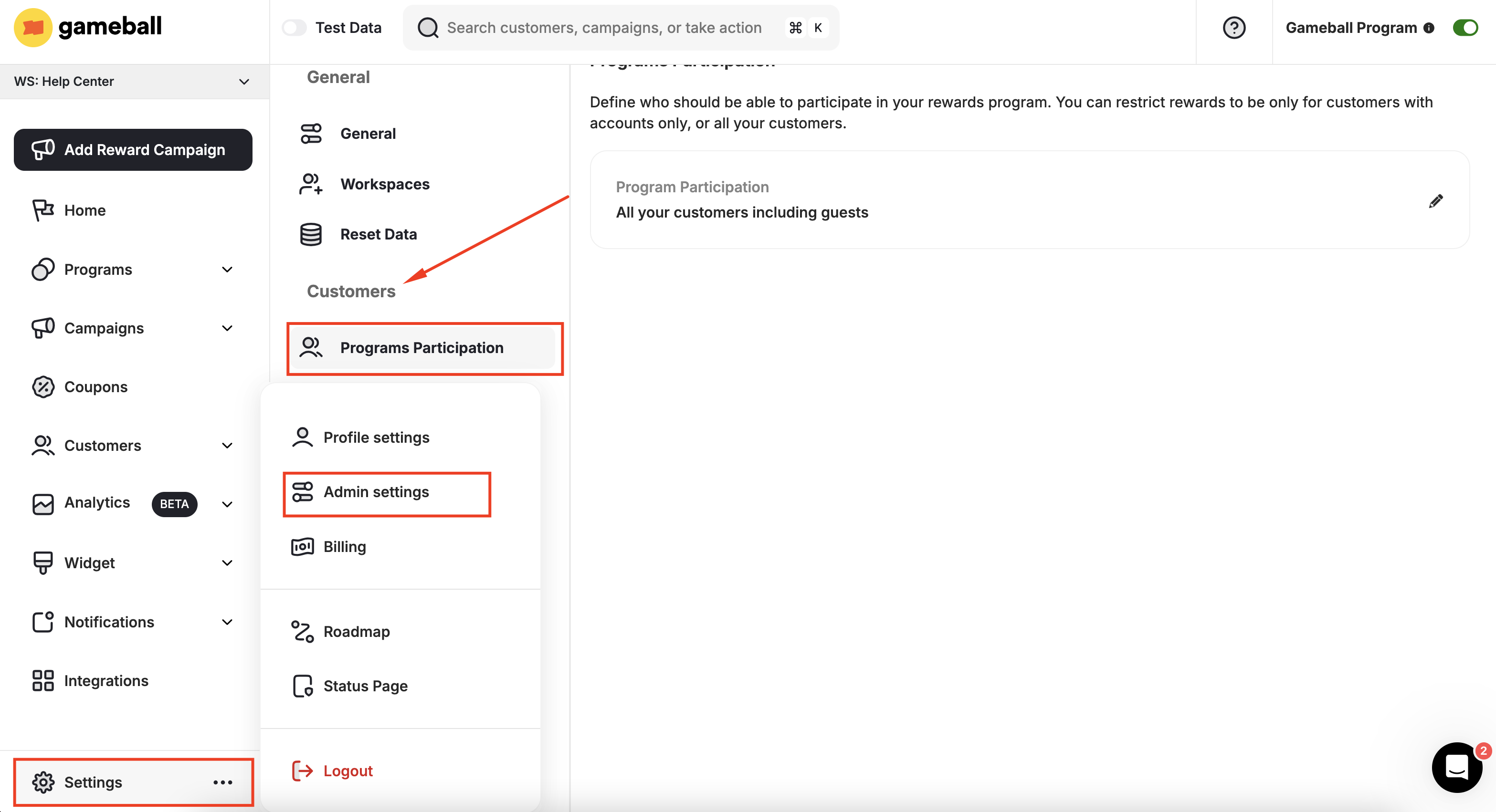
On **Gameball Admin Dashboard**, go to **Settings > Admin Settings > Programs Participation**, under **Customers**, click **Programs Participation**.
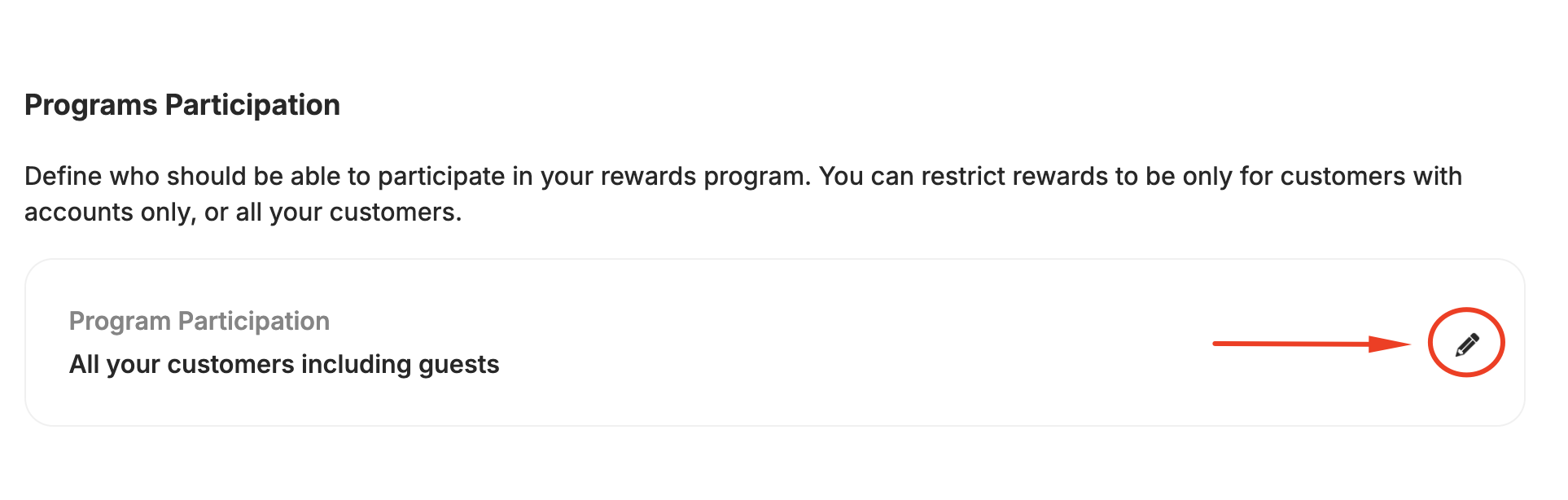
 Click the **Edit Icon**.
 Choose **All your customers including guests**, and click **Save**.
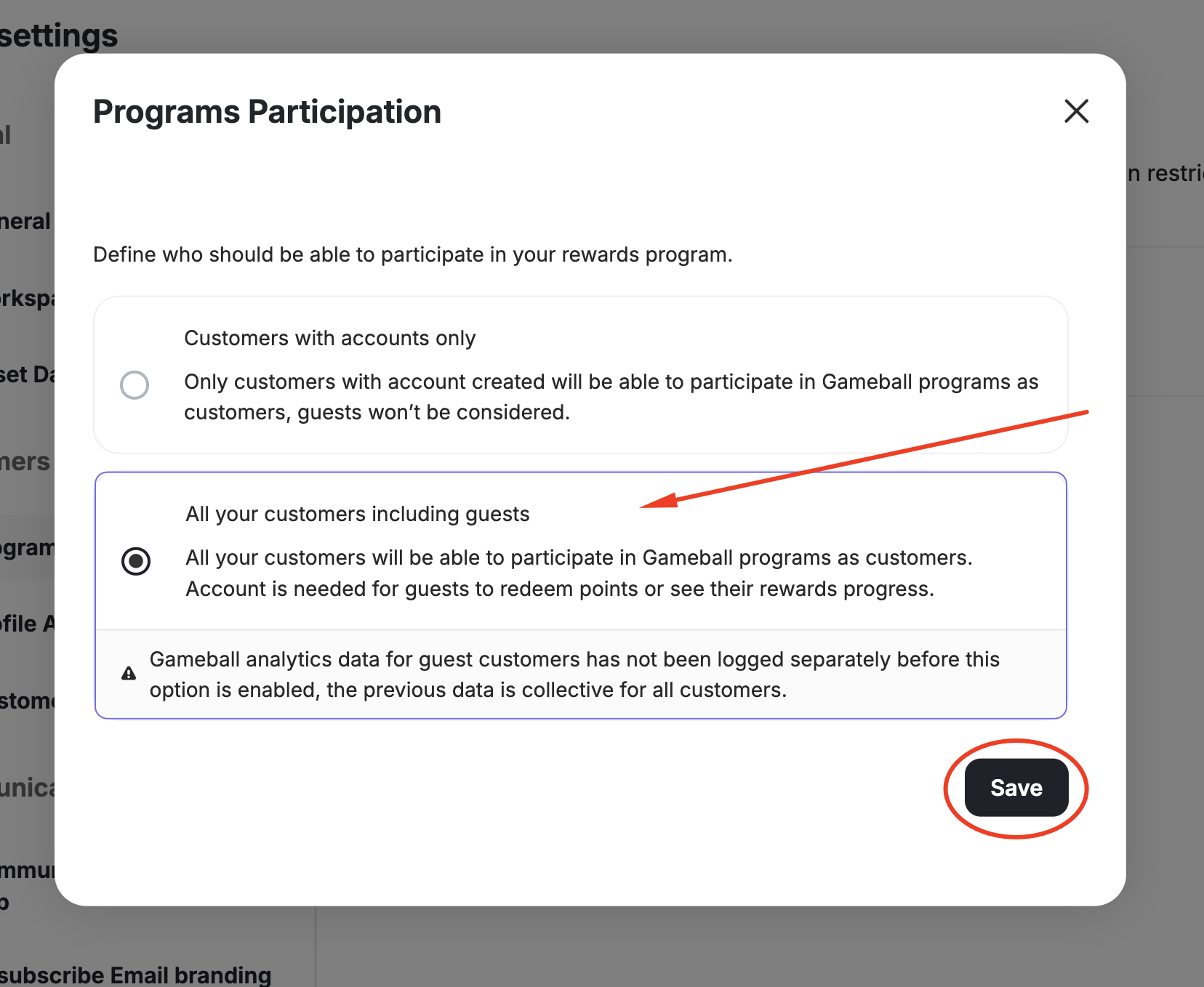 Gameball analytics data for guest customers has not been logged separately before this option is enabled; the previous data is collective for all customers.
***
## What Changes After Enabling Guest Customers?
Once you have enabled all types of customers to be part of your rewards program, two significant changes will apply:
* Guest customers will be able to actively engage in most of your configured loyalty programs.
* Data about your guest customers will appear on your dashboard in the [Customer Section](/product-documentation/understanding-your-customers/gameball-customers/introduction-to-customers-on-gameball) and the [Customers Activities](/product-documentation/understanding-your-customers/your-customers/customer-activity-log) page, along with registered customers' data.
Gameball analytics data for guest customers has not been logged separately before this option is enabled; the previous data is collective for all customers.
***
## What Changes After Enabling Guest Customers?
Once you have enabled all types of customers to be part of your rewards program, two significant changes will apply:
* Guest customers will be able to actively engage in most of your configured loyalty programs.
* Data about your guest customers will appear on your dashboard in the [Customer Section](/product-documentation/understanding-your-customers/gameball-customers/introduction-to-customers-on-gameball) and the [Customers Activities](/product-documentation/understanding-your-customers/your-customers/customer-activity-log) page, along with registered customers' data.
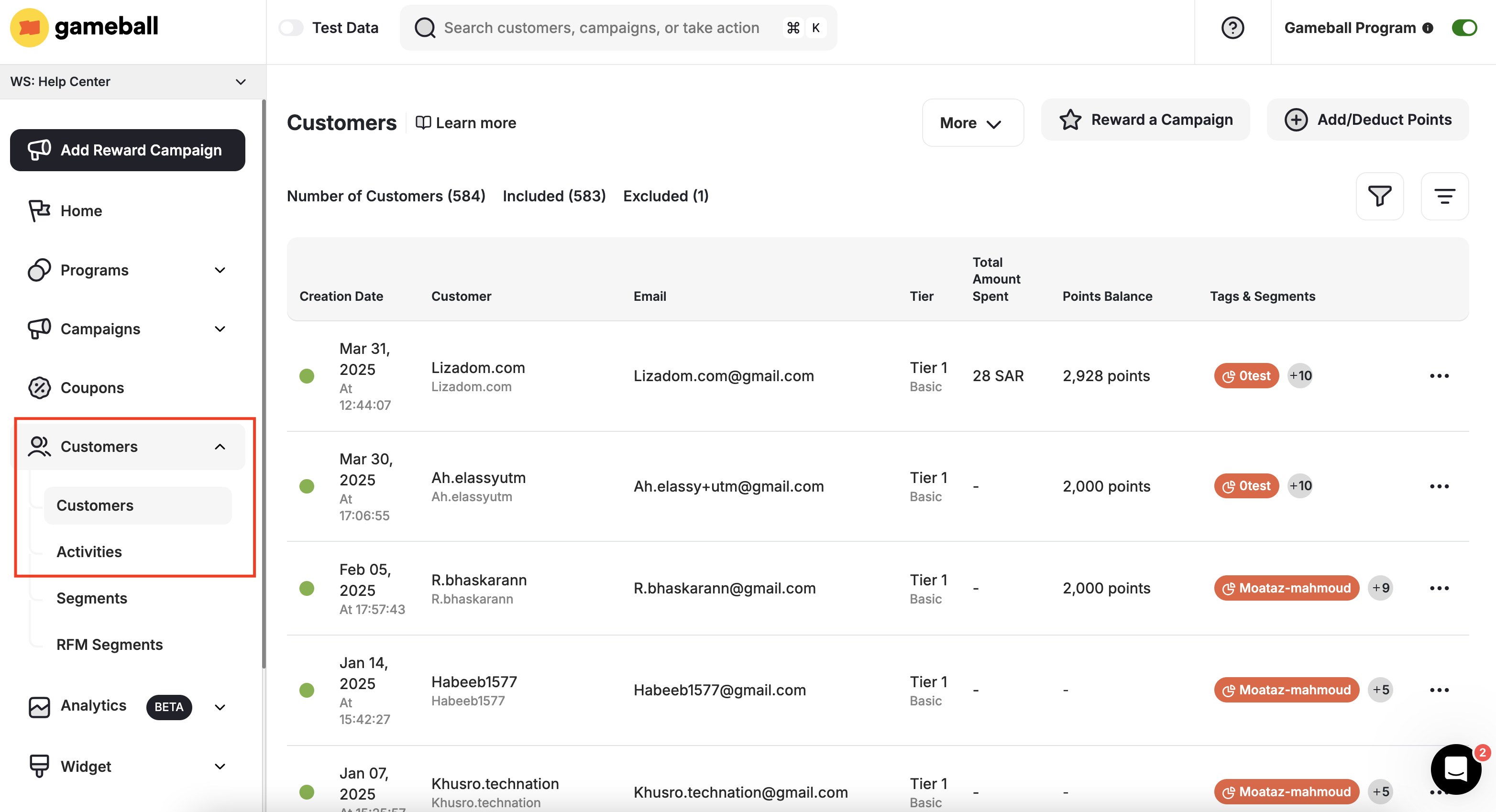 Guest customers have the same info as registered customers, such as:
* Creation date
* ID
* Email
* Level
* Leveling up method
* Points Balance
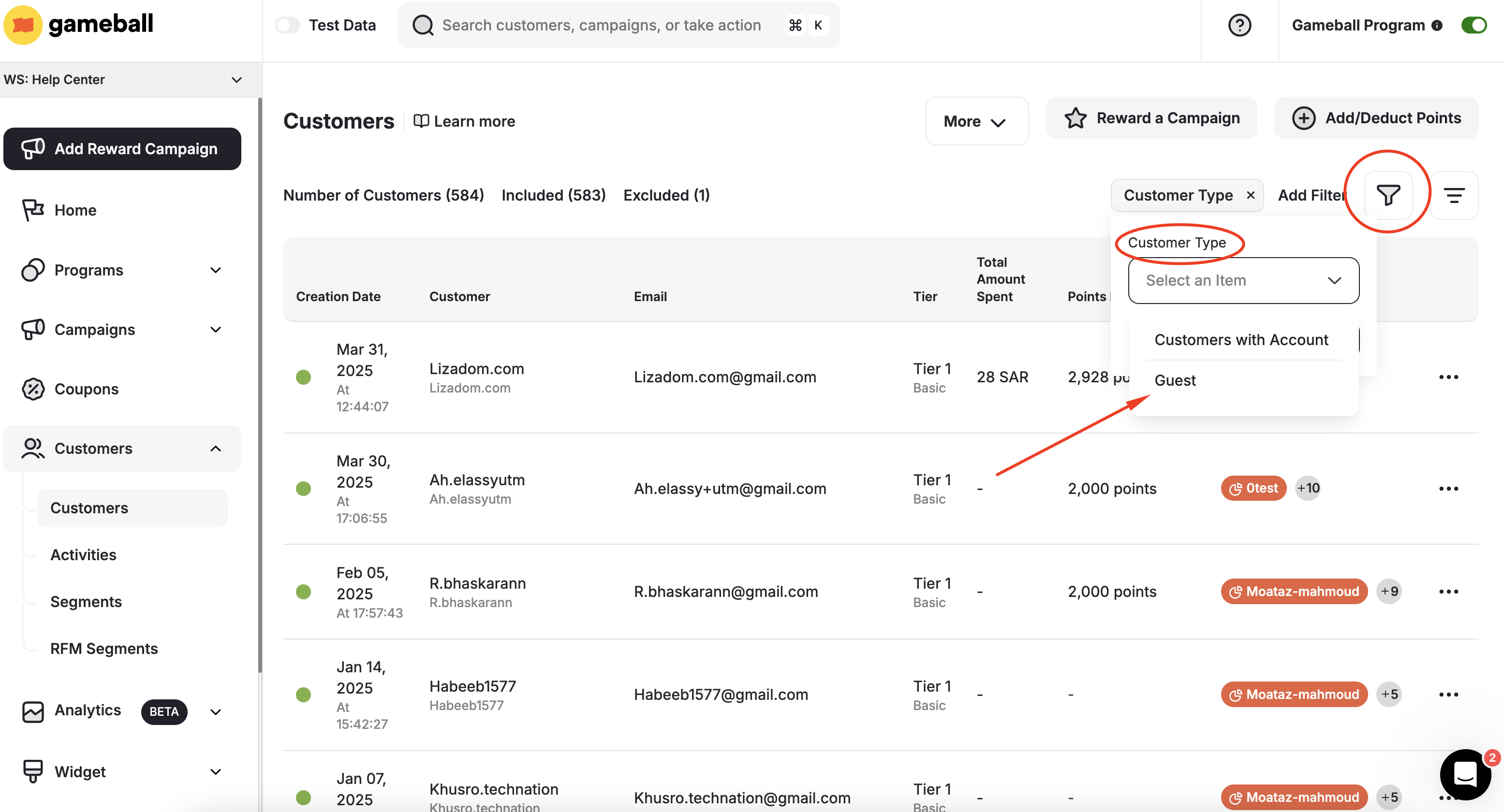
### Filtering to View Guests-Only Data
If you want to view only registered customers or only guests, you can filter the customer list:
Choose **"Customer Type"** as your filter, then choose **"Customer with Account"** or **"Guest"**.
Guest customers have the same info as registered customers, such as:
* Creation date
* ID
* Email
* Level
* Leveling up method
* Points Balance
### Filtering to View Guests-Only Data
If you want to view only registered customers or only guests, you can filter the customer list:
Choose **"Customer Type"** as your filter, then choose **"Customer with Account"** or **"Guest"**.
 All the current actions in the customer profile apply normally to guests: Include/Exclude, Adjust Balance, Adjust Level, Reward Campaigns, and Assign Tag.
***
## What Actions Can Be Applied to Guests?
Guest customers can have the following actions applied:
* Add Achievement Manually
* Tag Filtered Customers
* Include/Exclude Customers
* Update/Migrate Customers
* Reward a Campaign
* Add/Deduct Points
***
## Which Programs and Rewards Are Guests Included In?
| Program | Details |
| ----------------------- | ------------------------------------------------------------------------------ |
| **Cashback** | Same cashback rules configured will be applied by default to guests as well |
| **Redemption** | Guest customers will not be able to redeem their rewards unless they sign up |
| **Reward Campaigns** | Guests can achieve **Scheduled** and **Event-based** campaign types only |
| **Tiers** | The Tier program applies normally to guests |
| **Email Notifications** | Just like customers, guests will receive emails when they complete a milestone |
Guests have to register their email during the checkout process when placing an order to start receiving the configured email notifications.
| Program | Details |
| --------------------- | ---------------------------------------------------------------------------------------------------------------------------------------------------------- |
| **Referral** | Guests cannot refer other friends, however, they may receive a reward if referred by a registered customer (if your referral rule configurations allow it) |
| **Reward Campaigns** | Guests cannot achieve: Signup, Birthday, Anniversary, Daily Streak, or Social Media campaign types |
| **Points Redemption** | Guests can win points, but cannot redeem them until they sign up |
When a guest customer creates an account, they will be able to find all the rewards they have won before creating an account.
***
## Related Articles
Control which customers participate in your entire loyalty program.
Import guest and registered customers into Gameball using a CSV file.
All the current actions in the customer profile apply normally to guests: Include/Exclude, Adjust Balance, Adjust Level, Reward Campaigns, and Assign Tag.
***
## What Actions Can Be Applied to Guests?
Guest customers can have the following actions applied:
* Add Achievement Manually
* Tag Filtered Customers
* Include/Exclude Customers
* Update/Migrate Customers
* Reward a Campaign
* Add/Deduct Points
***
## Which Programs and Rewards Are Guests Included In?
| Program | Details |
| ----------------------- | ------------------------------------------------------------------------------ |
| **Cashback** | Same cashback rules configured will be applied by default to guests as well |
| **Redemption** | Guest customers will not be able to redeem their rewards unless they sign up |
| **Reward Campaigns** | Guests can achieve **Scheduled** and **Event-based** campaign types only |
| **Tiers** | The Tier program applies normally to guests |
| **Email Notifications** | Just like customers, guests will receive emails when they complete a milestone |
Guests have to register their email during the checkout process when placing an order to start receiving the configured email notifications.
| Program | Details |
| --------------------- | ---------------------------------------------------------------------------------------------------------------------------------------------------------- |
| **Referral** | Guests cannot refer other friends, however, they may receive a reward if referred by a registered customer (if your referral rule configurations allow it) |
| **Reward Campaigns** | Guests cannot achieve: Signup, Birthday, Anniversary, Daily Streak, or Social Media campaign types |
| **Points Redemption** | Guests can win points, but cannot redeem them until they sign up |
When a guest customer creates an account, they will be able to find all the rewards they have won before creating an account.
***
## Related Articles
Control which customers participate in your entire loyalty program.
Import guest and registered customers into Gameball using a CSV file.