> ## Documentation Index
> Fetch the complete documentation index at: https://docs.gameball.co/llms.txt
> Use this file to discover all available pages before exploring further.
# How Do I Publish Gameball Experience and Widget on My Platform?
> Learn how to enable Gameball experience on your platform and let your customers start using the widget.
Publishing the Gameball experience and widget on your platform is effortless. Once you finish designing and configuring the experience, follow the steps below.
***
## Publishing Your Gameball Experience
Log in to your **Gameball Admin Dashboard**.
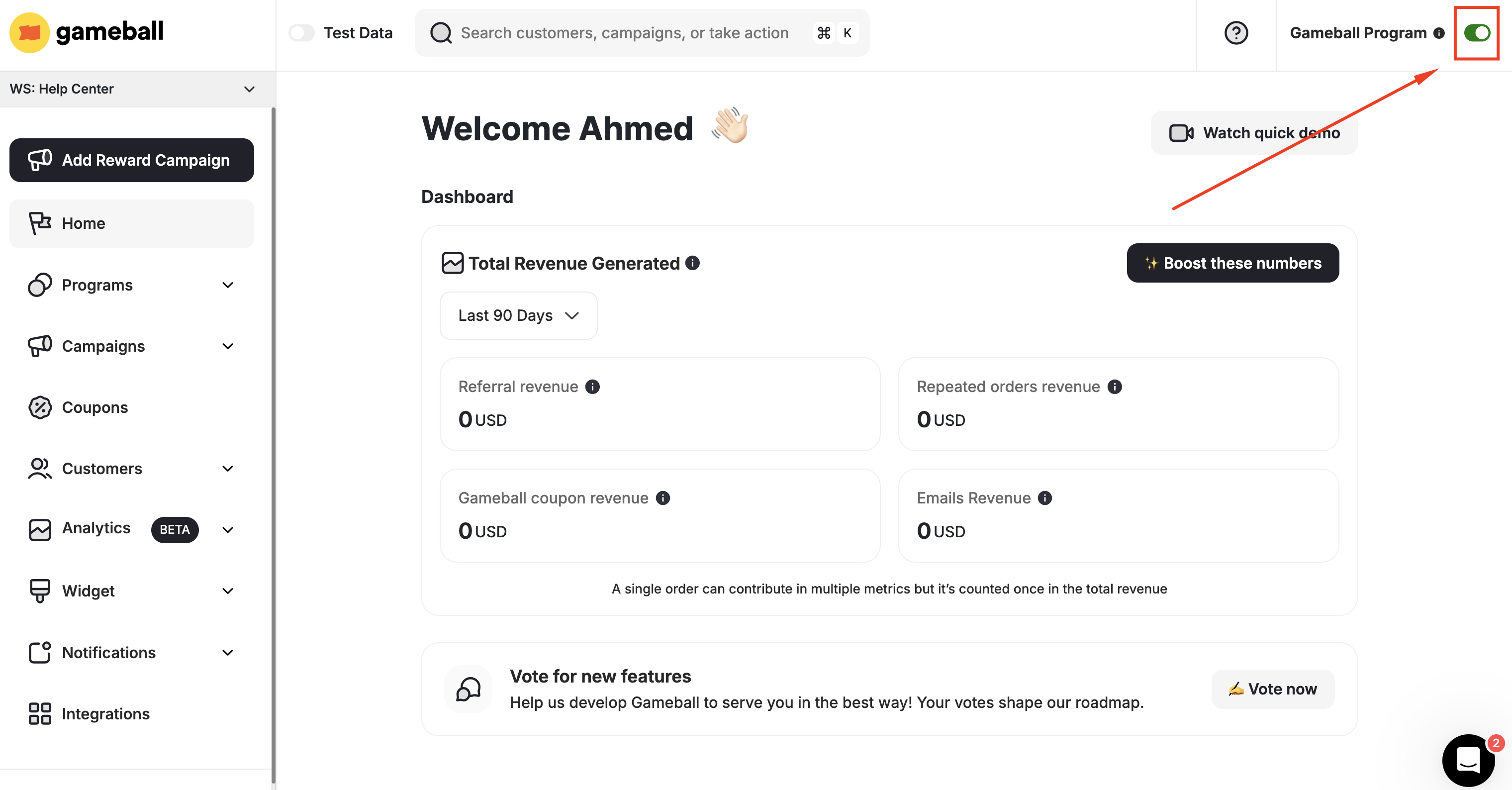
At the upper section of any page on the dashboard, publish Gameball by switching the toggle as shown in the screenshot below.
 ***
## What Happens When You Deactivate the Program?
When you disable Gameball by switching off the toggle, the following applies:
| Effect | Description |
| ------------------ | ------------------------------------------------------------------------------------------------ |
| Program visibility | Your loyalty program will **not** be visible to your customers |
| Reward earning | Your customers will **not** earn rewards |
| Notifications | Your customers will **not** receive any messages, notifications, or emails |
| Customer actions | Your customers' actions will still be added to Gameball |
| Existing coupons | Your customers will be able to use coupons they had already claimed before disabling the program |
Once you toggle to unpublish, your customers will no longer find the Gameball widget on your platform. Any actions like purchases done by your customers during the time Gameball is inactive will still reflect on Gameball; however, your customers will not be rewarded for their activity.
***
## What Happens When You Deactivate the Program?
When you disable Gameball by switching off the toggle, the following applies:
| Effect | Description |
| ------------------ | ------------------------------------------------------------------------------------------------ |
| Program visibility | Your loyalty program will **not** be visible to your customers |
| Reward earning | Your customers will **not** earn rewards |
| Notifications | Your customers will **not** receive any messages, notifications, or emails |
| Customer actions | Your customers' actions will still be added to Gameball |
| Existing coupons | Your customers will be able to use coupons they had already claimed before disabling the program |
Once you toggle to unpublish, your customers will no longer find the Gameball widget on your platform. Any actions like purchases done by your customers during the time Gameball is inactive will still reflect on Gameball; however, your customers will not be rewarded for their activity.
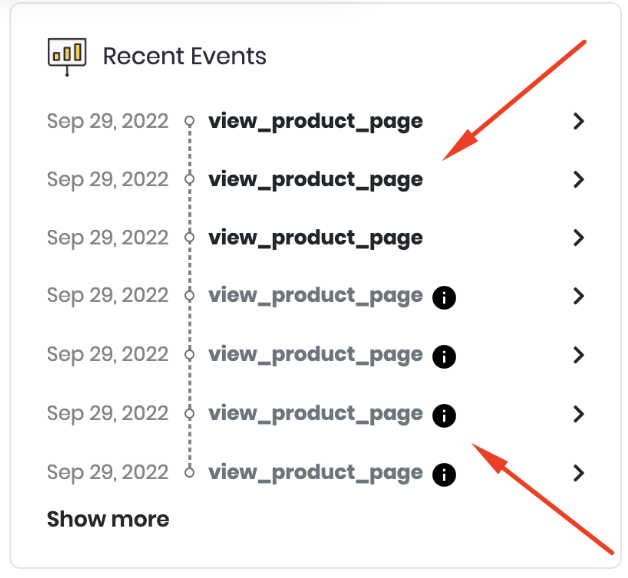 When the Gameball program is switched to unpublished, any customer event will still reflect on their profile on the dashboard; however, they will appear dimmed as these actions will have no consequence.
Once you switch it back on, the widget will appear again on your platform, and your customers will start getting rewarded again.
* Gameball will still be receiving any actions when the toggle is deactivated. **However**, no changes will take place as a result of these customer actions.
* Publishing Gameball means that your customers will be able to see the Gameball widget ([if the widget is not hidden](/product-documentation/customer-widget/start-configuring-profile/control-gameball-widget-visibility-on-your-platform)), and they will start getting rewards based on the designed loyalty experience.
A disclaimer should guide you to understand whether the customers can see the widget or not:
When the Gameball program is switched to unpublished, any customer event will still reflect on their profile on the dashboard; however, they will appear dimmed as these actions will have no consequence.
Once you switch it back on, the widget will appear again on your platform, and your customers will start getting rewarded again.
* Gameball will still be receiving any actions when the toggle is deactivated. **However**, no changes will take place as a result of these customer actions.
* Publishing Gameball means that your customers will be able to see the Gameball widget ([if the widget is not hidden](/product-documentation/customer-widget/start-configuring-profile/control-gameball-widget-visibility-on-your-platform)), and they will start getting rewards based on the designed loyalty experience.
A disclaimer should guide you to understand whether the customers can see the widget or not:
 Read more on [controlling your loyalty program's visibility](/product-documentation/customer-widget/start-configuring-profile/control-gameball-widget-visibility-on-your-platform).
***
## Related Articles
Set up customer account creation to allow customers to join your loyalty program.
Let Shopify customers exchange their points for discount codes and free items.
Move your existing customers from a previous loyalty program to Gameball.
Manage where and when the Gameball widget is visible on your platform.
Read more on [controlling your loyalty program's visibility](/product-documentation/customer-widget/start-configuring-profile/control-gameball-widget-visibility-on-your-platform).
***
## Related Articles
Set up customer account creation to allow customers to join your loyalty program.
Let Shopify customers exchange their points for discount codes and free items.
Move your existing customers from a previous loyalty program to Gameball.
Manage where and when the Gameball widget is visible on your platform.