> ## Documentation Index
> Fetch the complete documentation index at: https://docs.gameball.co/llms.txt
> Use this file to discover all available pages before exploring further.
# How Do I Give Different Point Earning Rules for Different Order Types?
> Create customized point-earning rules based on order attributes to reward customers differently depending on how and what they buy.
| Platform | Plan |
| ------------ | ---------- |
| Shopify | Guru |
| Salla | Guru |
| Non-Platform | Enterprise |
Gameball lets you create custom point-earning rules based on any order attribute. Rather than applying a single flat earning rate across all purchases, you can define specific conditions — such as order value, payment method, or product category — and assign different point rewards to each scenario.
***
## How to Set Up Custom Earning Rules
Go to **Programs > Earn Points** in your Gameball dashboard.
Click on the **Custom** tab.
Click **Add Rule**, then define your conditions. You can filter by any order attribute, such as:
* Order total price
* Product collection or category
* SKU
* Payment method
* Custom order metadata
When **SKU** is selected as the condition field, an **Upload CSV** option appears alongside the text input. Upload a CSV file to populate multiple SKUs at once instead of typing them individually. SKUs are automatically added to the field after upload and remain editable.
 CSV uploads support up to 100 SKUs per file. Clear validation messages are shown for any file type, size, or format issues.
Conditions can be set at the order level or the line-item level. See the [Condition Attributes Reference](#condition-attributes-reference) section below for the full list of available attributes.
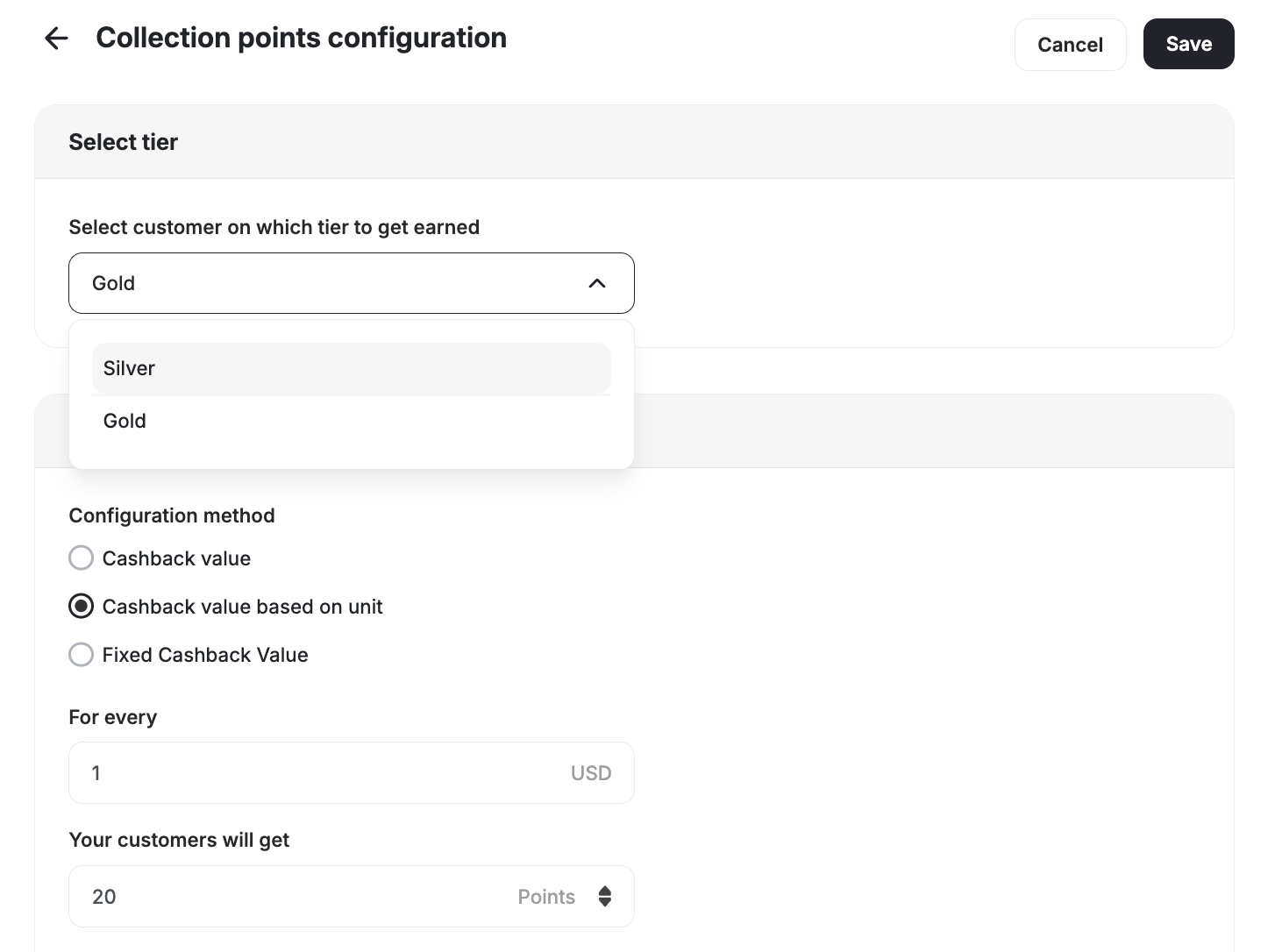
Select how points are calculated for orders that match your conditions:
Award a percentage of the order total as points. For example, give 5% cashback for orders from a specific collection.
Award a fixed number of points per currency unit spent. For example, give 2 points for every 1 EGP spent on orders paid by credit card.
Award a set number of points regardless of the order value. For example, give 10 points for any order above \$50.
Click **Save** to activate the rule. The rule will apply when all specified conditions are met.
***
## Combining Multiple Conditions
You can stack multiple conditions within a single rule. All conditions must be met for the rule to apply.
**Examples:**
* Reward 10 points for orders where `total_price` **greater than** `50`
* Give 5 points per \$1 for `product_category` **equals** `Electronics`, versus 2 points per \$1 for `product_category` **equals** `Accessories`
* Award bonus points for high-value purchases from the Summer Collection paid by credit card
***
## Condition Attributes Reference
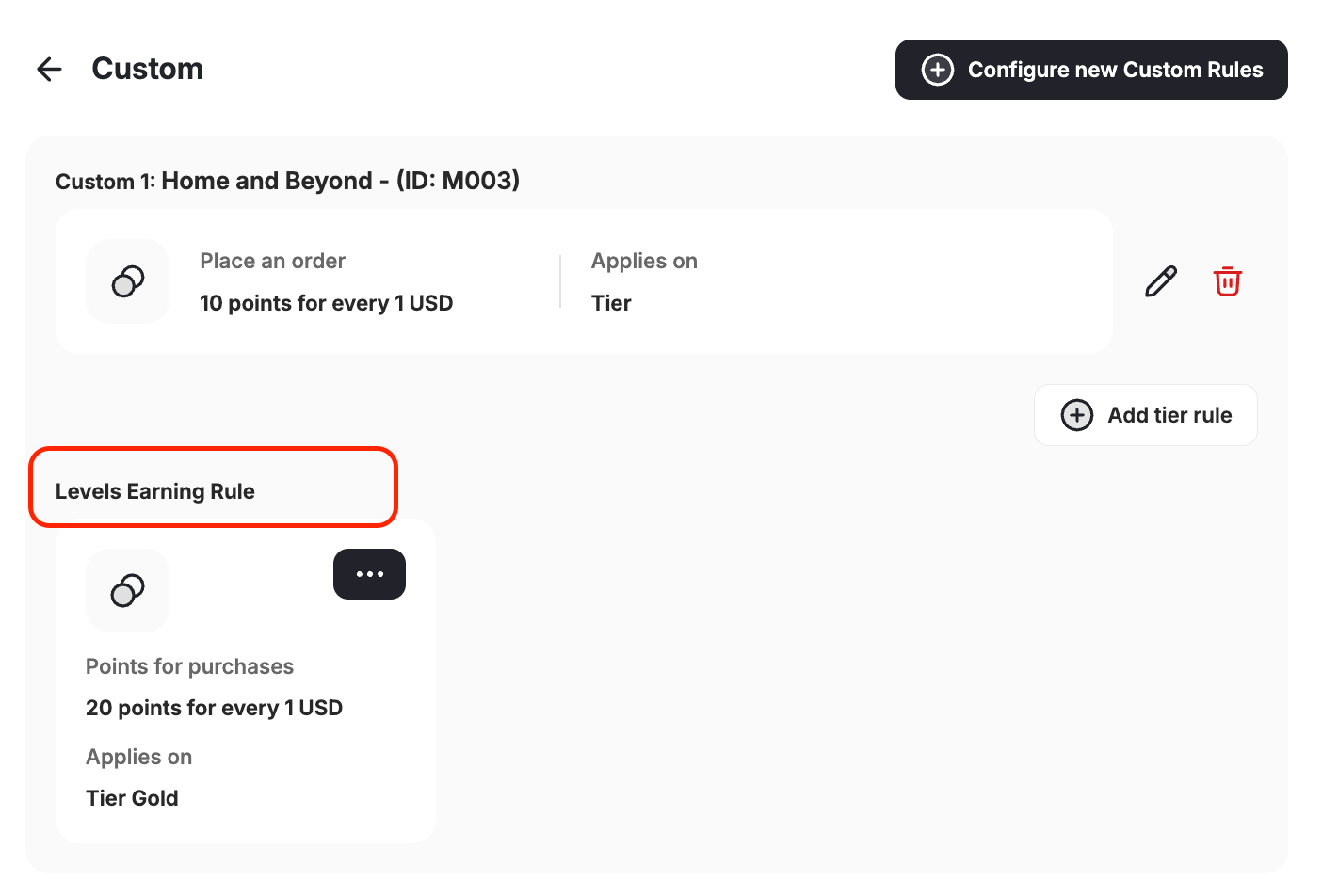
Beyond standard attributes like order total, payment method, and product category, the rule builder supports additional order-level and line-item-level attributes. These let you build more precise earning rules — including tier-specific ones. Each rule can be scoped to a specific **customer tier**, so Gold customers earn at a different rate than Silver customers for the exact same order condition. For example, a Gold tier customer who places an order with 5 or more items could earn 3× points, while a Silver tier customer earns 2× on the same order.
### Order-Level Attributes
These attributes apply to the order as a whole. Combine them with a customer tier and a point assignment method to reward customers differently based on both their loyalty status and how they shop.
| Attribute | Description |
| ----------------------------- | ------------------------------------------------------ |
| **Redeemed amount in points** | The number of points the customer burned on this order |
| **Coupon codes** | The coupon code applied to the order |
| **Total items** | Total quantity of all line items in the order |
| **Total unique items** | Number of distinct products in the order |
| **has\_points\_redemption** | True if points were redeemed on this order |
| **has\_coupon\_redemption** | True if a coupon was burned on this order |
For example, you can set separate rules for each tier — giving Gold customers a 3× multiplier when their order contains 5 or more items, Silver customers a 2× multiplier for the same condition, and standard customers the default rate. You can also award a bonus earn rate to customers on any tier who purchase without applying a coupon code.
CSV uploads support up to 100 SKUs per file. Clear validation messages are shown for any file type, size, or format issues.
Conditions can be set at the order level or the line-item level. See the [Condition Attributes Reference](#condition-attributes-reference) section below for the full list of available attributes.
Select how points are calculated for orders that match your conditions:
Award a percentage of the order total as points. For example, give 5% cashback for orders from a specific collection.
Award a fixed number of points per currency unit spent. For example, give 2 points for every 1 EGP spent on orders paid by credit card.
Award a set number of points regardless of the order value. For example, give 10 points for any order above \$50.
Click **Save** to activate the rule. The rule will apply when all specified conditions are met.
***
## Combining Multiple Conditions
You can stack multiple conditions within a single rule. All conditions must be met for the rule to apply.
**Examples:**
* Reward 10 points for orders where `total_price` **greater than** `50`
* Give 5 points per \$1 for `product_category` **equals** `Electronics`, versus 2 points per \$1 for `product_category` **equals** `Accessories`
* Award bonus points for high-value purchases from the Summer Collection paid by credit card
***
## Condition Attributes Reference
Beyond standard attributes like order total, payment method, and product category, the rule builder supports additional order-level and line-item-level attributes. These let you build more precise earning rules — including tier-specific ones. Each rule can be scoped to a specific **customer tier**, so Gold customers earn at a different rate than Silver customers for the exact same order condition. For example, a Gold tier customer who places an order with 5 or more items could earn 3× points, while a Silver tier customer earns 2× on the same order.
### Order-Level Attributes
These attributes apply to the order as a whole. Combine them with a customer tier and a point assignment method to reward customers differently based on both their loyalty status and how they shop.
| Attribute | Description |
| ----------------------------- | ------------------------------------------------------ |
| **Redeemed amount in points** | The number of points the customer burned on this order |
| **Coupon codes** | The coupon code applied to the order |
| **Total items** | Total quantity of all line items in the order |
| **Total unique items** | Number of distinct products in the order |
| **has\_points\_redemption** | True if points were redeemed on this order |
| **has\_coupon\_redemption** | True if a coupon was burned on this order |
For example, you can set separate rules for each tier — giving Gold customers a 3× multiplier when their order contains 5 or more items, Silver customers a 2× multiplier for the same condition, and standard customers the default rate. You can also award a bonus earn rate to customers on any tier who purchase without applying a coupon code.
 ### Line-Item-Level Attributes
These attributes apply to individual products within the order. Use them when you want to adjust earning based on what happened to a specific item — for example, awarding a higher earn rate on full-price items or giving bonus points on taxed line items.
| Attribute | Description |
| ------------ | ----------------------------------------------------- |
| **Discount** | The discount amount applied to the specific line item |
| **Tax** | The tax amount on the line item |
### Line-Item-Level Attributes
These attributes apply to individual products within the order. Use them when you want to adjust earning based on what happened to a specific item — for example, awarding a higher earn rate on full-price items or giving bonus points on taxed line items.
| Attribute | Description |
| ------------ | ----------------------------------------------------- |
| **Discount** | The discount amount applied to the specific line item |
| **Tax** | The tax amount on the line item |
 ***
## How Custom Rules Interact with Other Earn Rules
When multiple earning rules could apply to the same order, Gameball evaluates them based on rule priority. Custom rules take precedence over the default earn rule when their conditions are matched.
Custom cashback rules and collection-based cashback rules cannot be active simultaneously. Enabling custom cashback deactivates the Merchant feature on the system.
***
## Related Articles
Set up your base earn rule and pointing system configuration.
Customize earning rates by product collection.
Learn how Gameball prioritizes and calculates points across different rules.
***
## How Custom Rules Interact with Other Earn Rules
When multiple earning rules could apply to the same order, Gameball evaluates them based on rule priority. Custom rules take precedence over the default earn rule when their conditions are matched.
Custom cashback rules and collection-based cashback rules cannot be active simultaneously. Enabling custom cashback deactivates the Merchant feature on the system.
***
## Related Articles
Set up your base earn rule and pointing system configuration.
Customize earning rates by product collection.
Learn how Gameball prioritizes and calculates points across different rules.