> ## Documentation Index
> Fetch the complete documentation index at: https://docs.gameball.co/llms.txt
> Use this file to discover all available pages before exploring further.
# How Do I Customize Benefits for Different Tiers?
> Elevate the experience for your most dedicated customers with different benefits for each tier.
| Platform | Plan |
| -------------------------- | --------- |
| Available on all Platforms | All Plans |
Unlock the potential of your customer loyalty program by tailoring exclusive benefits for each tier they reach. When creating or editing tiers, take advantage of the opportunity to design unique benefits specifically for each tier. These benefits can range from discounts, points, different cashback calculations, and free products to brand perks such as free samples and special treatments.
In this article, you will learn more about Gameball's **Tiers Benefits** and how to set them up. But first, [learn how to configure a new tier](/product-documentation/programs/vip-tiers/configuring-gameball-vip-tiers).
 ***
## Gameball's Tiers Benefits
***
## Gameball's Tiers Benefits
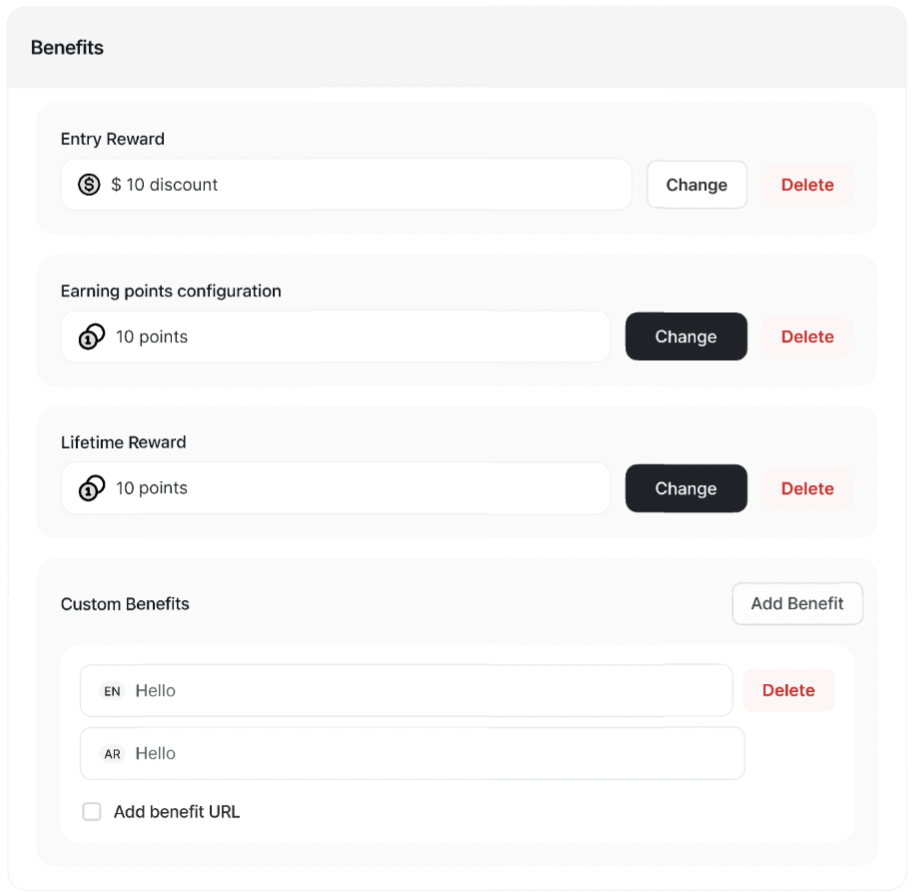
 Choose the reward customers will receive upon reaching this tier. This reward is a one-time offer to incentivize tier progression. To set it up:
**Add** a new tier, or **edit** an existing one.
In the **Benefits** section, click on **Add/Change Reward** beside the **Entry Reward**.
Choose the **Reward Type** you want from the drop-down.
Choose the reward customers will receive upon reaching this tier. This reward is a one-time offer to incentivize tier progression. To set it up:
**Add** a new tier, or **edit** an existing one.
In the **Benefits** section, click on **Add/Change Reward** beside the **Entry Reward**.
Choose the **Reward Type** you want from the drop-down.
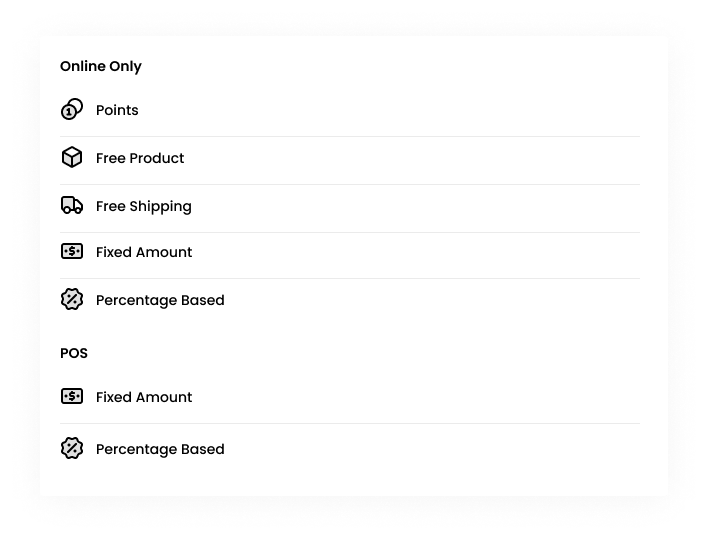 Set up the reward type accordingly. [Learn more about Reward Types and how to set them up](/product-documentation/rewards-campaigns/faqs/understanding-rewards-types).
Press **Save**.
Set up the reward type accordingly. [Learn more about Reward Types and how to set them up](/product-documentation/rewards-campaigns/faqs/understanding-rewards-types).
Press **Save**.
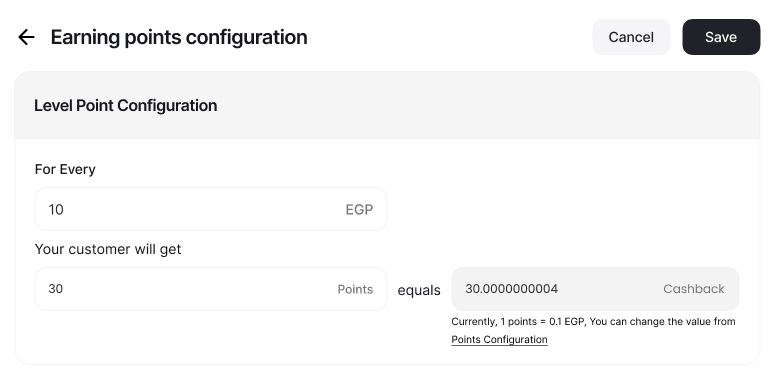
 Determine how many points customers earn in this tier for every dollar spent. This feature overrides the default earning points system and allows for personalized point accumulation based on tier. [Learn more about the Earning points system](/product-documentation/programs/loyalty-points-earn/launch-and-configure-your-earn-pointing-system).
To configure:
**Add** a new tier, or **edit** an existing one.
In the **Benefits** section, click on **Add/Change Reward** beside the **Loyalty Points Earning Custom Configuration**.
Enter both the number of points that you want the customers to earn when they spend a certain amount of dollars.
A cashback calculation of the rule that you set will be shown for your reference. [Learn more about how the redemption works](/product-documentation/programs/loyalty-points-earn/launch-and-configure-your-earn-pointing-system).
Determine how many points customers earn in this tier for every dollar spent. This feature overrides the default earning points system and allows for personalized point accumulation based on tier. [Learn more about the Earning points system](/product-documentation/programs/loyalty-points-earn/launch-and-configure-your-earn-pointing-system).
To configure:
**Add** a new tier, or **edit** an existing one.
In the **Benefits** section, click on **Add/Change Reward** beside the **Loyalty Points Earning Custom Configuration**.
Enter both the number of points that you want the customers to earn when they spend a certain amount of dollars.
A cashback calculation of the rule that you set will be shown for your reference. [Learn more about how the redemption works](/product-documentation/programs/loyalty-points-earn/launch-and-configure-your-earn-pointing-system).
 Grant customers on this tier a recurring benefit that they can enjoy as long as they remain on the tier. To set it up:
**Add** a new tier, or **edit** an existing one.
In the **Benefits** section, click on **Add/Change Reward** beside the **Lifetime Reward**.
Specify the reward type, **excluding points** that cannot be given as a lifetime reward. Set up the reward type accordingly. [Learn more about Reward Types and how to set them up](/product-documentation/rewards-campaigns/faqs/understanding-rewards-types).
Press **Save**.
Grant customers on this tier a recurring benefit that they can enjoy as long as they remain on the tier. To set it up:
**Add** a new tier, or **edit** an existing one.
In the **Benefits** section, click on **Add/Change Reward** beside the **Lifetime Reward**.
Specify the reward type, **excluding points** that cannot be given as a lifetime reward. Set up the reward type accordingly. [Learn more about Reward Types and how to set them up](/product-documentation/rewards-campaigns/faqs/understanding-rewards-types).
Press **Save**.
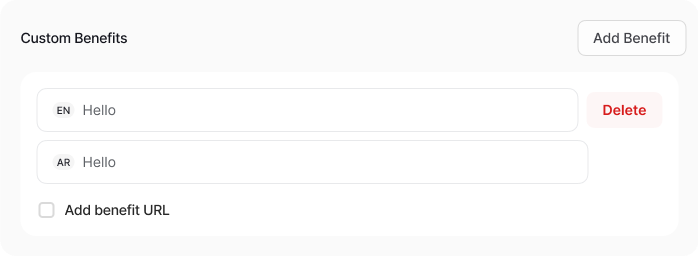
 Offer additional brand perks or benefits beyond the standard loyalty rewards provided by Gameball.
* Write a descriptive text explaining the extra benefits associated with this tier.
* Optionally, add a URL to redirect customers to a page providing more details about the benefits.
Offer additional brand perks or benefits beyond the standard loyalty rewards provided by Gameball.
* Write a descriptive text explaining the extra benefits associated with this tier.
* Optionally, add a URL to redirect customers to a page providing more details about the benefits.
 ***
## Return Window Duration for Tier Entry Reward Points
**Prevent temporary reward abuse** by locking tier-entry points until the return window expires. This ensures customers cannot instantly redeem tier-upgrade rewards and then refund their qualifying orders to gain unfair benefits.
With this update, tier-entry points can be temporarily **locked (pending)** until the configured window expires, improving reward integrity and reducing fraudulent behavior.
***
## Return Window Duration for Tier Entry Reward Points
**Prevent temporary reward abuse** by locking tier-entry points until the return window expires. This ensures customers cannot instantly redeem tier-upgrade rewards and then refund their qualifying orders to gain unfair benefits.
With this update, tier-entry points can be temporarily **locked (pending)** until the configured window expires, improving reward integrity and reducing fraudulent behavior.
 ### Configuration
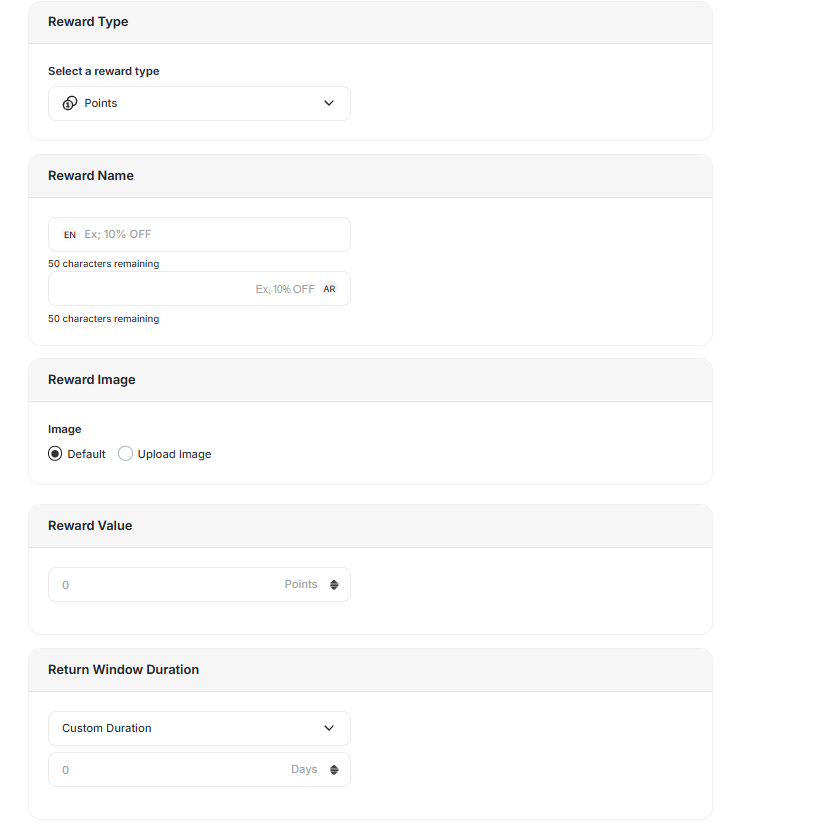
A new field is now available inside each **Tier Entry Reward** setup:
* **Return Window Duration (days)**
* Accepts numeric values greater than or equal to 0
* Default value: **0 days** (points activate immediately)
This gives you full control over how long tier-reward points stay locked before becoming usable.
### Updated Reward Logic
When a customer levels up to a new tier:
* Entry reward points are issued with **status = pending**.
* Pending duration matches the configured Return Window Duration.
* Points automatically switch to **status = active** once the window expires.
This ensures points cannot be redeemed during the waiting period.
### Refund and Downgrade Behavior
The system now handles return-window scenarios more intelligently:
| Scenario | Behavior |
| ---------------------------------------------- | ----------------------------------------------- |
| Refund or Tier Downgrade **before** activation | Pending points are **revoked automatically** |
| Refund **after** activation | Standard refund deduction rules apply, as usual |
This eliminates the temporary gain loophole that customers could previously exploit.
***
## Customers Discovering Tier Benefits
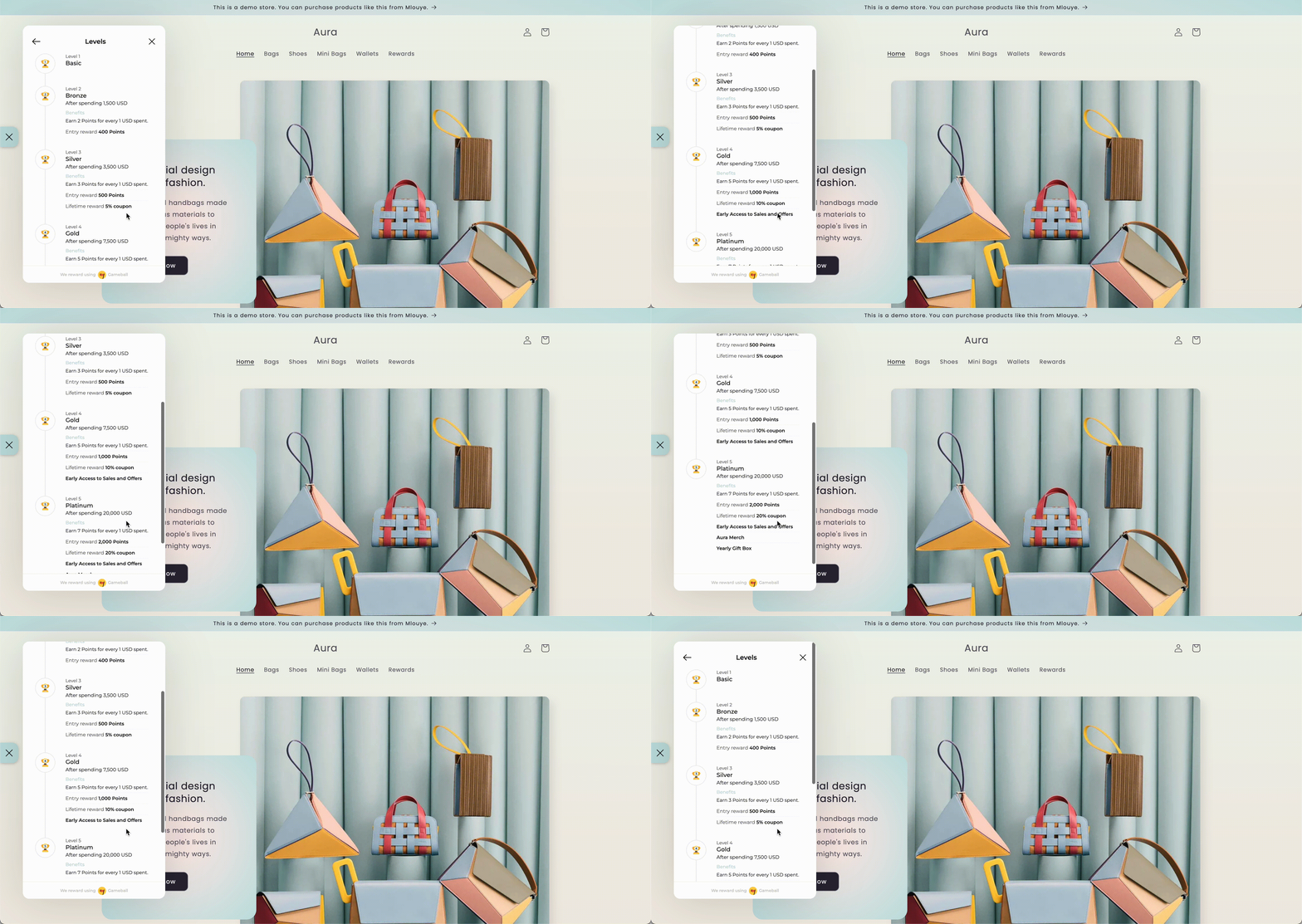
Once you've configured the benefits through the Gameball dashboard, customers will see the details prominently displayed in the tier tab of their widget. This ensures that they are aware of the exclusive benefits associated with their tier, enhancing their overall experience and incentivizing continued engagement.
### Configuration
A new field is now available inside each **Tier Entry Reward** setup:
* **Return Window Duration (days)**
* Accepts numeric values greater than or equal to 0
* Default value: **0 days** (points activate immediately)
This gives you full control over how long tier-reward points stay locked before becoming usable.
### Updated Reward Logic
When a customer levels up to a new tier:
* Entry reward points are issued with **status = pending**.
* Pending duration matches the configured Return Window Duration.
* Points automatically switch to **status = active** once the window expires.
This ensures points cannot be redeemed during the waiting period.
### Refund and Downgrade Behavior
The system now handles return-window scenarios more intelligently:
| Scenario | Behavior |
| ---------------------------------------------- | ----------------------------------------------- |
| Refund or Tier Downgrade **before** activation | Pending points are **revoked automatically** |
| Refund **after** activation | Standard refund deduction rules apply, as usual |
This eliminates the temporary gain loophole that customers could previously exploit.
***
## Customers Discovering Tier Benefits
Once you've configured the benefits through the Gameball dashboard, customers will see the details prominently displayed in the tier tab of their widget. This ensures that they are aware of the exclusive benefits associated with their tier, enhancing their overall experience and incentivizing continued engagement.
 ***
## Related Articles
Understand the different methods for advancing customers through tiers.
Learn how Gameball manages tier expiry in various scenarios.
***
## Related Articles
Understand the different methods for advancing customers through tiers.
Learn how Gameball manages tier expiry in various scenarios.