> ## Documentation Index
> Fetch the complete documentation index at: https://docs.gameball.co/llms.txt
> Use this file to discover all available pages before exploring further.
# What Is Rewards Types in Gameball?
> Let's dive deeper into each reward type that you can offer your customers and how you can set them up.
Rewarding customers is a key strategy to gamify their experience and foster loyalty. Gameball offers a variety of reward types that enable you to incentivize your customers effectively, whether they complete a specific campaign or redeem rewards for points they've collected.
 ***
## Types of Rewards Offered by Gameball
Gameball provides several reward types across various platforms, each designed to enhance the customer experience.
| Reward Type | Subcategories | Platform |
| ---------------------------- | ----------------------------------------------------------------------------------------------------------------------------------------------------------------------------------------------------------------------------------------------------------------------------------------------------------------------------------------------------- | ------------------------------------- |
| **Online Only Rewards** | Points, Free Product, Free Shipping, Fixed Amount-based Discount (Available in Dynamic mode), Percentage-based Discount, Custom Rewards (Third-party), External Reward, Coupon Engine Rewards (Third-party redemption, External Reward API call, Percentage-based cashback coupon, Fixed Amount-based cashback coupon, Percentage-based fee discount) | All platforms |
| **POS Rewards** | POS Fixed Amount-based Discount, POS Percentage-based Discount | Shopify |
| **Shopify-Specific Rewards** | Store Credit, Recharge Fixed Amount-based Discount, Recharge Percentage-based Discount | Shopify |
| **Recharge Rewards** | Fixed Amount-based Discount, Percentage-based Discount | Shopify - Recharge Subscription Users |
***
## Setting Up Each Reward Type
This reward is available as a campaign reward only.
| Platform | Plan |
| -------- | ---- |
| All | All |
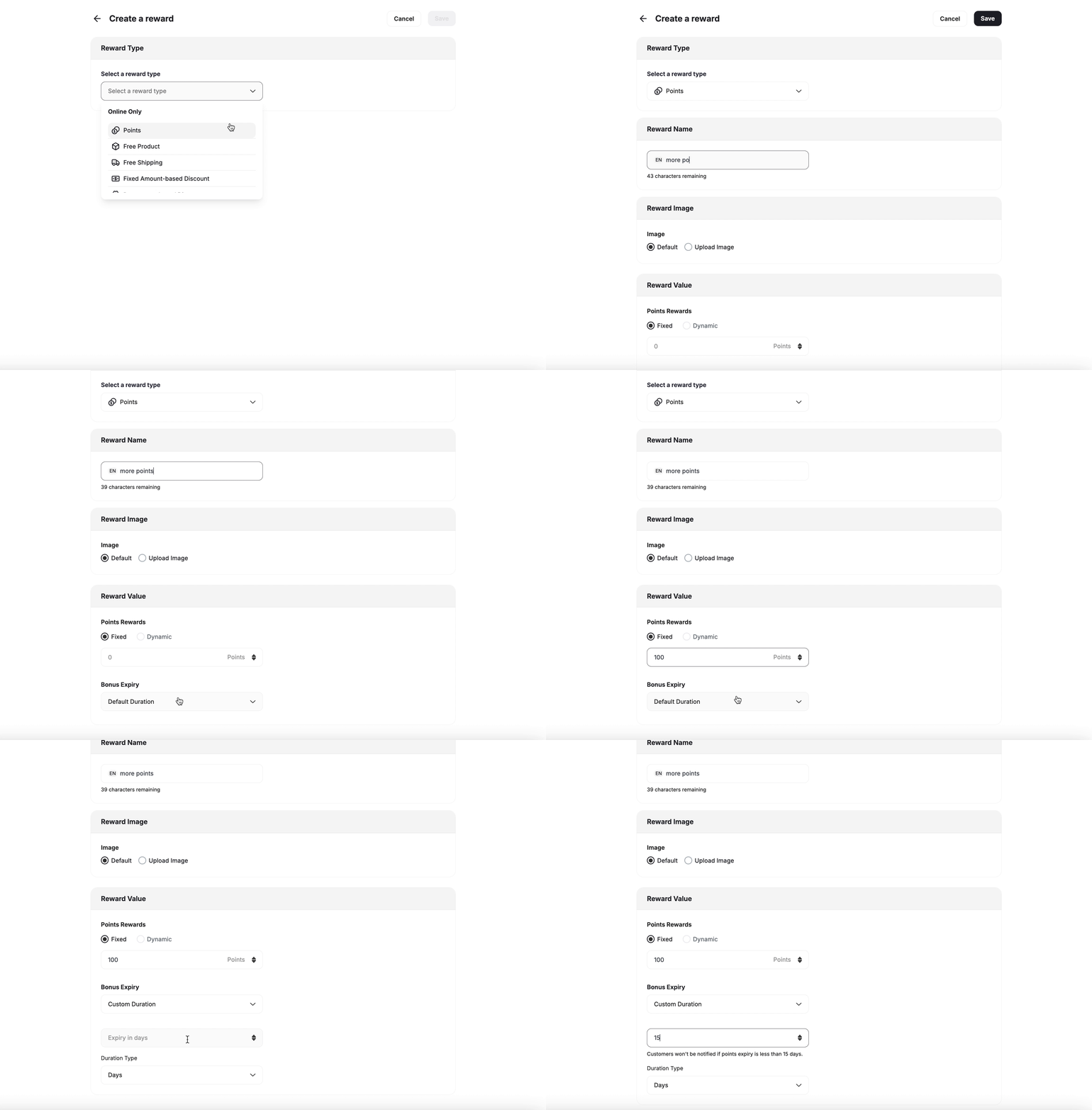
* **Add Points**: Specify the number of points to award customers.
* **Tiering Up Method**: If you are using Gameball's score feature for tiering, you can reward customers with scores in addition to points. [Learn more about Score](/product-documentation/programs/vip-tiers/tier-settings).
* **Points Expiry Options**:
* **Default Expiry**: Uses the platform's default points expiration setting. [Learn how to configure your default expiry settings](/product-documentation/programs/loyalty-points-earn)
* **Custom Expiry**: Override the default by setting a specific expiration for that particular reward.
* **Duration Type**: Choose from Days, Months, or Years.
* **Duration**: Define the duration based on the selected type.
***
## Types of Rewards Offered by Gameball
Gameball provides several reward types across various platforms, each designed to enhance the customer experience.
| Reward Type | Subcategories | Platform |
| ---------------------------- | ----------------------------------------------------------------------------------------------------------------------------------------------------------------------------------------------------------------------------------------------------------------------------------------------------------------------------------------------------- | ------------------------------------- |
| **Online Only Rewards** | Points, Free Product, Free Shipping, Fixed Amount-based Discount (Available in Dynamic mode), Percentage-based Discount, Custom Rewards (Third-party), External Reward, Coupon Engine Rewards (Third-party redemption, External Reward API call, Percentage-based cashback coupon, Fixed Amount-based cashback coupon, Percentage-based fee discount) | All platforms |
| **POS Rewards** | POS Fixed Amount-based Discount, POS Percentage-based Discount | Shopify |
| **Shopify-Specific Rewards** | Store Credit, Recharge Fixed Amount-based Discount, Recharge Percentage-based Discount | Shopify |
| **Recharge Rewards** | Fixed Amount-based Discount, Percentage-based Discount | Shopify - Recharge Subscription Users |
***
## Setting Up Each Reward Type
This reward is available as a campaign reward only.
| Platform | Plan |
| -------- | ---- |
| All | All |
* **Add Points**: Specify the number of points to award customers.
* **Tiering Up Method**: If you are using Gameball's score feature for tiering, you can reward customers with scores in addition to points. [Learn more about Score](/product-documentation/programs/vip-tiers/tier-settings).
* **Points Expiry Options**:
* **Default Expiry**: Uses the platform's default points expiration setting. [Learn how to configure your default expiry settings](/product-documentation/programs/loyalty-points-earn)
* **Custom Expiry**: Override the default by setting a specific expiration for that particular reward.
* **Duration Type**: Choose from Days, Months, or Years.
* **Duration**: Define the duration based on the selected type.
 This reward is available as a campaign reward as well as a redemption option.
| Platform | Plan |
| -------- | ------------------------- |
| All | All except for free plans |
**Reward Campaign:**
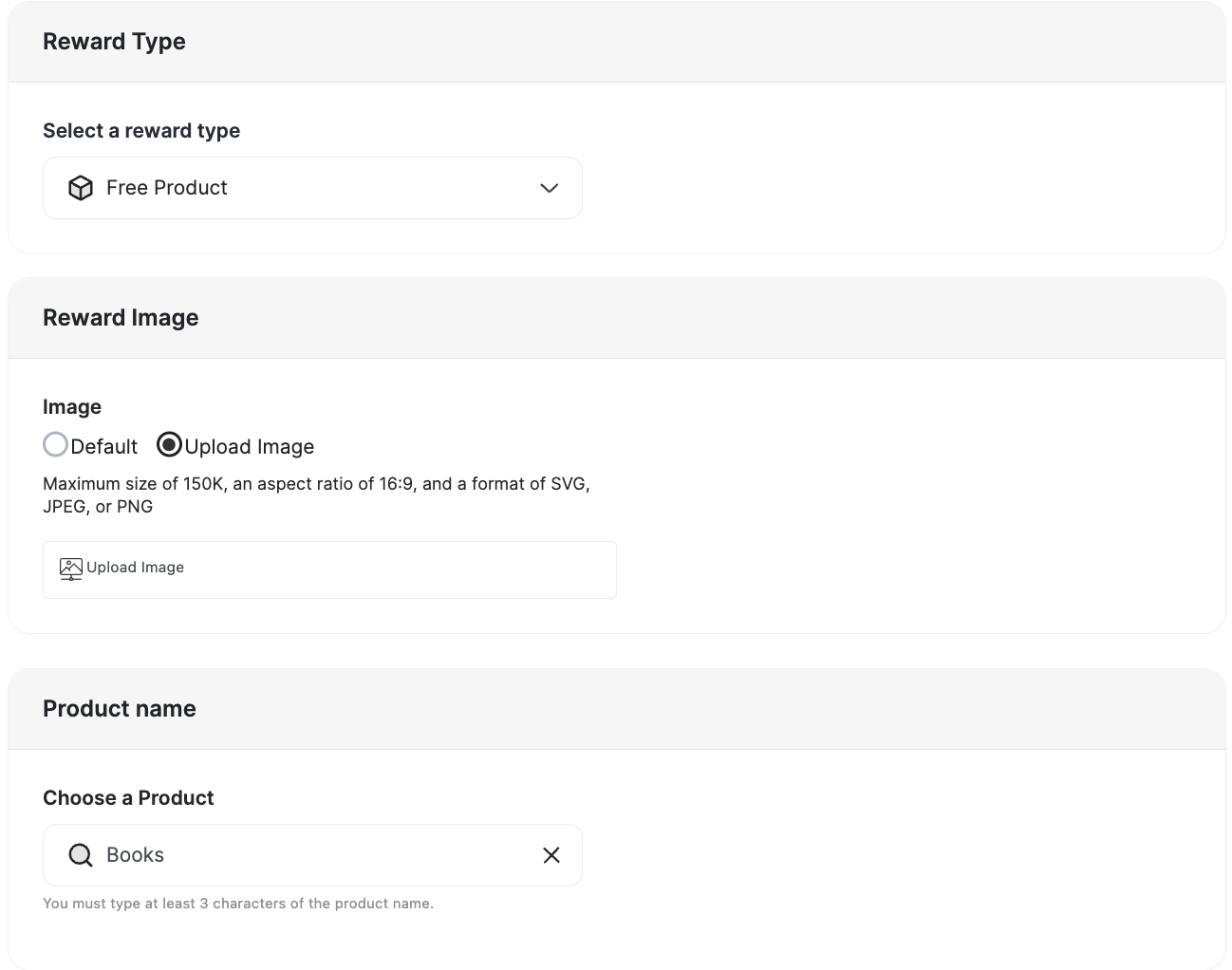
* **Reward Image**: Select the product's image.
This reward is available as a campaign reward as well as a redemption option.
| Platform | Plan |
| -------- | ------------------------- |
| All | All except for free plans |
**Reward Campaign:**
* **Reward Image**: Select the product's image.
 * **Advanced Options:**
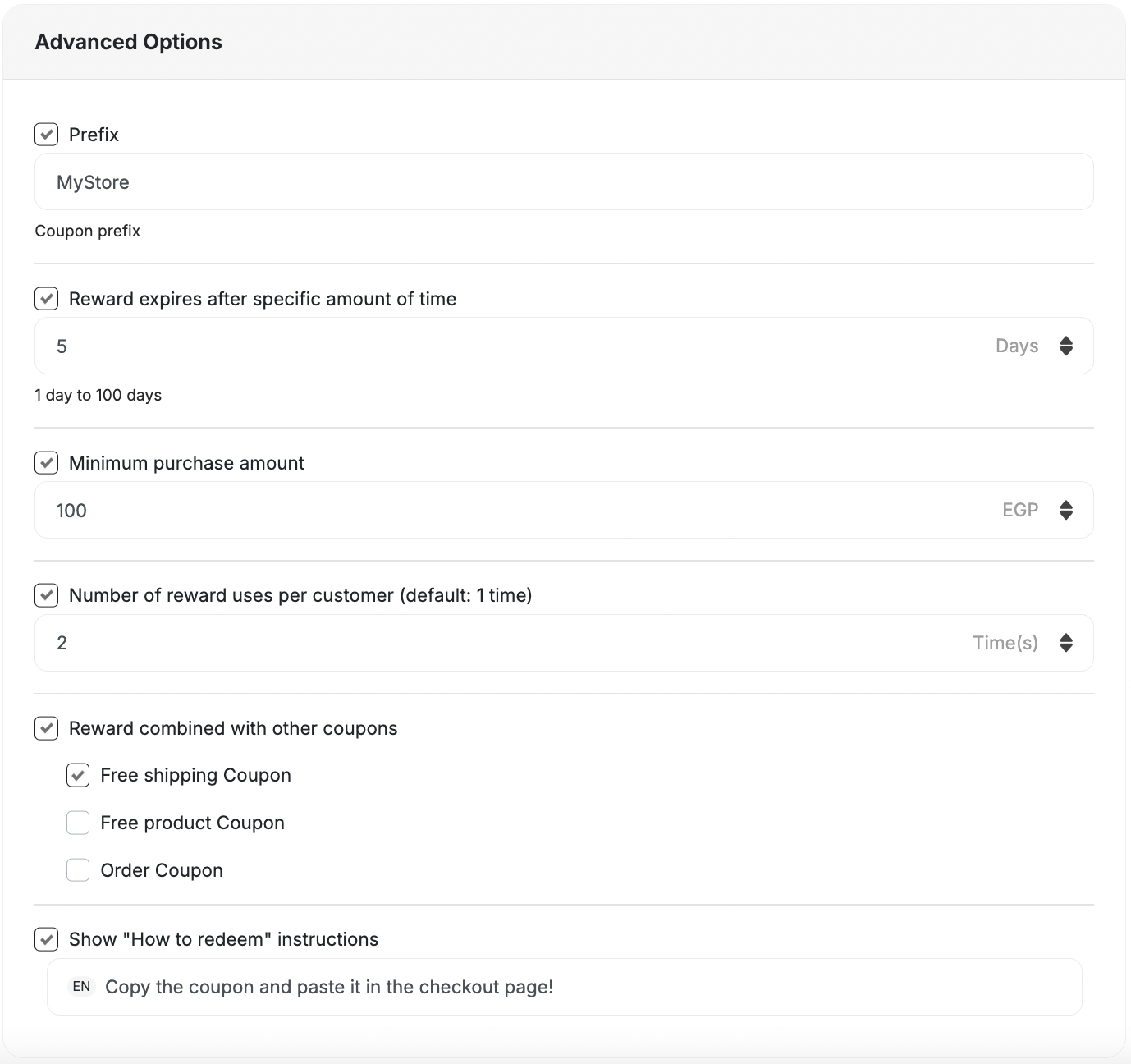
* **Prefix:** Add Coupon Prefix.
* **Reward expires after a specific amount of time:** Set the expiry for the reward.
* **Minimum purchase amount:** The amount required for usage. (Default: 1)
**Minimum Purchase Applies to the Product Price Only**
When you set a minimum purchase amount on a Free Product reward, Shopify and Salla validate the minimum against the price of the discounted product — not the customer's total cart value. For example, if the free product costs \$22.50 and your minimum is \$50, the coupon will be rejected even if the customer's cart totals \$100 or more.
This is a platform-level limitation on both Shopify and Salla. Set the minimum purchase amount based on the product's price, not the expected cart total.
* **Reward combined with other coupons:** Compatibility with other coupons or to be won alongside other coupons.
* **Show "How to redeem" instructions.**
* **Advanced Options:**
* **Prefix:** Add Coupon Prefix.
* **Reward expires after a specific amount of time:** Set the expiry for the reward.
* **Minimum purchase amount:** The amount required for usage. (Default: 1)
**Minimum Purchase Applies to the Product Price Only**
When you set a minimum purchase amount on a Free Product reward, Shopify and Salla validate the minimum against the price of the discounted product — not the customer's total cart value. For example, if the free product costs \$22.50 and your minimum is \$50, the coupon will be rejected even if the customer's cart totals \$100 or more.
This is a platform-level limitation on both Shopify and Salla. Set the minimum purchase amount based on the product's price, not the expected cart total.
* **Reward combined with other coupons:** Compatibility with other coupons or to be won alongside other coupons.
* **Show "How to redeem" instructions.**
 **Custom Redemption Rule:**
* Follow the same steps as the Reward Campaign setup.
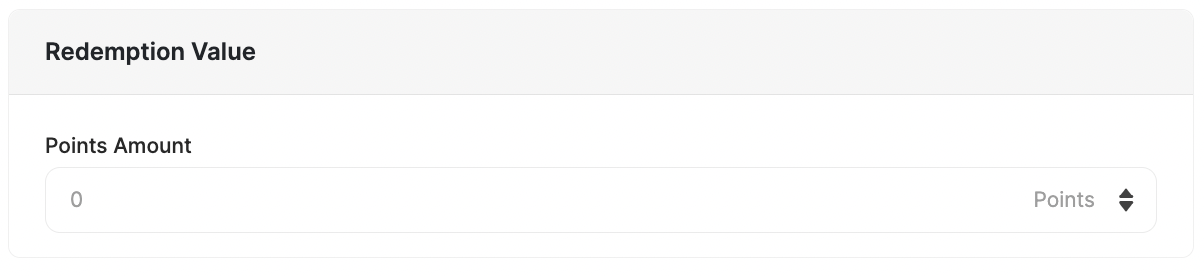
* Add the points needed to redeem this reward in the Redemption Value section.
**Custom Redemption Rule:**
* Follow the same steps as the Reward Campaign setup.
* Add the points needed to redeem this reward in the Redemption Value section.
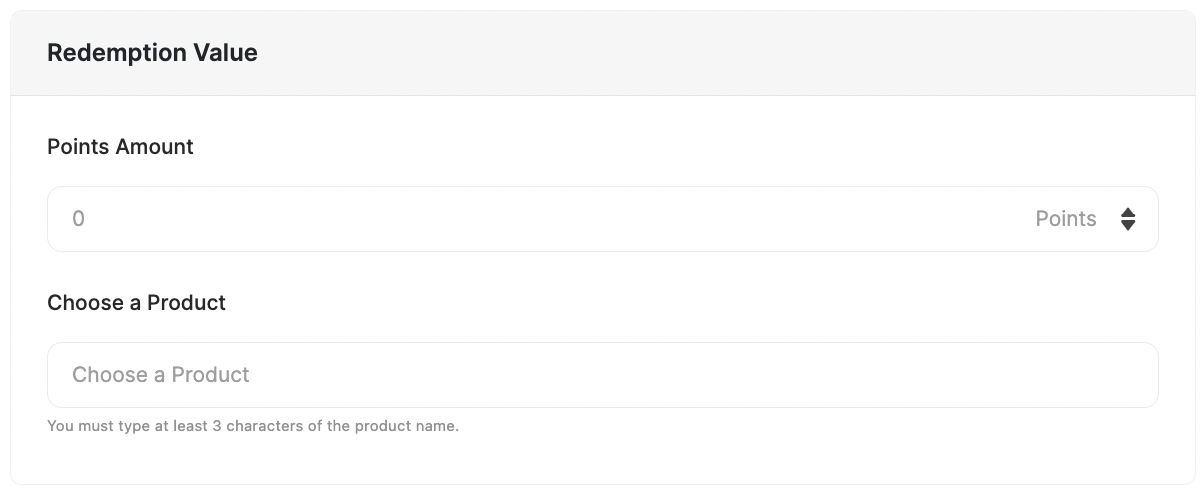 **How free product coupons work at checkout:** Gameball does not automatically add the free product to the customer's cart. The customer must manually add the product to their cart first, then apply the coupon code. The coupon applies a 100% discount on that product, making it free.
This reward is available as a campaign reward as well as a redemption option.
| Platform | Plan |
| -------- | ------------------------- |
| All | All except for free plans |
**Reward Campaign:**
* **Reward Name:** Choose a name for the reward.
* **Reward Image**: Choose to have the default or upload an image for display.
* **Advanced Options:**
* **Prefix:** Add Coupon Prefix.
* **Reward expires after a specific amount of time:** Set the expiry for the reward.
* **Minimum purchase amount:** The amount required for usage. (Default: 1)
* **Reward combined with other coupons:** Compatibility with other coupons, or to be won alongside other coupons.
* **Show "How to redeem" instructions.**
**How free product coupons work at checkout:** Gameball does not automatically add the free product to the customer's cart. The customer must manually add the product to their cart first, then apply the coupon code. The coupon applies a 100% discount on that product, making it free.
This reward is available as a campaign reward as well as a redemption option.
| Platform | Plan |
| -------- | ------------------------- |
| All | All except for free plans |
**Reward Campaign:**
* **Reward Name:** Choose a name for the reward.
* **Reward Image**: Choose to have the default or upload an image for display.
* **Advanced Options:**
* **Prefix:** Add Coupon Prefix.
* **Reward expires after a specific amount of time:** Set the expiry for the reward.
* **Minimum purchase amount:** The amount required for usage. (Default: 1)
* **Reward combined with other coupons:** Compatibility with other coupons, or to be won alongside other coupons.
* **Show "How to redeem" instructions.**
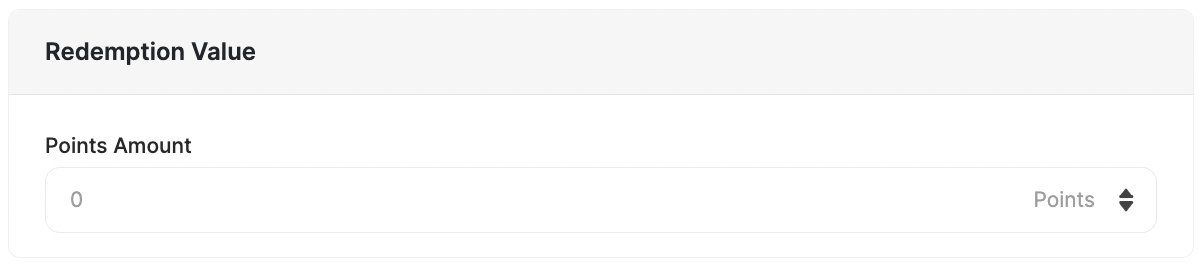
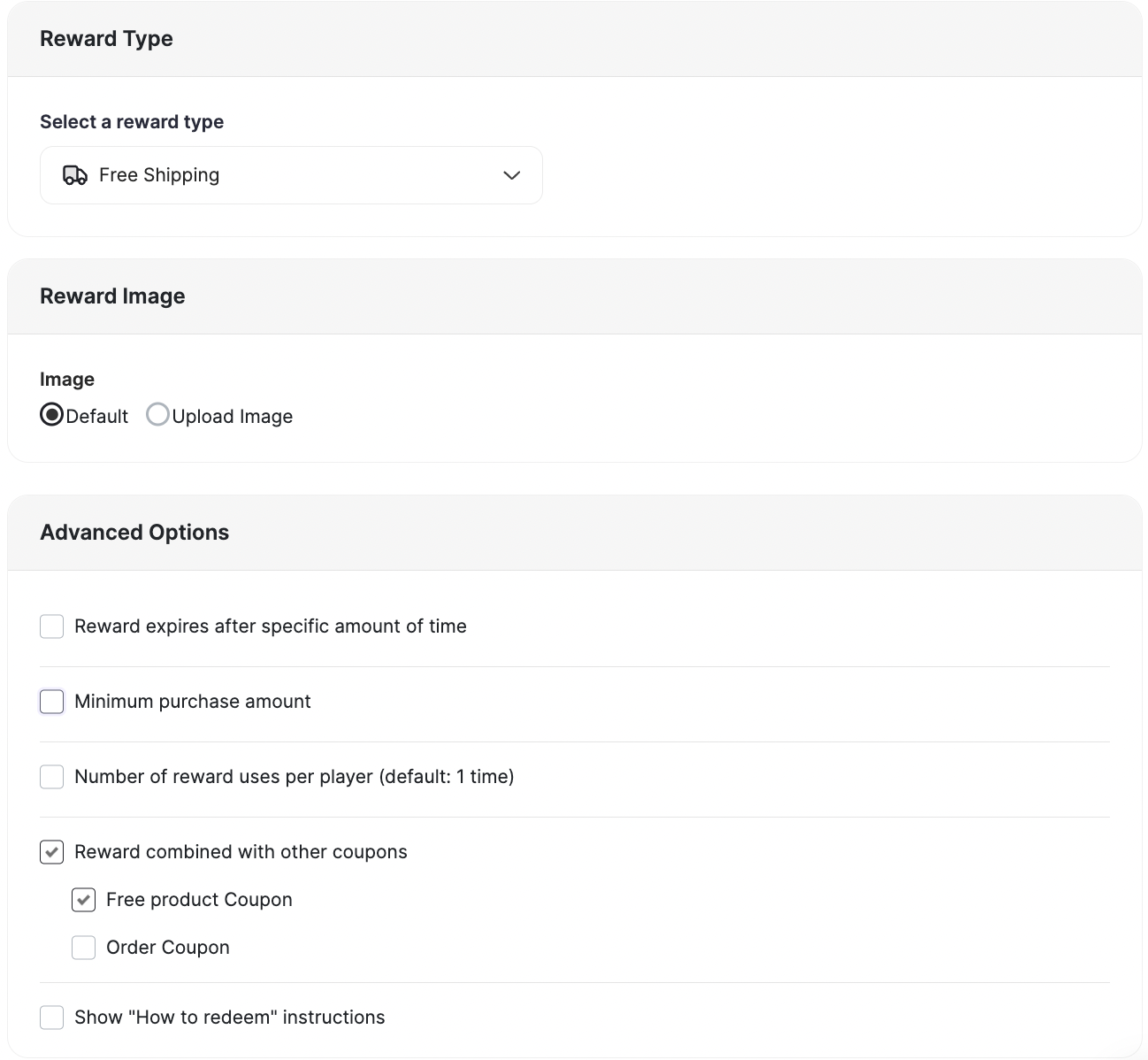 **Custom Redemption Rule:**
* Follow the same steps as the Reward Campaign setup.
* Add the points needed to redeem this reward in the Redemption Value section.
**Custom Redemption Rule:**
* Follow the same steps as the Reward Campaign setup.
* Add the points needed to redeem this reward in the Redemption Value section.
 This reward is available as a campaign reward as well as a redemption option.
| Platform | Plan |
| -------- | ---- |
| All | All |
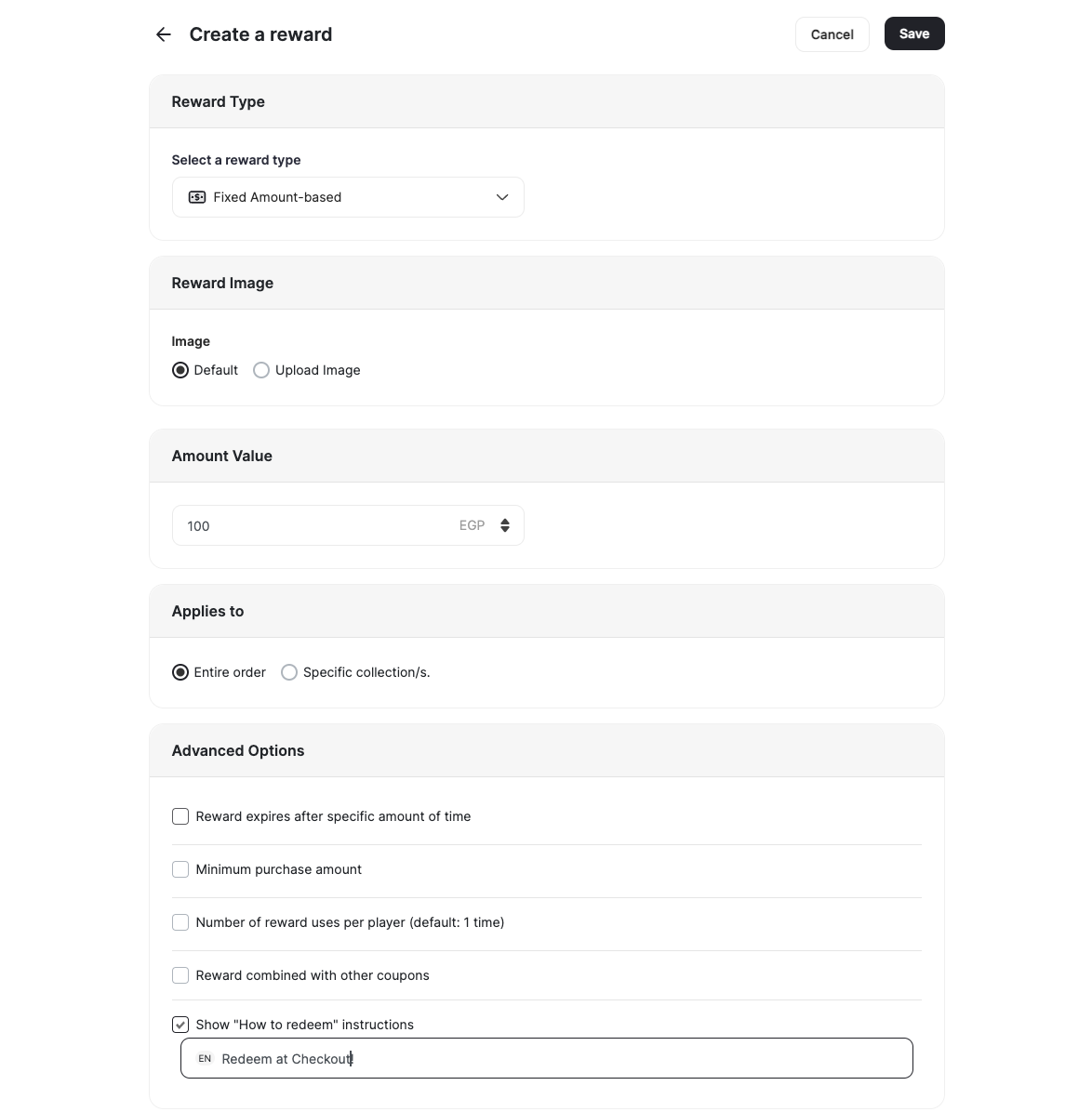
**Reward Campaign:**
* **Reward Image**: Choose an image.
* **Reward Value**: Set the value (e.g., \$100).
* **Applicability**: Specify if it applies to all purchases or specific **Collections** and/or specific **Merchants.**
* **Advanced Options:**
* **Prefix:** Add Coupon Prefix.
* **Reward expires after a specific amount of time:** Set the expiry for the reward.
* **Minimum purchase amount:** The amount required for usage. (Default: 1)
* **Reward combined with other coupons:** Compatibility with other coupons, or to be won alongside other coupons.
* **Show "How to redeem" instructions.**
This reward is available as a campaign reward as well as a redemption option.
| Platform | Plan |
| -------- | ---- |
| All | All |
**Reward Campaign:**
* **Reward Image**: Choose an image.
* **Reward Value**: Set the value (e.g., \$100).
* **Applicability**: Specify if it applies to all purchases or specific **Collections** and/or specific **Merchants.**
* **Advanced Options:**
* **Prefix:** Add Coupon Prefix.
* **Reward expires after a specific amount of time:** Set the expiry for the reward.
* **Minimum purchase amount:** The amount required for usage. (Default: 1)
* **Reward combined with other coupons:** Compatibility with other coupons, or to be won alongside other coupons.
* **Show "How to redeem" instructions.**
 **Custom Redemption Rule:**
* Follow the same steps as the Reward Campaign setup.
* Add the points needed to redeem this reward in the Redemption Value section.
**Custom Redemption Rule:**
* Follow the same steps as the Reward Campaign setup.
* Add the points needed to redeem this reward in the Redemption Value section.
 This reward is available as a campaign reward as well as a redemption option.
| Platform | Plan |
| -------- | ---- |
| All | All |
**Reward Campaign:**
* **Reward Image**: Choose an image.
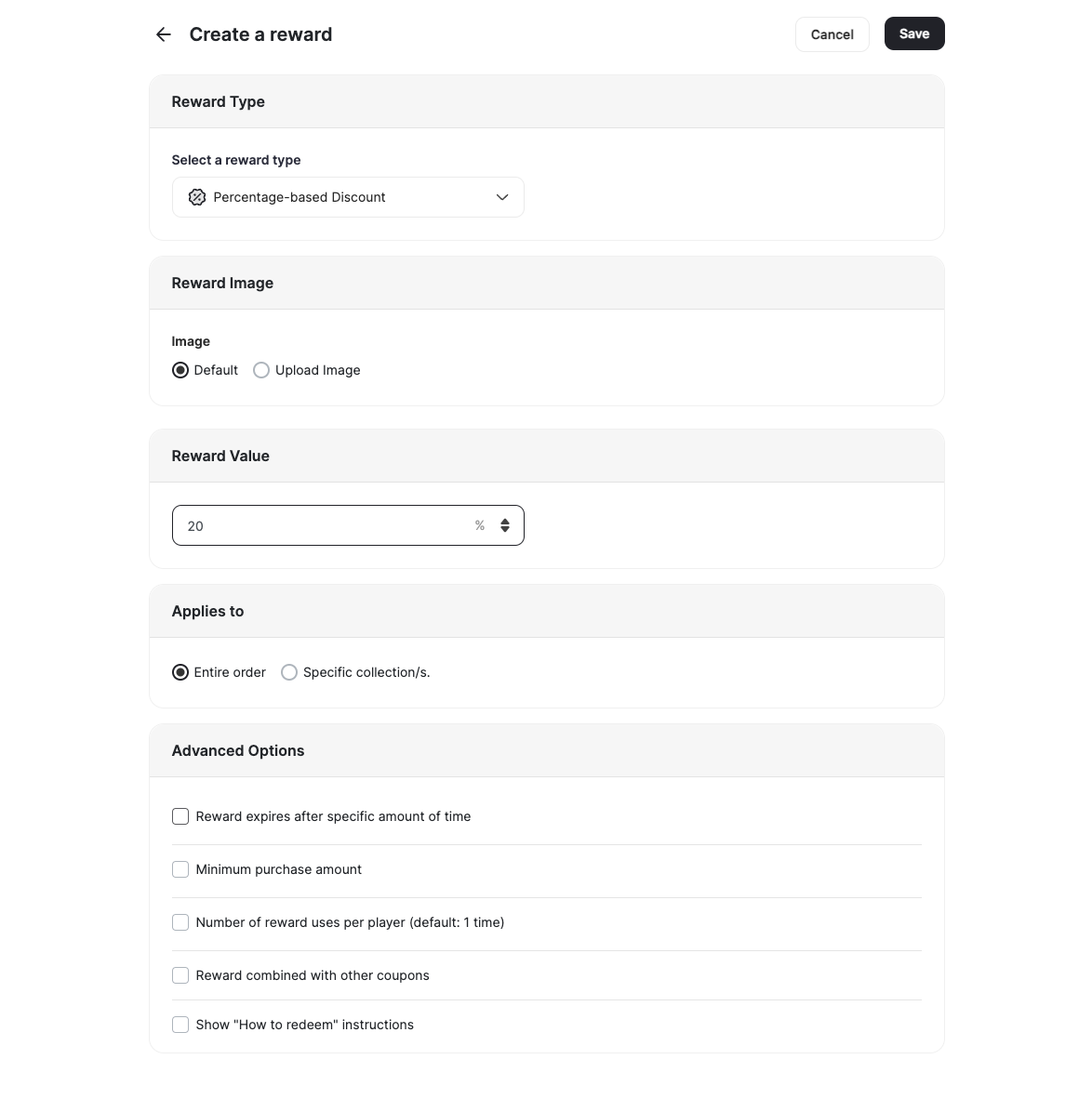
* **Discount Value**: Set the discount (e.g., 20% off).
* **Applicability**: Specify if it applies to all purchases or specific **Collections** and/or specific **Merchants.**
* **Advanced Options:**
* **Prefix:** Add Coupon Prefix.
* **Reward expires after a specific amount of time:** Set the expiry for the reward.
* **Minimum purchase amount:** The amount required for usage. (Default: 1)
* **Reward combined with other coupons:** Compatibility with other coupons, or to be won alongside other coupons.
* **Show "How to redeem" instructions.**
This reward is available as a campaign reward as well as a redemption option.
| Platform | Plan |
| -------- | ---- |
| All | All |
**Reward Campaign:**
* **Reward Image**: Choose an image.
* **Discount Value**: Set the discount (e.g., 20% off).
* **Applicability**: Specify if it applies to all purchases or specific **Collections** and/or specific **Merchants.**
* **Advanced Options:**
* **Prefix:** Add Coupon Prefix.
* **Reward expires after a specific amount of time:** Set the expiry for the reward.
* **Minimum purchase amount:** The amount required for usage. (Default: 1)
* **Reward combined with other coupons:** Compatibility with other coupons, or to be won alongside other coupons.
* **Show "How to redeem" instructions.**
 **Custom Redemption Rule:**
* Follow the same steps as the Reward Campaign setup.
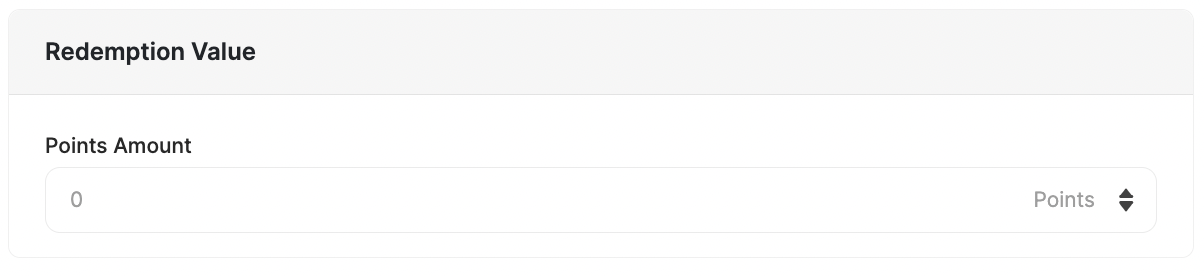
* Add the points needed to redeem this reward in the Redemption Value section.
**Custom Redemption Rule:**
* Follow the same steps as the Reward Campaign setup.
* Add the points needed to redeem this reward in the Redemption Value section.
 This reward is available as a campaign reward only.
| Platform | Plan |
| ------------ | -------------------------------------- |
| Shopify only | Starter, Pro and Guru (Newly enrolled) |
**Reward Campaign:**
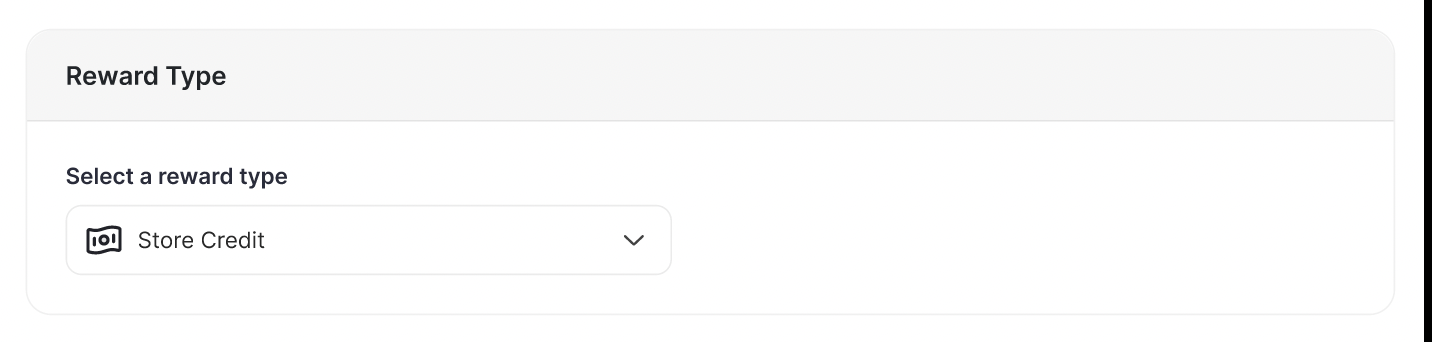
* **Credit Value:** Set the Credit value (e.g., \$100).
* **Bonus Expiry**: Set a specific expiry for this reward, overriding the default expiry.
This reward is available as a campaign reward only.
| Platform | Plan |
| ------------ | -------------------------------------- |
| Shopify only | Starter, Pro and Guru (Newly enrolled) |
**Reward Campaign:**
* **Credit Value:** Set the Credit value (e.g., \$100).
* **Bonus Expiry**: Set a specific expiry for this reward, overriding the default expiry.
 To reward your customers with store credit, you need to complete the following steps:
Enable the Shopify store credit feature and Shopify new accounts from Shopify's Customer Accounts Settings.
To reward your customers with store credit, you need to complete the following steps:
Enable the Shopify store credit feature and Shopify new accounts from Shopify's Customer Accounts Settings.
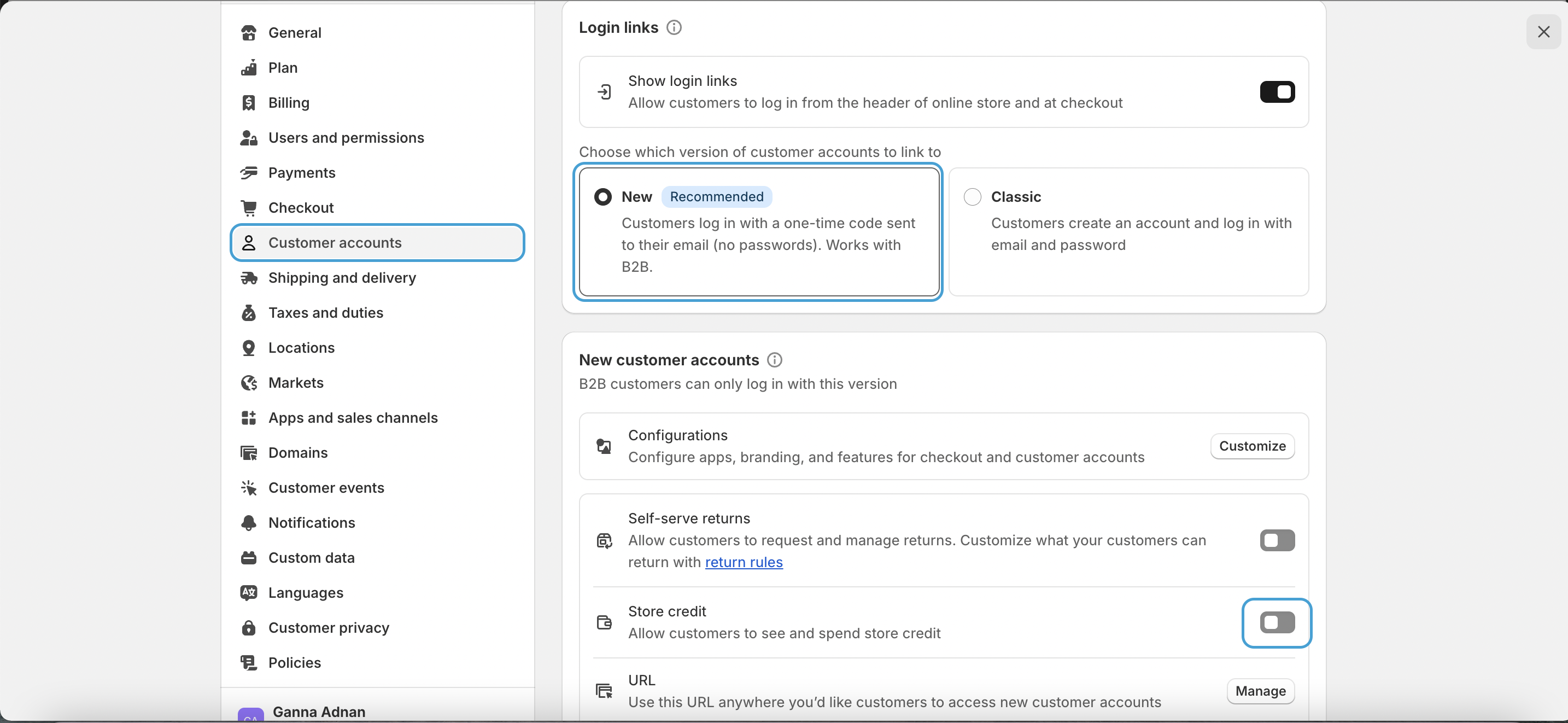 Grant Gameball permission to use Shopify's store credit APIs.
***
## Dynamic Value for "Fixed Coupon Rewards"
**Fixed Coupon Rewards** has a **Dynamic Value option**. Instead of being limited to a static reward (e.g., $10 off), you can now configure fixed coupons to dynamically calculate their value based on a percentage of a chosen variable (e.g., **15% of Value X**). In short, instead of always giving $10 off, a merchant can now set the coupon to equal **15% of the customer's cart total or a specific metadata value**, making offers more personalized and impactful.
Grant Gameball permission to use Shopify's store credit APIs.
***
## Dynamic Value for "Fixed Coupon Rewards"
**Fixed Coupon Rewards** has a **Dynamic Value option**. Instead of being limited to a static reward (e.g., $10 off), you can now configure fixed coupons to dynamically calculate their value based on a percentage of a chosen variable (e.g., **15% of Value X**). In short, instead of always giving $10 off, a merchant can now set the coupon to equal **15% of the customer's cart total or a specific metadata value**, making offers more personalized and impactful.
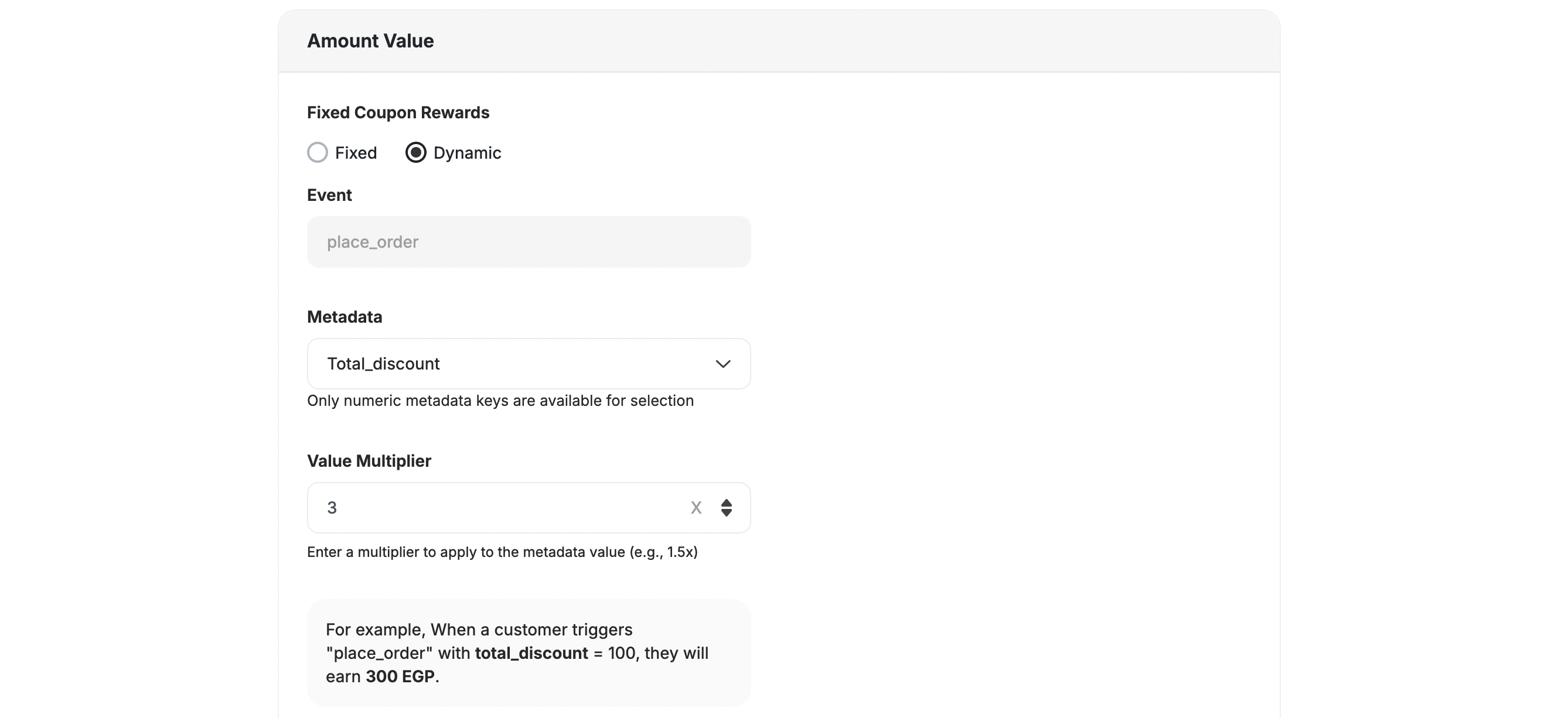 Configure a fixed coupon with a specific value (e.g., \$10 off) that never changes.
Set the coupon to calculate dynamically as a percentage of a chosen metric, such as the cart total or an order value.
No changes are required in your workflow when switching to dynamic mode — just configure the value type when setting up your fixed coupon rewards. Offers adapt to cart totals, order values, or metadata-driven actions automatically.
***
## Extra Reward Types
In addition to the online rewards, Gameball supports special rewards for Shopify POS systems and Recharge-enabled subscriptions.
This reward is available as a redemption option only.
Read about how to [Enable Customers to Spend Their Gameball Points on Shopify POS](/product-documentation/rewards-campaigns/faqs/understanding-rewards-types).
| Platform | Plan |
| ------------ | ------------------ |
| Shopify | All |
| Salla | Starter, Pro, Guru |
| Non-platform | Contact Support |
* **POS Amount-based Discount**: Reward customers with a fixed discount (e.g., \$10 off) when they purchase in-store.
* **POS Percentage-based Discount**: Offer a percentage discount (e.g., 10% off) for in-store purchases.
Configure a fixed coupon with a specific value (e.g., \$10 off) that never changes.
Set the coupon to calculate dynamically as a percentage of a chosen metric, such as the cart total or an order value.
No changes are required in your workflow when switching to dynamic mode — just configure the value type when setting up your fixed coupon rewards. Offers adapt to cart totals, order values, or metadata-driven actions automatically.
***
## Extra Reward Types
In addition to the online rewards, Gameball supports special rewards for Shopify POS systems and Recharge-enabled subscriptions.
This reward is available as a redemption option only.
Read about how to [Enable Customers to Spend Their Gameball Points on Shopify POS](/product-documentation/rewards-campaigns/faqs/understanding-rewards-types).
| Platform | Plan |
| ------------ | ------------------ |
| Shopify | All |
| Salla | Starter, Pro, Guru |
| Non-platform | Contact Support |
* **POS Amount-based Discount**: Reward customers with a fixed discount (e.g., \$10 off) when they purchase in-store.
* **POS Percentage-based Discount**: Offer a percentage discount (e.g., 10% off) for in-store purchases.
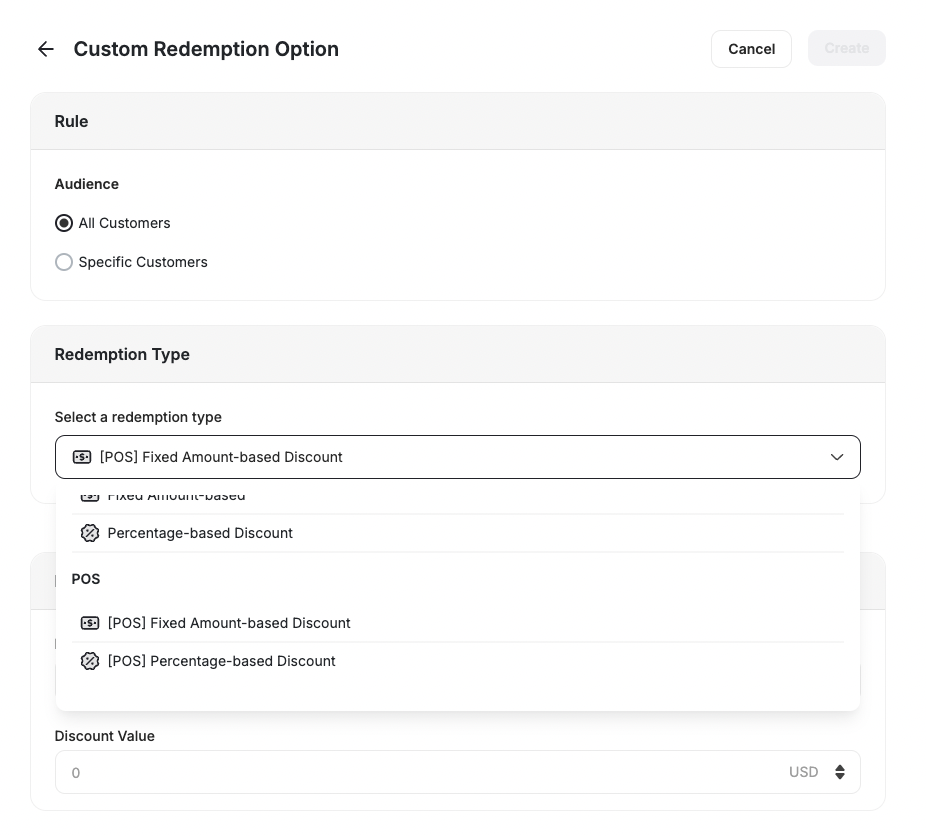 Setting up these rewards follows the same steps as the online rewards, ensuring you have integrated your POS system with Gameball.
* **Recharge Amount-based Discount**: Provide customers with a fixed discount on their Recharge subscription orders.
* **Recharge Percentage-based Discount**: Offer a percentage discount on recurring Recharge subscription orders.
Setting up these rewards follows the same steps as the online rewards, ensuring you have integrated your POS system with Gameball.
* **Recharge Amount-based Discount**: Provide customers with a fixed discount on their Recharge subscription orders.
* **Recharge Percentage-based Discount**: Offer a percentage discount on recurring Recharge subscription orders.
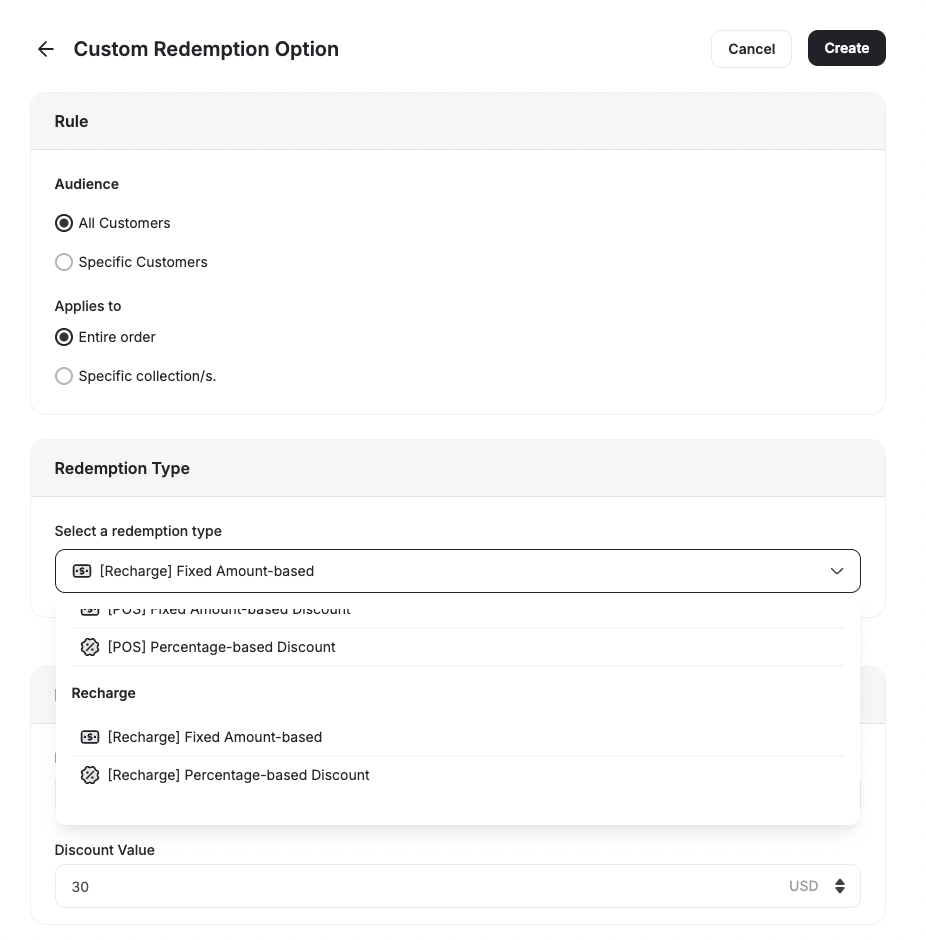 Both Recharge rewards work similarly to the online discount rewards but require your store to be integrated with Recharge for subscriptions.
***
## Customizing Your Reward Campaign
[Learn how to set up a customized reward campaign](/product-documentation/rewards-campaigns/reward-campaign-general-setup-guide).
For all rewards, you can adjust the following advanced options to suit your business needs:
* **Prefix:** Add Coupon Prefix.
* **Reward expires after a specific amount of time:** Set the expiry for the reward.
* **Minimum purchase amount:** The amount required for usage. (Default: 1)
* **Reward combined with other coupons:** Compatibility with other coupons or to be won alongside other coupons.
* **Show "How to redeem" instructions.**
Ensure your coupon configuration is compatible with the reward type and platform.
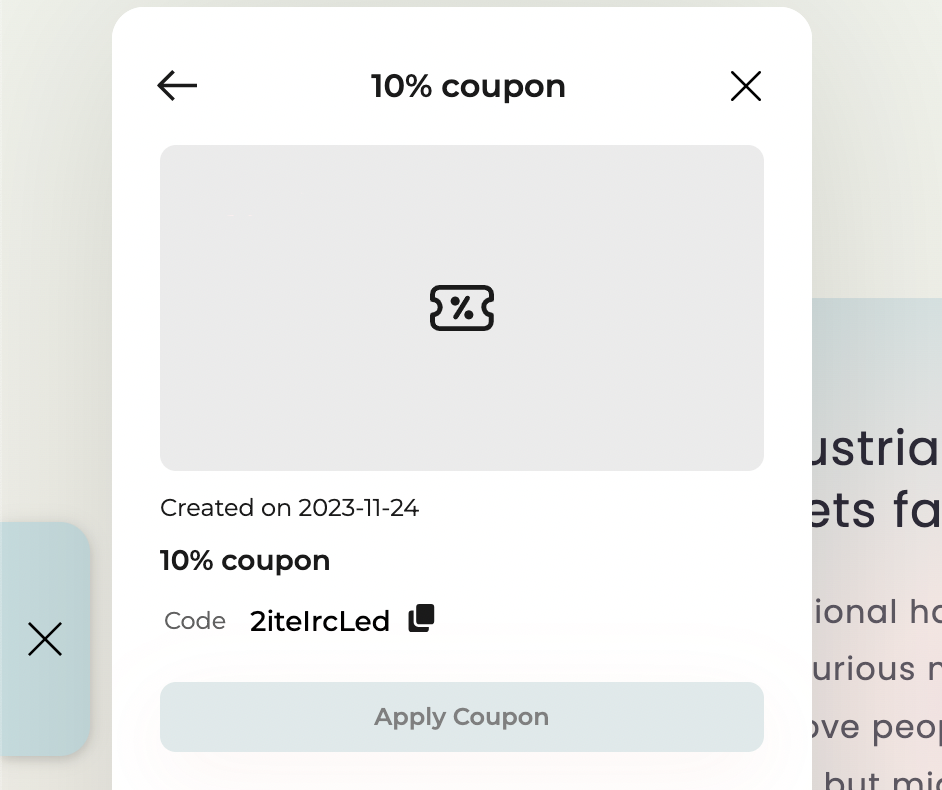
* A **"Check Coupons Details"** button will be displayed on the **success screen** of any game **only if the reward type is a coupon**.
* The button **will not** appear for any other reward types (e.g., points, badges, items).
* When the player clicks **"Check Coupons Details"**, they will be redirected to the **Coupon Details Page** inside the widget.
***
## Related Articles
Build a reward campaign triggered by specific customer actions from scratch.
Set up a reward campaign that fires on a scheduled date or instantly.
Configure custom redemption rules so customers can exchange points for specific rewards.
Both Recharge rewards work similarly to the online discount rewards but require your store to be integrated with Recharge for subscriptions.
***
## Customizing Your Reward Campaign
[Learn how to set up a customized reward campaign](/product-documentation/rewards-campaigns/reward-campaign-general-setup-guide).
For all rewards, you can adjust the following advanced options to suit your business needs:
* **Prefix:** Add Coupon Prefix.
* **Reward expires after a specific amount of time:** Set the expiry for the reward.
* **Minimum purchase amount:** The amount required for usage. (Default: 1)
* **Reward combined with other coupons:** Compatibility with other coupons or to be won alongside other coupons.
* **Show "How to redeem" instructions.**
Ensure your coupon configuration is compatible with the reward type and platform.
* A **"Check Coupons Details"** button will be displayed on the **success screen** of any game **only if the reward type is a coupon**.
* The button **will not** appear for any other reward types (e.g., points, badges, items).
* When the player clicks **"Check Coupons Details"**, they will be redirected to the **Coupon Details Page** inside the widget.
***
## Related Articles
Build a reward campaign triggered by specific customer actions from scratch.
Set up a reward campaign that fires on a scheduled date or instantly.
Configure custom redemption rules so customers can exchange points for specific rewards.