> ## Documentation Index
> Fetch the complete documentation index at: https://docs.gameball.co/llms.txt
> Use this file to discover all available pages before exploring further.
# What Is a Reward Campaign?
> Discover Gameball's Rewards Campaigns, formerly known as Challenges, and implement various reward strategies to achieve their objectives.
Rewarding your customers is a powerful way to drive engagement, increase loyalty, and boost sales. In this article, we'll introduce the different types of Reward Campaigns and highlight our ready-made templates designed to help you engage, acquire, retain, personalize, grow, and celebrate special occasions with your customers.
## Types of Reward Campaigns
There are two ways you can create reward campaigns on Gameball:
Customize a campaign from the beginning with full control over every setting.
Ready-to-use templates that help you serve specific goals quickly.
 ***
## Start a Campaign from Scratch
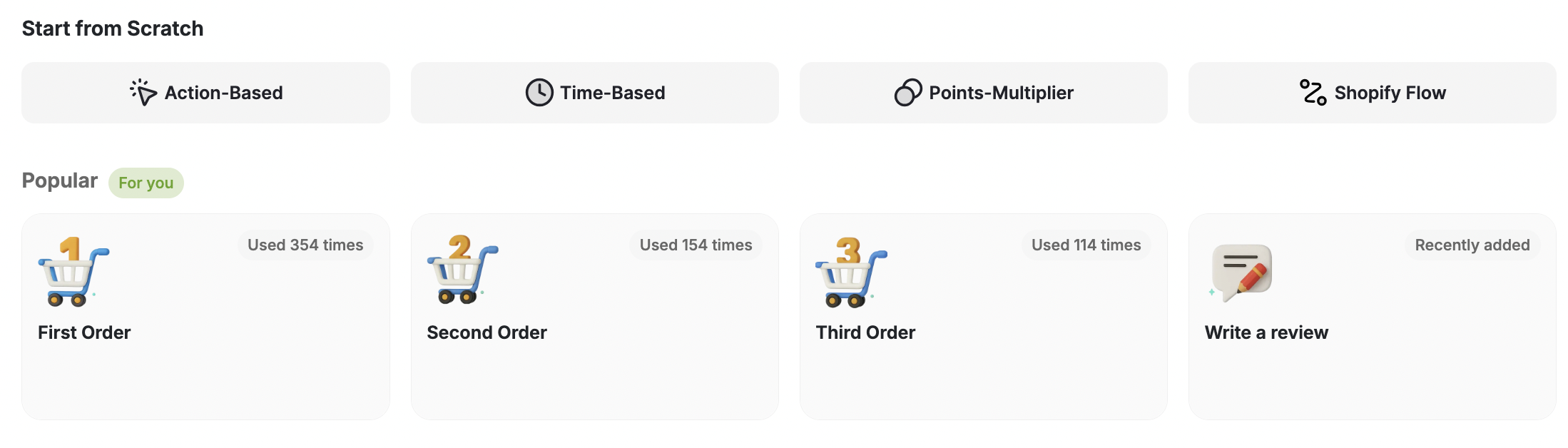
To start creating a campaign from scratch, pick one of the following campaign types:
Reward customers based on specific actions they take, such as making a purchase, referring a friend, or completing a survey.
Reward customers on certain dates or occasions, such as birthdays, anniversaries, or holidays, to create a sense of exclusivity and appreciation.
Multiply the points earned by customers when they make a purchase, previously known as Cashback Campaigns, to incentivize spending and drive repeat purchases.
Create custom rewards triggered by specific actions on apps connected to Shopify Flow, letting you tailor rewards for unique actions like social engagement.
***
## Ready-Made Reward Campaign Templates
Gameball offers a range of ready-made templates categorized based on your objectives. These templates can be **filtered by reward campaign types.**
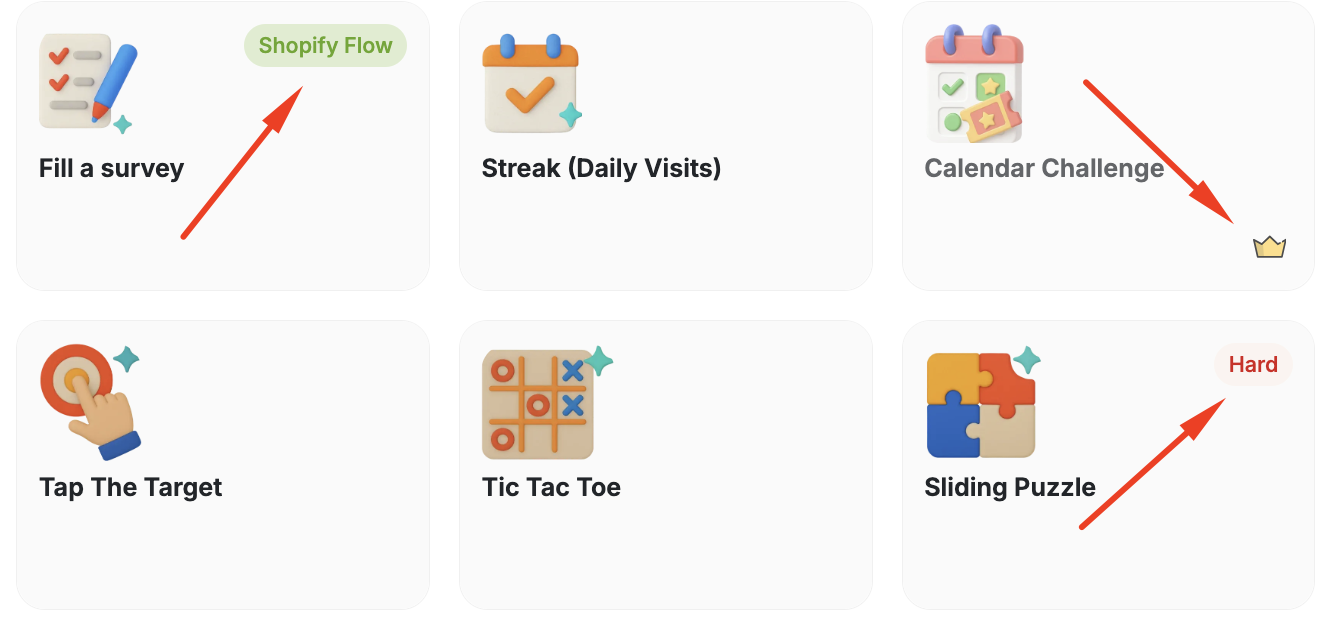
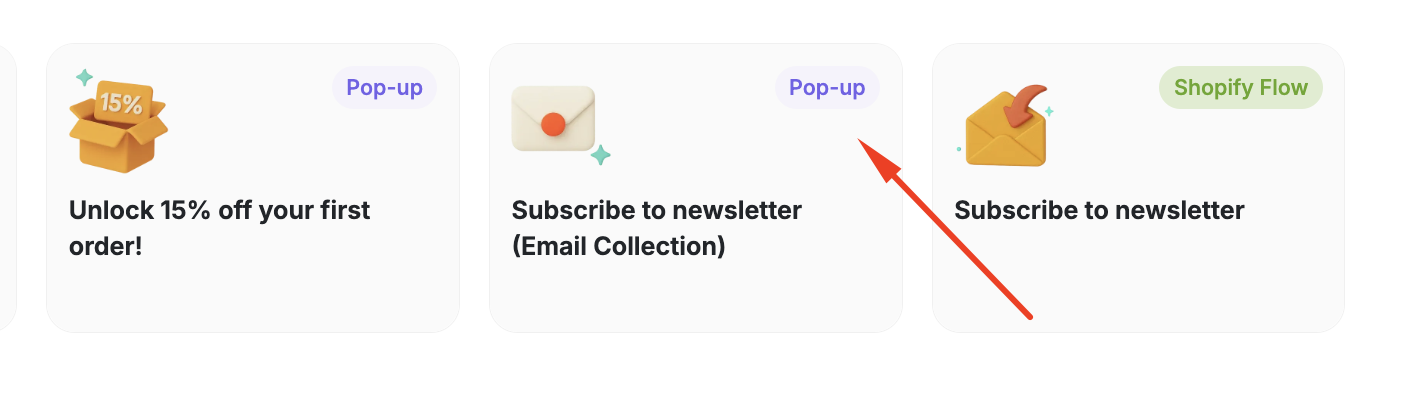
Before diving into the available templates, you must recognise the different types of templates you can distinguish through the **Tags** and **Icons** on each card.
***
## Start a Campaign from Scratch
To start creating a campaign from scratch, pick one of the following campaign types:
Reward customers based on specific actions they take, such as making a purchase, referring a friend, or completing a survey.
Reward customers on certain dates or occasions, such as birthdays, anniversaries, or holidays, to create a sense of exclusivity and appreciation.
Multiply the points earned by customers when they make a purchase, previously known as Cashback Campaigns, to incentivize spending and drive repeat purchases.
Create custom rewards triggered by specific actions on apps connected to Shopify Flow, letting you tailor rewards for unique actions like social engagement.
***
## Ready-Made Reward Campaign Templates
Gameball offers a range of ready-made templates categorized based on your objectives. These templates can be **filtered by reward campaign types.**
Before diving into the available templates, you must recognise the different types of templates you can distinguish through the **Tags** and **Icons** on each card.
 | Tag | Description |
| ------------ | -------------------------------------------------------------------------------------------------------------------------------------------------------------------------- |
| Shopify Flow | Available only on Shopify Flow. |
| Pop-up | This campaign does not only appear on the widget, but could be displayed as a pop-up when your customers visit your platform. This guarantees higher participation number. |
| Hard | Usually found on Game related campaigns. Means it is relatively more difficult to play and win than the other games. |
| Crown icon | Available on under a specific plan. |
***
## Available Types and Templates
Aimed to engage with customers in a fun, interactive manner and to keep them coming back for more.
| Tag | Description |
| ------------ | -------------------------------------------------------------------------------------------------------------------------------------------------------------------------- |
| Shopify Flow | Available only on Shopify Flow. |
| Pop-up | This campaign does not only appear on the widget, but could be displayed as a pop-up when your customers visit your platform. This guarantees higher participation number. |
| Hard | Usually found on Game related campaigns. Means it is relatively more difficult to play and win than the other games. |
| Crown icon | Available on under a specific plan. |
***
## Available Types and Templates
Aimed to engage with customers in a fun, interactive manner and to keep them coming back for more.
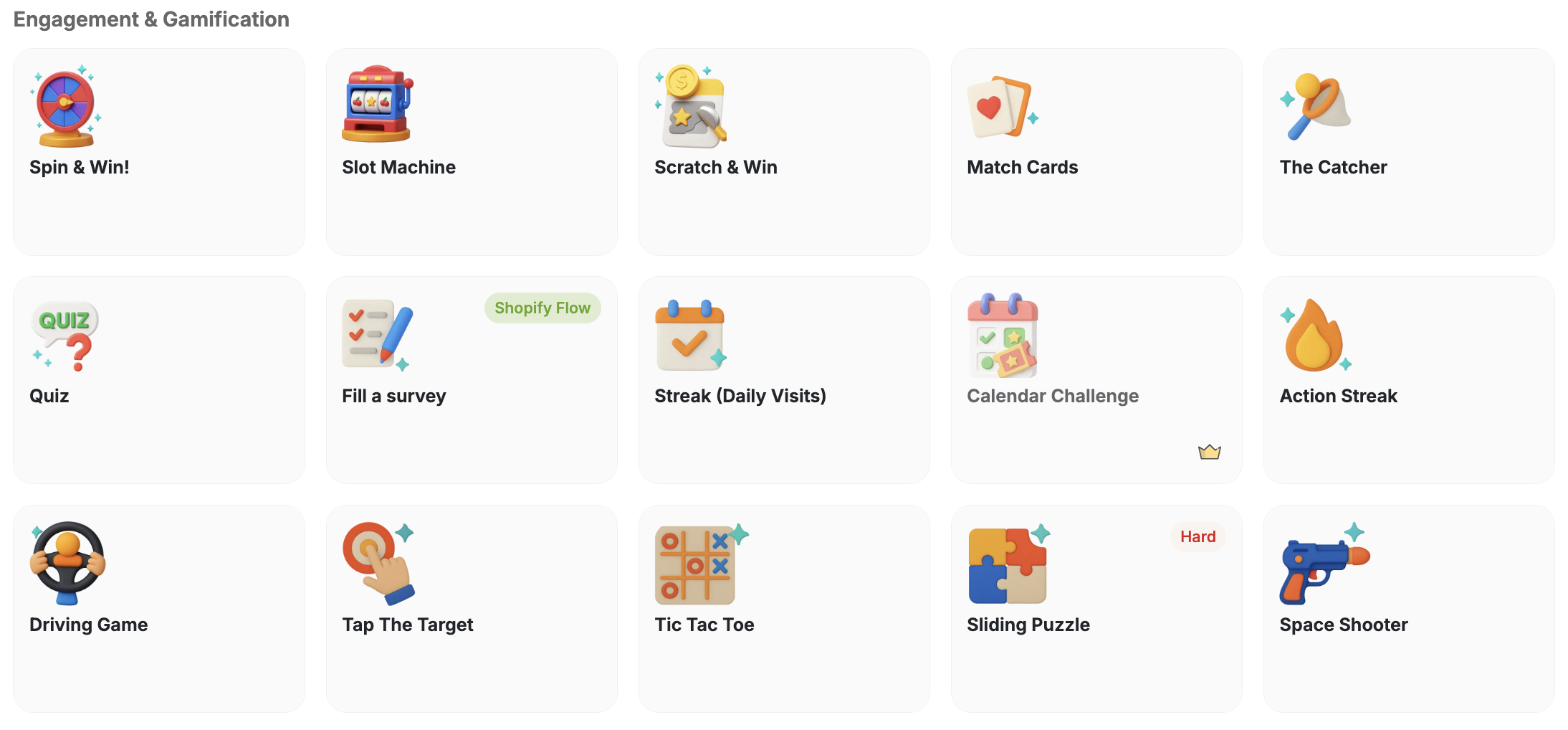 Let customers spin a wheel for a chance to win prizes.
A slot machine game that rewards lucky customers.
Customers scratch a card to reveal their reward.
A memory card-matching game with rewards for winners.
An arcade-style catching game with reward prizes.
Reward customers who answer quiz questions correctly.
Reward customers for completing a survey via Shopify Flow.
Encourage daily visits by rewarding consecutive check-ins.
A calendar-based challenge campaign for sustained engagement.
Reward customers who collect stamps through repeated actions.
An interactive driving game that rewards top performers.
A tap-based game where customers aim for targets to win.
A classic tic-tac-toe game with reward-based outcomes.
A challenging sliding puzzle game for dedicated players.
An arcade space shooter game with points and prize rewards.
Aimed at attracting new customers and incentivizing them to take specific actions, such as making their first purchase.
Let customers spin a wheel for a chance to win prizes.
A slot machine game that rewards lucky customers.
Customers scratch a card to reveal their reward.
A memory card-matching game with rewards for winners.
An arcade-style catching game with reward prizes.
Reward customers who answer quiz questions correctly.
Reward customers for completing a survey via Shopify Flow.
Encourage daily visits by rewarding consecutive check-ins.
A calendar-based challenge campaign for sustained engagement.
Reward customers who collect stamps through repeated actions.
An interactive driving game that rewards top performers.
A tap-based game where customers aim for targets to win.
A classic tic-tac-toe game with reward-based outcomes.
A challenging sliding puzzle game for dedicated players.
An arcade space shooter game with points and prize rewards.
Aimed at attracting new customers and incentivizing them to take specific actions, such as making their first purchase.
 Reward customers who create a new account on your platform.
Display a pop-up offering a first-order discount to new visitors.
Capture emails and reward newsletter sign-ups via a pop-up.
Reward newsletter subscriptions triggered through Shopify Flow.
Designed to increase customer engagement through gamification and interactive challenges.
Reward customers who create a new account on your platform.
Display a pop-up offering a first-order discount to new visitors.
Capture emails and reward newsletter sign-ups via a pop-up.
Reward newsletter subscriptions triggered through Shopify Flow.
Designed to increase customer engagement through gamification and interactive challenges.
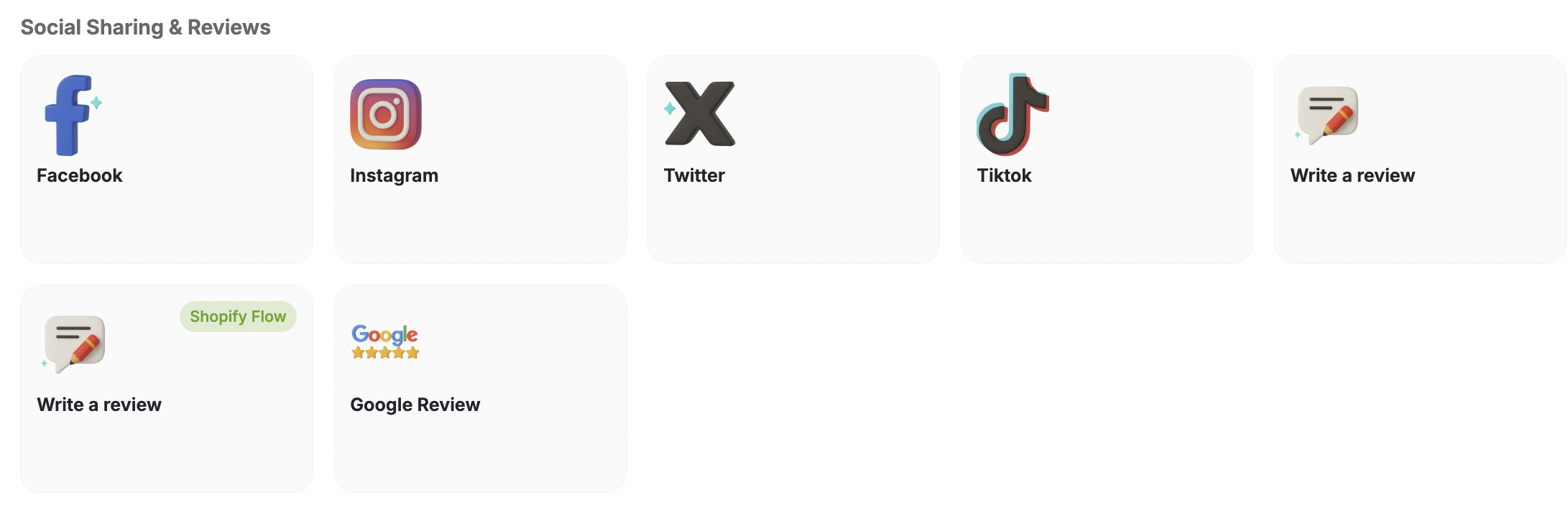 Reward customers for sharing content on Facebook.
Reward customers for sharing content on Instagram.
Reward customers for sharing content on Twitter.
Reward customers for sharing content on TikTok.
Reward customers for leaving a product review.
Reward reviews submitted through a Shopify Flow trigger.
Reward customers who leave a Google review for your business.
Geared towards growing your customer base and increasing sales through promoting a specific product or collection, and other growth-oriented activities.
Reward customers for sharing content on Facebook.
Reward customers for sharing content on Instagram.
Reward customers for sharing content on Twitter.
Reward customers for sharing content on TikTok.
Reward customers for leaving a product review.
Reward reviews submitted through a Shopify Flow trigger.
Reward customers who leave a Google review for your business.
Geared towards growing your customer base and increasing sales through promoting a specific product or collection, and other growth-oriented activities.
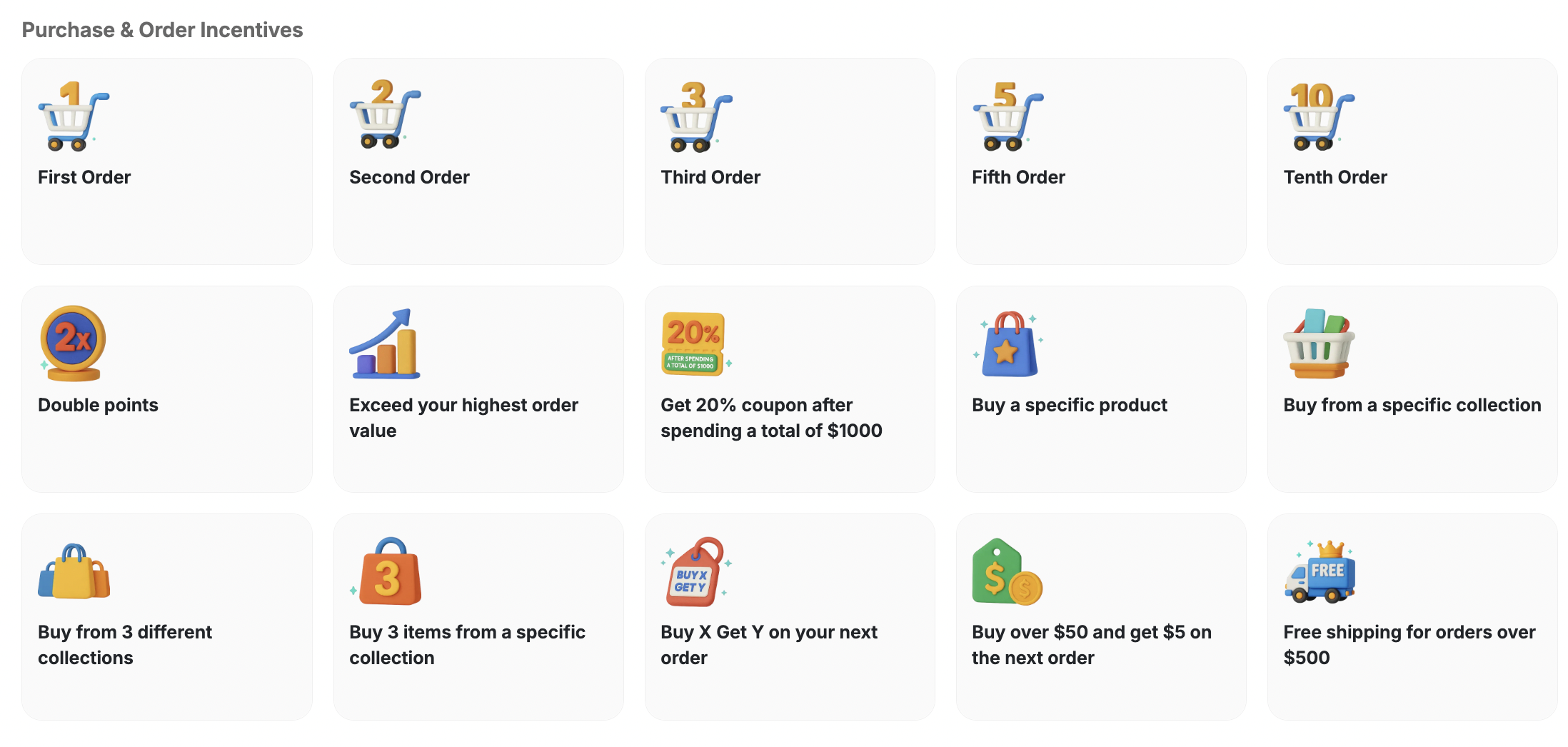 Reward customers who place their first order.
Incentivize customers to return with a second purchase reward.
Drive a third purchase with a loyalty reward.
Celebrate the fifth order milestone with a special reward.
Reward customers who reach their tenth order.
Run a limited-time double points earning promotion.
Reward customers who beat their personal highest order value.
Issue a 20% coupon once a customer crosses a \$1000 spend threshold.
Reward customers who purchase a targeted product.
Incentivize purchases from a featured collection.
Reward customers who shop across three different collections.
Reward customers who add three items from the same collection.
Offer a reward on the next order after a qualifying purchase.
Give a $5 next-order reward for orders above $50.
Unlock free shipping for customers who spend over \$500.
Celebrate special occasions such as birthdays, holidays, or milestones with your customers by offering exclusive rewards and promotions.
Reward customers who place their first order.
Incentivize customers to return with a second purchase reward.
Drive a third purchase with a loyalty reward.
Celebrate the fifth order milestone with a special reward.
Reward customers who reach their tenth order.
Run a limited-time double points earning promotion.
Reward customers who beat their personal highest order value.
Issue a 20% coupon once a customer crosses a \$1000 spend threshold.
Reward customers who purchase a targeted product.
Incentivize purchases from a featured collection.
Reward customers who shop across three different collections.
Reward customers who add three items from the same collection.
Offer a reward on the next order after a qualifying purchase.
Give a $5 next-order reward for orders above $50.
Unlock free shipping for customers who spend over \$500.
Celebrate special occasions such as birthdays, holidays, or milestones with your customers by offering exclusive rewards and promotions.
 Send a special reward to customers on their birthday.
Celebrate customers' anniversaries with exclusive rewards.
Run time-limited campaigns tied to seasonal promotions.
Supercharge Black Friday sales with a targeted reward campaign.
Delight customers with a festive Christmas reward campaign.
***
## How to Use Reward Campaigns
From the left side menu, navigate to the **Campaigns** section and click on **Rewards**.
Send a special reward to customers on their birthday.
Celebrate customers' anniversaries with exclusive rewards.
Run time-limited campaigns tied to seasonal promotions.
Supercharge Black Friday sales with a targeted reward campaign.
Delight customers with a festive Christmas reward campaign.
***
## How to Use Reward Campaigns
From the left side menu, navigate to the **Campaigns** section and click on **Rewards**.
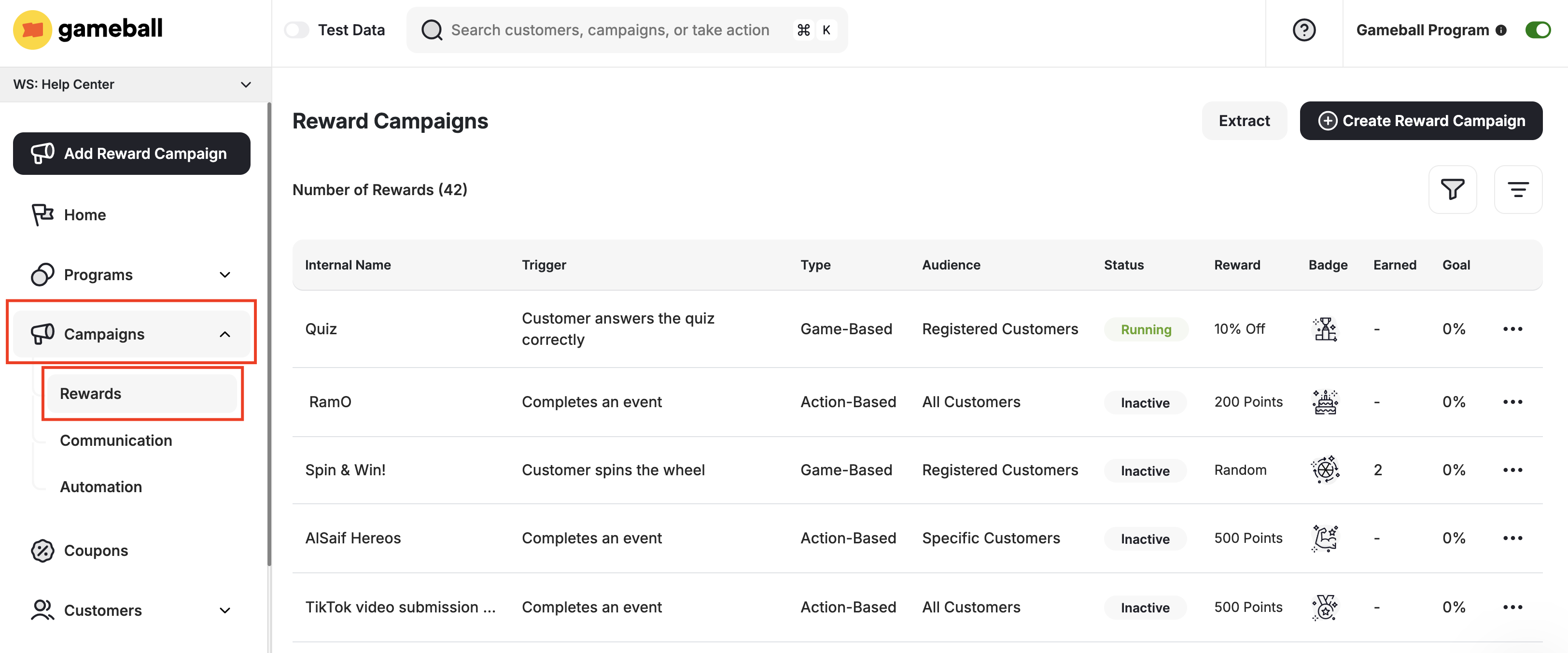 You are now on the reward campaigns page, where you can see and manage data on previously created campaigns.
Choose the desired **template based on your objectives**, or choose to create a **new reward campaign from scratch**.
You are now on the reward campaigns page, where you can see and manage data on previously created campaigns.
Choose the desired **template based on your objectives**, or choose to create a **new reward campaign from scratch**.
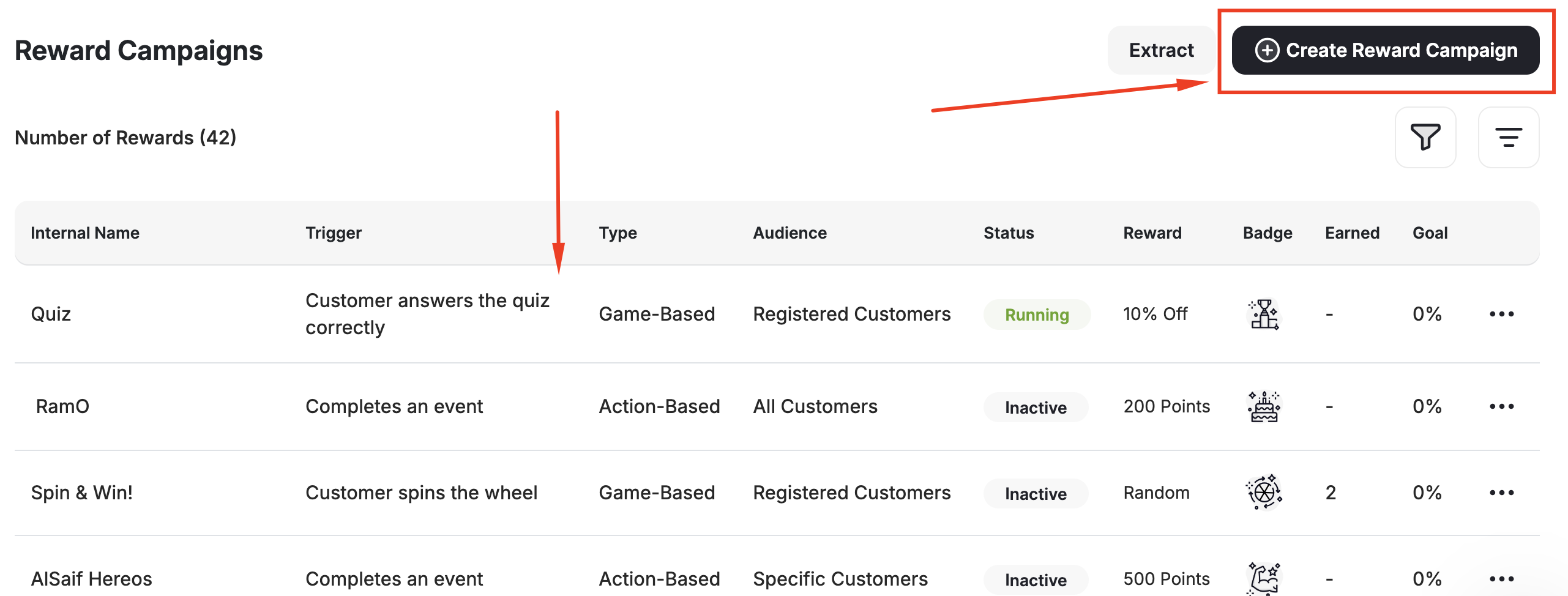 Make the necessary adjustments and **activate** the reward campaign to start rewarding your customers and driving desired behaviors.
***
## Manage Your Campaigns Efficiently
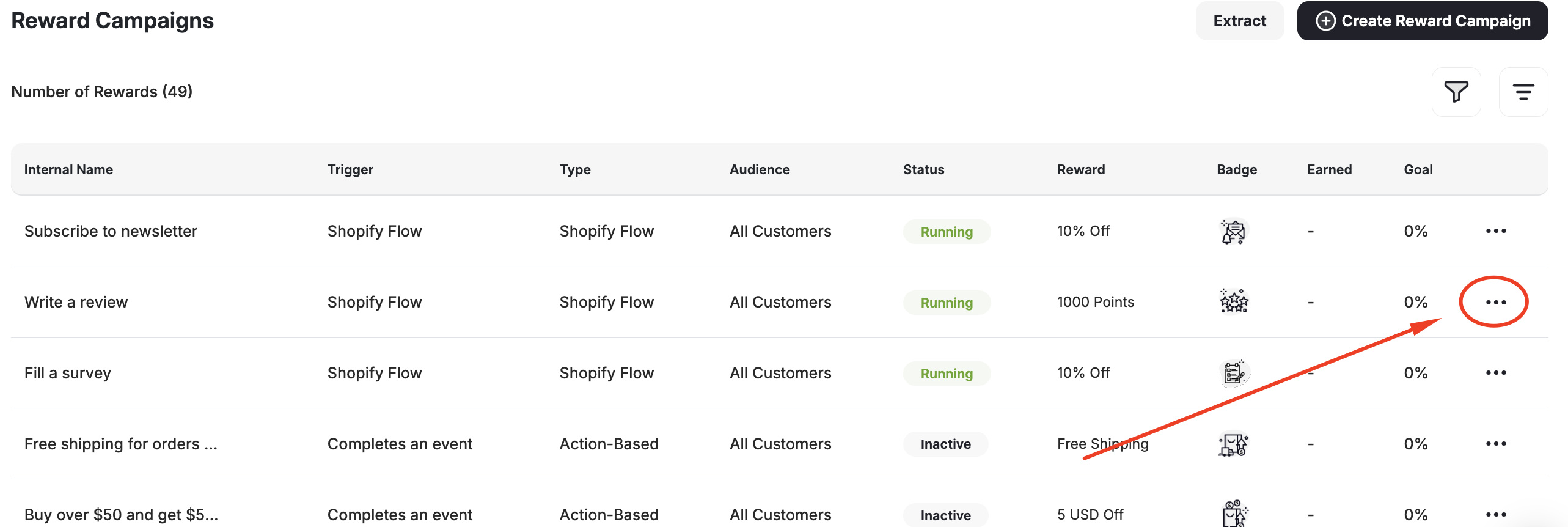
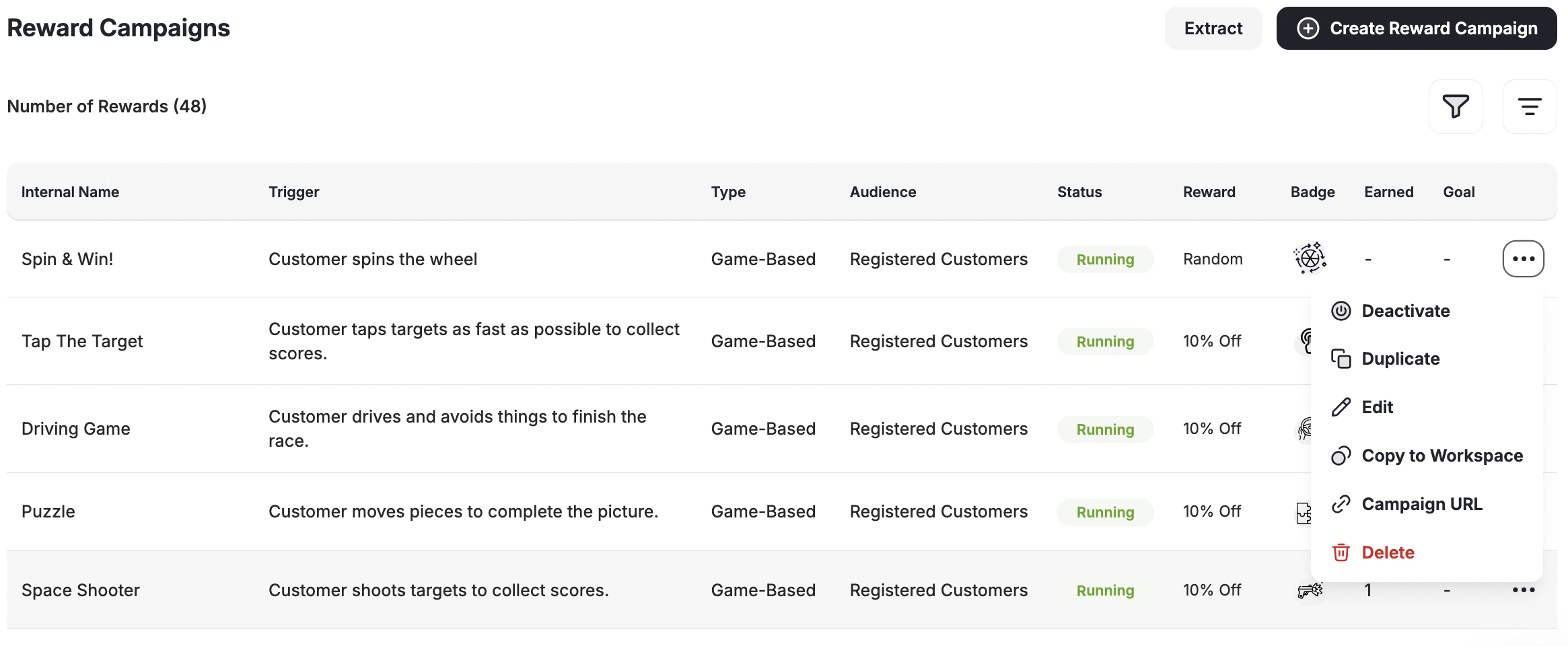
Gameball offers convenient shortcuts to manage your reward campaigns seamlessly. When you access your campaigns through the **Gameball Admin Dashboard,** you'll find a comprehensive **list of all your created campaigns** along with their details.
By **clicking on the points** beside each campaign, you'll unlock a range of options to streamline your campaign management process.
Make the necessary adjustments and **activate** the reward campaign to start rewarding your customers and driving desired behaviors.
***
## Manage Your Campaigns Efficiently
Gameball offers convenient shortcuts to manage your reward campaigns seamlessly. When you access your campaigns through the **Gameball Admin Dashboard,** you'll find a comprehensive **list of all your created campaigns** along with their details.
By **clicking on the points** beside each campaign, you'll unlock a range of options to streamline your campaign management process.
 | Shortcut | Description |
| --------------------- | ---------------------------------------------------------------------------------------------------------------------------------------------- |
| Duplicate | Create an identical copy of the selected campaign. This is useful when you need to replicate a campaign with minor adjustments. |
| Activate / Deactivate | Toggle the active status of the campaign. Easily enable or disable a campaign to control its visibility and functionality. |
| Edit | Make adjustments to the settings and details of the selected campaign. Access the campaign's inner page to modify its configuration as needed. |
| Copy to Workspace | Copy that same campaign to a different workspace. |
| Campaign URL | Copy campaign URL. |
| Delete | Permanently remove the selected campaign. Exercise caution when using this option, as deleted campaigns cannot be recovered. |
By utilizing these shortcuts, you can efficiently manage your reward campaigns, saving time and ensuring that your customer engagement strategies remain dynamic and effective.
***
## Related Articles
A deep dive into every reward type available and how to configure each one.
Learn which metrics to track and how to measure campaign performance.
| Shortcut | Description |
| --------------------- | ---------------------------------------------------------------------------------------------------------------------------------------------- |
| Duplicate | Create an identical copy of the selected campaign. This is useful when you need to replicate a campaign with minor adjustments. |
| Activate / Deactivate | Toggle the active status of the campaign. Easily enable or disable a campaign to control its visibility and functionality. |
| Edit | Make adjustments to the settings and details of the selected campaign. Access the campaign's inner page to modify its configuration as needed. |
| Copy to Workspace | Copy that same campaign to a different workspace. |
| Campaign URL | Copy campaign URL. |
| Delete | Permanently remove the selected campaign. Exercise caution when using this option, as deleted campaigns cannot be recovered. |
By utilizing these shortcuts, you can efficiently manage your reward campaigns, saving time and ensuring that your customer engagement strategies remain dynamic and effective.
***
## Related Articles
A deep dive into every reward type available and how to configure each one.
Learn which metrics to track and how to measure campaign performance.