> ## Documentation Index
> Fetch the complete documentation index at: https://docs.gameball.co/llms.txt
> Use this file to discover all available pages before exploring further.
# How Do I Set Up Slot Machine?
> Engage your customers with Gameball's slot machine and ask them to try their luck.
## Plan Availability
| Plan | Available |
| ---------- | --------- |
| Starter | Yes |
| Pro & Guru | Yes |
| Plan | Available |
| ------ | --------- |
| Add-on | Yes |
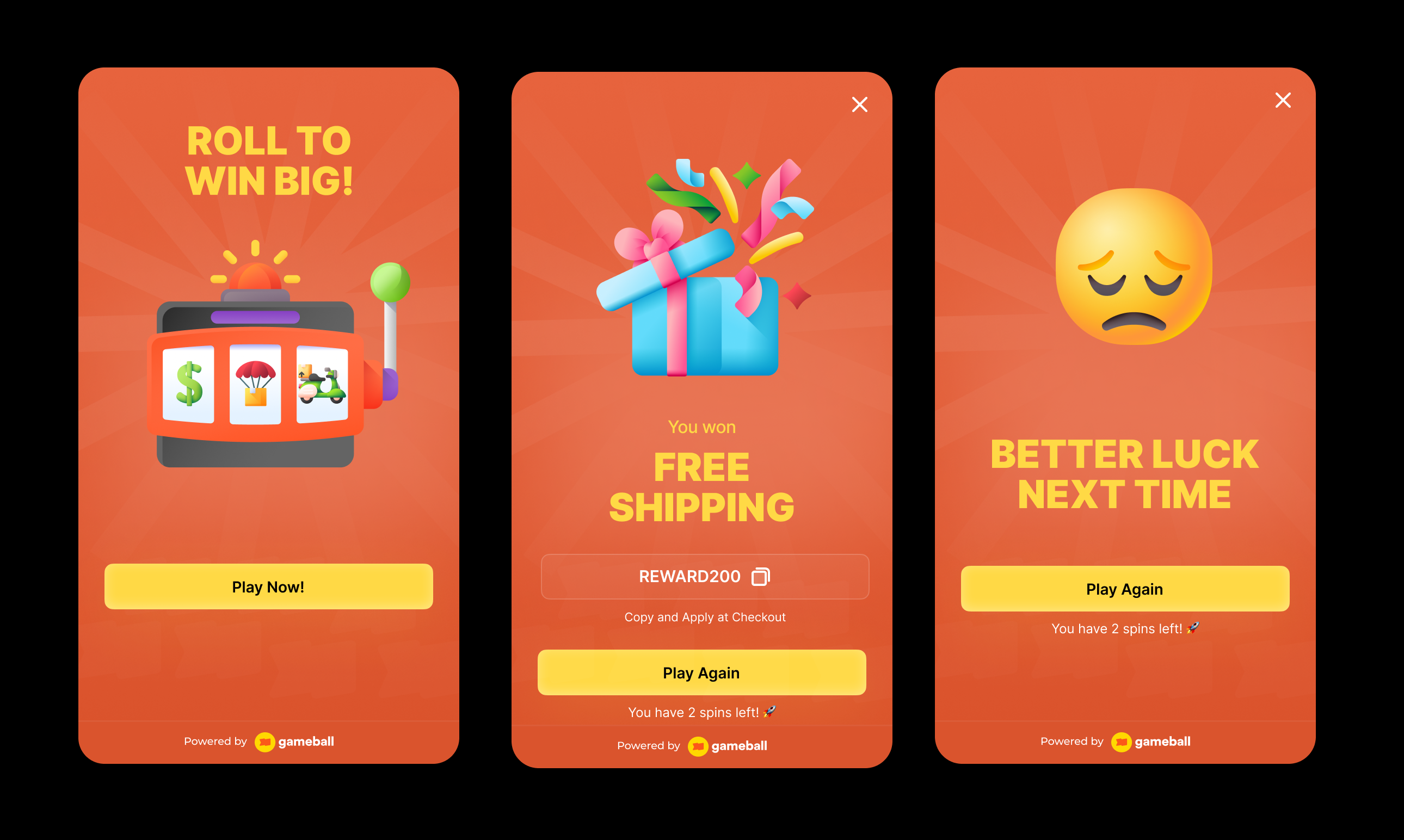
Add excitement to your customer experience with the Slot Machine campaign. This gamified feature lets customers try their luck -- if all three slots align, they win a prize! From discounts and free products to bonus points, the rewards keep them coming back.
 ***
## Creating a Slot Machine Campaign
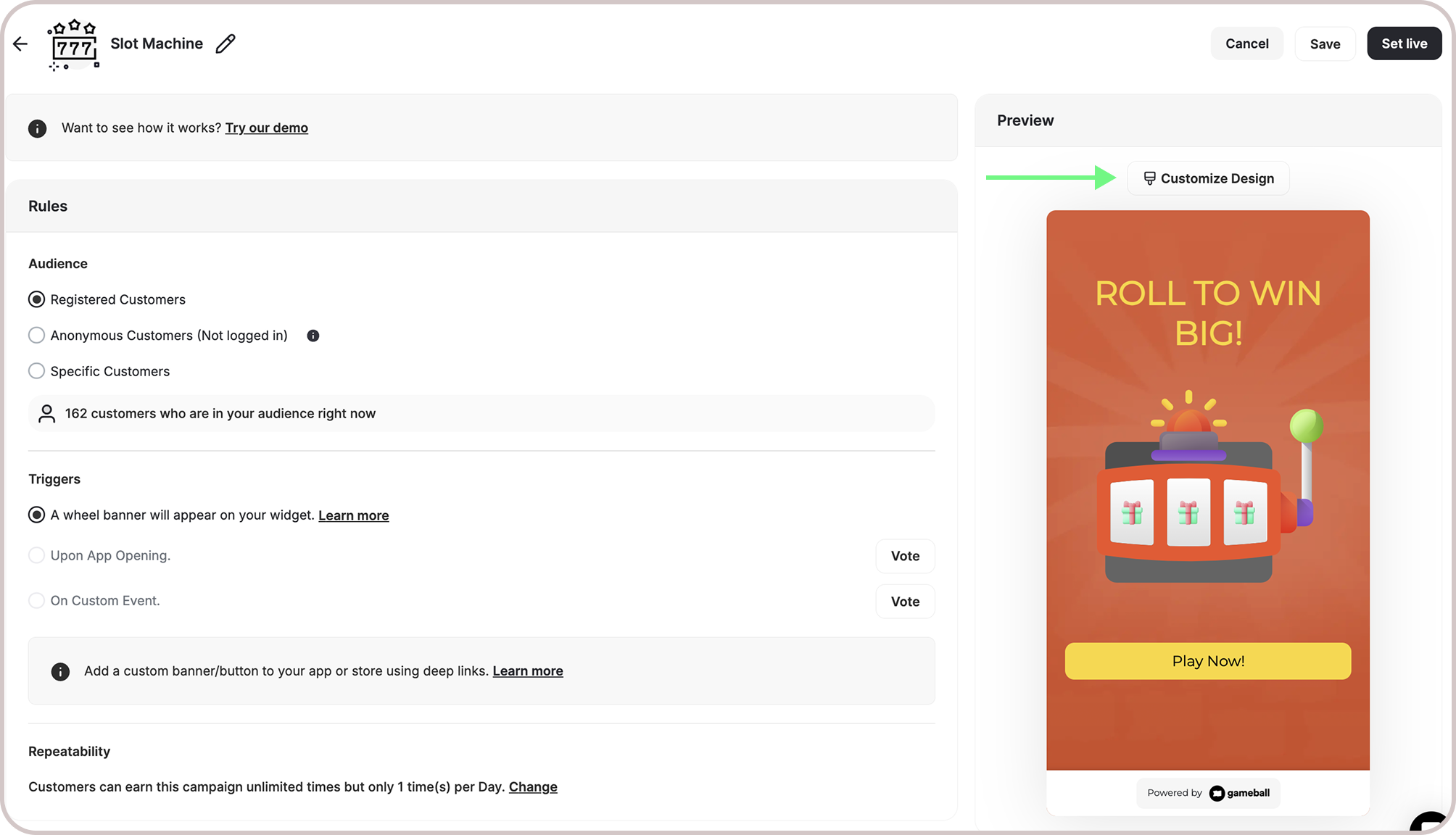
Open Gameball and click **Add Reward Campaign**.
Select the **Slot Machine** template.
Edit the campaign's setup (see configuration sections below).
Click **Set Live** to activate the campaign.
***
## Campaign Configuration
* **Machine Banner on Widget:**
A banner will display on your widget's homepage. When customers click the banner, they'll be taken to the game screen where they can roll the machine.
* **Deep Link:**
Use the `#gameball-slot` deep link to trigger the slot machine campaign from a custom banner or button on your website or app. [Learn more](/product-documentation/rewards-campaigns/start-from-scratch/setup-reward-campaign).
* **Registered Customers:**
Customers who have an account on your platform (signed up)
* **Anonymous Customers:**
Visitors browsing anonymously without providing any contact information or identifiable details (not signed up)
* Visitors can open the game, submit basic information through the lead form, play, and receive rewards, matching the standalone game URL experience.
* Widget deep links that open a specific game work for guests as well. The widget would open directly into the game screen and allow participation without login.
* **Specific Customers:**
You can choose for a specific selection of customers to participate in this campaign by filtering using segments, tags or customer attributes.
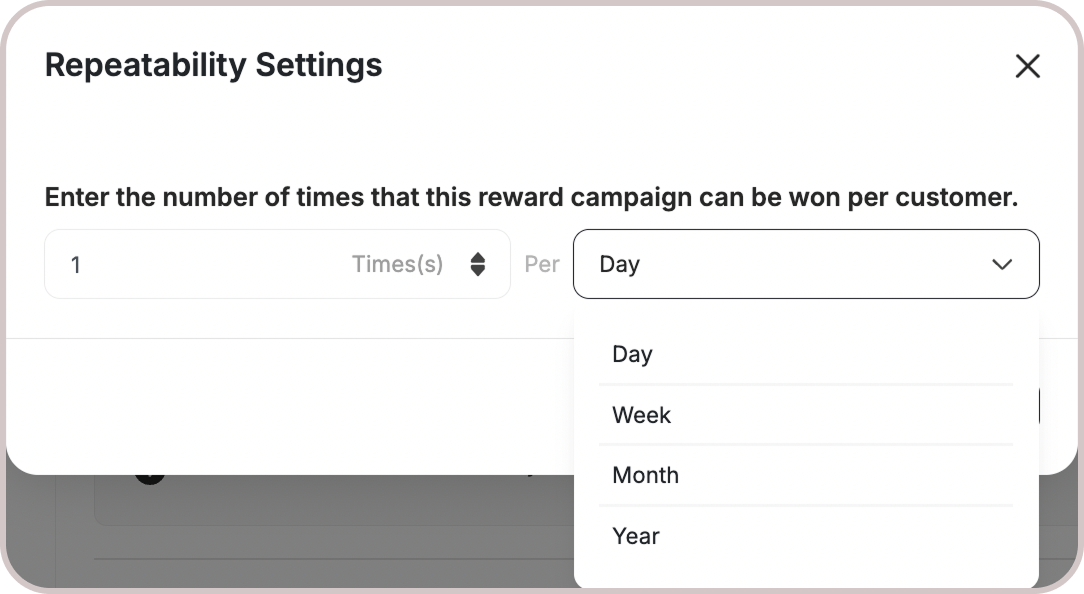
By default, customers can roll the machine **once per day**. A new opportunity to replay it begins at 00:00 AM based on the chosen time zone.
All Games campaigns support only the Limit per day/week/etc. [Learn more](/product-documentation/rewards-campaigns/start-from-scratch/setup-reward-campaign).
***
## Creating a Slot Machine Campaign
Open Gameball and click **Add Reward Campaign**.
Select the **Slot Machine** template.
Edit the campaign's setup (see configuration sections below).
Click **Set Live** to activate the campaign.
***
## Campaign Configuration
* **Machine Banner on Widget:**
A banner will display on your widget's homepage. When customers click the banner, they'll be taken to the game screen where they can roll the machine.
* **Deep Link:**
Use the `#gameball-slot` deep link to trigger the slot machine campaign from a custom banner or button on your website or app. [Learn more](/product-documentation/rewards-campaigns/start-from-scratch/setup-reward-campaign).
* **Registered Customers:**
Customers who have an account on your platform (signed up)
* **Anonymous Customers:**
Visitors browsing anonymously without providing any contact information or identifiable details (not signed up)
* Visitors can open the game, submit basic information through the lead form, play, and receive rewards, matching the standalone game URL experience.
* Widget deep links that open a specific game work for guests as well. The widget would open directly into the game screen and allow participation without login.
* **Specific Customers:**
You can choose for a specific selection of customers to participate in this campaign by filtering using segments, tags or customer attributes.
By default, customers can roll the machine **once per day**. A new opportunity to replay it begins at 00:00 AM based on the chosen time zone.
All Games campaigns support only the Limit per day/week/etc. [Learn more](/product-documentation/rewards-campaigns/start-from-scratch/setup-reward-campaign).
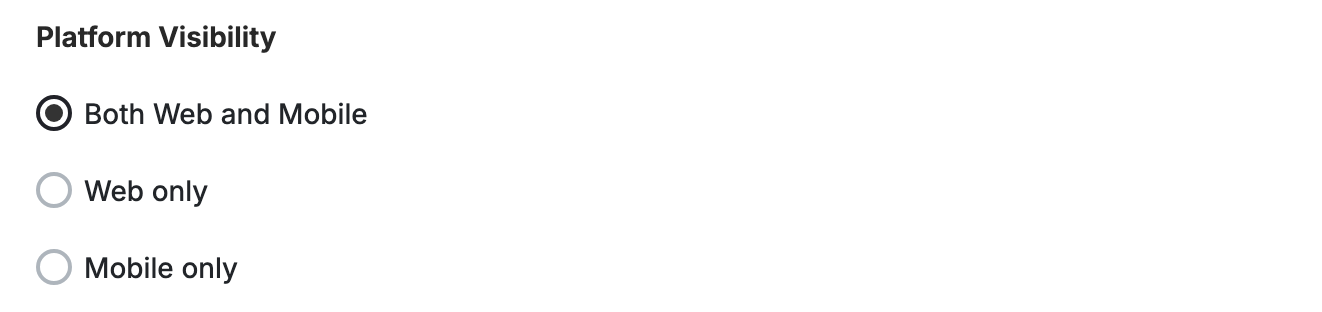
 You can choose whether the game campaign is shown on web, mobile, or both, giving you better control over engagement strategies across platforms.
 This template uses the standard reward campaign setup. See the [Generic Setup Guide](/product-documentation/rewards-campaigns/start-from-scratch/setup-reward-campaign) for details.
***
## Rewards Setup
This template uses the standard reward campaign setup. See the [Generic Setup Guide](/product-documentation/rewards-campaigns/start-from-scratch/setup-reward-campaign) for details.
***
## Rewards Setup
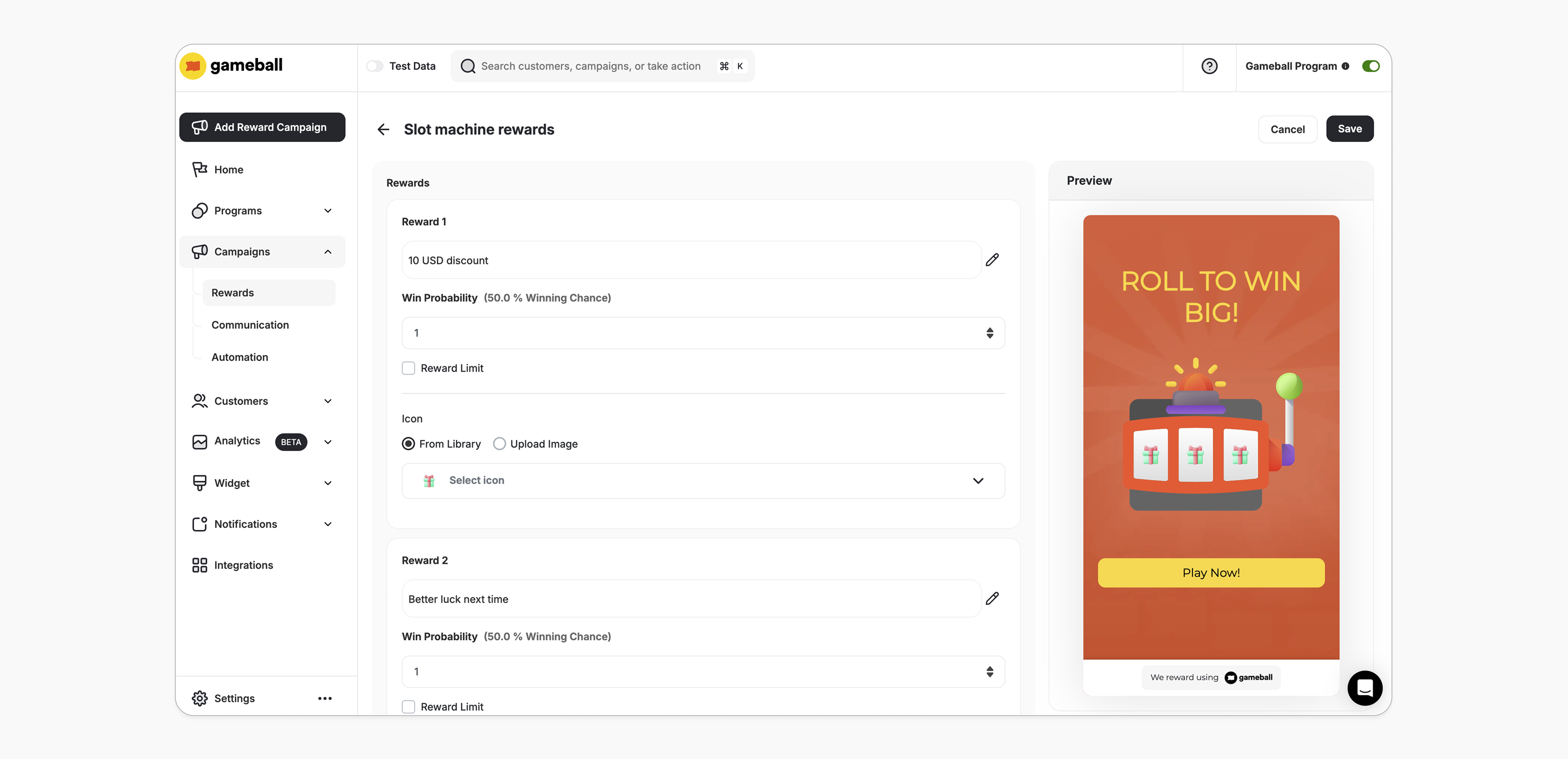 Choose from any of the reward types supported by Gameball. [Learn more](/product-documentation/rewards-campaigns/start-from-scratch/setup-reward-campaign).
| Setting | Value |
| ----------------------- | ----- |
| Minimum rewards allowed | 2 |
| Maximum rewards allowed | 8 |
Enter a numerical value (e.g., 2, 3, 4) to represent the probability of a customer receiving this reward. Every spin is completely independent of the previous ones, and the chance of landing on a specific reward is always the same, no matter how many times the machine has been rolled.
* The probability input can accept a value of 0, meaning the reward will not be available.
* Probabilities are calculated based on the sum of all assigned probabilities across the rewards.
While each reward has a set probability, it doesn't guarantee that all rewards will be won equally over time. Some rewards might appear more often, while others might be less frequent. It's all part of the random nature of the game!
**Example:**
* Reward #1: Probability 1
* Reward #2: Probability 1
* Reward #3: Probability 1
After 100 trials, you might see results like this:
* Reward #1: 27 times
* Reward #2: 36 times
* Reward #3: 37 times
The maximum number of times a specific reward can be claimed by all customers throughout the campaign.
* **Optional Feature:** You can choose to add a reward limit when configuring the campaign.
* **Tracking Wins:** Gameball will track how many times each reward has been won. After the limit is reached, the reward will still appear on the machine but will no longer be winnable.
* **Reward Limit Adjustment:**
* **Increase the Limit:** If the new limit is higher, customers can win the reward again.
* **Decrease the Limit:** If the new limit is lower, the system will prevent the reward from being won if the initial limit was already reached.
**Example:**
* Reward 1: Probability 1, Limit: 1
* Reward 2: Probability 1, No Limit
* Reward 3: Probability 1, No Limit
After 10 trials: Reward 1 hits 1 win (limit reached), Reward 2 hits 5 wins, Reward 3 hits 4 wins.
If all rewards have limits and they are reached, customers will see a "No rewards available at the moment" message.
***
## End User Experience
**How it works:**
Customers earn rewards through rolling the machine.
If all three windows match, they win a reward.
Prizes can include discounts, free items, bonus points, and more.
The customer is notified via the widget or email, depending on your configuration when they earned a reward. [Learn more](/product-documentation/rewards-campaigns/start-from-scratch/setup-reward-campaign).
***
## Customization
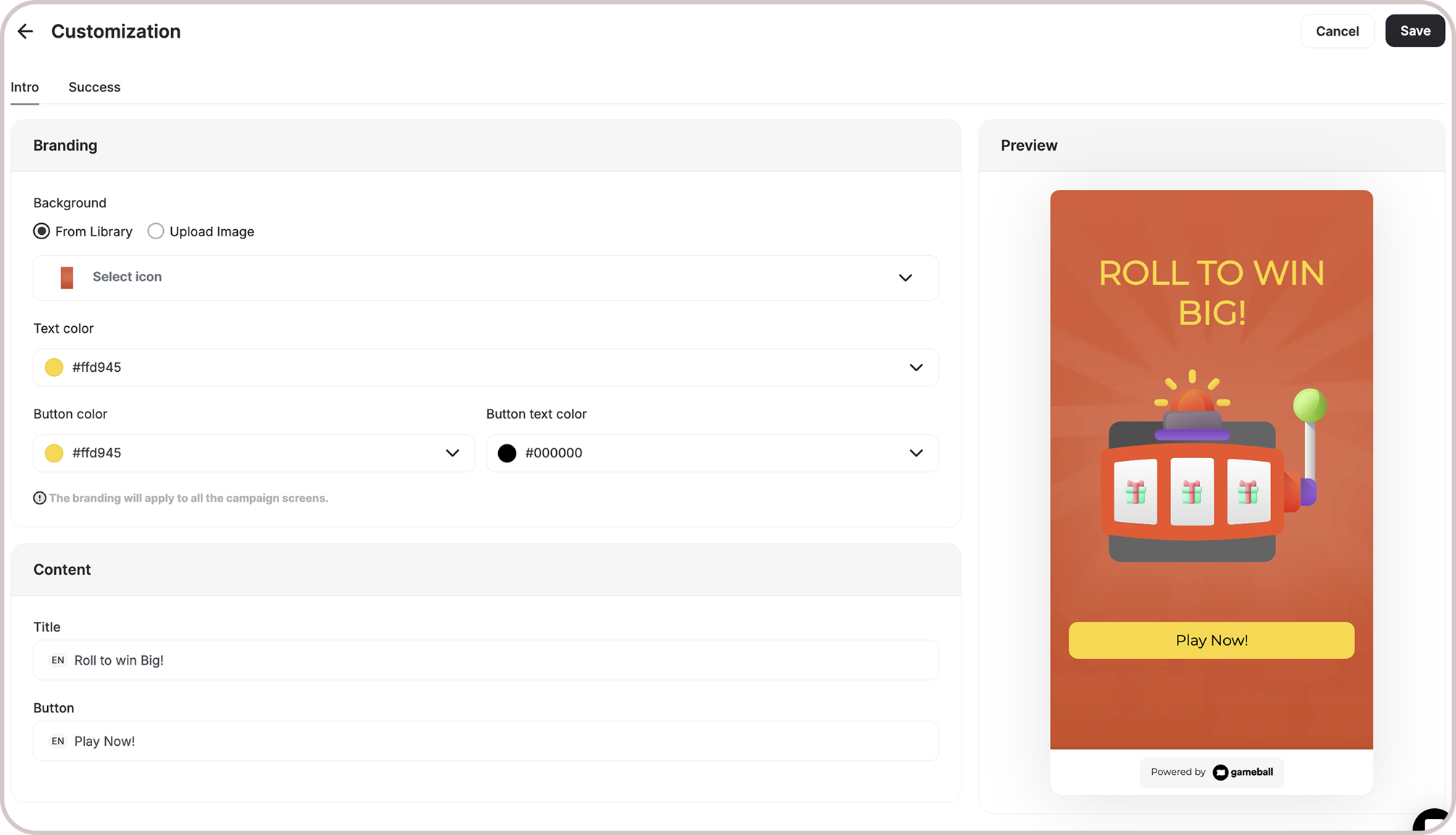
You can fully customize each stage of the campaign through dedicated tabs representing the different screens in the flow:
Configure the banner that appears in the widget to promote the Slot Machine campaign.
Set up the main game screen with headlines, descriptions, and call-to-action messages.
Shown when audience is set to **Anonymous Customers (Not logged in)**. Collect visitor information before gameplay.
Customize the message and visuals shown when a customer wins.
Configure the message shown when a customer does not win.
For each screen, you can tailor:
* **Branding**: Adjust background colors, text colors, and upload custom artworks.
* **Content**: Edit the headlines, descriptions, and call-to-action messages to match your tone and messaging.
Choose from any of the reward types supported by Gameball. [Learn more](/product-documentation/rewards-campaigns/start-from-scratch/setup-reward-campaign).
| Setting | Value |
| ----------------------- | ----- |
| Minimum rewards allowed | 2 |
| Maximum rewards allowed | 8 |
Enter a numerical value (e.g., 2, 3, 4) to represent the probability of a customer receiving this reward. Every spin is completely independent of the previous ones, and the chance of landing on a specific reward is always the same, no matter how many times the machine has been rolled.
* The probability input can accept a value of 0, meaning the reward will not be available.
* Probabilities are calculated based on the sum of all assigned probabilities across the rewards.
While each reward has a set probability, it doesn't guarantee that all rewards will be won equally over time. Some rewards might appear more often, while others might be less frequent. It's all part of the random nature of the game!
**Example:**
* Reward #1: Probability 1
* Reward #2: Probability 1
* Reward #3: Probability 1
After 100 trials, you might see results like this:
* Reward #1: 27 times
* Reward #2: 36 times
* Reward #3: 37 times
The maximum number of times a specific reward can be claimed by all customers throughout the campaign.
* **Optional Feature:** You can choose to add a reward limit when configuring the campaign.
* **Tracking Wins:** Gameball will track how many times each reward has been won. After the limit is reached, the reward will still appear on the machine but will no longer be winnable.
* **Reward Limit Adjustment:**
* **Increase the Limit:** If the new limit is higher, customers can win the reward again.
* **Decrease the Limit:** If the new limit is lower, the system will prevent the reward from being won if the initial limit was already reached.
**Example:**
* Reward 1: Probability 1, Limit: 1
* Reward 2: Probability 1, No Limit
* Reward 3: Probability 1, No Limit
After 10 trials: Reward 1 hits 1 win (limit reached), Reward 2 hits 5 wins, Reward 3 hits 4 wins.
If all rewards have limits and they are reached, customers will see a "No rewards available at the moment" message.
***
## End User Experience
**How it works:**
Customers earn rewards through rolling the machine.
If all three windows match, they win a reward.
Prizes can include discounts, free items, bonus points, and more.
The customer is notified via the widget or email, depending on your configuration when they earned a reward. [Learn more](/product-documentation/rewards-campaigns/start-from-scratch/setup-reward-campaign).
***
## Customization
You can fully customize each stage of the campaign through dedicated tabs representing the different screens in the flow:
Configure the banner that appears in the widget to promote the Slot Machine campaign.
Set up the main game screen with headlines, descriptions, and call-to-action messages.
Shown when audience is set to **Anonymous Customers (Not logged in)**. Collect visitor information before gameplay.
Customize the message and visuals shown when a customer wins.
Configure the message shown when a customer does not win.
For each screen, you can tailor:
* **Branding**: Adjust background colors, text colors, and upload custom artworks.
* **Content**: Edit the headlines, descriptions, and call-to-action messages to match your tone and messaging.
 ***
## Important Notes
### Fraud Prevention
In the "Slot Machine" campaigns for guests (**Audience is Anonymous/Not Logged-in**), the following protections apply:
| Protection | Description |
| --------------------------------- | -------------------------------------------------------------------------------------------------------------------------------------------------------- |
| **Single Play Per Session** | Guest users can try the game only once per session. If they attempt to re-enter, a message displays: "You have already spun the Machine." |
| **Multiple Machines in Campaign** | For campaigns with multiple machines, this restriction applies individually to each machine. Guests can still roll any other machine they haven't tried. |
| **Session Restriction** | If a guest opens a new browser tab or window after playing, the same restriction message will appear. |
**Customer Eligibility**
Games in the widget update dynamically based on customer eligibility, ensuring customers only see games they can still participate in.
**Games are hidden when customers become ineligible.**
If a customer no longer belongs to the game's target segment, the game is automatically removed from the widget and won't reappear unless eligibility is restored.
### Anonymous Option
* If you choose **Anonymous** as the audience, the campaign will be available to visitors who are not yet identified on your store.
* Once enabled, a lead form will automatically appear prompting the customer to enter their information (e.g. name, email).
* This is a great way to collect leads and retarget potential customers later.
* You can fully customize this form by navigating to **Customize Design -> Lead Form**.
***
## Important Notes
### Fraud Prevention
In the "Slot Machine" campaigns for guests (**Audience is Anonymous/Not Logged-in**), the following protections apply:
| Protection | Description |
| --------------------------------- | -------------------------------------------------------------------------------------------------------------------------------------------------------- |
| **Single Play Per Session** | Guest users can try the game only once per session. If they attempt to re-enter, a message displays: "You have already spun the Machine." |
| **Multiple Machines in Campaign** | For campaigns with multiple machines, this restriction applies individually to each machine. Guests can still roll any other machine they haven't tried. |
| **Session Restriction** | If a guest opens a new browser tab or window after playing, the same restriction message will appear. |
**Customer Eligibility**
Games in the widget update dynamically based on customer eligibility, ensuring customers only see games they can still participate in.
**Games are hidden when customers become ineligible.**
If a customer no longer belongs to the game's target segment, the game is automatically removed from the widget and won't reappear unless eligibility is restored.
### Anonymous Option
* If you choose **Anonymous** as the audience, the campaign will be available to visitors who are not yet identified on your store.
* Once enabled, a lead form will automatically appear prompting the customer to enter their information (e.g. name, email).
* This is a great way to collect leads and retarget potential customers later.
* You can fully customize this form by navigating to **Customize Design -> Lead Form**.
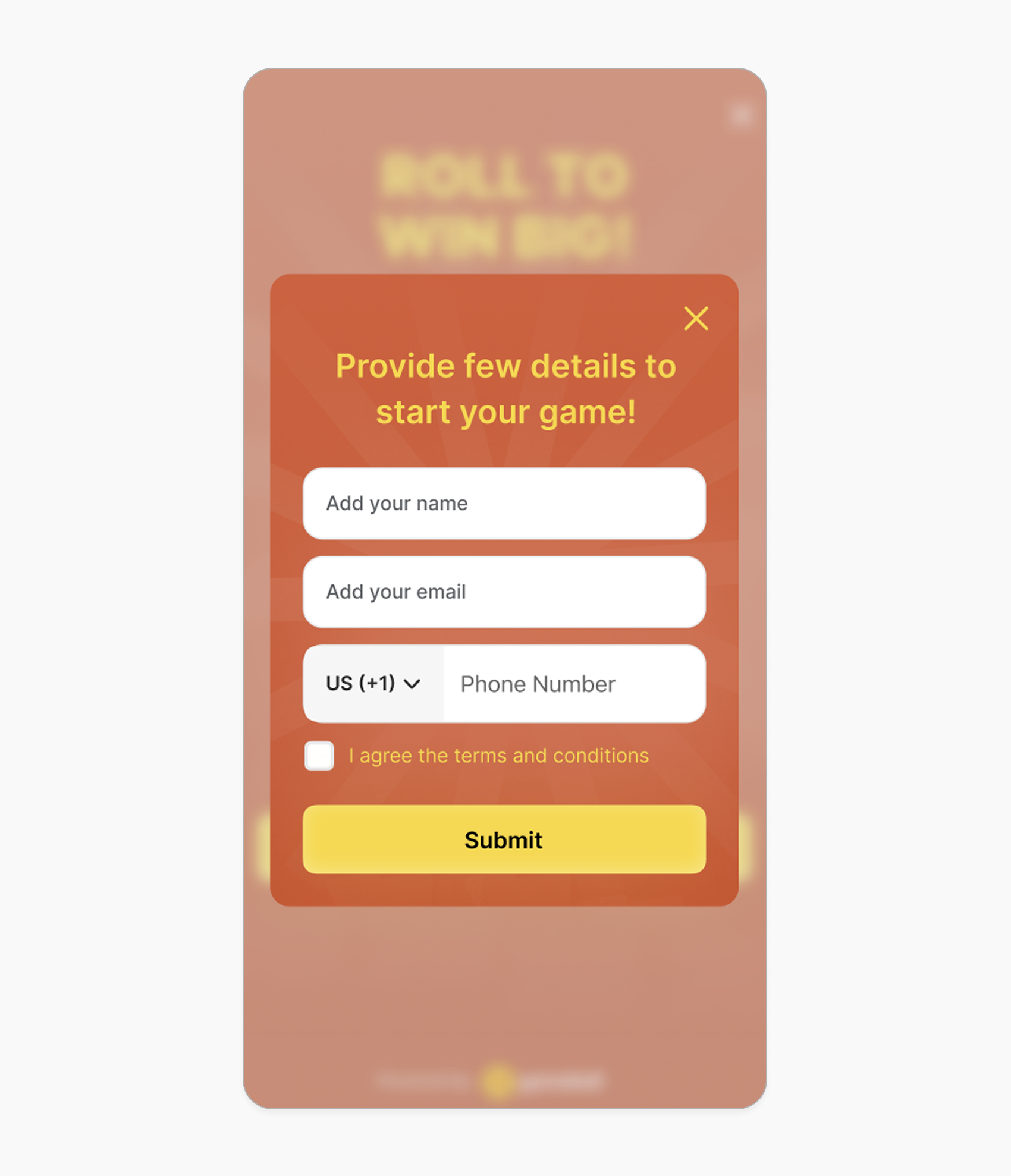 Customizing the lead form also allows you to add a hyperlink to the **"terms and services"** so that customers can read and accept them before clicking submit.
***
## Related Articles
Learn the full setup process for creating and activating reward campaigns.
Explore all reward types available and how to configure each one.
Configure in-app and email notifications triggered when customers earn rewards.
Customizing the lead form also allows you to add a hyperlink to the **"terms and services"** so that customers can read and accept them before clicking submit.
***
## Related Articles
Learn the full setup process for creating and activating reward campaigns.
Explore all reward types available and how to configure each one.
Configure in-app and email notifications triggered when customers earn rewards.