> ## Documentation Index
> Fetch the complete documentation index at: https://docs.gameball.co/llms.txt
> Use this file to discover all available pages before exploring further.
# Family Wallet
> Shared point wallets for household accounts that allow family members to pool points and redeem rewards together
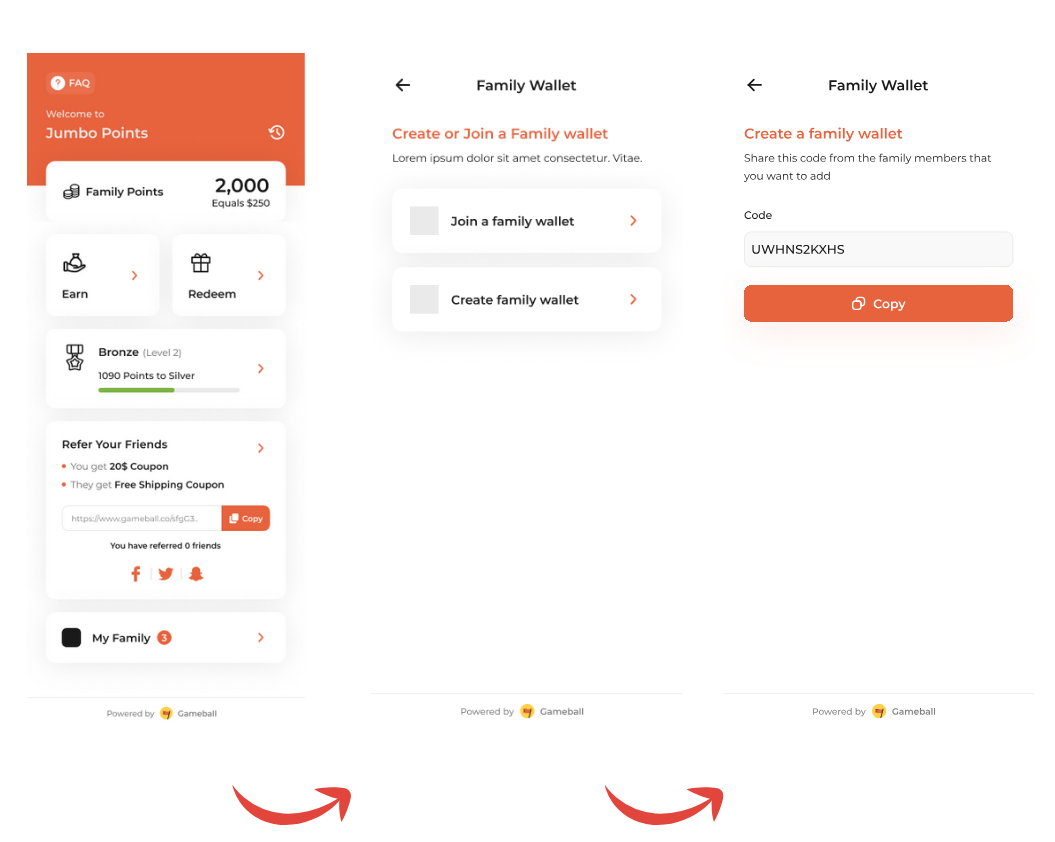
The **Family Wallet** feature in Gameball allows your customers to pool their earned points into a single, shared wallet, enabling family members or groups to collaborate on earning and redeeming rewards. This is a fantastic way to engage multiple users within the same group and offer them a seamless, collective experience.
 ***
## What is Family Wallet?
Family Wallet enables multiple customers to share a common point wallet and rewards. When enabled, family members can combine their individual point balances into one shared wallet, making it easier to accumulate points faster and redeem bigger rewards together.
**Unified Experience**
* Shared point balance across family members
* Faster point accumulation through combined efforts
* Ability to redeem bigger rewards together
**Individual Accounts**
* Each customer has separate point balance
* Points can't be combined
* Limited redemption options
***
## Key Features
### Family Wallet Ownership
A Family Wallet is owned by a single customer, referred to as the **Parent**:
* The **Parent** owns and manages the Family Wallet
* The Parent can invite other customers (family members) to join
* Members must **confirm their invitation** to join
* Only the Parent can invite or remove members
* Maximum **10 members** per Family Wallet
***
## What is Family Wallet?
Family Wallet enables multiple customers to share a common point wallet and rewards. When enabled, family members can combine their individual point balances into one shared wallet, making it easier to accumulate points faster and redeem bigger rewards together.
**Unified Experience**
* Shared point balance across family members
* Faster point accumulation through combined efforts
* Ability to redeem bigger rewards together
**Individual Accounts**
* Each customer has separate point balance
* Points can't be combined
* Limited redemption options
***
## Key Features
### Family Wallet Ownership
A Family Wallet is owned by a single customer, referred to as the **Parent**:
* The **Parent** owns and manages the Family Wallet
* The Parent can invite other customers (family members) to join
* Members must **confirm their invitation** to join
* Only the Parent can invite or remove members
* Maximum **10 members** per Family Wallet
 ### Point Management
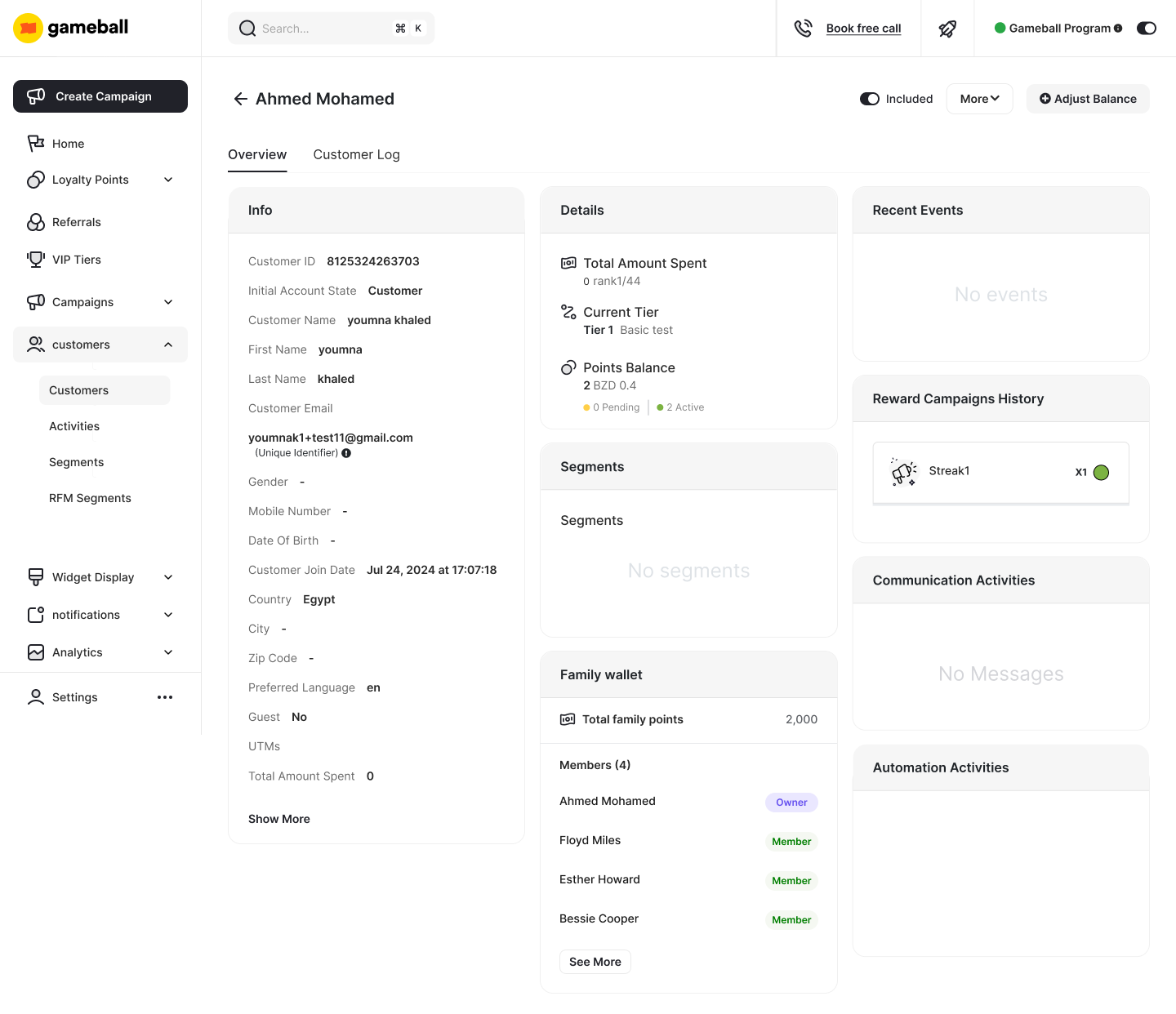
* **Earning**: Points earned by Parent and all members are **combined into a single wallet**
* **Redemption**: Both Parent and members can redeem from the combined wallet anytime
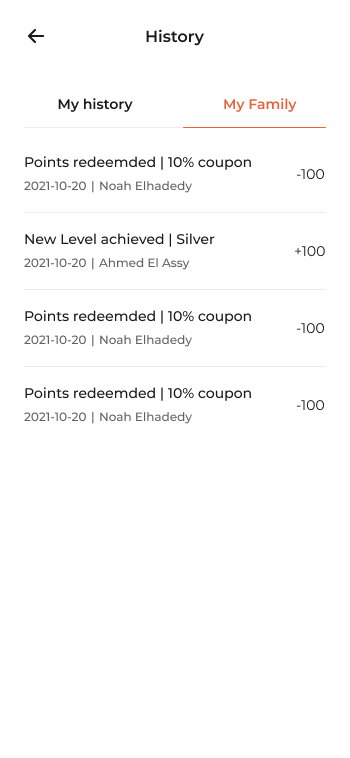
* **Viewing**: Every member can see their individual points and the combined balance
* **History**: Parent sees complete history; members see only their own history
### Point Management
* **Earning**: Points earned by Parent and all members are **combined into a single wallet**
* **Redemption**: Both Parent and members can redeem from the combined wallet anytime
* **Viewing**: Every member can see their individual points and the combined balance
* **History**: Parent sees complete history; members see only their own history
 If the Parent account is deleted, the Family Wallet will also be deleted, and all members will revert to standard accounts. Members can leave the Family Wallet at any time.
### Family Wallet Views
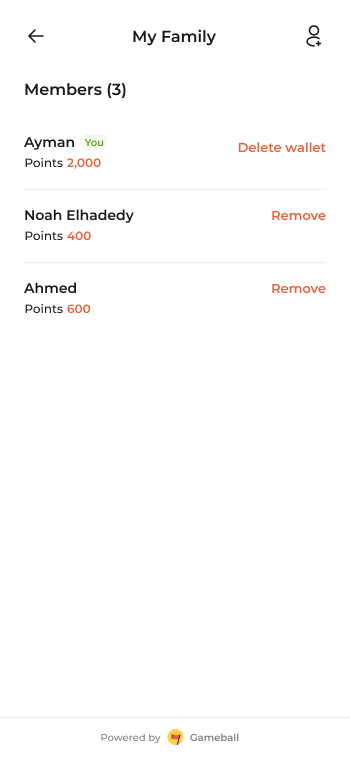
**Parent/Owner View:**
The Parent can see all family members, their individual points, and manage the wallet (add/remove members, delete wallet).
If the Parent account is deleted, the Family Wallet will also be deleted, and all members will revert to standard accounts. Members can leave the Family Wallet at any time.
### Family Wallet Views
**Parent/Owner View:**
The Parent can see all family members, their individual points, and manage the wallet (add/remove members, delete wallet).
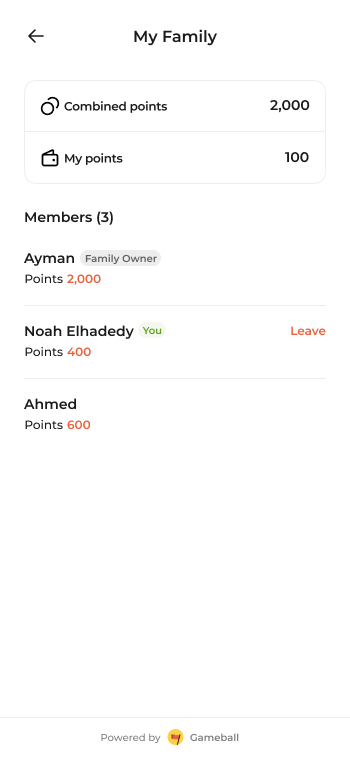
 **Member View:**
Members can see their individual points, the combined family points, and all family members. They can leave the family wallet at any time.
**Member View:**
Members can see their individual points, the combined family points, and all family members. They can leave the family wallet at any time.
 ***
## Setting Up Family Wallet
Family Wallet is enabled through the Gameball Dashboard:
Go to **Settings** → **Customers** → **Family Wallet** in your Gameball Dashboard.
Click the toggle to enable the Family Wallet feature.
***
## Setting Up Family Wallet
Family Wallet is enabled through the Gameball Dashboard:
Go to **Settings** → **Customers** → **Family Wallet** in your Gameball Dashboard.
Click the toggle to enable the Family Wallet feature.
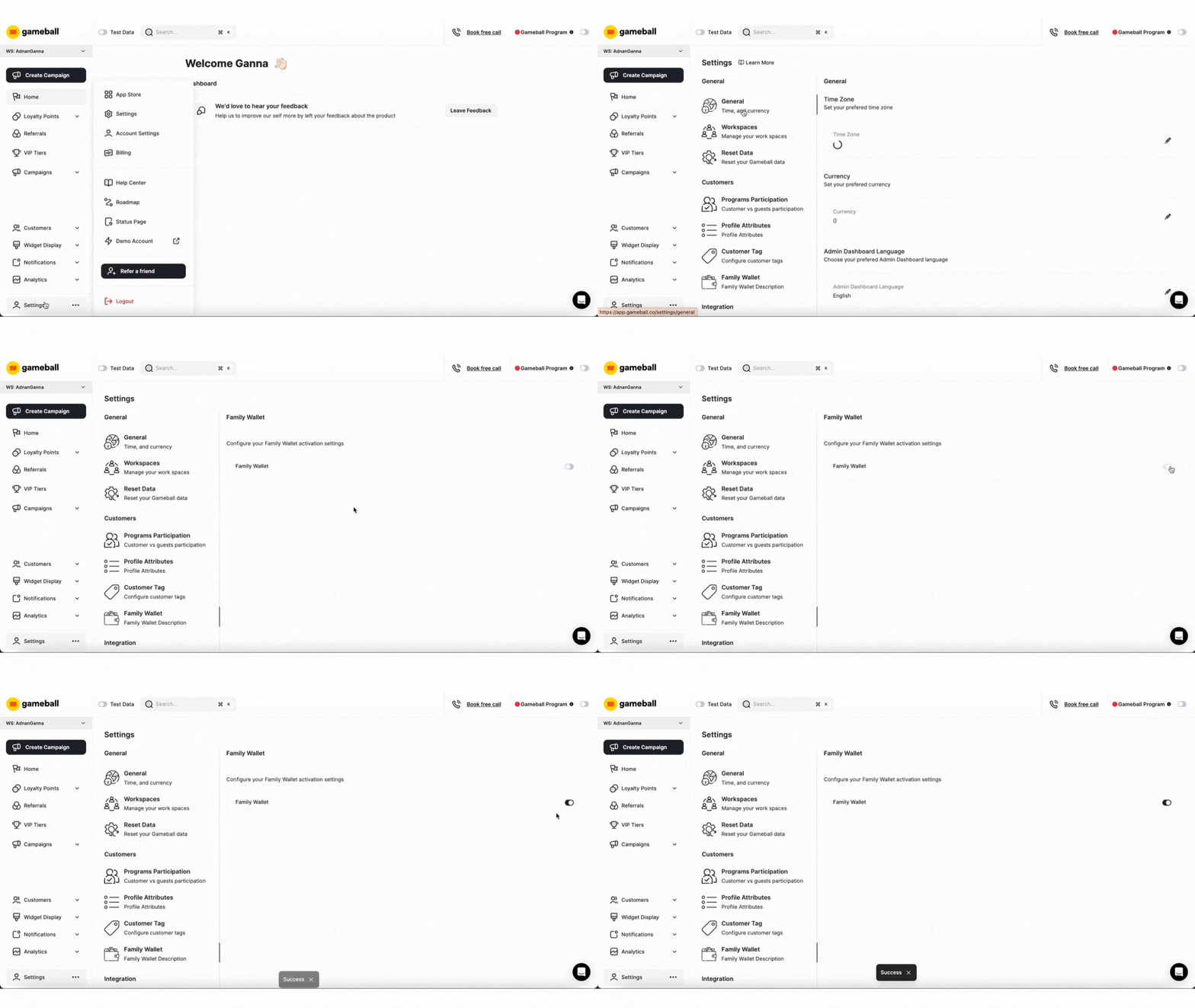 Once enabled, customers (as Parents) can start inviting members to join their Family Wallet through the dashboard. When creating a Family Wallet, a shareable code is generated that family members can use to join.
***
## Family Wallet in the API
While Family Wallet management (inviting members, removing members, etc.) is handled through the Gameball Dashboard, the API provides visibility into family wallet redemptions through transaction responses.
### Family Wallet Redemption Fields
When a customer redeems points from a Family Wallet, the transaction response includes these fields:
* **`familyRedemptionAmount`**: Redemption monetary value related to family wallet, if applicable (null for individual redemptions)
* **`familyRedemptionPoints`**: Redemption points related to family wallet, if applicable (null for individual redemptions)
These fields appear in transaction responses when querying the [List Transactions API](/api-reference/transactions/transaction-management/list-transactions).
### Example: Identifying Family Wallet Redemptions
```javascript theme={null}
// Get transaction history
const response = await fetch(
`https://api.gameball.co/api/v4.0/integrations/transactions?customerId=${customerId}`,
{
headers: {
'apikey': 'YOUR_API_KEY',
'secretkey': 'YOUR_SECRET_KEY'
}
}
);
const data = await response.json();
// Check for family wallet redemptions
data.transactions.forEach(transaction => {
if (transaction.familyRedemptionAmount !== null) {
// This is a family wallet redemption
console.log(`Family Wallet Redemption: ${transaction.familyRedemptionPoints} points`);
}
});
```
***
## Use Cases
Families who frequently shop together can pool their rewards to reach higher-tier benefits or redeem bigger rewards more quickly.
**Example**: A parent shopping for household goods earns points while their children earn points from individual purchases—all contributing to the same Family Wallet.
The entire family works together to accumulate points faster.
Families using multiple Gameball-enabled services can combine their loyalty points, ensuring they never miss out on redemption opportunities.
**Example**: A family uses your e-commerce platform, mobile app, and physical stores. All points earned contribute to one shared wallet.
No points are left unused—family members can redeem from the combined balance anytime.
The Parent can monitor and control reward usage, useful for families where parents wish to regulate redemption by younger members.
Parents maintain oversight while still providing the benefits of shared point accumulation.
***
## Best Practices
Clearly communicate how Family Wallet works, including the Parent role, member limits, and redemption policies.
Use `familyRedemptionAmount` and `familyRedemptionPoints` fields to provide transparency about family wallet redemptions in your UI.
***
## Related Resources
View transaction history with family wallet redemption fields
Once enabled, customers (as Parents) can start inviting members to join their Family Wallet through the dashboard. When creating a Family Wallet, a shareable code is generated that family members can use to join.
***
## Family Wallet in the API
While Family Wallet management (inviting members, removing members, etc.) is handled through the Gameball Dashboard, the API provides visibility into family wallet redemptions through transaction responses.
### Family Wallet Redemption Fields
When a customer redeems points from a Family Wallet, the transaction response includes these fields:
* **`familyRedemptionAmount`**: Redemption monetary value related to family wallet, if applicable (null for individual redemptions)
* **`familyRedemptionPoints`**: Redemption points related to family wallet, if applicable (null for individual redemptions)
These fields appear in transaction responses when querying the [List Transactions API](/api-reference/transactions/transaction-management/list-transactions).
### Example: Identifying Family Wallet Redemptions
```javascript theme={null}
// Get transaction history
const response = await fetch(
`https://api.gameball.co/api/v4.0/integrations/transactions?customerId=${customerId}`,
{
headers: {
'apikey': 'YOUR_API_KEY',
'secretkey': 'YOUR_SECRET_KEY'
}
}
);
const data = await response.json();
// Check for family wallet redemptions
data.transactions.forEach(transaction => {
if (transaction.familyRedemptionAmount !== null) {
// This is a family wallet redemption
console.log(`Family Wallet Redemption: ${transaction.familyRedemptionPoints} points`);
}
});
```
***
## Use Cases
Families who frequently shop together can pool their rewards to reach higher-tier benefits or redeem bigger rewards more quickly.
**Example**: A parent shopping for household goods earns points while their children earn points from individual purchases—all contributing to the same Family Wallet.
The entire family works together to accumulate points faster.
Families using multiple Gameball-enabled services can combine their loyalty points, ensuring they never miss out on redemption opportunities.
**Example**: A family uses your e-commerce platform, mobile app, and physical stores. All points earned contribute to one shared wallet.
No points are left unused—family members can redeem from the combined balance anytime.
The Parent can monitor and control reward usage, useful for families where parents wish to regulate redemption by younger members.
Parents maintain oversight while still providing the benefits of shared point accumulation.
***
## Best Practices
Clearly communicate how Family Wallet works, including the Parent role, member limits, and redemption policies.
Use `familyRedemptionAmount` and `familyRedemptionPoints` fields to provide transparency about family wallet redemptions in your UI.
***
## Related Resources
View transaction history with family wallet redemption fields