> ## Documentation Index
> Fetch the complete documentation index at: https://docs.gameball.co/llms.txt
> Use this file to discover all available pages before exploring further.
# Taxes and Shipping Exclusion
> Exclude taxes and shipping from point calculations
# Overview
Some businesses prefer to reward customers only on the **actual product value**, excluding **shipping fees** and **taxes** from the rewardable amount.\
Gameball supports this behavior through a configurable setting.
If enabled, Gameball will automatically **subtract tax and shipping values** before calculating the reward amount.
### How to enable the shipping and tax exclusion feature:
1. In your dashboard, navigate to **Programs → Earn Points** from the left-side menu.
2. Ensure that both of the following options are **enabled** by switching on their toggles:
.png) ***
## Why This Matters
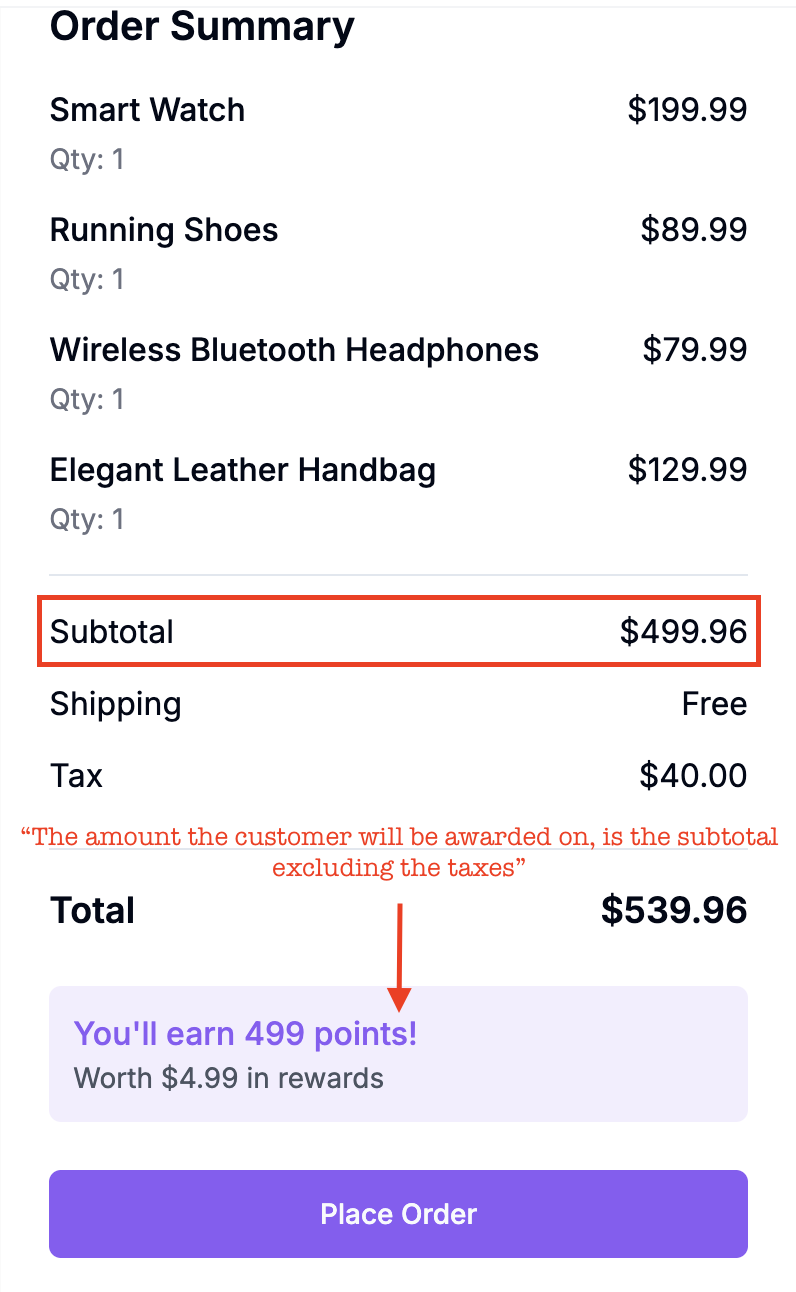
Let’s say your customer pays \$540, but \$40 of that is tax and shipping. If you don’t exclude these values, your loyalty program will over-reward, giving points for money not actually spent on products.
That’s why, if you choose to exclude tax and shipping, it’s critical to send **complete and accurate values** in the [**Order API**](/api-reference/order/order-tracking), so Gameball can apply deductions correctly.
***
## Why This Matters
Let’s say your customer pays \$540, but \$40 of that is tax and shipping. If you don’t exclude these values, your loyalty program will over-reward, giving points for money not actually spent on products.
That’s why, if you choose to exclude tax and shipping, it’s critical to send **complete and accurate values** in the [**Order API**](/api-reference/order/order-tracking), so Gameball can apply deductions correctly.
 ***
## Prerequisites for Using the “Exclude Taxes and Shipping” Feature
To ensure this feature works as expected, your Order API payload must include the following fields:
### **1. totalShipping (Required if feature is enabled)**
You must include the totalShipping attribute in your Order API request.
* This value is used by Gameball to **deduct shipping costs** from both totalPaid and totalPrice when calculating rewards.
* Even though totalShipping is optional by default, it becomes **mandatory** once this feature is activated.
Always send totalPaid and totalPrice **as-is**, including shipping and taxes. Do **not** exclude them yourself, Gameball will handle the deductions internally.
### **2. totalTax and Item-Level taxes (Required if feature is enabled)**
You must send both totalTax and per-item taxes values.
* **totalTax** (order-level): Used to deduct total taxes from totalPaid and totalPrice.
* **taxes** (item-level): Represents the total tax for that specific line item.
#### **Tax Calculation Clarification:**
If an item has a tax of **\$10 per unit**, and the customer buys **2 units**, the correct taxes value for that item is:
> 2 × \$10 = \$20
This ensures Gameball calculates tax deductions accurately per product.
Even though the API doesn’t enforce these fields, they become mandatory when **tax and shipping exclusions** are turned on.
### **Summary of Required Fields (When Feature Is Enabled)**
| Field | Required | Description |
| -------------------- | ----------------- | ---------------------------------------------------------- |
| `totalShipping` | Yes | Used to deduct shipping from `totalPaid` and `totalPrice`. |
| `totalTax` | Yes | Used to deduct taxes from `totalPaid` and `totalPrice`. |
| `lineItems[*].taxes` | If lineItems used | Must reflect the total tax for the quantity purchased. |
### Example Scenario:
Let’s say a customer places this order:
* 2 × Moisturizer at **\$200 each** → **Subtotal = \$400**
* 1 × Tote Bag at **\$150**
* **Product Subtotal = \$400 + \$150 = \$550**
* Shipping Fee = **\$50**
* Tax on Moisturizer = **\$10 per unit × 2 = \$20**
* Tax on Tote Bag = **\$15**
* **Total Tax = \$20 + \$15 = \$35**
* **Total Paid = \$550 (products) + \$50 (shipping) + \$35 (tax) = \$635**
**Your API Payload:**
```json theme={null}
{
"orderId": "ORD-10001",
"customerId": "CUST_56789",
"totalPaid": 635,
"totalPrice": 635,
"totalShipping": 50,
"totalTax": 35,
"lineItems": [
{
"productId": "PROD_MOISTURIZER",
"price": 200,
"quantity": 2,
"collection": ["Skin Care"],
"taxes": 20
},
{
"productId": "PROD_TOTE_BAG",
"price": 150,
"quantity": 1,
"collection": ["Accessories"],
"taxes": 15
}
]
}
```
Always send all tax and shipping values in your payload, Gameball will handle the exclusion internally. Do not modify your total values manually.
***
## How Gameball Calculates Rewards
With **tax and shipping exclusions** turned on, Gameball calculates the **rewardable amount** as follows:
1. **Start with:** `totalPaid = $635`
2. **Subtract shipping:** `$635 – $50 = $585`
3. **Subtract tax:** `$585 – $35 = $550`
Gameball rewards will be calculated based on **\$550**, the actual product value.
### **What Happens If You Don’t send taxes in Line Items**
If you send `totalTax` at the order level but omit the taxes field for each `lineItem`, Gameball will still work as follows:
* For **merchant-level cashback** (general rate):
Cashback will still be calculated correctly; Gameball will subtract `totalTax` from the order total before applying the reward.
* For **collection-based cashback** (different rates per collection):
Gameball will treat missing taxes values as **0** per line item. Since the item prices are already sent excluding tax, the calculation result will be the same, but per-item accuracy and visibility will be lost.
**In short:**
> Rewards will still be calculated correctly overall, but omitting item-level taxes limits the precision of per-product or per-collection reward tracking.
**Best Practice:**
> Always include both `totalTax` and `taxes` per item for accurate, collection-level cashback calculations and consistent analytics.
***
## Key Takeaways
Gameball ensures customers are rewarded accurately, only for the **true value of products**.
**Remember to:**
* Include `totalShipping`, `totalTax`, and per-lineItem `taxes` when this feature is active
* Ensure the `taxes` field in each `lineItem` represents the **total tax for that product line** (`unit tax × quantity`)
* Keep your data complete and consistent to guarantee precise reward calculations
***
## Prerequisites for Using the “Exclude Taxes and Shipping” Feature
To ensure this feature works as expected, your Order API payload must include the following fields:
### **1. totalShipping (Required if feature is enabled)**
You must include the totalShipping attribute in your Order API request.
* This value is used by Gameball to **deduct shipping costs** from both totalPaid and totalPrice when calculating rewards.
* Even though totalShipping is optional by default, it becomes **mandatory** once this feature is activated.
Always send totalPaid and totalPrice **as-is**, including shipping and taxes. Do **not** exclude them yourself, Gameball will handle the deductions internally.
### **2. totalTax and Item-Level taxes (Required if feature is enabled)**
You must send both totalTax and per-item taxes values.
* **totalTax** (order-level): Used to deduct total taxes from totalPaid and totalPrice.
* **taxes** (item-level): Represents the total tax for that specific line item.
#### **Tax Calculation Clarification:**
If an item has a tax of **\$10 per unit**, and the customer buys **2 units**, the correct taxes value for that item is:
> 2 × \$10 = \$20
This ensures Gameball calculates tax deductions accurately per product.
Even though the API doesn’t enforce these fields, they become mandatory when **tax and shipping exclusions** are turned on.
### **Summary of Required Fields (When Feature Is Enabled)**
| Field | Required | Description |
| -------------------- | ----------------- | ---------------------------------------------------------- |
| `totalShipping` | Yes | Used to deduct shipping from `totalPaid` and `totalPrice`. |
| `totalTax` | Yes | Used to deduct taxes from `totalPaid` and `totalPrice`. |
| `lineItems[*].taxes` | If lineItems used | Must reflect the total tax for the quantity purchased. |
### Example Scenario:
Let’s say a customer places this order:
* 2 × Moisturizer at **\$200 each** → **Subtotal = \$400**
* 1 × Tote Bag at **\$150**
* **Product Subtotal = \$400 + \$150 = \$550**
* Shipping Fee = **\$50**
* Tax on Moisturizer = **\$10 per unit × 2 = \$20**
* Tax on Tote Bag = **\$15**
* **Total Tax = \$20 + \$15 = \$35**
* **Total Paid = \$550 (products) + \$50 (shipping) + \$35 (tax) = \$635**
**Your API Payload:**
```json theme={null}
{
"orderId": "ORD-10001",
"customerId": "CUST_56789",
"totalPaid": 635,
"totalPrice": 635,
"totalShipping": 50,
"totalTax": 35,
"lineItems": [
{
"productId": "PROD_MOISTURIZER",
"price": 200,
"quantity": 2,
"collection": ["Skin Care"],
"taxes": 20
},
{
"productId": "PROD_TOTE_BAG",
"price": 150,
"quantity": 1,
"collection": ["Accessories"],
"taxes": 15
}
]
}
```
Always send all tax and shipping values in your payload, Gameball will handle the exclusion internally. Do not modify your total values manually.
***
## How Gameball Calculates Rewards
With **tax and shipping exclusions** turned on, Gameball calculates the **rewardable amount** as follows:
1. **Start with:** `totalPaid = $635`
2. **Subtract shipping:** `$635 – $50 = $585`
3. **Subtract tax:** `$585 – $35 = $550`
Gameball rewards will be calculated based on **\$550**, the actual product value.
### **What Happens If You Don’t send taxes in Line Items**
If you send `totalTax` at the order level but omit the taxes field for each `lineItem`, Gameball will still work as follows:
* For **merchant-level cashback** (general rate):
Cashback will still be calculated correctly; Gameball will subtract `totalTax` from the order total before applying the reward.
* For **collection-based cashback** (different rates per collection):
Gameball will treat missing taxes values as **0** per line item. Since the item prices are already sent excluding tax, the calculation result will be the same, but per-item accuracy and visibility will be lost.
**In short:**
> Rewards will still be calculated correctly overall, but omitting item-level taxes limits the precision of per-product or per-collection reward tracking.
**Best Practice:**
> Always include both `totalTax` and `taxes` per item for accurate, collection-level cashback calculations and consistent analytics.
***
## Key Takeaways
Gameball ensures customers are rewarded accurately, only for the **true value of products**.
**Remember to:**
* Include `totalShipping`, `totalTax`, and per-lineItem `taxes` when this feature is active
* Ensure the `taxes` field in each `lineItem` represents the **total tax for that product line** (`unit tax × quantity`)
* Keep your data complete and consistent to guarantee precise reward calculations