> ## Documentation Index
> Fetch the complete documentation index at: https://docs.gameball.co/llms.txt
> Use this file to discover all available pages before exploring further.
# Redeem Through Your Couponing Engine
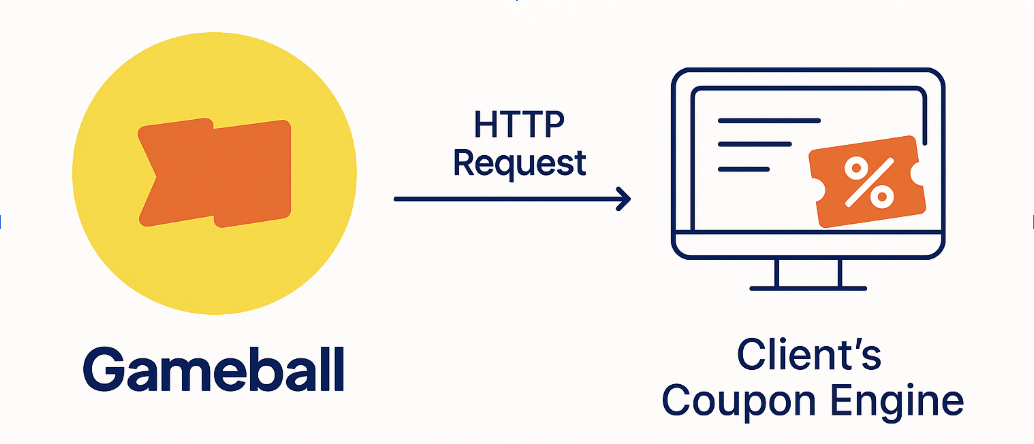
> If you already have a backend couponing system, whether custom-built or part of your e-commerce platform, Gameball allows you to plug into it via webhooks. This lets Gameball notify your system to create a coupon when a customer earns or redeems a reward. You keep full control over coupon creation logic, while Gameball handles loyalty tracking, redemption rules, and reward delivery.
## **What Does This Integration Do?**
Instead of using Gameball’s native coupon engine, Gameball can send a **real-time HTTP request** to your system when:
* A customer **redeems points** for a coupon reward
* A customer **completes a campaign** and earns a coupon
Your system then returns a valid coupon code, which Gameball shows to the customer.
 ## **Supported Use Cases**
| **Scenario** | **Example** |
| :-------------- | :-------------------------------------------------- |
| Redeem Points | Adam redeems 500 points and receives a 10% OFF code |
| Campaign Reward | Sarah completes a mission and earns a \$20 coupon |
## **Flow: How Gameball Communicates With Your System**
# Implementation Guide
## Step-by-Step Integration Flow
### Step 1: Configure Gameball to Call Your Endpoint
| **Gameball Widget** | **Custom UI** |
| :----------------------------------------------------------------- | :------------------------------------------------------------------------------- |
| Configuration required only once — the rest is handled internally. | Same configuration required — you control how the coupon is generated/displayed. |
Gameball needs to know how to reach your couponing engine:
## **Supported Use Cases**
| **Scenario** | **Example** |
| :-------------- | :-------------------------------------------------- |
| Redeem Points | Adam redeems 500 points and receives a 10% OFF code |
| Campaign Reward | Sarah completes a mission and earns a \$20 coupon |
## **Flow: How Gameball Communicates With Your System**
# Implementation Guide
## Step-by-Step Integration Flow
### Step 1: Configure Gameball to Call Your Endpoint
| **Gameball Widget** | **Custom UI** |
| :----------------------------------------------------------------- | :------------------------------------------------------------------------------- |
| Configuration required only once — the rest is handled internally. | Same configuration required — you control how the coupon is generated/displayed. |
Gameball needs to know how to reach your couponing engine:
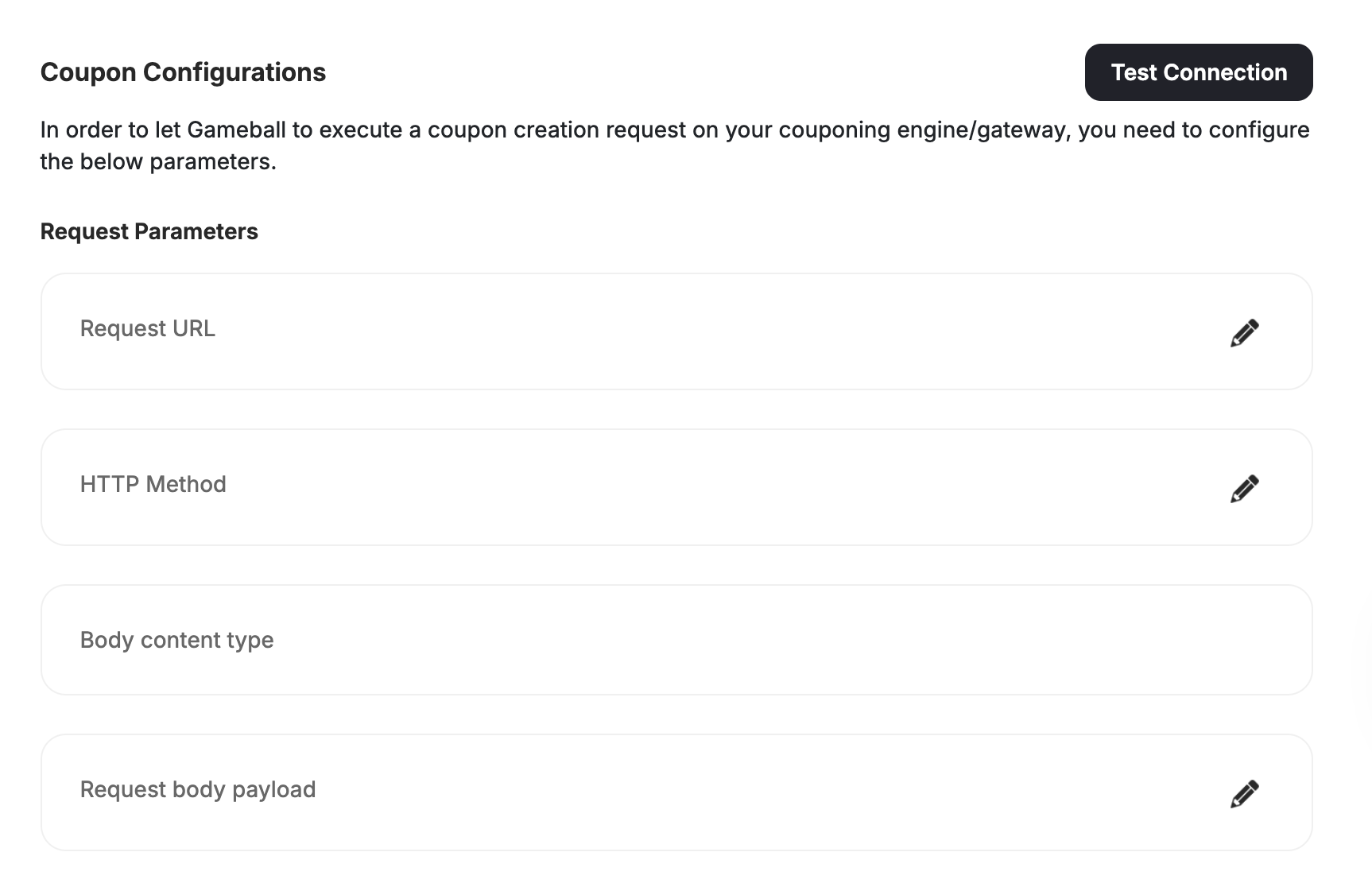 | **Field** | **Description** |
| :------------ | :-------------------------------------------------------------------------------------------------------------------- |
| url | Your coupon generation endpoint, e.g., [https://api.yourapp.com/create-coupon](https://api.yourapp.com/create-coupon) |
| method | Usually POST |
| contentType | Typically application/json |
| headers | Auth or token headers, if needed |
| payload | The request body Gameball will send |
| couponMapping | Map Gameball coupon types to your supported types |
| platforms | Platforms where the coupon applies (e.g., web, mobile, POS) |
### **Step 2: Configure via API (Optional)**
You can configure this directly via API:
**API:**
PUT /api/v4.0/integrations/configurations/coupon
APIKey: YOUR\_API\_KEY
SecretKey: YOUR\_SECRET\_KEY
Content-Type: application/json
```json theme={null}
{
"url": "https://yourdomain.com/api/coupons",
"method": "POST",
"contentType": "application/json",
"headers": [
{ "key": "Authorization", "value": "Bearer 123456" }
],
"payload": {
"code": "{{code}}",
"value": "{{amount}}",
"couponType": "{{discount_type}}"
},
"couponMapping": {
"percentage": true,
"fixed": true,
"freeShipping": true
},
"platforms": ["web", "mobile"]
}
```
### **Step 3: Build Your Coupon Creation Endpoint**
This is your own API that Gameball will call.
**Example (Node.js):**
```javascript theme={null}
app.post('/api/coupons', (req, res) => {
const { code, value, customerId } = req.body;
// Create and store the coupon
res.status(200).send({ couponCode: code });
});
```
You must return HTTP 200 and include the coupon code in the response.
### **Step 4: Test the Connection**
| **Gameball Widget** | **Custom UI** |
| :----------------------------------------------------------------------------- | :------------------------------------------------- |
| Use **“Test Connection”** from Gameball dashboard to simulate coupon creation. | Same. Useful for debugging or dry-run integration. |
**API (to retrieve config):**
GET /api/v4.0/integrations/configurations/coupon
APIKey: YOUR\_API\_KEY
SecretKey: YOUR\_SECRET\_KEY
***
# Coupon Redemption Flows
Gameball supports two primary coupon generation flows, both of which work with either the **Gameball widget** or your **custom UI**.
## **1. Manual Coupon Redemption**
### **Overview**
| **Gameball Widget** | **Custom UI** |
| :-------------------------------------------------------------------------------------- | :------------------------------------------------------------------------ |
| Redemption flow is fully handled: point display, coupon generation, and coupon listing. | You handle reward options, redemption calls, and coupon display manually. |
### **Step-by-Step: Widget-Based Manual Redemption**
**Step 1:**
Customer opens the widget → Gameball displays points balance and redemption options.
| **Field** | **Description** |
| :------------ | :-------------------------------------------------------------------------------------------------------------------- |
| url | Your coupon generation endpoint, e.g., [https://api.yourapp.com/create-coupon](https://api.yourapp.com/create-coupon) |
| method | Usually POST |
| contentType | Typically application/json |
| headers | Auth or token headers, if needed |
| payload | The request body Gameball will send |
| couponMapping | Map Gameball coupon types to your supported types |
| platforms | Platforms where the coupon applies (e.g., web, mobile, POS) |
### **Step 2: Configure via API (Optional)**
You can configure this directly via API:
**API:**
PUT /api/v4.0/integrations/configurations/coupon
APIKey: YOUR\_API\_KEY
SecretKey: YOUR\_SECRET\_KEY
Content-Type: application/json
```json theme={null}
{
"url": "https://yourdomain.com/api/coupons",
"method": "POST",
"contentType": "application/json",
"headers": [
{ "key": "Authorization", "value": "Bearer 123456" }
],
"payload": {
"code": "{{code}}",
"value": "{{amount}}",
"couponType": "{{discount_type}}"
},
"couponMapping": {
"percentage": true,
"fixed": true,
"freeShipping": true
},
"platforms": ["web", "mobile"]
}
```
### **Step 3: Build Your Coupon Creation Endpoint**
This is your own API that Gameball will call.
**Example (Node.js):**
```javascript theme={null}
app.post('/api/coupons', (req, res) => {
const { code, value, customerId } = req.body;
// Create and store the coupon
res.status(200).send({ couponCode: code });
});
```
You must return HTTP 200 and include the coupon code in the response.
### **Step 4: Test the Connection**
| **Gameball Widget** | **Custom UI** |
| :----------------------------------------------------------------------------- | :------------------------------------------------- |
| Use **“Test Connection”** from Gameball dashboard to simulate coupon creation. | Same. Useful for debugging or dry-run integration. |
**API (to retrieve config):**
GET /api/v4.0/integrations/configurations/coupon
APIKey: YOUR\_API\_KEY
SecretKey: YOUR\_SECRET\_KEY
***
# Coupon Redemption Flows
Gameball supports two primary coupon generation flows, both of which work with either the **Gameball widget** or your **custom UI**.
## **1. Manual Coupon Redemption**
### **Overview**
| **Gameball Widget** | **Custom UI** |
| :-------------------------------------------------------------------------------------- | :------------------------------------------------------------------------ |
| Redemption flow is fully handled: point display, coupon generation, and coupon listing. | You handle reward options, redemption calls, and coupon display manually. |
### **Step-by-Step: Widget-Based Manual Redemption**
**Step 1:**
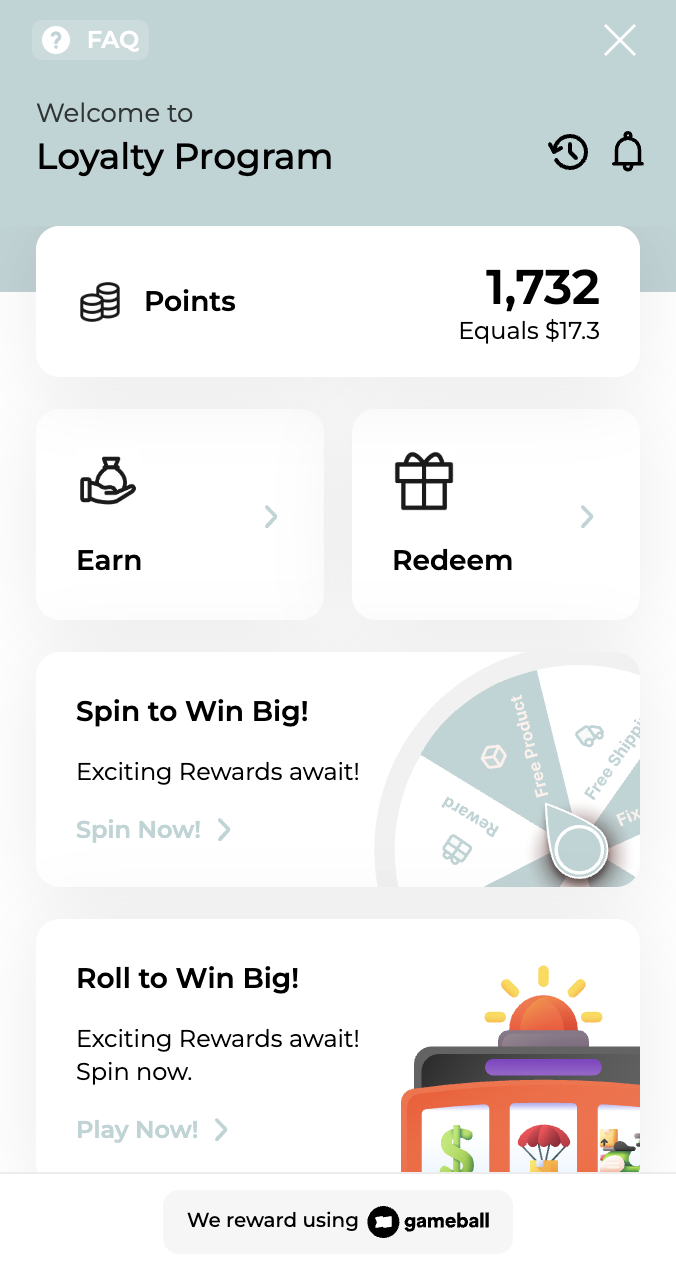
Customer opens the widget → Gameball displays points balance and redemption options.
 **Step 2:**
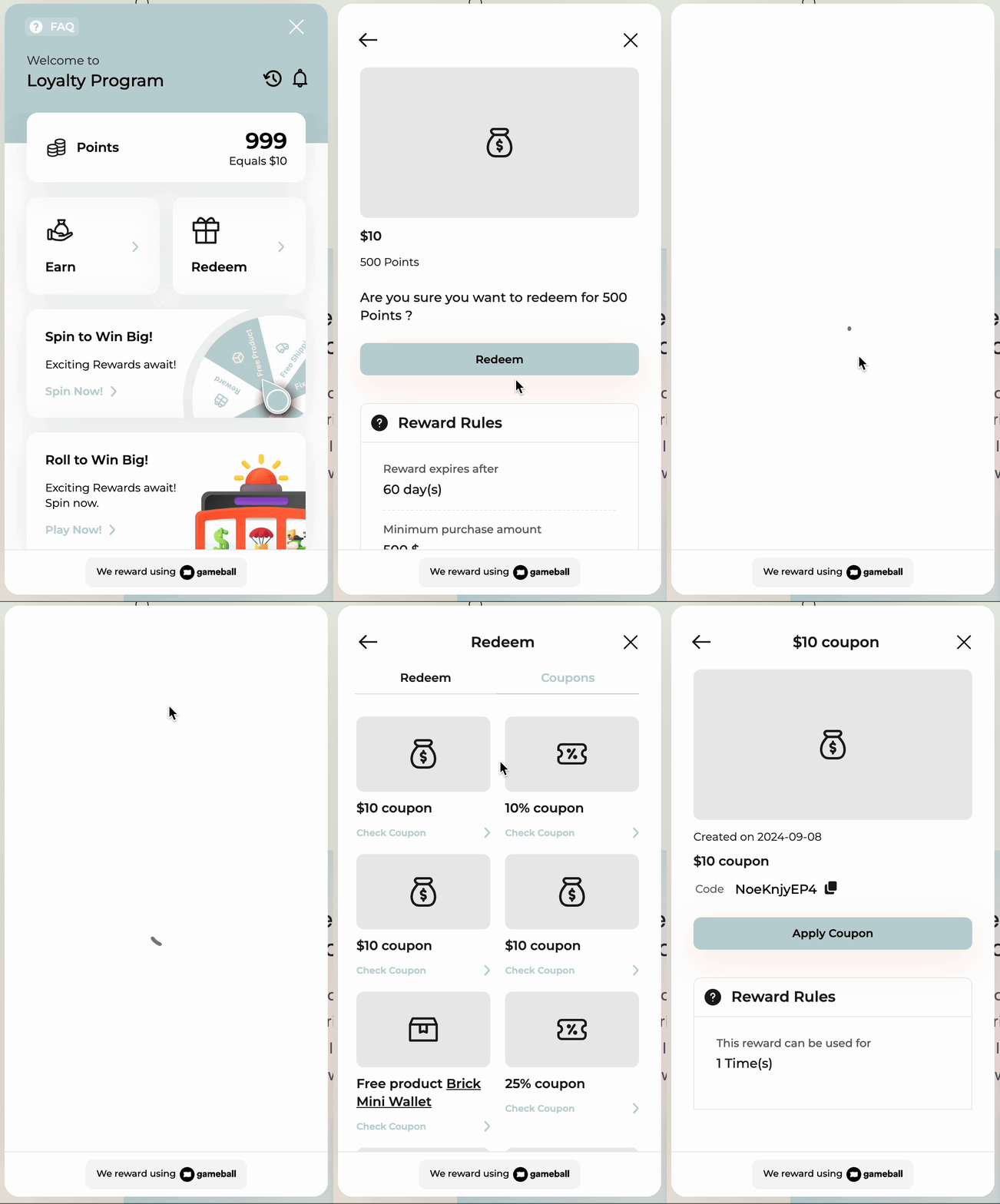
Customer selects a reward → Gameball sends a webhook to your backend and shows the returned coupon in **My Coupons**.
**Step 2:**
Customer selects a reward → Gameball sends a webhook to your backend and shows the returned coupon in **My Coupons**.
 **Step 3:**
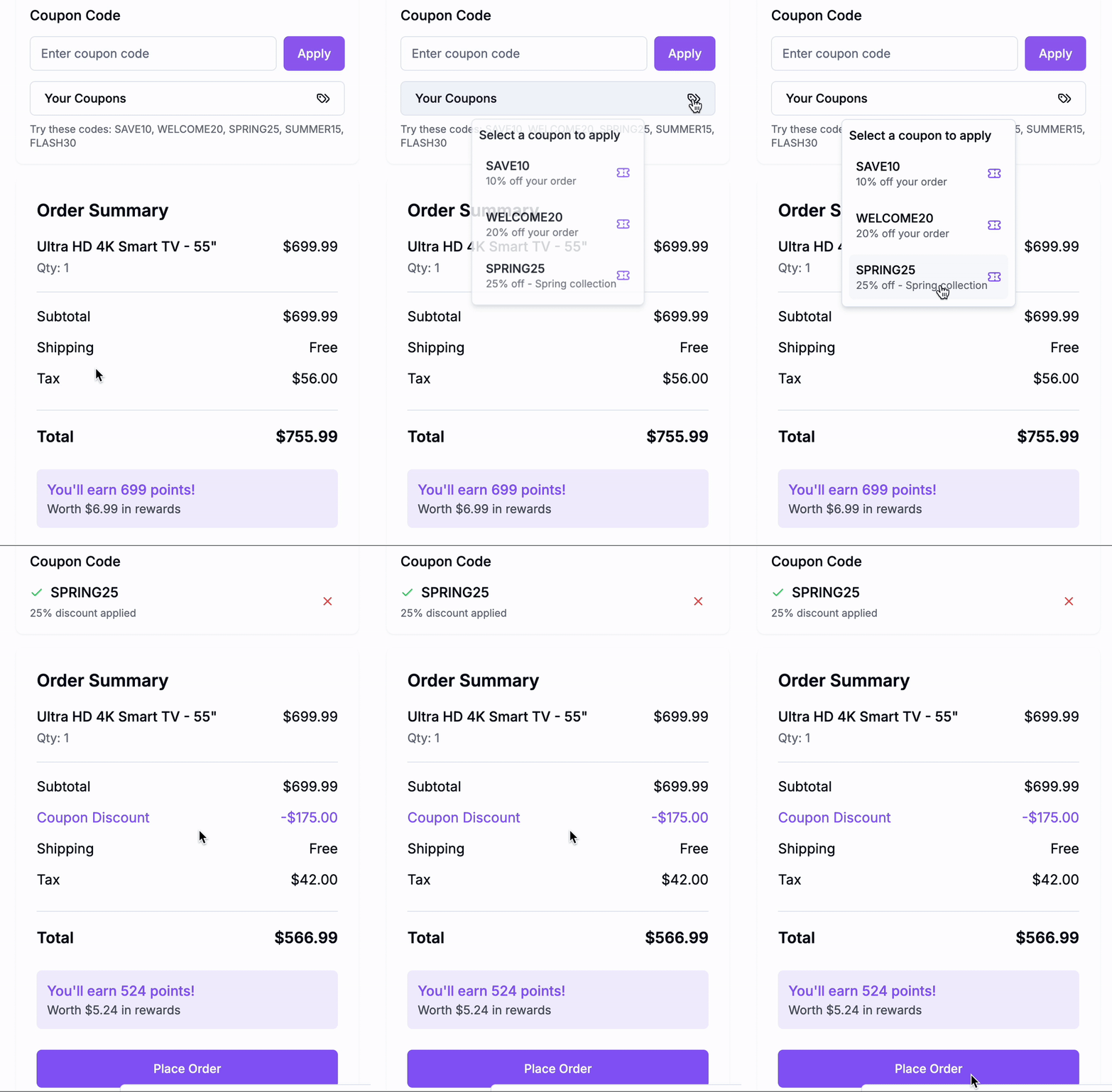
At checkout, the customer applies the coupon. You use:
**Step 3:**
At checkout, the customer applies the coupon. You use:
 ```http theme={null}
POST /order
```
```json filename="request.json" theme={null}
{
"customerId": "cust_12345",
"orderId": "ORD123",
"totalPaid": 135,
"coupons": {
"couponCodes": ["GB1023"]
}
}
```
***
### **Step-by-Step: Custom UI Manual Redemption**
**Step 1: Fetch Redemption Options**
[GET /redemption-configs](/api-reference/configurations/reward-configurations/redemption-settings)
```json filename="response.json" theme={null}
{
"redemptionRules": [
{
"id": 2138,
"pointsToRedeem": 100,
"coupon": {
"couponType": "fixed_rate_discount",
"discountValue": 10
}
}
]
}
```
**Step 2: Redeem Points**
[POST /redeem](/api-reference/transactions/cashback-and-redemptions/redeem#redeem-points)
```json filename="request.json" theme={null}
{
"customerId": "cust_12345",
"ruleId": 2138,
"transactionId": "txn_001",
"transactionTime": "2024-11-01T12:00:00Z"
}
```
```json filename="response.json" theme={null}
{
"couponCode": "GB1023",
"redeemEquivalentPoints": 100
}
```
**Step 3: Display Earned Coupons**
[GET /customers//coupons](/api-reference/customers/management/get-customer-coupons)
**Step 4: Apply at Checkout**
Same as widget, use the [POST /order API](/api-reference/order/order-tracking).
## **2. Campaign-Based Coupon Rewards**
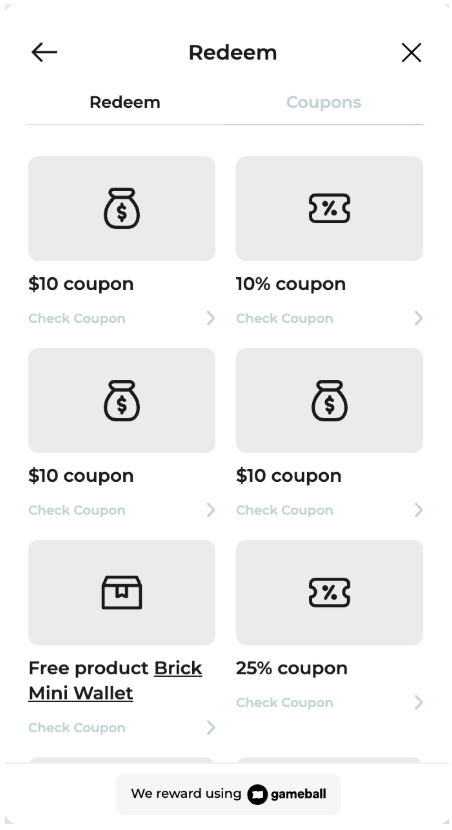
Widget automatically shows campaign-earned coupons in “My Coupons”.
```http theme={null}
POST /order
```
```json filename="request.json" theme={null}
{
"customerId": "cust_12345",
"orderId": "ORD123",
"totalPaid": 135,
"coupons": {
"couponCodes": ["GB1023"]
}
}
```
***
### **Step-by-Step: Custom UI Manual Redemption**
**Step 1: Fetch Redemption Options**
[GET /redemption-configs](/api-reference/configurations/reward-configurations/redemption-settings)
```json filename="response.json" theme={null}
{
"redemptionRules": [
{
"id": 2138,
"pointsToRedeem": 100,
"coupon": {
"couponType": "fixed_rate_discount",
"discountValue": 10
}
}
]
}
```
**Step 2: Redeem Points**
[POST /redeem](/api-reference/transactions/cashback-and-redemptions/redeem#redeem-points)
```json filename="request.json" theme={null}
{
"customerId": "cust_12345",
"ruleId": 2138,
"transactionId": "txn_001",
"transactionTime": "2024-11-01T12:00:00Z"
}
```
```json filename="response.json" theme={null}
{
"couponCode": "GB1023",
"redeemEquivalentPoints": 100
}
```
**Step 3: Display Earned Coupons**
[GET /customers//coupons](/api-reference/customers/management/get-customer-coupons)
**Step 4: Apply at Checkout**
Same as widget, use the [POST /order API](/api-reference/order/order-tracking).
## **2. Campaign-Based Coupon Rewards**
Widget automatically shows campaign-earned coupons in “My Coupons”.
 ### **Step-by-Step: Widget Campaign Flow**
* Gameball displays the coupon in real-time once earned from a campaign.
* No API integration needed to show it.
* At checkout, use [POST /order](/api-reference/order/order-tracking) as shown earlier.
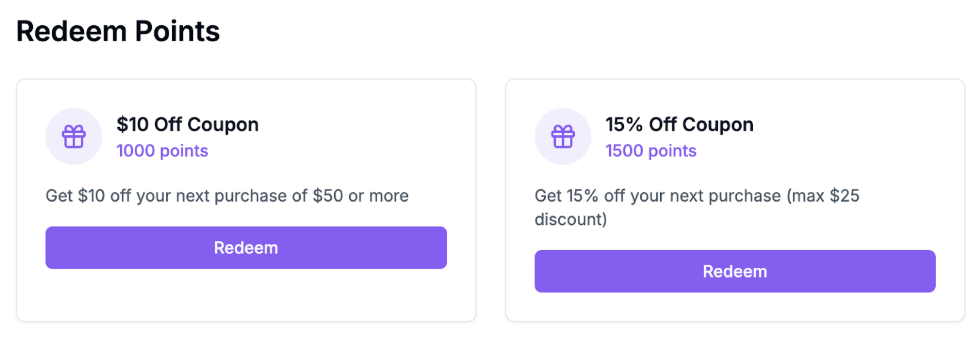
You must fetch and display earned coupons using the API.
### **Step-by-Step: Widget Campaign Flow**
* Gameball displays the coupon in real-time once earned from a campaign.
* No API integration needed to show it.
* At checkout, use [POST /order](/api-reference/order/order-tracking) as shown earlier.
You must fetch and display earned coupons using the API.
 ### **Step-by-Step: Custom UI Campaign Flow**
**Step 1: Fetch All Coupons**
[GET /customers/{playerId}/coupons](/api-reference/customers/management/get-customer-coupons)
```json theme={null}
{
"coupons": [
{
"code": "GB2024",
"type": "percentage_discount",
"value": 15,
"expiryDate": "2024-12-31T23:59:59Z"
}
]
}
```
**Step 2: Apply Coupon**
[POST /order](/api-reference/order/order-tracking)
***
## **Final Summary**
| **Step** | **Widget** | **Custom UI** |
| :------------------------------ | :-------------------- | :------------------------------ |
| Configure Webhook | ✅ Required | ✅ Required |
| Show redemption options | ✅ Auto | ✅ Manual |
| Redeem points → generate coupon | ✅ Auto | ✅ API (/redeem) |
| Show earned coupons | ✅ Auto (“My Coupons”) | ✅ API (/customers/{id}/coupons) |
| Apply at checkout | ❌ (manual) | ❌ (manual) |
***
## Related Resources
Convert loyalty points into coupon rewards
Use Gameball’s engine when you don’t need custom issuance
Display coupons created by your backend
Learn the built-in alternative to custom coupon generation
### **Step-by-Step: Custom UI Campaign Flow**
**Step 1: Fetch All Coupons**
[GET /customers/{playerId}/coupons](/api-reference/customers/management/get-customer-coupons)
```json theme={null}
{
"coupons": [
{
"code": "GB2024",
"type": "percentage_discount",
"value": 15,
"expiryDate": "2024-12-31T23:59:59Z"
}
]
}
```
**Step 2: Apply Coupon**
[POST /order](/api-reference/order/order-tracking)
***
## **Final Summary**
| **Step** | **Widget** | **Custom UI** |
| :------------------------------ | :-------------------- | :------------------------------ |
| Configure Webhook | ✅ Required | ✅ Required |
| Show redemption options | ✅ Auto | ✅ Manual |
| Redeem points → generate coupon | ✅ Auto | ✅ API (/redeem) |
| Show earned coupons | ✅ Auto (“My Coupons”) | ✅ API (/customers/{id}/coupons) |
| Apply at checkout | ❌ (manual) | ❌ (manual) |
***
## Related Resources
Convert loyalty points into coupon rewards
Use Gameball’s engine when you don’t need custom issuance
Display coupons created by your backend
Learn the built-in alternative to custom coupon generation