One of the most effective ways to get new users is through user referrals. You can use Gameball referrals capabilities to encourage your users to invite their friends by offering rewards for successful referrals to both the referrer and the recipient.Gameball referrals uses Firebase Dynamic Links in the background to generate customers’ referral links and track referrals. Dynamic Links are smart URLs (deep links) that survive the app install process, so new referred users via referral links will be easily tracked when they open the app for the first time.Gameball and its SDK provides hassle free integration to track referrals where you will only need to:
Provide your firebase info through Gameball dashboard to generate referral links to your customers.
Invoke referral method with every new account creation through your app.
Referral information can be submitted to Gameball using two methods. The first option involves relying on automatic detection, which is triggered when the register player method is called. Alternatively, you can explicitly use the friend referral. Both approaches yield the desired outcome, and the choice between them depends on your specific scenarios.
After setting up the necessary Firebase dependencies and adding your Firebase details to Gameball’s dashboard, when register player SDK method is called, the system will automatically detect if there is a referral code. If a referral code is found, it will be included in the registration request. This allows the newly registered customer to be linked with the referral code.
friendReferral should be called after your customer registration, hence a new customer is created. It basically detects if the customer has registered using a referral code or not.If you need to use a referral method to sign up a new customer using a referral link, call the function below to use the referral module. Best use case is in the success of the registration API of your app.
let playerAttributes: [String : Any] = [ "displayName": "John Snow", "email": "example@example.com"]self.gameballApp?.friendReferral( playerUniqueId: "{CUST_ID}", playerAttributes: playerAttributes, completion: { result in print(result) })
The playerAttributes is optional, so if you haven’t created it yet then call the method like this with only the new playerUniqueId.
self.gameballApp?.friendReferral( playerUniqueId: "{CUST_ID}", completion: { result in print(result) })
Set up a new Firebase project and install the Dynamic Links SDK into your app. Installing the Dynamic Links SDK allows Firebase to pass along data about the Dynamic Link to the app, including after the user installs the app.Import Firebase in AppDelegate File
import Firebase
Copy this code in your AppDelegate
func handleIncommingDynamicLink(_ dynamicLink: DynamicLink){ guard let url = dynamicLink.url else { return } self.gameballApp?.recievedDynamicLink(url: url)}func application(_ application: UIApplication, continue userActivity: NSUserActivity, restorationHandler: @escaping ([UIUserActivityRestoring]?) -> Void) -> Bool { if let incommingURL = userActivity.webpageURL { let linkHandled = DynamicLinks.dynamicLinks().handleUniversalLink(incommingURL) { (dynamicLink, error) in guard error == nil else { return } if let dynamicLink = dynamicLink { self.handleIncommingDynamicLink(dynamicLink) } } return linkHandled } return false}func application(_ app: UIApplication, open url: URL, options: [UIApplication.OpenURLOptionsKey : Any] = [:]) -> Bool { if let dynamicLink = DynamicLinks.dynamicLinks().dynamicLink(fromCustomSchemeURL: url){ self.handleIncommingDynamicLink(dynamicLink) return true } else { return false }}


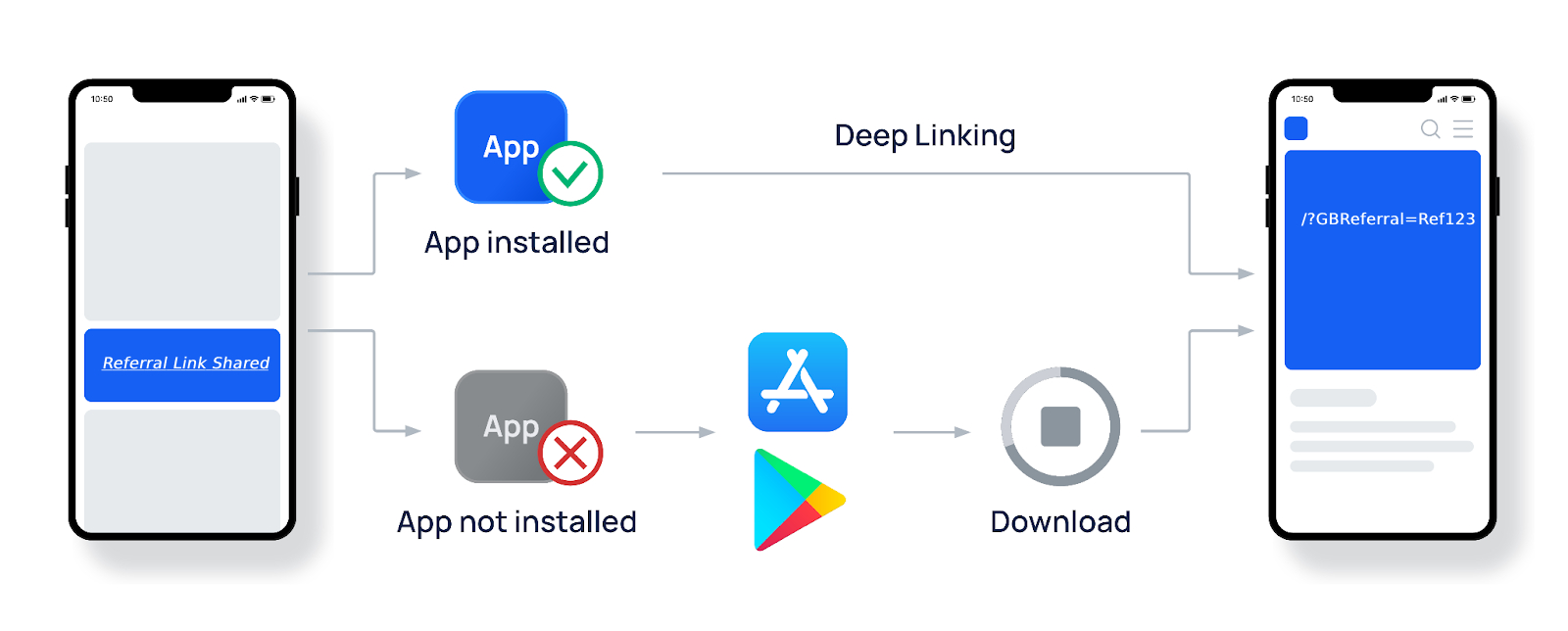 Your customers will be able to get and share their referral link from Gameball Customer Widget.