Available for all Gameball customers except for free packages Placeholder variable text is used to add personalized data on each customer to your email notifications. Variables appearing in the email notifications preview are automatically replaced with actual data. So when the actual email notification is sent to your customers, the actual data appears instead of the variable placed. Starting with a quick overview of variables. A variable is a value that can change depending on conditions or on information passed to the program. It is simply a name that can be replaced with a real value from computer memory.Documentation Index
Fetch the complete documentation index at: https://docs.gameball.co/llms.txt
Use this file to discover all available pages before exploring further.
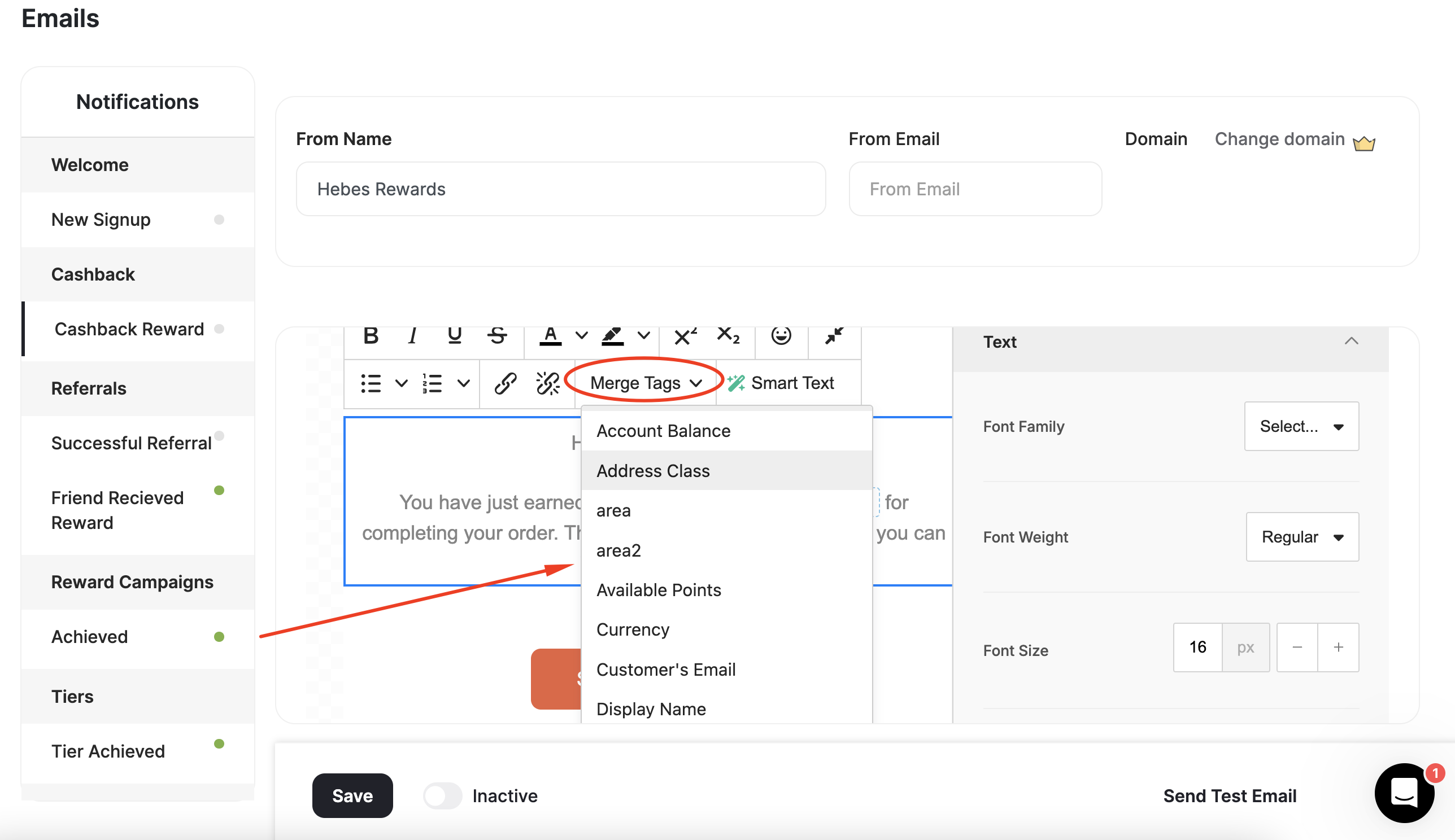
Using Merge Tags
To use a variable in an email, click Merge Tags and select your variable.
Available Variables
At Gameball, we use the following variables in email notifications:| Variable | Definition |
|---|---|
| Customer’s first name | The customer’s first name, if available. |
| Display Name | Display name |
| Customer’s email | The customer’s email, if available. |
| Score earned | The score earned with the customer’s latest achievement. Learn more |
| Equivalent value of earned points | Points earned with the customer’s latest achievement. |
| Equivalent value of total points | The equivalent monetary value of points. |
| Currency | Currency is set through the Admin Settings. |
| Points name | A customized name for points in the default language, based on your settings. |
| Score name | A customized name for the score in the default language, based on your settings. Learn more |
| Equivalent value of total points | Customer’s total points after completing their latest achievement. |
| Equivalent value of new points | The equivalent monetary value of new points. |
| New Tier | The new tier was reached by the customer. |
| Previous Tier | Customer’s tier before their latest achievement. |
| Referral Link | Customer’s link they use in the referral process |
| Mobile Referral Link | Customer’s link they use in the referral process via mobile |
| Paid Amount | The amount a customer paid in a given order |
| Merchant Name | Merchant Name |
| Branch Name | Branch Name |
| Return Days | Number of days for the return window |
| Available Points | Available points |
| Pending Points | Pending Points |
| Birthday | Customer’s birthday, if available |
| Remaining to Next Tier | The number of points, orders, or referrals the customer needs to reach their next VIP tier. |
What’s Next?
You are now all set to activate your email notification and start notifying your customers of their achievements through emails!Related Articles
Instant Notifications for Customers' Activity
Overview of all real-time notification types available across Gameball programs.