

Accessing Order Details
When an activity is linked to an order (e.g., cashback reward or refund), the order ID will appear as a clickable value directly within the activity log.1
Navigate to Activities
Go to Customers > Activities.
2
Find an order-related activity
Locate any activity associated with an order (e.g., Cashback Rewarded, Points Refunded).
3
Click the order ID
Click the order ID shown on the second line of the activity. This will open a side tab with full order details.
What You’ll See in the Order Details
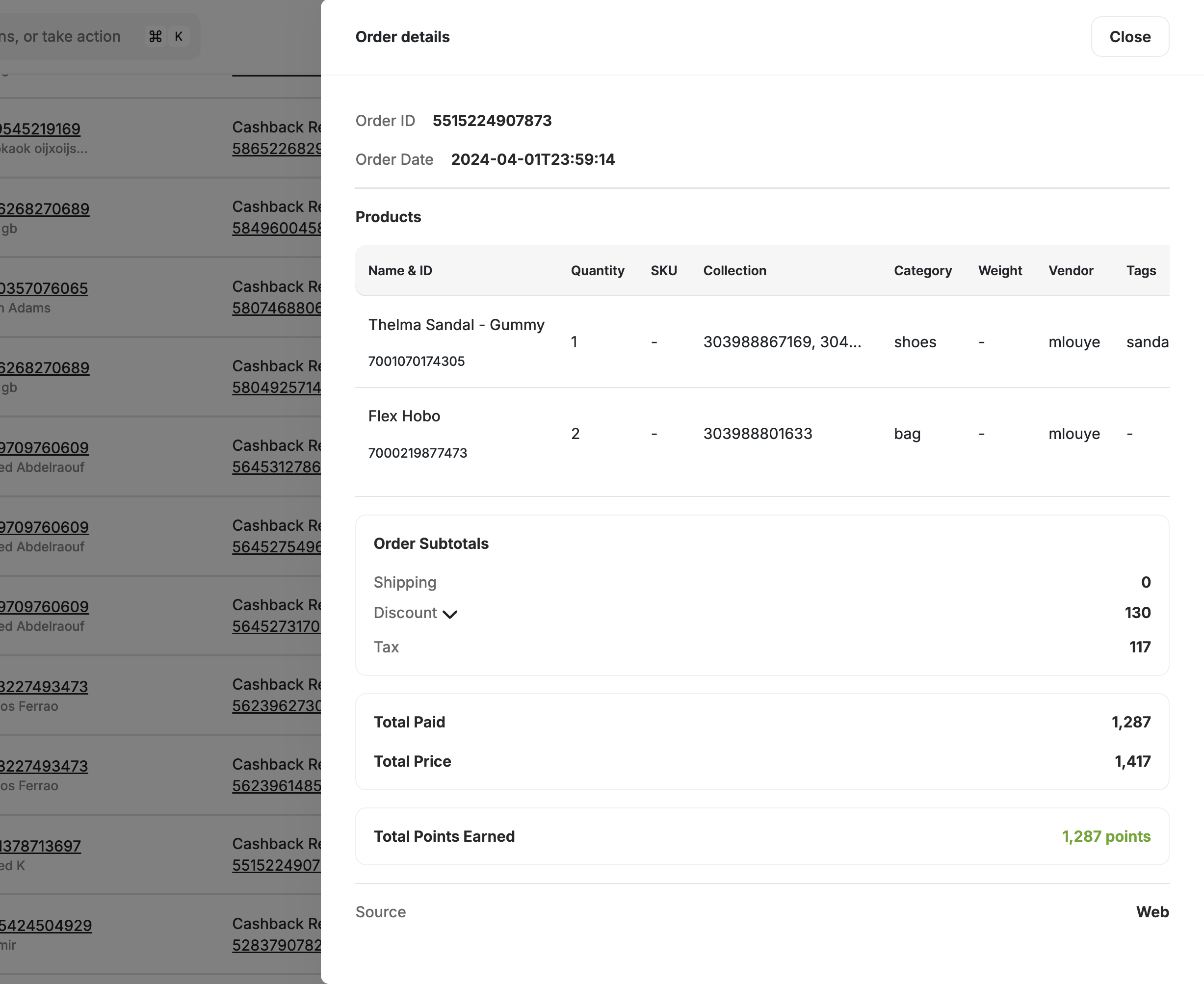
Order Summary
Order Summary
- Order ID and Order Date
- Merchant Name and Branch Name
- Points Redeemed or Points Earned through this order
- Total Paid, Total Price, and Payment Method
Product Breakdown
Product Breakdown
A breakdown of all products in the order, including:
- Name & ID
- Quantity, SKU, Category
- Price, Tax, and Discounts
Order Subtotals
Order Subtotals
- Order Subtotals: shipping, discount, and tax
Extras
Extras
Any custom key-value attributes sent in the order are shown in an Extras section. Empty fields are automatically hidden to keep the view clean.
Channel
Channel
Displays the channel the order was placed on: Mobile, Web, or In-store.
Coupon Codes
Coupon Codes
Displays the Gameball-generated coupon code that was redeemed on this order. Gameball automatically links each redeemed coupon session back to its order, so you can see exactly which coupon drove each transaction directly from the activity log.
Shopify Order Reference Number
Shopify Order Reference Number
For Shopify merchants, the order reference number (e.g., #1307) is stored as a
referenceId on every transaction, making it easy to cross-reference orders between Shopify admin and Gameball activity logs. The field also appears as a dedicated column in exported reports.Viewing Refund Details
If the activity is related to a refund (e.g., Points Refunded):1
Click the refund ID
Click the refund ID shown in the log.
2
Review refund details
You will be directed to a Refund Details panel. This panel includes:
- Refund ID and Refund Date
- Merchant and Branch
- Points Refunded
- A View Order Details button that links back to the original order.
Important Notes
- Clicking an Order ID opens the original transaction summary.
- Clicking a Refund ID shows the refund panel, including a link to the associated order.
- This feature is useful for support agents reviewing customer concerns related to rewards, cashback, or balance changes.
Related Articles
Customer Activity Log
Track customer activities and export logs.
Explore a Customer Profile
View and manage individual customer profiles.