

Gameball’s App Popup trigger opens a game campaign by itself inside your mobile app, so customers reach the game without opening the widget first. You set up the in-app integration once, then launch any game campaign as an App Popup from the dashboard, with almost no custom development per campaign.
Which Campaigns Support App Popup
You can launch any of these 11 game campaigns as an App Popup:- Spin the Wheel
- Slot Machine
- Scratch & Win
- Match Cards
- Catcher
- Quiz
- Tic Tac Toe
- Space Shooter
- Puzzle
- Tap the Target
- Driving Game
Web Only Campaigns: App Popup isn’t available for campaigns whose platform visibility is set to Web only.
Set Up an App Popup
Your app needs the Gameball SDK installed and in-app messaging integrated before an App Popup can open. You do this once for all your campaigns.1
Choose App Popup under Rules → Triggers
In the campaign builder, go to Rules → Triggers and select App Popup (mobile app trigger). It sits next to the widget banner and Web Popup (URL-based trigger) options.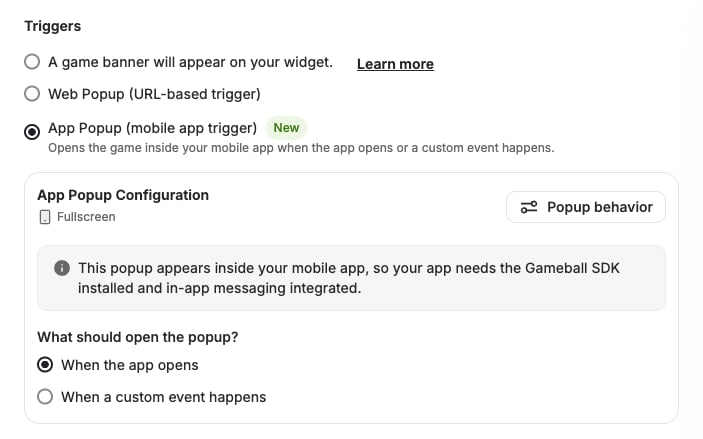
2
Choose what opens the popup
Under What should open the popup?, select one of the following: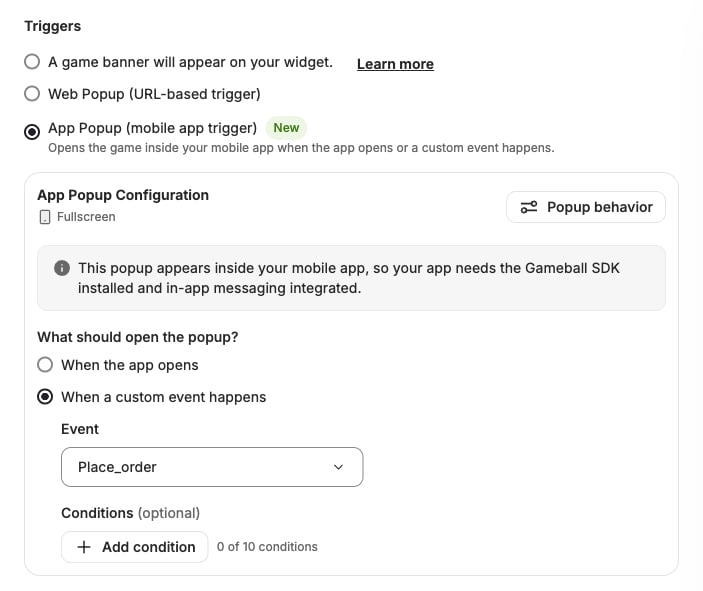
- When the app opens: The popup opens when the customer opens your app.
- When a custom event happens: Select the Event that opens the popup. Optionally, click Add condition to narrow it down by the event’s properties. You can add up to 10 conditions.
3
Choose Fullscreen or Modal in Popup behavior
Click Popup behavior and choose how the popup looks: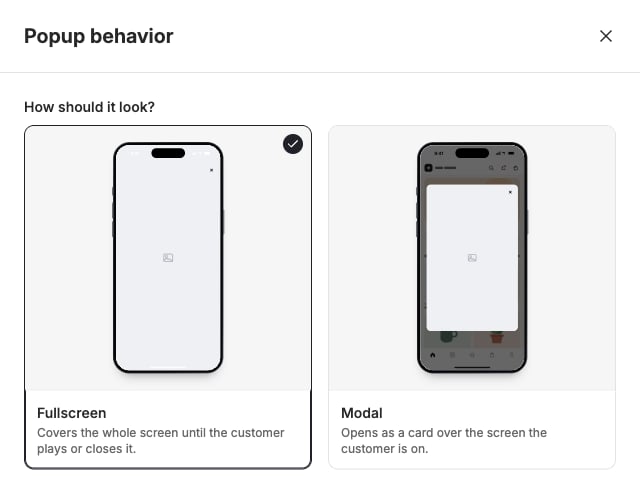
- Fullscreen: Covers the whole screen until the customer plays or closes it.
- Modal: Opens as a card over the screen the customer is on.
Control How Often the Popup Appears
App Popup uses the same rules as in-app messages: the repeat setting, minimum interval, cooldown, and quiet hours. Learn more about in-app message delivery settings.Common Questions
Do I need custom development for every campaign?
Do I need custom development for every campaign?
No. After the in-app integration is set up once, you launch each game campaign as an App Popup from the dashboard, with almost no custom development per campaign.
Why can't I pick App Popup on my campaign?
Why can't I pick App Popup on my campaign?
App Popup isn’t available for campaigns set to Web only. Change the campaign’s platform visibility to include mobile, then select the trigger again.
Related Articles
Create and Configure In-App Messaging Campaigns
Learn how in-app message delivery rules work.
Trigger Game Popups Based on Page URL
Show game popups on your website with Web Popup.