

Plan Availability
- E-commerce Platforms
- Custom Integrations
Overview
Gameball currently supports nine languages on the dashboard to enable clients to use their local language while setting up their player experience. You can choose between the following languages:English (EN)
Default dashboard language.
Arabic (AR)
Full right-to-left support.
French (FR)
Complete French localization.
Japanese (JA)
Full Japanese localization.
Español (ES)
Complete Spanish localization.
Italiano (IT)
Complete Italian localization.
Português (Brasil)
Brazilian Portuguese localization.
Português (Portugal)
European Portuguese localization.
Deutsch (DE)
Complete German localization.
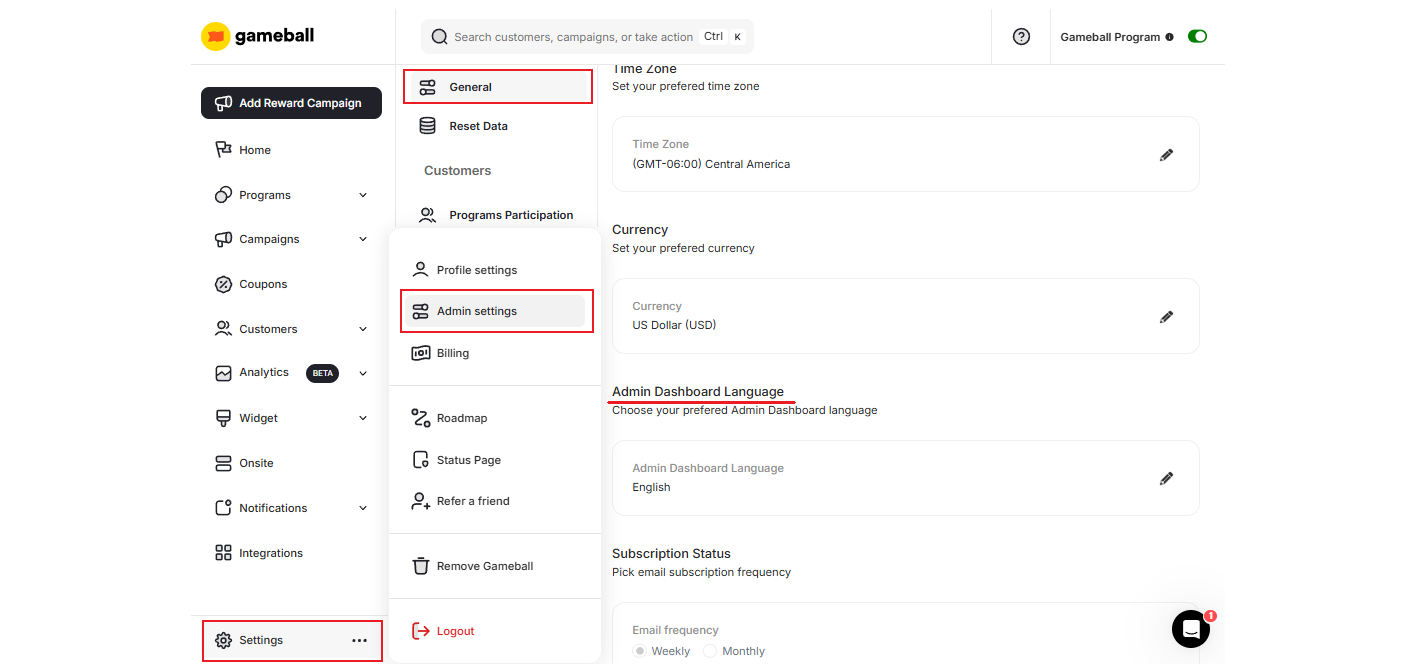
Changing the Dashboard Language
By default, your dashboard language is English (EN). You can easily change that by following these steps:1
Log in to your Gameball dashboard
Access your account at the Gameball Admin Dashboard.
2
Navigate to Language Settings
Go to Profile Settings > Preferences.
3
Edit the Language
In the Admin Dashboard Language, click on the Edit icon.
4
Select your preferred language
Choose your preferred language from the dropdown menu, then click Save.
5
Confirm the change
Watch your dashboard change its previous language to the selected language.
We are currently working on localizing our dashboard to more languages. If you would like to suggest a new language, please email us at support@gameball.co.
Related Articles
Configure Player Widget Language
Configure the language of the player-facing widget on your platform.
Configure Gameball Time Zone Settings
Match your platform timezone with Gameball data timestamps.
Configure Gameball Currency Settings
Match your platform currency with the Gameball currency display.
Manage your Gameball Player Attributes
Configure customer profile attributes for deeper segmentation insights.