

All examples below assume that the cashback value you set allows customers to earn 1 point for every 1 USD.
Full Refund
When a full refund is needed because of a canceled order, Gameball deducts the entire point reward that was granted as a reward when the order was first placed.Partial Refund Affecting a Points Cashback Reward (Multiple Times)
If, for example, a customer made an order of 100 USD, then cancelled part of the order twice or more, here is how Gameball deals with this case:Full and Partial Refund — Entirely Paid Using Points Balance
If a customer decides to make an order and pay for it using the points they have previously earned and saved, then they will not need to make any form of monetary transaction. In this case, Gameball does not reward the customer with cashback points, and upon partial or full refund, Gameball returns the points spent accordingly.Full and Partial Refund — Partially Paid Using Points Balance
If a customer decided to make an order and pay using both points balance and actual payment, then Gameball would only reward them with cashback based on the paid amount and would disregard the part paid by points. Here is how Gameball deals with the refund based on the previous case:Special Case: Refunding a Value Greater Than the Remaining Cashback Reward
Gameball will refund the whole cashback reward and not the extra value.Salla: Automatic Partial Refund Detection
Salla has no native partial-refund action — merchants perform one by editing the order. Gameball now detects this automatically: on every order edit, it compares the original order against the edited version, works out whether the change is genuinely a refund, and reverses the right amount of points — no manual intervention needed.
Points are reversed against the actual decrease (original minus edited), not the full order value, and reversed refunds follow the same behavior described above for every other platform.
How Will Customer Tiers Be Affected by the Refund?
Gameball gives you more control over how refunds affect tier progress. You can choose whether refunded orders contribute to customers’ tier advancement, ensuring your loyalty logic stays aligned with your business rules.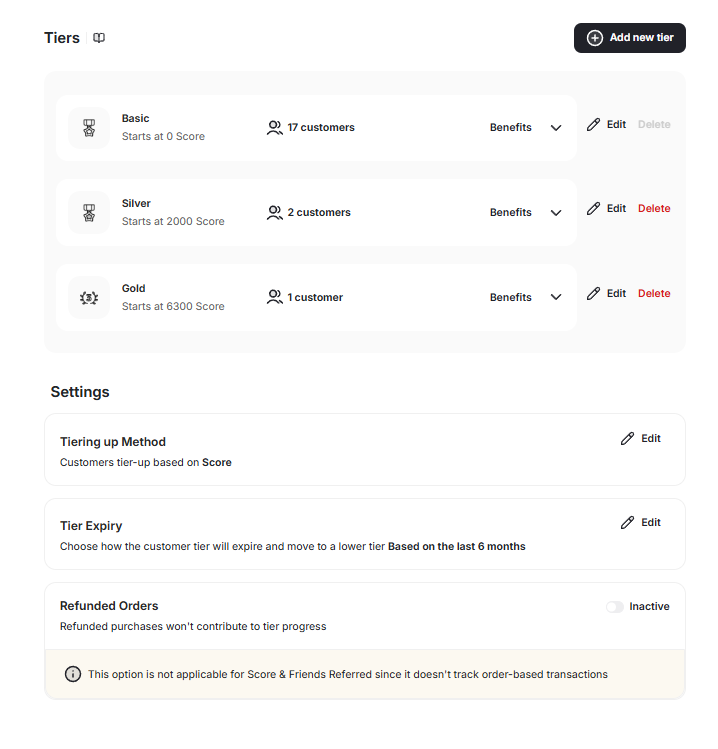
Tier progress in both the dashboard and widget automatically reflects the updated calculation. Progress reductions from refunds are shown in real time.
Related Articles
Configure VIP Tiers
Set up and manage your VIP tier program including refund behavior settings.
Launch and Configure Points Redemption
Configure how customers redeem their earned points for rewards.